


Visualize your Repo
GitUp lets you see your entire labyrinth of branches and merges with perfect clarity.
Live Map
Any change you make, large or small, even outside GitUp, is immediately reflected in GitUp's graph. No refreshing, no waiting.
Quick View
Highlight a commit and hit the spacebar to quickly see its message and diff.

It's okay to mess up
GitUp gives you full, transparent control over your local checkout, so it's easy to back out from unwanted changes.
Undo / Redo
Margaritas, tattoos, sudo rm -rf / …some things in life can't be undone.
But GitUp makes undoing your latest changes as easy as cmd-z.
Snapshots
GitUp's Snapshot feature builds a Time-Machine-like history of every change made to your repo, allowing you to step backwards to any point in time.

Full-featured
Rewrite, split, delete, and re-order commits, fixup and squash, cherry-pick, merge, rebase—It's all here, and it's lightning-fast.
Quick Keys
GitUp puts the power in your fingertips.
Surf your repo, make changes, and rewind it all back with a few short keystrokes.
GitUp gets out of the way
You're here to write code, not meditate on arcane Git incantations.

Serious Speed
GitUp loads and renders the entire graph of 40,000 commits for the official Git repo in less than a second.
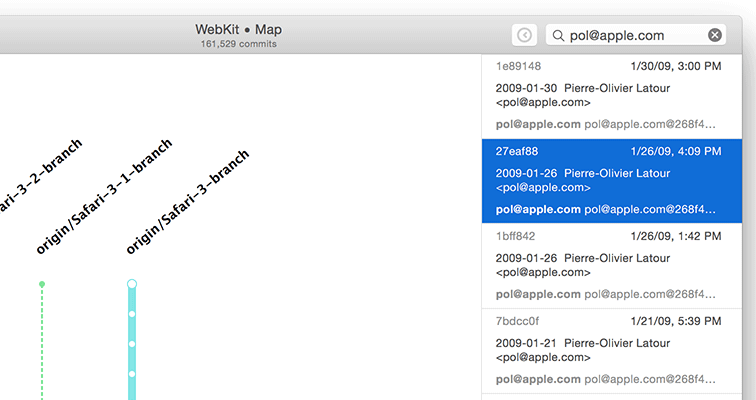
Instant Search
Search branches, tags and every commit in the repo by message, author and even diff content, then jump to the results instantly.
Built For Professional Engineers
Because it bypasses the Git binary tool and interacts directly with the repo database, GitUp is vastly more reliable than other Git clients and often faster than the command line.
Beginners Welcome
GitUp's Live Map and clutter-free UI make an ideal learning environment for Git newcomers, while the Undo & Snapshots features let you learn and experiment safely.