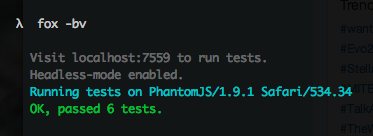
A new pragmatic JavaScript testing framework for both NodeJS and browsers. Screencast
Features
- No configuration needed.
- It's quite simple, run
provacommand to run on Node, add-bparameter to run on browsers (browserifies for you) - Keep the browsers always open, it enables watchify as well, so your browser will run your tests automatically
- Headless testing is simple as well, run tests in PhantomJS by
-iparameter. - Beautified error output that show failing lines.
- ChaiJS is injected to every module to avoid repeating. If you don't prefer injection, pass
-Vto avoid it. - Mostly compatible with Mocha.
Install
First Steps
Create a new test document and name it test.js. ChaiJS' expect and assert modules are injected to the test modules by default;
describe('Number', function(){
  it('converts a date to a number', function(){
      expect( Number(new Date) ).to.be.a('number')
  })
})
Available BDD methods:
- before
- beforeEach
- describe
- it
- afterEach
- after
Running on Node
$ prova # It'll look modules like test.js and test/index by default. You can specify them manually; prova test_foo.js test_b*.js
OK, passed 1 test.
Running On Browsers
$ prova -b
Visit localhost:7559 to run tests on a web browser
Once you pass -b parameter, Prova compiles your source code for browsers and publishes a web page where you can run and see the test results.
Running On PhantomJS Headlessly
If you have PhantomJS installed in your system, run Prova with -i parameters to run the tests headlessly;