The Summary
So in my previous two posts I discussed how the data I was seeing in my iPhone location logs was actually not very accurate, and certainly didn't reveal where I lived or worked or had stayed on my travels - beyond showing the cities I had been to, including general areas I had visited, as well as some I hadn't. There had been some discussion that the data appeared to be, in a number of cases, the location of cell towers you had been in communication with, although in some cases locations were a long way from where you had been.
The quick summary: I believe I have confirmed that Apple is not storing your location, but the (actual or estimated) location of cell towers (and WiFi access points) that are close to you, to help locate you as you move (these are not necessarily towers that you have been in communication with). In the data I have examined there is nothing that is based on the accurate location of the iPhone. For a good example, see my previous post showing the location of cell equipment in Coors Field baseball stadium, and not revealing the location of my home which is very close to there. In my opinion, if Apple was storing this data in order to know where you had been, they would be storing different, more accurate location data that they have access to.
And, importantly, they are not storing history - the only thing that can be found from the files is when you last visited a general area, not if you made repeat visits. This is especially important as it means that many of the concerns expressed about this data are simply not valid: it cannot be used to determine where you live, or work, or go to school, or who your doctor is.
Here is a report of what Al Franken said:
Sen. Al Franken, a Minnesota Democrat, said it raises “serious privacy concerns,” especially for children using the devices, because “anyone who gains access to this single file could likely determine the location of a user’s home, the businesses he frequents, the doctors he visits, the schools his children attend and the trips he has taken — over the past months or even a year.”
The only part of this that is correct is that the data will show what cities you've visited, with some indication of which parts of a city you may have visited, though nothing definite - there will be records in areas you didn't visit. And it doesn't show repeated visits to the same location, only the last one.
Update: see below for a very interesting comment from "Anonymous", who includes a link to a document submitted by Apple to Congress in July 2010. This includes the following:
"When a customer requests current location information ... Apple will retrieve known locations for nearby cell towers and Wi-Fi access points from its proprietary database and transmit the data back to the device" ... "The device uses the information, along with GPS coordinates (if available), to determine its actual location. Information about the device's location is not transmitted to Apple, Skyhook or Google. Nor is it transmitted to any third-party application provider, unless the customer expressly consents".
The data under discussion in this whole debate is clearly (in my opinion) a cache of the data mentioned here of nearby cell towers and Wi-Fi access points. I guess the remaining valid concern is that this cache is not stored as securely as it could be, and a fairly large amount of data is stored in the cache. But still this data provides only relatively coarse information as discussed here, and is stored only on the user's own computer, so the risks are relatively minor compared to many of the more dramatic scenarios that have been raised.
Update April 27: Apple has issued a Q&A document about all this, which confirms the conclusions I had drawn, and talks about changes they will make. See my thoughts here.
Read on to find out how I reached these conclusions.
The details
Last night someone called Jude commented on my last post, saying:
My Guess?It's not a list of cell phone locations that you've been to, but the opposite, a list of cell phone locations near you downloaded to the iPhone from Apple in case you move into range of one of them. i.e. At a guess what is happening is location services identifies a cell tower and asks for its location, and is replied to with the list of locations that contains that cell tower, that list is then cached so that it does not need to be requested again.
Of course, this is only a guess based on the wide range of addresses people are seeing and how its near to, but not exactly where, the people have traveled.
Good thinking Jude! I thought this could explain a lot, so I investigated further. First I looked at some data from my fairly recent New York trip. I looked at the timestamps on some locations and did a query to display all the locations with the same timestamp. I found out that in general, quite a number of records shared the same timestamp, and they would be clustered in the same area. For example, this screen shot shows a set of records that were all loaded at exactly the same time:
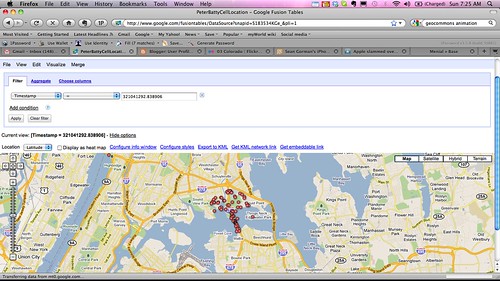
This cluster of points is some way above where I drove, I was driving along the Long Island Expressway going east from LaGuardia Airport. The timestamp appears to be in seconds and has 7 decimal places, so it is apparent that this set of data must have been downloaded in a single transaction, it was not obtained by communicating with cell towers at each of these locations independently. It seems reasonable to assume that this data was downloaded to help locate me in the event that I drove into this area (which I didn't). You can observe similar clusters by clicking a dot at random, copying the timestamp, and running a filter in Google Fusion Tables to display all dots with the same timestamp.
What I really wanted to do now was to animate my data, to more easily visualize what was happening. I couldn't figure out an easy way to do this in Google Fusion tables - although it has some capability for this, it wasn't recognizing the timestamp field as a date-time. So I went to look at the data that Sean Gorman had posted of his logs at GeoCommons (my original file had been too large to visualize there without me doing a little more work). GeoCommons has a cool animation capability, which you can try out on Sean's map by dragging the sliders at the bottom left.
I found something really interesting when I zoomed in around the geoIQ office in Arlington, where Sean works. This screen shot shows that between November 11, 2010 and April 20, 2011, there is no record of Sean being at his office.
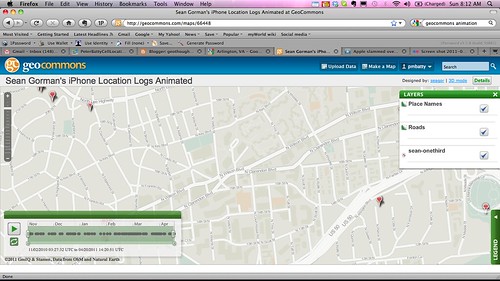
Now I know that Sean likes to escape for a spot of skiing in Colorado now and then, but that's a pretty long absence for a company President :) ! And I know I have met with him in the office during that time period.
If you drag the time slider a little further, then at the same instant, about 20 more locations appear on the map, covering a general area around the office, roughly half a mile square:
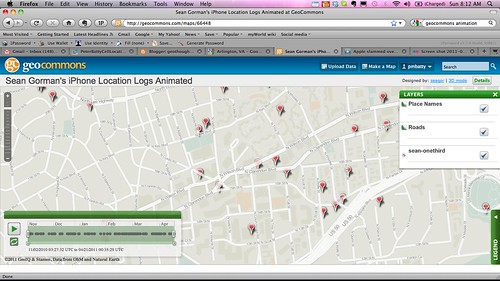
So from this data I can tell that Sean was somewhere in the general area of this half mile square (not necessarily inside it) on April 20. I know nothing about whether he was there before that, and I don't know anything about exactly where he went.
So, this data stored in the iPhone logs is much less revealing than it may initially seem. At a quick glance it does look like it is recording your location history, and I think that Pete Warden and Alasdair Allan were quite right to raise the concerns that they did. It takes some digging in the data to realize that the concerns are not nearly as bad as they appeared at first sight. By publicizing it as they did, and providing their tools and documentation on how to examine the data, they made it easy for others like myself, Sean Gorman and Will Clarke to analyze the data and figure out more about what is going on.
It's still not clear exactly what the data is for, but my guess, as Jude suggested, is that it is to aid in fast location determination - once the iPhone figures out that you're in an area, it downloads data for surrounding cell towers (and Wifi hotspots, a detail I haven't gone into here but the data is available for those too, as discussed in my previous post), so it can quickly locate you as you move around that area (update: see the first comment below, and my addition to the initial summary, which reference a document from Apple that confirms that this is the case).
So to summarize again, there are still some concerns with this data - it does give an approximate indication of places you've been, but not good enough to identify specific buildings or businesses. It doesn't record history - there is no way to tell if you've visited a location multiple times, you can just tell the last time you visited a general area (though there might be clues about multiple visits - for example data showing you visited a neighboring area on a different date, but nothing definitive or detailed about repeat visits). But it definitely doesn't reveal the sort of detailed information that many people have been concerned about.