We’ve open sourced Backboard, a motion-driven animation framework for Android. It’s built on top of Rebound, and makes it easier to animate views based on user interaction. We use Backboard in the Tumblr Android app to make our app more responsive and fun.
See more posts like this on Tumblr
#animation #open source #AndroidMore you might like
Coming soon to the mobile apps: Inbox tab in Activity
Ever wondered where to find your blog’s received asks and submissions on the mobile app? They’re in settings, which takes a lot of taps to get to, especially if you have multiple blogs.
We heard some feedback on our recent update to settings on Android that you wanted easier access to your Inbox. So, we’re working on moving the Inbox to your Activity screen.

This was something we worked on during Hack Days in March, so while we put the finishing touches on it, tell us what you think of this change!
This is now rolling out on Android! Let us know if you notice any weirdness.
Now in Labs on Android: Settings redesign
Tumblr has tons of settings, and in the app, most of them are in a single list under “General Settings”. We cleaned up the layout and reorganized to make browsing preferences and notifications easier to find, put all your blog and communities settings in one place, and added a few options that were previously web-only.
If you use an Android device, make sure you’re using version 45.2 of the Tumblr app, and you can switch on the new settings area in Labs -> Redesigned Settings. You might need to restart the app to see changes.
Got feedback? Leave it on this post!
The new settings area is now rolling out to everyone on Android. This will no longer be a Labs feature — thanks to those who tested and gave feedback!
You may or may not see the toggle in Labs while we work on enabling this for everyone. As always, if you notice any issues when trying out the new settings, let us know here!
Open Sourcing Kanvas: Tumblr’s Media Editor and Camera
Today, Tumblr is releasing Kanvas, the Media Editor and Camera used in the Tumblr iOS app, as open-source!
https://github.com/tumblr/kanvas-ios
 ALT
ALTKanvas is an open-source iOS library for adding effects, drawings, text, stickers, and making GIFs from existing media or the camera. It’s used by Tumblr for its camera, media editor, GIF maker, and media posting tool, and WordPress will be using it in the future too!
The project is licensed under the Mozilla Public License v2. Check out the Projects tab on GitHub for an idea of what we’re working on, and how you can contribute. The README is a good place to see Kanvas in action and add it to your own app. And if you’re interested, follow the project, as we’ll be posting more documentation about how Kanvas work and the history of the project.
Thanks to everyone who’s contributed to Kanvas over the years, and we’re excited to see what this new open-source & WordPress chapter brings.
 ALT
ALTOpen Sourcing our Kubernetes Tools
At Tumblr, we are avid fans of Kubernetes. We have been using Kubernetes for all manner of workloads, like critical-path web requests handling for tumblr.com, background task executions like sending queued posts and push notifications, and scheduled jobs for spam detection and content moderation. Throughout our journey to move our 11 year old (almost 12! 🎂) platform to a container-native architecture, we have made innumerable changes to how our applications are designed and run. Inspired by a lot of existing Kubernetes APIs and best practices, we’re excited to share with the community some of the tools we’ve developed at Tumblr as our infrastructure has evolved to work with Kubernetes.
To help us integrate Kubernetes into our workflows, we have built a handful of tools of which we are open-sourcing three today! Each tool is a small, focused utility, designed to solve specific integration needs Tumblr had while migrating our workflows to Kubernetes. The tools were built to handle our needs internally, but we believe they are useful to the wider Kubernetes community.
Now in Labs on Android: Settings redesign
Tumblr has tons of settings, and in the app, most of them are in a single list under “General Settings”. We cleaned up the layout and reorganized to make browsing preferences and notifications easier to find, put all your blog and communities settings in one place, and added a few options that were previously web-only.
If you use an Android device, make sure you’re using version 45.2 of the Tumblr app, and you can switch on the new settings area in Labs -> Redesigned Settings. You might need to restart the app to see changes.
Got feedback? Leave it on this post!
Where's that comment?
Hello Tumblr!
@jubs here, today, to tell you about a feature we're building: Comments by author!
Comments (or replies) have been around for a while, but they have always been tucked away from your regular feed, and so we're working on a few ways to integrate them into the rest of our experience.
Soon, blogs will have a Comments tab alongside Posts, Likes, and Following. There, you will be able to see posts other people have been commenting on, and, more importantly, find your own comments! This was not possible before, except through notifications if someone engaged with your comment.
We're also working on a way to surface posts commented on by people you follow in your feeds. You will be able to find those in the For You tab, and later, alongside chronological posts in the Following tab.
So, how do you identify those posts in the feeds?
Replied posts will show a small preview right there in your dashboard, before you click anything.
This is not out yet, but soon! In the meantime, tell us what you think and expect from this! ☺︎
Launch Day
@jubs again!
First of all, thank you all for the feedback in the original post!
Today, we’re launching the new “Comments” tab for Blog pages, and we’ll be testing a For You recommendation based on comments from people you follow. The posts will have a preview of the reply, so you know why you’re seeing that post.
You will be able to control the new tab visibility, and whether we should include your comments in your follower’s feeds, through a new setting:

The toggle can be found on https://www.tumblr.com/settings/blog/YOUR_BLOG or in the General Settings > Replies section, on Mobile. If you have already disabled the “Share posts you like” setting, the setting will default to disabled.
The new tab is only available on Web and iOS (44.8+) for now, but the toggle is available to everyone (including on Android), so you can control what other people see on your blogs, even if you don’t have the new feature yet. Don’t worry, we have plans to implement the tab and posts on Android, soon!
—
We want to later include these replied posts to the Following feed as well, and we’re planning on adapting the current “Include posts liked by the blogs you follow” toggle to also consider comments, in case you don’t want to see shared comments from people you follow.

What do you think? As always, we appreciate your thoughts, keep ‘em coming!
omg asked:
Hi folks - long time tumblr user - love your work. Now that you are owned by Automattic - who have a long tradition of open source, I was wondering if you have any plans to open source the Tumblr iOS app?

Hello! Good question. We at Tumblr love open source as well! We don’t know yet if we’re going to open source anything like the iOS app. But if we do any new open sourcing work, we’ll post about it on here, so stay tuned.
Introducing Graywater for Android
Introducing Graywater, Tumblr’s framework for decomposing complex items in a RecyclerView list in order to improve scroll performance, reduce memory usage, and lay a foundation for a more composition-oriented approach to building lists. With Graywater, the app now scrolls faster and crashes less often, and it also gives us a solid foundation for building new features faster and better than before.
On screens that display posts, such as the dashboard, the Tumblr Android app customizes one adapter across multiple screens. This approach results in a complex adapter, and over time, our previous solution became difficult to manage and hard to reason about since there was no consistent place for screen-specific behavior.
Furthermore, each post type had its own layout and viewholder, which meant that once a user encountered a post type they hadn’t seen on that screen before, the entire post had to go through the inflate, layout, and draw process. Once offscreen, the post would take up large chunk of memory in the RecyclerView pool.

Graywater solves this by rendering only the parts of a post that are visible and reusing the parts of a post that appear in other posts, such as the header and footer. By breaking up a large post into smaller components, the UI thread has to do less on each scroll. Even though there are more view types, each individual view type is smaller, so memory usage is lower.
For example, a photoset post may be composed of ten photos, one after another. In the previous architecture, a photoset layout with headers and footers would be inflated and the photo views added in afterwards. If the viewholder is recycled and the next photoset post only has one photo, the extra photo views are discarded. With Graywater, each individual photo view is recycled separately, which allows RecyclerView to reuse the photo views that appeared earlier in the photoset.
This idea is based off of Facebook’s post on a faster news feed and Components for Android, which have been open-sourced as Litho.
Graywater differs from other RecyclerView libraries by being small (a single file!) and flexible enough to work within your model architecture. For libraries like Epoxy and Groupie to accomplish sub-item recycling, complex items like posts need to be decomposed into smaller viewmodels beforehand. For Litho to flatten view hierarchies and perform fine-grained recycling, existing XML layouts need to be converted to layout specs.
By converting to Graywater, we’ve been able to reduce OutOfMemory errors by 90% and dramatically improve scroll performance. It is now much easier to add new item types that are composed of preexisting post components. We have also migrated screen-specific logic to the screen itself by injecting the customized component into the adapter. By open-sourcing Graywater, we’re hoping the Android community will achieve similar performance and architecture gains, and we’re excited to hear what the community builds next!
Coming soon to the mobile apps: Inbox tab in Activity
Ever wondered where to find your blog’s received asks and submissions on the mobile app? They’re in settings, which takes a lot of taps to get to, especially if you have multiple blogs.
We heard some feedback on our recent update to settings on Android that you wanted easier access to your Inbox. So, we’re working on moving the Inbox to your Activity screen.
This was something we worked on during Hack Days in March, so while we put the finishing touches on it, tell us what you think of this change!
Tumblr Hack Week, March 2022 Edition
It was Hack Week (more than just a day!) once again at Tumblr! A couple of times per year we grind everything to a halt and spend a week working on whatever we want and see how far we can get with our hacks. Since last time, we’ve launched the ability to have a Discord => Tumblr integration, we’re close to launching Twitch embed support, and custom logos are now possible in the mobile apps! And from a previous Hack Day, we’ve launched “Timestamps Everywhere” on web, and we’re working on rolling it out to the mobile apps very soon!
Here are some of the projects that got made for this last Hack Week. Some of these things you may also end up seeing on the site…
Interacting as a Sideblog/Secondary blog
@designpatternpirate put together a proof of concept for switching to a sideblog/secondary blog when liking or replying to posts. Using this hack, you’d be able to switch which of your blogs you’re “acting as” when hitting the like button or when replying to a post, to start. You’d even have separate Likes pages for each blog!
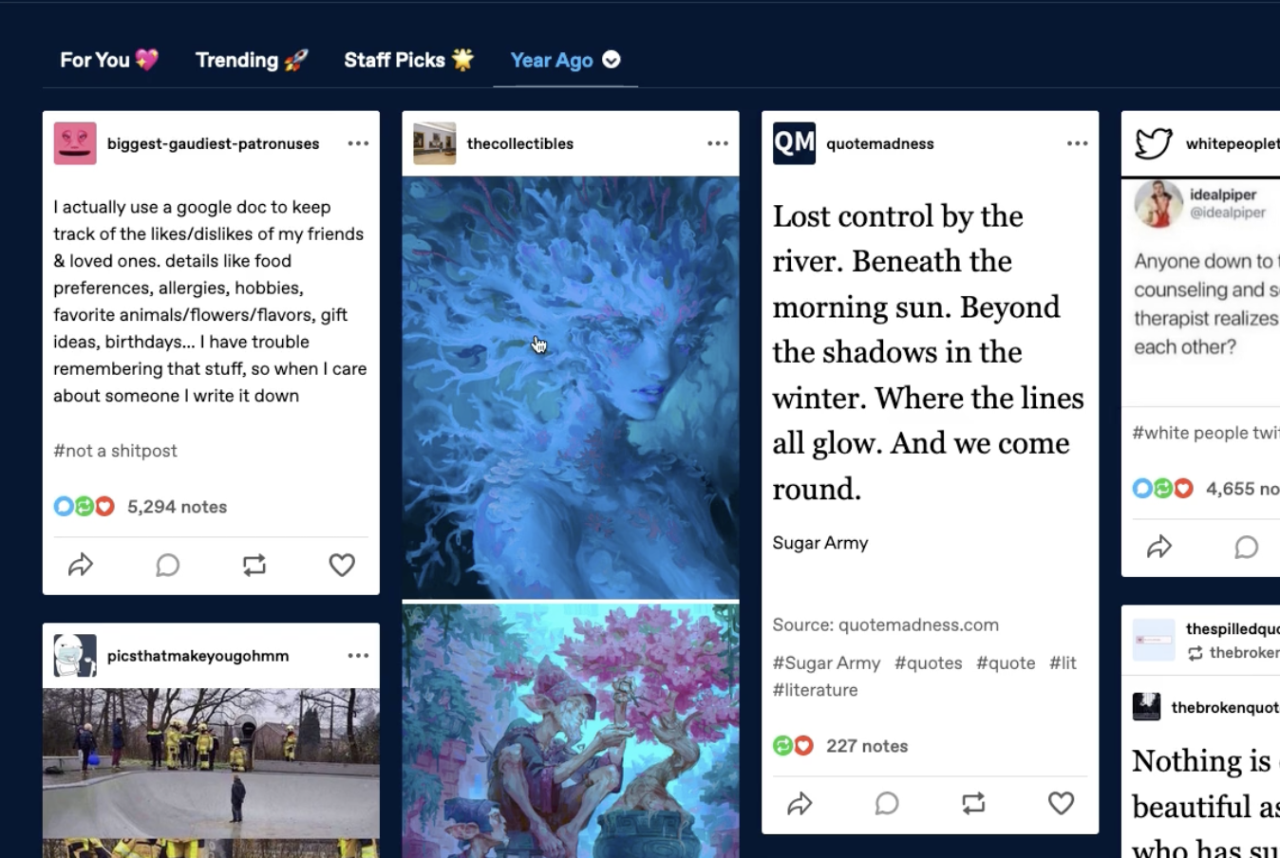
“One Year Ago” Dashboard Feed
André hacked together a feed which shows a portal backwards in time, to what the blogs you’re following were posting a year ago today:
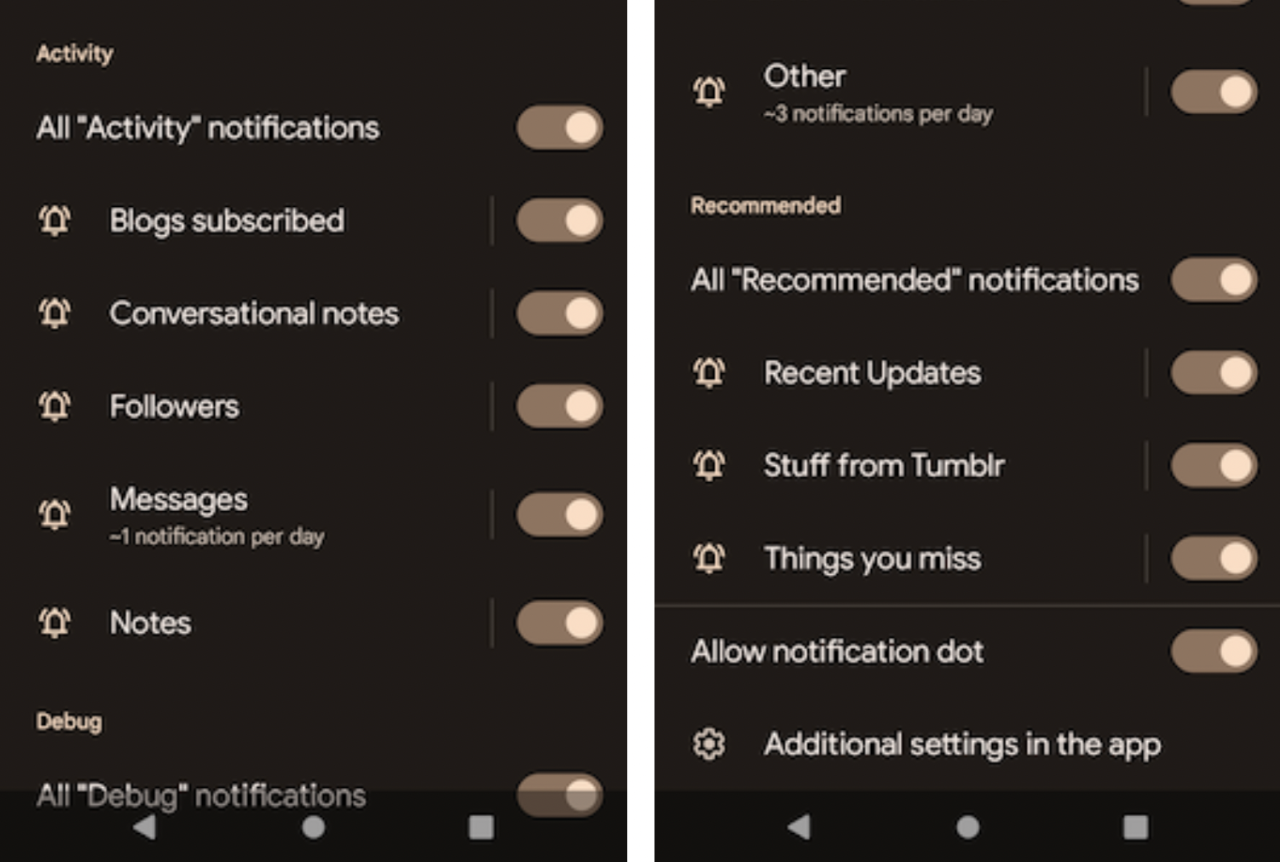
Moving Android notification settings
On Android, Omar moved all of our notification settings out of the Tumblr app and into the Android OS level notifications settings view, like other apps do:
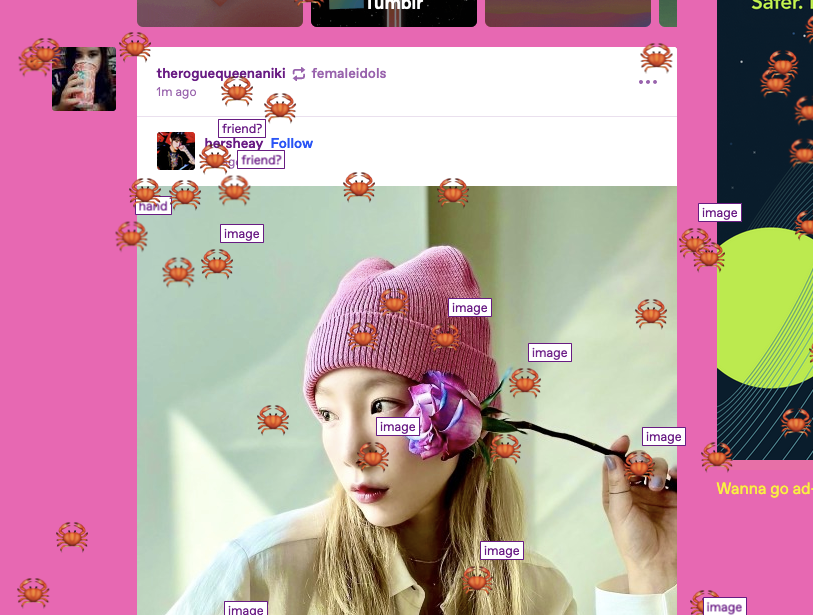
“Time for crab!” 🦀
@superchlorine hacked together a delightful button for the dashboard that summons crabs which scuttle across the page, and even comment on what they’re traipsing over:
As always, stay tuned to the @changes blog to see if any of these hacks make it on Tumblr for real!