Table of Contents | Previous
| Next
| Index
Chapter 12
There are usually a variety of ways to partition an application between client and server. Some tasks can be performed only on the client or on the server; others can be performed on either. Although there is no definitive way to know what to do where, you can follow these general guidelines:
As a rule of thumb, use client processing (the
Item #1: Sweatshirt
Item #2: Socks
Table of Contents | Previous | Next | Index
Chapter 12
Basics of Server-Side JavaScript
- What to Do Where
- Overview of Runtime Processing
- Server-Side Language Overview
- Embedding JavaScript in HTML
- Runtime Processing on the Server
- Constructing the HTML Page
- Accessing CGI Variables
- Communicating Between Server and Client
- Garbage Collection
What to Do Where
The client (browser) environment provides the front end to an application. In this environment, for example, you display HTML pages in windows and maintain browser session histories of HTML pages displayed during a session. The objects in this environment, therefore, must be able to manipulate pages, windows, and histories. By contrast, in the server environment you work with the resources on the server. For example, you can connect to relational databases, share information across users of an application, or manipulate the server's file system. The objects in this environment must be able to manipulate relational databases and server file systems. In addition, an HTML page is not displayed on the server. It is retrieved from the server to be displayed on the client. The page retrieved can contain client-side JavaScript. If the requested page is part of a JavaScript application, the server may generate this page on the fly. In developing a JavaScript application, keep in mind the differences between client and server platforms. They are compared in the following table.Table 12.1 Client and server comparison
| Servers | Clients |
|---|---|
Servers can become overloaded when accessed by thousands of clients. | |
SCRIPT tag) for these tasks:
- Validating user input; that is, checking that values entered in forms are valid
- Prompting a user for confirmation and displaying error or informational dialog boxes
- Performing aggregate calculations (such as sums or averages) or other processing on data retrieved from the server
- Conditionalizing HTML
- Performing other functions that do not require information from the server
SERVER tag) for these tasks:
- Maintaining information through a series of client accesses
- Maintaining data shared among several clients or applications
- Accessing a database or files on the server
- Calling external libraries on the server
- Dynamically customizing Java applets; for example, visualizing data using a Java applet
Overview of Runtime Processing
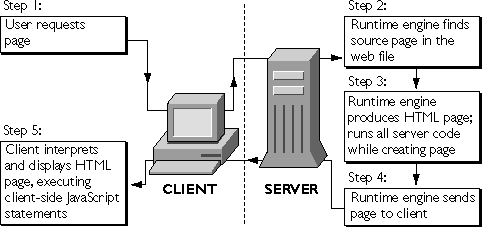
Once you've installed and started a JavaScript application, users can access it. The basic procedure is as follows:- A user accesses the application URL with a web browser, such as Netscape Communicator. The web browser sends a client request to the server for a page in the application.
- If the request is to a page under the application URL, the JavaScript runtime engine running on the server finds information in the web file corresponding to that URL. For details on what happens in this and the next two steps, see "Runtime Processing on the Server" on page 211.
-
The runtime engine constructs an HTML page to send to the client in response. It runs the bytecodes associated with
SERVERtags from the original source code HTML, creating an HTML page based on those bytecodes and any other HTML found in the original. For information on how you can influence that page that is constructed, see "Constructing the HTML Page" on page 216. - The runtime engine sends the new HTML page (which may contain client-side JavaScript statements) to the client.
- The JavaScript runtime engine inside the web browser interprets any client-side JavaScript statements, formats HTML output, and displays results to the user.
Figure 12.1 Processing a JavaScript page request
<html>
<head> <title> Add New Customer </title> </head>
<body text="#FFFF00" bgcolor="#C0C0C0" background="blue_marble.gif">
<img src="billlog2.gif">
<br>
<server>
if ( project.lock() ) {
   project.lastID = 1 + project.lastID;
   client.customerID = project.lastID;
   project.unlock();
}
</server>
<h1>Add a New Customer </h1>
<p>Note: <b>All</b> fields are required for the new customer
<form method="post" action="add.htm"></p>
<p>ID:
<br><server>write("<STRONG><FONT COLOR=\"#00FF00\">" +
   project.lastID + "</FONT></STRONG>");</server>
<!-- other html statements -->
</body>When this page is accessed, the runtime engine on the server executes the code associated with the
</html>
SERVER tags. (The code shown in bold.) If the new customer ID is 42, the server sends this HTML page to the client to be displayed:
<html>
<head> <title> Add New Customer </title> </head>
<body text="#FFFF00" bgcolor="#C0C0C0" background="blue_marble.gif">
<img src="billlog2.gif">
<br>
<h1>Add a New Customer </h1>
<p>Note: <b>All</b> fields are required for the new customer
<form method="post" action="add.htm"></p>
<p>ID:
<br><STRONG><FONT COLOR="#00FF00">42</FONT></STRONG>
<!-- other html statements -->
</body>
</html>
Server-Side Language Overview
Client-side and server-side JavaScript both implement the JavaScript 1.2 language. In addition, each adds objects and functions specific to working in the client or the server environment. For example, client-side JavaScript includes theform object to represent a form on an HTML page, whereas server-side JavaScript includes the database object for connecting to an external relational database.
The Client-Side JavaScript Guide discusses in detail the core JavaScript language and the additions specific to client-side JavaScript.
ECMA, the European standards organization for standardizing information and communication systems, derived its ECMA-262 standard from the JavaScript language. You can download the standard specification from ECMA's web site at http://www.ecma.ch.
Core Language
For the most part, server-side JavaScript implements the JavaScript 1.2 language completely, as does client-side JavaScript. By default, however, server-side JavaScript differs from the JavaScript 1.2 specification in its treatment of comparison operators. Also, server-side JavaScript implements prototypes as defined in the specification, but the implications are somewhat different in the server environment than in the client environment. This section discusses these differences.Comparison Operators
The behavior of comparison operators changed between JavaScript 1.1 and JavaScript 1.2. JavaScript 1.1 provided automatic conversion of operands for comparison operators. In particular:- If both operands are objects, JavaScript 1.1 compares object references.
- If either operand is null, JavaScript 1.1 converts the other operand to an object and compares references.
- If one operand is a string and the other is an object, JavaScript 1.1 converts the object to a string and compares string characters.
- Otherwise, JavaScript 1.1 converts both operands to numbers and compares numeric identity.
- JavaScript 1.2 never attempts to convert operands from one type to another.
- JavaScript 1.2 always compares the identity of operands of like type. If the operands are not of like type, they are not equal.
-a 1.2 option to jsac, the JavaScript compiler. The compiler is described in "Compiling an Application" on page 56.
Prototypes
As described in the Server-Side JavaScript Reference, you can use theprototype property of many classes to add new properties to a class and to all of its instances. As described in "Classes and Objects" on page 205, server-side JavaScript adds several classes and predefined objects. For the new classes that have the prototype property, it works for server-side JavaScript exactly as for client-side JavaScript.
You can use the prototype property to add new properties to the Blob, Connection, Cursor, DbPool, File, Lock, Resultset, SendMail, and Stproc classes. In addition, you can use the prototype property of the DbBuiltin class to add properties to the predefined database object. Note that you cannot create an instance of the DbBuiltin class; instead, you use the database object provided by the JavaScript runtime engine.
You cannot use prototype with the client, project, request, and server objects.
Also, as for client-side JavaScript, you can use the prototype property for any class that you define for your application.
Remember that all JavaScript applications on a server run in the same environment. This is why you can share information between clients and applications. One consequence of this, however, is that if you use the prototype property to add a new property to any of the server-side classes added by JavaScript, the new property is available to all applications running on the server, not just the application in which the property was added. This provides you with an easy mechanism for adding functionality to all JavaScript applications on your server.
By contrast, if you add a property to a class you define in your application, that property is available only to the application in which it was created.
Usage
You need to be aware of how the JavaScript application compiler recognizes client-side and server-side JavaScript in an HTML file. Client-side JavaScript statements can occur in several situations:-
By including them as statements and functions within a
SCRIPTtag -
By specifying a file as JavaScript source to the
SCRIPTtag - By specifying a JavaScript expression as the value of an HTML attribute
- By including statements as event handlers within certain other HTML tags
-
By including them as statements and functions within a
SERVERtag - By specifying a file as JavaScript source to the JavaScript application compiler
- By specifying a JavaScript expression as the value or name of an HTML attribute
Environment
The LiveConnect feature of the core JavaScript language works differently on the server than it does on the client. For more information, see Chapter 21, "LiveConnect Overview." JavaScript provides additional functionality without the use of objects. You access this functionality through functions not associated with any object (global functions). The core JavaScript language provides the global functions described in the following table.Table 12.2 Core JavaScript global functions
Server-side JavaScript adds the global functions described in the following table.Table 12.3 JavaScript server-side global functions
Classes and Objects
To support the different tasks you perform on each side, JavaScript has classes and predefined objects that work on the client but not on the server and other classes and predefined objects that work on the server but not on the client.Important These names of these objects are reserved for JavaScript. Do not create your own objects using any of these names.The core JavaScript language provides the classes described in the following table. For details of all of these objects, see the Server-Side JavaScript Reference.
Table 12.4 Core JavaScript classes
Server-side JavaScript includes the core classes, but not classes added by client-side JavaScript. Server-side JavaScript has its own set of additional classes to support needed functionality, as described in the following table.Table 12.5 Server-side JavaScript classes
In addition, server-side JavaScript has the predefined objects described in the following table. These objects are all available for each HTTP request. You cannot create additional instances of any of these objects.Table 12.6 Server-side JavaScript singleton objects
Embedding JavaScript in HTML
There are two ways to embed server-side JavaScript statements in an HTML page:-
With the
SERVERtag
Use this tag to enclose a single JavaScript statement or several statements. You precede the JavaScript statements with - With a backquote (`), also known as a tick Use this character to enclose a JavaScript expressions inside an HTML tag, typically to generate an HTML attribute or attribute value based on JavaScript values. This technique is useful inside tags such as anchors, images, or form element tags, for example, to provide the value of an anchor's
<SERVER> and follow them with </SERVER>.
You can intermix the SERVER tag with complete HTML statements. Never put the SERVER tag between the open bracket (<) and close bracket (>) of a single HTML tag. (See "The SERVER tag" on page 208.) Also, do not use the <SCRIPT> tag between <SERVER> and </SERVER>.HREF attribute.
Do not use backquotes to enclose JavaScript expressions outside HTML tags. (See "Backquotes" on page 209.)write function in a SERVER tag or enclose statements in backquotes, the runtime engine dynamically generates new HTML to modify the page it sends to the client.
The SERVER tag
TheSERVER tag is the most common way to embed server-side JavaScript in an HTML page. You can use the SERVER tag in any situation; typically, however, you use backquotes instead if you're generating attributes names or values for the HTML page.
Most statements between the <SERVER> and </SERVER> tags do not appear on the HTML page sent to the client. Instead, the statements are executed on the server. However, the output from any calls to the write function do appear in the resulting HTML.
The following excerpt from the Hello World sample application illustrates these uses:
<P>This time you areWhen given this code snippet, the runtime engine on the server generates HTML based on the value of
<SERVER>
write(request.newname);
client.oldname = request.newname;
</SERVER>
<h3>Enter your name</h3>
request.newname in the write statement. In the second statement, it simply performs a JavaScript operation, assigning the value of request.newname to client.oldname. It does not generate any HTML. So, if request.newname is "Mr. Ed," the runtime engine generates the following HTML for the previous snippet:
<P>This time you are
Mr. Ed
<h3>Enter your name</h3>
Backquotes
Use backquotes (`) to enclose server-side JavaScript expressions as substitutes for HTML attribute names or attribute values. JavaScript embedded in HTML with backquotes automatically generates HTML; you do not need to use write.
In general, HTML tags are of the form
<TAG ATTRIB="value" [...ATTRIB="value"]>where
ATTRIB is an attribute and "value" is its value. The bracketed expression indicates that any number of attribute/value pairs is possible.
When you enclose a JavaScript expression in backquotes to be used as an attribute value, the JavaScript runtime engine automatically adds quotation marks for you around the entire value. You do not provide quotation marks yourself for this purpose, although you may need them to delimit string literals in the expression, as in the example that follows. The runtime engine does not do this for attribute names, because attribute names are not supposed to be enclosed in quotation marks.
For example, consider the following line from the Hangman sample application:
<IMG SRC=`"images\hang" + client.num_misses + ".gif"`>This line dynamically generates the name of the image to use based on the value of
client.num_misses. The backquotes enclose a JavaScript expression that concatenates the string "images\hang" with the integer value of client.num_misses and the string ".gif", producing a string such as "images\hang0.gif". The result is HTML such as
<IMG SRC="images\hang0.gif">The order of the quotation marks is critical. The backquote comes first, indicating that the following value is a JavaScript expression, consisting of a string (
"images\hang"), concatenated with an integer (client.num_misses), concatenated with another string (".gif"). JavaScript converts the entire expression to a string and adds the necessary quotation marks around the attribute value.
You need to be careful about using double quotation marks inside backquotes, because the value they enclose is interpreted as a literal value. For this reason, do not surround JavaScript expressions you want evaluated with quotation marks. For example, if the value of client.val is NetHead, then this statement:
<A NAME=`client.val`>generates this HTML:
<A NAME="NetHead">But this statement:
<A NAME=`"client.val"`>generates this HTML:
<A NAME="client.val">As another example, two of the
ANCHOR tag's attributes are HREF and NAME. HREF makes the tag a hyperlink, and NAME makes it a named anchor. The following statements use the choice variable to set the attrib and val properties of the client object and then create either a hyperlink or a target, depending on those values:
<SERVER>
if (choice == "link") {
   client.attrib = "HREF";
   client.val = "http://www.netscape.com";
}
if (choice == "target") {
   client.attrib = "NAME";
   client.val = "NetHead";
}
</SERVER>
<A `client.attrib`=`client.val`>Netscape Communications</A>If the value of
choice is "link", the result is
<A HREF="http://home.netscape.com">Netscape Communications</A>If the value of
choice is "target", the result is
<A NAME="NetHead">Netscape Communications</A>
When to Use Each Technique
In most cases, it is clear when to use theSERVER tag and when to use backquotes. However, sometimes you can achieve the same result either way. In general, it is best to use backquotes to embed JavaScript values inside HTML tags, and to use the SERVER tag elsewhere.
For example, in Hangman, instead of writing
<IMG SRC=`"images\hang" + client.num_misses + ".gif"`>you could write
<SERVER>Notice the backslash that lets you use a quotation mark inside a literal string. Although the resulting HTML is the same, in this case backquotes are preferable because the source is easier to read and edit.
write("<IMG SRC=\"images\hang");
write(client.num_misses);
write(".gif\">");
</SERVER>
Runtime Processing on the Server
"Overview of Runtime Processing" on page 198 gives an overview of what happens at runtime when a single user accesses a page in a JavaScript application. This section provides more details about steps 2 through 4 of this process, so you can better see what happens at each stage. This description provides a context for understanding what you can do on the client and on the server. One of the most important things to remember when thinking about JavaScript applications is the asynchronous nature of processing on the Web. JavaScript applications are designed to be used by many people at the same time. The JavaScript runtime engine on the server handles requests from many different users as they come in and processes them in the order received. Unlike a traditional application that is run by a single user on a single machine, your application must support the interleaving of multiple simultaneous users. In fact, since each frame in an HTML document with multiple frames generates its own request, what might seem to be a single request to the end user can appear as several requests to the runtime engine. HTTP (Hypertext Transfer Protocol) is the protocol by which an HTML page is sent to a client. This protocol is stateless, that is, information is not preserved between requests. In general, any information needed to process an HTTP request needs to be sent with the request. This poses problems for many applications. How do you share information between different users of an application or even between different requests by the same user? JavaScript's Session Management Service was designed to help with this problem. This service is discussed in detail in Chapter 13, "Session Management Service." For now simply remember that the runtime engine automatically maintains theclient, server, project, and request objects for you.
When the Netscape server receives a client request for an application page, it first performs authorization. This step is part of the basic server administration functions. If the request fails server authorization, then no subsequent steps are performed. If the request receives server authorization, then the JavaScript runtime engine continues. The runtime engine performs these steps, described in the following sections:
- Constructs a new request object and constructs or restores the client object.
- Finds the page for the request and starts constructing an HTML page to send to the client.
- For each piece of the source HTML page, adds to the buffer or executes code.
- Saves the client object properties.
- Sends HTML to the client.
- Destroys the request object and saves or destroys the client object.
Step 1. Construct request object and construct or restore client object
It initializes the built-in properties of therequest object, such as the request's IP address and any form input elements associated with the request. If the URL for the request specifies other properties, those are initialized for the request object, as described in "Encoding Information in a URL" on page 226.
If the client object already exists, the runtime engine retrieves it based on the specified client-maintenance technique. (See "Techniques for Maintaining the client Object" on page 253.) If no client object exists, the runtime engine constructs a new object with no properties.
You cannot count on the order in which these objects are constructed.
Step 2. Find source page and start constructing HTML page
When you compiled your JavaScript application, the source included HTML pages containing server-side JavaScript statements. The main goal of the runtime engine is to construct, from one of those source pages, an HTML page containing only HTML and client-side JavaScript statements. As it creates this HTML page, the runtime engine stores the partially created page in a special area of memory called a buffer until it is time to send the buffered contents to the client.Step 3. Add to output buffer or execute code
This step is performed for each piece of code on the source page. The details of the effects of various server-side statements are covered in other sections of this manual. For more information, see "Constructing the HTML Page" on page 216. For a given request, the runtime engine keeps performing this step until one of these things happens:- The buffer contains 64KB of HTML. In this situation, the runtime engine performs steps 4 and 5 and then returns to step 3 with a newly emptied buffer and continues processing the same request. (Step 4 is only executed once, even if steps 3 and 5 are repeated.)
-
The server executes the
flushfunction.
In this situation, the runtime engine performs steps 4 and 5 and then returns to step 3 with a newly emptied buffer and continues processing the same request. (Step 4 is only executed once, even if steps 3 and 5 are repeated.) -
The server executes the
redirectfunction.
In this situation, the runtime engine finishes this request by performing steps 4 through 6. It ignores anything occurring after the - It reaches the end of the page. In this situation, the runtime engine finishes this request by performing steps 4 through 6.
redirect function in the source file and starts a new request for the page specified in the call to redirect.Step 4. Save client object properties
The runtime engine saves theclient object's properties immediately before the first time it sends part of the HTML page to the client. It only saves these properties once. The runtime engine can repeat steps 3 and 5, but it cannot repeat this step.
The runtime engine saves the properties at this point to support some of the maintenance techniques for the client object. For example, the client URL encoding scheme sends the client properties in the header of the HTML file. Because the header is sent as the first part of the file, the client properties must be sent then.
client properties. You should always change client properties in the file before any call to redirect or flush and before generating 64KB of HTML output.
If you change property values for the client object in the code after HTML has been sent to the client, those changes remain in effect for the rest of that client request, but they are then discarded. Hence, the next client request does not get those values for the properties; it gets the values that were in effect when content was first sent to the client. For example, assume your code contains these statements:
<HTML>
<P>The current customer is
<SERVER>
client.customerName = "Mr. Ed";
write(client.customerName);
client.customerName = "Mr. Bill";
</SERVER>
<P>The current customer really isThis series of statements results in this HTML being sent to the client:
<SERVER>
write(client.customerName);
</SERVER>
</HTML>
<P>The current customer is Mr. EdAnd when the next client request occurs, the value of
<P>The current customer really is Mr. Bill
client.customerName is "Mr. Bill". This very similar set of statements results in the same HTML:
<HTML>However, when the next client request occurs, the value of
<P>The current customer is
<SERVER>
client.customerName = "Mr. Ed";
write(client.customerName);
flush();
client.customerName = "Mr. Bill";
</SERVER>
<P>The current customer really is
<SERVER>
write(client.customerName);
</SERVER>
</HTML>
client.customerName is "Mr. Ed"; it is not "Mr. Bill".
For more information, see "Techniques for Maintaining the client Object" on page 253.
Step 5. Send HTML to client
The server sends the page content to the client. For pages with no server-side JavaScript statements, the server simply transfers HTML to the client. For other pages, the runtime engine performs the application logic to construct HTML and then sends the generated page to the client.Step 6. Destroy request object and save or destroy client object
The runtime engine destroys therequest object constructed for this client request. It saves the values of the client object and then destroys the physical JavaScript object. It does not destroy either the project or the server object.
Constructing the HTML Page
When you compile your JavaScript application, the source includes HTML pages that contain server-side JavaScript statements and perhaps also HTML pages that do not contain server-side JavaScript statements. When a user accesses a page in an application that does not contain server-side JavaScript statements, the server sends the page back as it would any other HTML page. When a user accesses a page that does contain server-side JavaScript statements, the runtime engine on the server constructs an HTML page to send in response, using one of the source pages of your application. The runtime engine scans the source page. As it encounters HTML statements or client-side JavaScript statements, it appends them to the page being created. As it encounters server-side JavaScript statements, it executes them. Although most server-side JavaScript statements perform processing on the server, some affect the page being constructed. The following sections discuss three functions--write, flush, and redirect--that affect the HTML page served.
Generating HTML
As discussed earlier in this chapter, thewrite function generates HTML based on the value of JavaScript expression given as its argument. For example, consider this statement
write("<P>Customer Name is:" + project.custname + ".");In response to this statement, JavaScript generates HTML including a paragraph tag and some text, concatenated with the value of the
custname property of the project object. For example, if this property is "Fred's software company", the client would receive the following HTML:
<P>Customer Name is: Fred's software company.As far as the client is concerned, this is normal HTML on the page. However, it is actually generated dynamically by the JavaScript runtime engine.
Flushing the Output Buffer
To improve performance, JavaScript buffers the HTML page it constructs. Theflush function immediately sends data from the internal buffer to the client. If you do not explicitly call the flush function, JavaScript sends data to the client after each 64KB of content in the constructed HTML page.
Don't confuse the flush function with the flush method of the File class. (For information on using the File class to perform file input and output, see "File System Service" on page 280.)
You can use flush to control the timing of data transfer to the client. For example, you might choose to flush the buffer before an operation that creates a delay, such as a database query. Also, if a database query retrieves a large number of rows, flushing the buffer every few rows prevents long delays in displaying data.
NOTE: If you use the client cookie technique to maintain the properties of theThe following code fragment shows howclientobject, you must make all changes to theclientobject before flushing the buffer. For more information, see "Techniques for Maintaining the client Object" on page 253.
flush is used. Assume that your application needs to perform some action on every customer in your customer database. If you have a lot of customers, this could result in a lengthy delay. So that the user doesn't have to wait in front of an unchanging screen, your application could send output to the client before starting the processing and then again after processing each row. To do so, you could use code similar to the following:
flush();
conn.beginTransaction();
cursor = conn.cursor ("SELECT * FROM CUSTOMER", true);
while ( cursor.next() ) {
   // ... process the row ...
   flush();
}
conn.commitTransaction();
cursor.close();
Changing to a New Client Request
Theredirect function terminates the current client request and starts another for the specified URL. For example, assume you have this statement:
redirect("http://www.royalairways.com/apps/page2.html");When the runtime engine executes this statement, it terminates the current request. The runtime engine does not continue to process the original page. Therefore any HTML or JavaScript statements that follow the call to
redirect on the original page are lost. The client immediately loads the indicated page, discarding any previous content.
The parameter to redirect can be any server-side JavaScript statement that evaluates to a URL. In this way, you can dynamically generate the URL used in redirect. For example, if a page defines a variable choice, you can redirect the client to a page based on the value of choice, as follows:
redirect ("http://www.royalairways.com/apps/page"If you want to be certain that the current
+ choice + ".html");
client properties are available in the new request, and you're using one of the URL-based maintenance techniques for the client object, you should encode the properties in the URL you pass to redirect. For information on doing so, see "Manually Appending client Properties to URLs" on page 266.
In general, properties of the request object and top-level JavaScript variables last only for a single client request. When you redirect to a new page, you may want to maintain some of this information for multiple requests. You can do so by appending the property names and values to the URL, as described in "Encoding Information in a URL" on page 226.
Accessing CGI Variables
Like most web servers, Netscape servers set values for a particular set of environment variables, called CGI variables, when setting up the context for running a CGI script. Writers of CGI scripts expect to be able to use these variables in their scripts. By contrast, Netscape web servers do not set up a separate environment for server-side JavaScript applications. Nevertheless, some of the information typically set in CGI variables can also be useful in JavaScript applications. The runtime engine provides several mechanisms for accessing this information:-
By accessing properties of the predefined
requestobject -
By using the
ssjs_getCGIVariablefunction to access some CGI variables and other environment variables -
By using the
httpHeadermethod ofrequestto access properties of the client request header
request object that correspond to CGI variables. For more information on these properties and on the request object in general, see "The request Object" on page 239.
Table 12.7 CGI variables accessible as properties of the request object
ssjs_getCGIVariable lets you access the environment variables set in the server process, including the CGI variables listed in the following table.
Table 12.8 CGI variables accessible through ssjs_getCGIVariable
ssjs_getCGIVariable is shown here:
value = ssjs_getCGIVariable("name");This statement sets the variable
value to the value of the name CGI variable. If you supply an argument that isn't one of the CGI variables listed in Table 12.8, the runtime engine looks for an environment variable by that name in the server environment. If found, the runtime engine returns the value; otherwise, it returns null. For example, the following code assigns the value of the standard CLASSPATH environment variable to the JavaScript variable classpath:
classpath = ssjs_getCGIVariable("CLASSPATH");The
httpHeader method of request returns the header of the current client request. For a CGI script, Netscape web servers set CGI variables for some of the information in the header. For JavaScript applications, you get that information directly from the header. Table 12.9 shows information available as CGI variables in the CGI environment, but as header properties in server-side JavaScript. In header properties, the underlines in the CGI-variable name (_) are replaced with dashes (-); for example, the CGI variable CONTENT_LENGTH corresponds to the header property content-length.
Table 12.9 CGI variables accessible through the client header
For more information on manipulating the client header, see "Request and Response Manipulation" on page 292. The following table shows the CGI variables that are not supported by server-side JavaScript, because they are not applicable when running JavaScript applications.Table 12.10 CGI variables not supported by server-side JavaScript
Communicating Between Server and Client
Frequently your JavaScript application needs to communicate information either from the server to the client or from the client to the server. For example, when a user first accesses thevideoapp application, the application dynamically generates the list of movie categories from the current database contents. That information, generated on the server, needs to be communicated back to the client. Conversely, when the user picks a category from that list, the user's choice must be communicated back to the server so that it can generate the set of movies.
Sending Values from Client to Server
Here are several ways to send information from the client to the server:-
The runtime engine automatically creates properties of the
requestobject for each value in an HTML form. (See "Accessing Form Values" on page 223.) -
If you're using a URL-based maintenance technique for properties of the
clientobject, you can modify the URL sent to the server to include property values for theclientandrequestobjects. (See "Encoding Information in a URL" on page 226.) -
You can use cookies to set property values for the
clientandrequestobjects. (See "Using Cookies" on page 230.) -
On the client, you can modify the header of the client request. You can then use the
httpHeadermethod of therequestobject to manipulate the header and possibly the body of the request. (See "Request and Response Manipulation" on page 292.) - You can use LiveConnect with CORBA services to communicate between client and server. (See Chapter 22, "Accessing CORBA Services.")
Accessing Form Values
Forms are the bread and butter of a JavaScript application. You use form elements such as text fields and radio buttons as the primary mechanism for transferring data from the client to the server. When the user clicks a Submit button, the browser submits the values entered in the form to the server for processing. TheACTION attribute of the FORM tag determines the application to which the values are submitted. To send information to the application on the server, use an application URL as the value of the ACTION attribute.
If the document containing the form is a compiled part of the same application, you can simply supply the name of the page instead of a complete URL. For example, here is the FORM tag from the Hangman sample application:
<FORM METHOD="post" ACTION="hangman.html">Forms sent to server-side JavaScript applications can use either
get or post as the value of the METHOD attribute.
NOTE: Server-side JavaScript applications do not automatically support file upload. That is, if the action specified is a page in a JavaScript application and you submit anEach input element in an HTML form corresponds to a property of theINPUTelement ofTYPE="file", your application must manually handle the file, as described in "Request and Response Manipulation" on page 292.
request object. The property name is specified by the NAME attribute of the form element. For example, the following HTML creates a request property called guess that accepts a single character in a text field. You refer to this property in server-side JavaScript as request.guess.
<FORM METHOD="post" ACTION="hangman.html">A
<P>
What is your guess?
<INPUT TYPE="text" NAME="guess" SIZE="1">
SELECT form element that allows multiple selections requires special treatment, because it is a single property that can have multiple values. You can use the getOptionValue function to retrieve the values of selected options in a multiple select list. For more information, see "Using Select Lists" on page 225.
For more information on the request object, see "The request Object" on page 239.
If you want to process data on the client first, you have to create a client-side JavaScript function to perform processing on the form-element values and then assign the output of the client function to a form element. You can hide the element, so that it is not displayed to the user, if you want to perform client preprocessing.
For example, suppose you have a client-side JavaScript function named calc that performs calculations based on the user's input. You want to pass the result of this function to your application for further processing. You first need to define a hidden form element for the result, as follows:
<INPUT TYPE="hidden" NAME="result" SIZE=5>Then you need to create an
onClick event handler for the Submit button that assigns the output of the function to the hidden element:
<INPUT TYPE="submit" VALUE="Submit"The value of
onClick="this.form.result.value=calc(this.form)">
result is submitted along with any other form-element values. This value can be referenced as request.result in the application.
Using Select Lists
The HTMLSELECT tag, used with the MULTIPLE attribute, allows you to associate multiple values with a single form element. If your application requires select lists that allow multiple selected options, you use the getOptionValue function to get the values in JavaScript. The syntax of getOptionValue is
itemValue = getOptionValue(name, index)Here,
name is the string specified as the NAME attribute of the SELECT tag, and index is the zero-based ordinal index of the selected option. The getOptionValue function returns the value of the selected item, as specified by the associated OPTION tag.
The function getOptionValueCount returns the number of options (specified by OPTION tags) in the select list. It requires only one argument, the string containing the name of the SELECT tag.
For example, suppose you have the following element in a form:
<SELECT NAME="what-to-wear" MULTIPLE SIZE=8>You could process the input from this select list as follows:
<OPTION SELECTED>Jeans
<OPTION>Wool Sweater
<OPTION SELECTED>Sweatshirt
<OPTION SELECTED>Socks
<OPTION>Leather Jacket
<OPTION>Boots
<OPTION>Running Shoes
<OPTION>Cape
</SELECT>
<SERVER>If the user kept the default selections, this script would return: Item #0: Jeans
var i = 0;
var howmany = getOptionValueCount("what-to-wear");
while ( i < howmany ) {
var optionValue =
getOptionValue("what-to-wear", i);
write ("<br>Item #" + i + ": " + optionValue + "\n");
i++;
}
</SERVER>
Item #1: Sweatshirt
Item #2: Socks
Encoding Information in a URL
You can manually encode properties of therequest object into a URL that accesses a page of your application. In creating the URL, you use the following syntax:
URL?varName1=value1[&varName2=value2...]Here,
URL is the base URL, each varNameN is a property name, and each valueN is the corresponding property value (with special characters escaped). In this scheme, the base URL is followed by a question mark (?) which is in turn followed by pairs of property names and their values. Separate each pair with an ampersand (&). When the runtime engine on the server receives the resultant URL as a client request, it creates a request property named varNameN for each listed variable.
For example, the following HTML defines a hyperlink to a page that instantiates the request properties i and j to 1 and 2, respectively. JavaScript statements in refpage.html can then refer to these variables as request.i and request.j.
<A HREF="refpage.html?i=1&j=2">Click Here</A>Instead of using a static URL string, as in the preceding example, you can use server-side or client-side JavaScript statements to dynamically generate the URL that encodes the property values. For example, your application could include a page such as the following:
<HTML>
<HEAD>
<SCRIPT>
function compute () {
   // ...replace with an appropriate computation
   // that returns a search string ...
   return "?num=25";
}
</SCRIPT>
</HEAD>
<BODY>
<a HREF="refpage.htm" onClick="this.search=compute()">
Click here to submit a value.</a></p>
</BODY>In this case, when the user clicks the link, the runtime engine on the client runs the
</HTML>
onClick event handler. This event handler sets the search portion of the URL in the link to whatever string is returned by the compute function. When the runtime engine on the server gets this request, it creates a num property for the request object and sets the value to 25.
As a second example, you might want to add request properties to a URL created in a server-side script. This is most likely to be useful if you'll be redirecting the client request to a new page. To add request properties in a server-side script, you could instead use this statement:
<A HREF=`"refpage.html?i=" + escape(i) + "&j=" + escape(j)`>If you create a URL in a server-side JavaScript statement, the
Click Here</A>
client object's properties are not automatically added. If you're using a URL-based maintenance technique for the client object, use the addClient function to generate the final URL. In this example, the statement would be:
<A HREF=`addClient("refpage.html?i=" + escape(i)For information on using
+ "&j=" + escape(j))`>Click Here</A>
addClient, see "Manually Appending client Properties to URLs" on page 266.
The core JavaScript escape function allows you to encode names or values appended to a URL that may include special characters. In general, if an application needs to generate its own property names and values in a URL request, you should use escape, to ensure that all values are interpreted properly. For more information, see the Server-Side JavaScript Reference.
Remember that a URL does not change when a user reloads it, although the page's contents may change. Any properties sent in the original URL are restored to their values in the URL as it was first sent, regardless of any changes that may have been made during processing. For example, if the user clicks the Reload button to reload the URL in the previous example, i and j are again set to 1 and 2, respectively.
Sending Values from Server to Client
A JavaScript application communicates with the client through HTML and client-side JavaScript. If you simply want to display information to the user, there is no subtlety: you create the HTML to format the information as you want it displayed. However, you may want to send values to client scripts directly. You can do this in a variety of ways, including these three:- You can set default form values and values for hidden form elements. (See "Default Form Values and Hidden Form Elements" on page 228.)
-
You can directly substitute information in client-side
SCRIPTstatements or event handlers. (See "Direct Substitution" on page 229.) -
You can use cookies to send
clientproperty values or other values to the client. (See "Using Cookies" on page 230.) -
You can modify the header of the response sent to the client, using the
deleteResponseHeaderandaddResponseHeaderfunctions. (See "Request and Response Manipulation" on page 292.) - You can use LiveConnect with CORBA services to communicate between client and server. (See Chapter 22, "Accessing CORBA Services.")
Default Form Values and Hidden Form Elements
To display an HTML form with default values set in the form elements, use theINPUT tag to create the desired form element, substituting a server-side JavaScript expression for the VALUE attribute. For example, you can use the following statement to display a text element and set the default value based on the value of client.custname:
<INPUT TYPE="text" NAME="customerName" SIZE="30"The initial value of this text field is set to the value of the variable
VALUE=`client.custname`>
client.custname. So, if the value of client.custname is Victoria, this statement is sent to the client:
<INPUT TYPE="text" NAME="customerName" SIZE="30" VALUE="Victoria">You can use a similar technique with hidden form elements if you do not want to display the value to the user, as in this example:
<INPUT TYPE="hidden" NAME="custID" SIZE=5 VALUE=`client.custID`>In both cases, you can use these values in client-side JavaScript in property values of objects available on the client. If these two elements are in a form named
entryForm, then these values become the JavaScript properties document.entryForm.customerName and document.entryForm.custID, respectively. You can then perform client processing on these values in client-side scripts. For more information, see the Client-Side JavaScript Guide.
Direct Substitution
You can also use server-side JavaScript to generate client-side scripts. These values can be used in subsequent statements on the client. As a simple example, you could initialize a client-side variable namedbudget based on the value of client.amount as follows:
<p>The budget is:If the value of
<SCRIPT>
<SERVER>
write("var budget = " + client.amount);
</SERVER>
document.write(budget);
</SCRIPT>
client.amount is 50, this would generate the following JavaScript:
<p>The budget is:When run on the client, this appears as follows:
<SCRIPT>
var budget = 50
document.write(budget);
</SCRIPT>
The budget is: 50
Using Cookies
Cookies are a mechanism you can use on the client to maintain information between requests. This information resides in a file calledcookie.txt (the cookie file) stored on the client machine. The Netscape cookie protocol is described in detail in the Client-Side JavaScript Guide.
You can use cookies to send information in both directions, from the client to the server and from the server to the client. Cookies you send from the client become properties of either the client object or of the request object. Although you can send any string value to the client from the server as a cookie, the simplest method involves sending client object properties.
Properties of the client Object as Cookies
If an application uses the client cookie technique to maintain theclient object, the runtime engine on the server stores the names and values of properties of the client object as cookies on the client. For information on using cookies to maintain the client object, see "Techniques for Maintaining the client Object" on page 253.
For a client property called propName, the runtime engine automatically creates a cookie named NETSCAPE_LIVEWIRE.propName, assuming the application uses the client cookie maintenance technique. The runtime engine encodes property values as required by the Netscape cookie protocol.
To access these cookies in a client-side JavaScript script, you can extract the information using the document.cookie property and a function such as the getSSCookie function shown here:
function getSSCookie(name) {The
var search = "NETSCAPE_LIVEWIRE." + name + "=";
var retstr = "";
var offset = 0;
var end = 0;
if (document.cookie.length > 0) {
offset = document.cookie.indexOf(search);
if (offset != -1) {
offset += search.length;
end = document.cookie.indexOf(";", offset);
if (end == -1)
end = document.cookie.length;
retstr = unescape(document.cookie.substring(offset, end));
}
}
return(retstr)
}
getSSCookie function is not a predefined JavaScript function. If you need similar functionality, you must define it for your application.
To send information to the server to become a property of the client object, add a cookie whose name is of the form NETSCAPE_LIVEWIRE.propName. Assuming your application uses the client cookie maintenance technique, the runtime engine on the server creates a client property named propName for this cookie.
To do so, you can use a function such as the following:
function setSSCookie (name, value, expire) {Here, too, the
document.cookie =
"NETSCAPE_LIVEWIRE." + name + "="
+ escape(value)
+ ((expire == null) ? "" : ("; expires=" + expire.toGMTString()));
}
setSSCookie function is not a predefined JavaScript function. If you need similar functionality, you must define it for your application.
You can call these functions in client-side JavaScript to get and set property values for the client object, as in the following example:
var value = getSSCookie ("answer");This group of statements checks whether there is a
if (value == "") {
var expires = new Date();
expires.setDate(expires.getDate() + 7);
setSSCookie ("answer", "42", Expires);
}
else
document.write ("The answer is ", value);
client property called answer. If not, the code creates it and sets its value to 42; if so, it displays its value.
Other Cookies
When a request is sent to the server for a page in a JavaScript application, the header of the request includes all cookies currently set for the application. You can use therequest.httpHeader method to access these cookies from server-side JavaScript and assign them to server-side variables. Conversely, you can use the addResponseHeader function to add new cookies to the response sent back to the client. This functionality is described in "Request and Response Manipulation" on page 292.
On the client, you can use a function such as the following to access a particular cookie:
function GetCookie (name) {And you can use a function such as the following to set a cookie on the client:
var arg = name + "=";
var alen = arg.length;
var clen = document.cookie.length;
var i = 0;
while (i < clen) {
var j = i + alen;
if (document.cookie.substring(i, j) == arg) {
var end = document.cookie.indexOf (";", j);
if (end == -1)
end = document.cookie.length;
return unescape(document.cookie.substring(j, end));
}
i = document.cookie.indexOf(" ", i) + 1;
if (i == 0) break;
}
return null;
}
function setCookie (name, value, expires, path, domain, secure) {If the path you specify for a cookie is in your JavaScript application, then that cookie will be sent in any request sent to the application. You can use this technique for passing cookie information between the client and the server regardless of the
document.cookie =
name + "="
+ escape(value)
+ ((expires) ? "; expires=" + expires.toGMTString() : "")
+ ((path) ? "; path=" + path : "")
+ ((domain) ? "; domain=" + domain : "")
+ ((secure) ? "; secure" : "");
}
client object maintenance technique you use.
Garbage Collection
Server-side JavaScript contains a garbage collector that automatically frees memory allocated to objects no longer in use. Most users do not need to understand the details of the garbage collector. This section gives an overview of the garbage collector and information on when it is invoked.Important This section provides advanced users with a peek into the internal workings of server-side JavaScript. Netscape does not guarantee that these algorithms will remain the same in future releases.The JavaScript object space consists of arenas. That is, the JavaScript runtime engine allocates a set of arenas from which it allocates objects. When the runtime engine receives a request for a new object, it first looks on the free list. If the free list has available space, the engine allocates that space. Otherwise, the runtime engine allocates space from the arena currently in use. If all arenas are in use, the runtime engine allocates a new arena. When all the objects from an arena are garbage, the garbage collector frees the arena. A JavaScript string is typically allocated as a GC object. The string has a reference to the bytes of the string which are also allocated in the process heap. When a string object is garbage collected, the string's bytes are freed. The JavaScript garbage collector is a based on mark and sweep. It does not relocate objects. The garbage collector maintains a root set of objects at all times. This root set includes the JavaScript stack, the global object for the JavaScript context, and any JavaScript objects which have been explicitly added to the root set. During the mark phase, the garbage collector marks all objects that are reachable from the root set. At the end of this phase, all unmarked objects are garbage. All garbage objects are collected into a free list. A garbage collection is considered necessary if the number of bytes currently in use is 1.5 times the number of bytes that were in use at the end of the last garbage collection. The runtime engine checks for this condition at the following points and starts the garbage collector if it needs to:
- At the end of every request.
-
During a long JavaScript computation after a predetermined number of JavaScript bytecode operations have executed, and only when a branch operation is executed. If you have code with no branch operations, garbage collection won't occur simply because a predetermined number of operations have executed. (A branch operation can be an
ifstatement,whilestatement, function call, and so on.) - When an attempt is made to allocate a new JavaScript object but JavaScript has no available memory and no additional memory can be obtained from the operation system.
-
When the
lw_ForceGarbageCollectionfunction is called.
Table of Contents | Previous | Next | Index
Last Updated: 11/12/98 15:29:26