Updated 06/02/2020
Understanding Container Images
To fully understand how to compare container base images, we must understand the bits inside of them. There are two major parts of an operating system – the kernel and the user space. The kernel is a special program executed directly on the hardware or virtual machine – it controls access to resources and schedules processes. The other major part is the user space – this is the set of files, including libraries, interpreters, and programs that you see when you log into a server and list the contents of a directory such as /usr or /lib.
Historically hardware people have cared about the kernel, while software people have cared about the user space. Stated another way, people who enable hardware, by writing drivers do their work in the kernel. On the other hand, people who write business applications write their applications in user space (aka Python, Perl, Ruby, Node.js, etc). Systems Administrators have always lived at the nexus between these two tribes managing both hardware, and enabling programmers to build stuff on the systems they care for.
Containers essentially break the operating system up even further, allowing the two pieces to be managed independently as a container host and a container image. The container host is made up of an operating system kernel, and minimal user space with a container engine, and container runtime. The host is primarily responsible for enabling the hardware, and providing an interface to start containers. The container image is made up of the libraries, interpreters, and configuration files of an operating system user space, as well as the developer’s application code. These container images are the domain of application developers.
The beauty of the container paradigm is that these two worlds can be managed separately both in time and space. Systems administrators can update the host without interrupting programmers, while programmers can select any library they want without bricking the operating system.
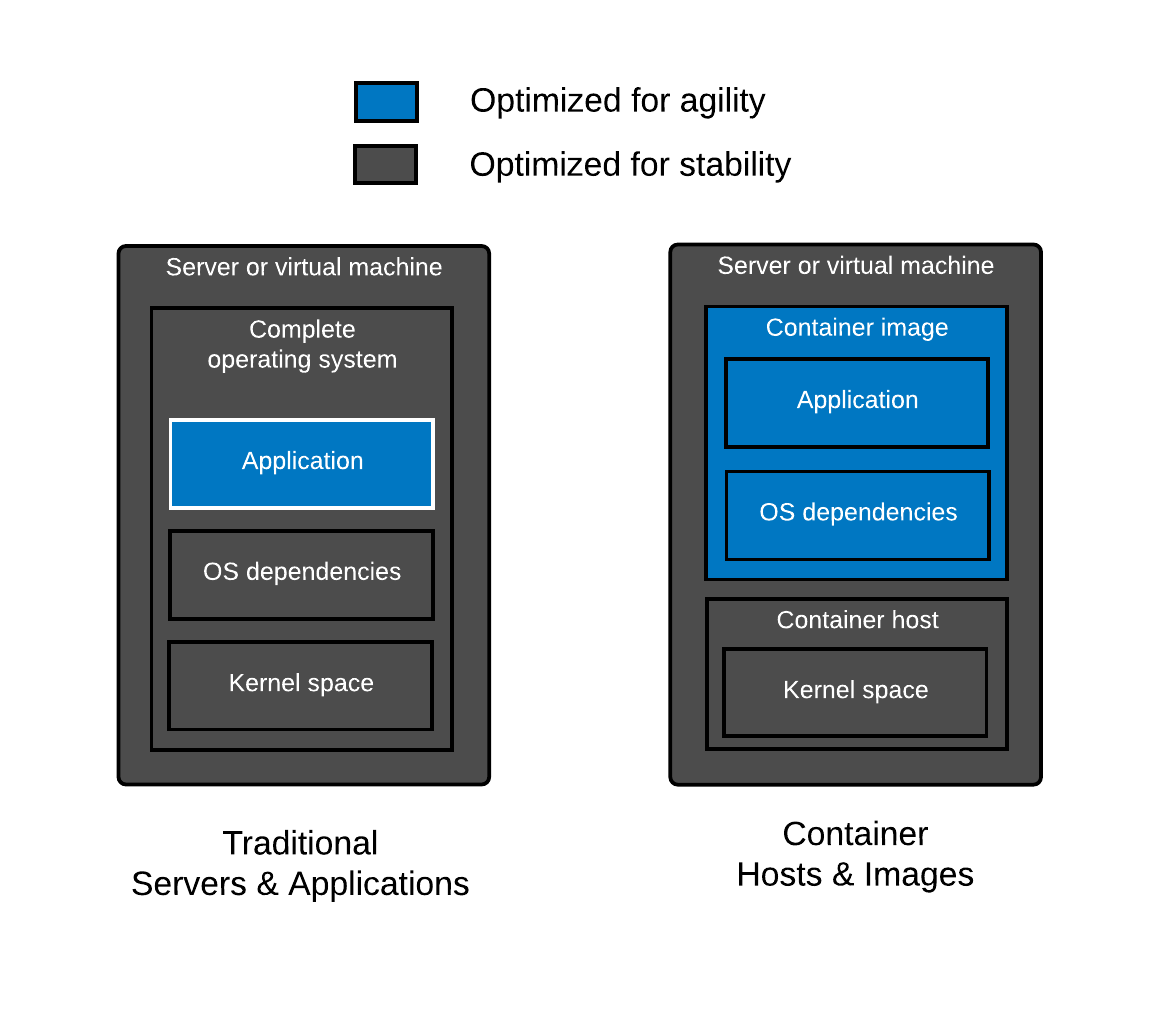
As mentioned, a container base image is essentially the userspace of an operating system packaged up and shipped around, typically as an Open Containers Initiative (OCI) or Docker image. The same work that goes into the development, release, and maintenance of a user space is necessary for a good base image.
Construction of base images is fundamentally different from layered images (See also: Where’s The Red Hat Universal Base Image Dockerfile?). Creating a base image requires more than just a Dockerfile because you need a filesystem with a package manager and a package database properly installed and configured. Many base images have Dockerfiles which use the COPY directive to pull in a filesystem, package manager and package database (example Debian Dockerfile). But, where does this filesystem come from?
Typically, this comes from an operating system installer (like Anaconda) or tooling that uses the same metadata and logic. We refer to the output of an operating system installer as a root filesystem, often called a rootfs. This rootfs is typically tweaked (often files are removed), then imported into a container engine which makes it available as a container image. From here, we can build layered images with Dockerfiles. Understand that the bootstrapping of a base image is fundamentally different than building layered images with Dockerfiles.
What Should You Know When Selecting a Container Image
Since a container base image is basically a minimal install of an operating system stuffed in a container image, this article will compare and contrast the capabilities of different Linux distributions which are commonly used as the source material to construct base images. Therefore, selecting a base image is quite similar to selecting a Linux distro (See also: Do Linux distributions still matter with containers?). Since container images are typically focused on application programming, you need to think about the programming languages and interpreters such as PHP, Ruby, Python, Bash, and even Node.js as well as the required dependencies for these programming languages such as glibc, libseccomp, zlib, openssl, libsasl, and tzdata. Even if your application is based on an interpreted language, it still relies on operating system libraries. This surprises many people, because they don’t realize that interpreted languages often rely on external implementations for things that are difficult to write or maintain like encryption, database drivers, or other complex algorithms. Some examples are openssl (crypto in PHP) , libxml2 (lxml in Python), or database extensions (mysql in Ruby). Even the Java Virtual Machine (JVM) is written in C, which means it is compiled and linked against external libraries like glibc.
What about distroless? There is no such thing as distroless. Even though there’s typically no package manager, you’re always relying on a dependency tree of software created by a community of people – that’s essentially what a Linux distribution is. Distroless, just removes the flexibility of a package manager. Think of distroless as a set of content, and updates to that content over some period of time (lifecycle) – libraries, utilities, language runtimes, etc, plus the metadata which describes the dependencies between them. Yum, DNF, and APT already do this for you and the people that contribute to these projects are quite good at doing it. Imagine rolling all of your own libraries – now, imagine a CVE comes out for libblah-3.2 which you have embedded in 422 different applications. With distroless, you need to update everyone of your containers, and then verify that they have been patched. But they don’t have any meta-data to verify, so now you need to inspect the actual libraries. If this doesn’t sound fun then just stick with using base images from proven Linux distributions – they already know how to handle these problem for you.
This article will analyze the selection criteria for container base images in three major focus areas: architecture, security, and performance. The architecture, performance, and security commitments to the operating system bits in the base image (as well as your software supply chain) will have a profound effect on reliability, supportability, and ease of use over time.
And, if you think you don’t need to think about any of this because you build from scratch, think again: Do Linux Distributions Matter with Containers Blog – Video – Presentation.
Think through the good, better, best with regard to the architecture, security and performance of the content that is inside of the Linux base image. The decisions are quite similar to choosing a Linux distribution for the container host because what’s inside the container image is a Linux distribution.
Table
Let’s explore some common base images and try to understand the benefits and drawbacks of each. We will not explore every base image out there, but this selection of base images should give you enough information to do your own analysis on base images which are not covered here. Also, much of this analysis is automated to make it easy to update, so feel free to start with the code when doing your own analysis (pull requests welcome).
| Image Type | Alpine | CentOS | Debian | Debian Slim | Fedora | UBI | UBI Minimal | UBI Micro |
Ubuntu LTS |
| Version | 3.11 | 7.8 | Bullseye | Bullseye | 31 | 8.2 | 8.2 | 8.2 | 20.04 |
Architecture |
|||||||||
| C Library | muslc | glibc | glibc | glibc | glibc | glibc | glibc | glibc | glibc |
| Package Format | apk | rpm | dpkg | dpkg | rpm | rpm | rpm | dpkg | |
| Dependency Management | apk | yum | apt | apt | dnf | yum/dnf | yum/dnf | yum/dnf | apt |
| Core Utilities | Busybox | GNU Core Utils | GNU Core Utils | GNU Core Utils | GNU Core Utils | GNU Core Utils | GNU Core Utils | GNU Core Utils |
GNU Core Utils |
| Compressed Size | 2.7MB | 71MB | 49MB | 26MB | 63MB | 69MB | 51MB | 12MB | 27MB |
| Storage Size | 5.7MB | 202MB | 117MB | 72MB | 192MB | 228MB | 140MB | 36MB | 73MB |
| Java App Compressed Size: | 115MB | 190MB | 199MB | 172MB | 230MB | 191MB | 171MB | 150MB | 202MB |
| Java App Storage Size: |
230MB | 511MB | 419MB | 368MB | 589MB | 508MB | 413MB | 364MB | 455MB |
| Life Cycle | ~23 Months | Follows RHELNo EUS |
Unknown | Unknown | 6 months | 10 years +EUS |
10 years +EUS |
10 years +EUS |
10 years security |
| Compatibility Guarantees | Unknown | Follows RHEL | Generally within minor version | Generally within minor version | Generally, within a major version | Based on Tier | Based on Tier | Based on Tier | Generally within minor version |
| Troubleshooting Tools | Standard Packages | Centos Tools Container |
Standard Packages | Standard Packages | Fedora | Standard Packages |
Standard Packages |
Standard Packages |
Standard Packages |
| Technical Support | Community | Community | Community | Community | Community | Community & Commercial | Community & Commercial | Community & Commercial | Commercial & Community |
| ISV Support | Community | Community | Community | Community | Community | Community & Commercial | Community & Commercial | Community & Commercial | Community |
Security |
|||||||||
| Updates | Community | Community | Community | Community | Community | Commercial | Commercial | Commercial | Community |
| Tracking | None | Announce List, Errata | OVAL Data, CVE Database, & Errata | OVAL Data, CVE Database, & Errata | Errata | OVAL Data, CVE Database, Vulnerability API & Errata | OVAL Data, CVE Database, Vulnerability API & Errata | OVAL Data, CVE Database, Vulnerability API & Errata | OVAL Data, CVE Database, & Errata |
| Proactive Security Response Team | None | None | Community | Community | Community | Community & Commercial | Community & Commercial | Community & Commercial | Community & Commercial |
| Binary Hardening (java) | |||||||||
| RELRO | Full | Full | Partial | Parial | Full | Full | Full | Full | Full |
| Stack Canary | No | No | No | No | No | No | No | No | No |
| NX | Enabled | Enabled | Enabled | Enabled | Enabled | Enabled | Enabled | Enabled | Enabled |
| PIE | Enabled | Enabled | Enabled | Enabled | Enabled | Enabled | Enabled | Enabled | Enabled |
| RPATH | Yes | Yes | No | No | Yes | Yes | Yes | Yes | No |
| RUNPATH | No | No | Yes | Yes | No | No | No | No | Yes |
| Symbols | 68 | 115 | No | No | 92 | 115 | 115 | 115 | No |
| Fortify | No | No | No | No | No | No | No | No | No |
Performance |
|||||||||
| Automated Testing | GitHub Actions | Koji Builds | None Found | None Found | None Found | Commercial | Commercial | Commercial | None Found |
| Proactive Performance Engineering Team | Community | Community | Community | Community | Community | Commercial | Commercial | Commercial | Community |
Architecture
C Library
When evaluating a container image, it’s important to take some basic things into consideration. Which C library, package format and core utilities are used, may be more important than you think. Most distributions use the same tools, but Alpine Linux has special versions of all of these, for the express purpose of making a small distribution. But, small is not the only thing that matters.
Changing core libraries and utilities can have a profound effect on what software will compile and run. It can also affect performance & security. Distributions have tried moving to smaller C libraries, and eventually moved back to glibc. Glibc just works, and it works everywhere, and it has had a profound amount of testing and usage over the years. It’s a similar story with GCC, tons of testing and automation.
Here are some architectural challenges withcontainers:
-
- Using Alpine can make Python Docker builds 50× slower
- The problem with Docker and Alpine’s package pinning
- The best Docker base image for your Python application (April 2020)
- Moving away from Alpine – missing packages, version pinning problems, and problems with syslog (busybox)
- “I run into more problems than I can count using alpine. (1) once you add a few packages it gets to 200mb like everyone else. (2) some tools require rebuilding or compiling projects. Resource costs are the same or higher. (3) no glibc. It uclibc. (4) my biggest concern is security. I don’t know these guys or the package maintainers.” from here.
- “We’ve seen countless other issues surface in our CI environment, and while most are solvable with a hack here and there, we wonder how much benefit there is with the hacks. In an already complex distributed system, libc complications can be devastating, and most people would likely pay more megabytes for a working system.” from here.
Support
Moving into the enterprise space, it’s also important to think about things like Support Policies, Life cycle, ABI/API Commitment, and ISV Certifications. While Red Hat leads in this space, all of the distributions work towards some level of commitment in each of these areas.
- Support Policies – Many distributions backport patches to fix bugs or patch security problems. In a container image, these back ports could be the difference between porting your application to a new base image, or just running apt-get or yum update. Stated another way, this is the difference between not noticing a rebuild in CI/CD or having a developer spend a day migrating your application.
- Life Cycle: because your containers will likely end up running for a long time in production – just like VMs did. This is where compatibility guarantees come into play, especially in CI/CD systems where you want things to just work. Many distributions target compatibility within a minor version, but can and do roll versions of important pieces of software. This can make an automated build work one day, and break the next. You need to be able to rebuild container images on demand, all day, every day.
- ABI/API Commitment: remember that the compatibility of your C library and your kernel matters, even in containers. For example, if the C library in your container image moves fast and is not in sync with the container host’s kernel, things will break.
- ISV Certifications: the ecosystem of software that forms will have a profound effect on your own ability to deploy applications in containers. A large ecosystem will allow you to offload work to community or third party vendors.
Size
When you are choosing the container image that is right for your application, please think through more than just size. Even if size is a major concern, don’t just compare base images. Compare the base image along with all of the software that you will put on top of it to deliver your application. With diverse workloads, this can lead to a final size that is not so different between distributions. Also, remember that good supply chain hygiene can have a profound effect in an environment at scale.
Note, the Fedora project is tackling a dependency minimization project which should pay dividends in future container images in the Red Hat ecosystem: https://tiny.distro.builders/
Mixing Images & Hosts
Mixing images and hosts is a bad idea. With problems ranging from tzdata that gets updated at different times, to host and kernel compatibility problems. Think through how important these things are at scale for all of your applications. Selecting the right container image is similar to building a core build and standard operating environment. Having a standard base image is definitely more efficient at scale, though it will inevitably make some people mad because they can’t use what they want. We’ve seen this all before.
For more, see: https://crunchtools.com/tag/container-portability/
Security
Every distribution provides some form of package updates for some length of time. This is the bare minimum to really be considered a Linux distribution. This affects your base image choice, because everyone needs updates. There is definitely a good, better, best way to evaluate this:
- Good: the distribution in the container image produces updates for a significant lifecycle, say 5 years or more. Enough time for you and your team to get return on investment (ROI) before having to port your applications to a new base image (don’t just think about your one application, think about the entire organization’s needs).
- Better: the distribution in the container image provides machine readable data which can be consumed by security automation. The distribution provides dashboards and data bases with security information and explanations of vulnerabilities.
- Best: the distribution in the container image has a security response team which proactively analyzes upstream code, and proactively patches security problems in the Linux distribution.
Again, this is a place where Red Hat leads. The Red Hat Product Security team investigated more than 2700 vulnerabilities, which led to 1,313 fixes in 2019. They also produce an immense amount of security data which can be consumed within security automation tools to make sure your container images are in good shape. Red Hat also provides the Container Health Index within the Red Hat Ecosystem Catalog to help users quickly analyze container base images.
Here are some security challenges with containers
- The Alpine packages use SHA1 verification whereas the rest of the industry has moved on tth SHA256 or better (RPM moved to SHA256 in 2009)
- Many Linux distributions compile hardened binaries with: RELRO, STACK CANARY, NX PIE, RPATH, and FORTIFY – check out the checksec program used to generate the table above. Three are also many good links on each hardening technology in the table above.
Performance
All software has performance bottlenecks as well as performance regressions in new versions as they are released. Ask yourself, how does the Linux distribution ensure performance? Again, let’s take a good, better, best approach.
- Good: Use a bug tracker and collect problems as contributors and users report them. Fix them as they are tracked. Almost all Linux distributions do this. I call this the police and fire method, wait until people dial 911.
- Better: Use the bug tracker and proactively build tests so that these bugs don’t creep back into the Linux distribution, and hence back into the container images. With the release of each new major or minor version, do acceptance testing around performance with regard to common use cases like Web Servers, Mail Servers, JVMs, etc.
- Best: Have a team of engineers proactively build out complete test cases, and publish the results. Feed all of the lessons learned back into the Linux distribution.
Once again, this is a place where Red Hat leads. The Red Hat performance team proactively tests Kubernetes and Linux, for example, here & here, and shares the lessons learned back upstream. Here’s what they are working on now.
Biases
I think any comparison article is by nature controversial. I’m a strong supporter of disclosing one’s biases. I think it makes for more productive conversations. Here are some of my biases:
- I think about humans first – Bachelor’s in Anthropology
- I love algorithms and code – Minor in Computer Science
- I believe in open source a lot – I found Linux in 1997
- Long time user of RHEL, Fedora, Gentoo, Debian and Ubuntu (in that order)
- I spent a long time in operations, automating things
- I started with Containers before Docker 1.0
- I work at Red Hat, and launched Red Hat Universal Base Image
Even though I work at Red Hat, I tried to give each Linux distro a fair analysis, even distroless. If you have any criticisms or corrections, I will be happy to update this blog.
Originally posted at: https://crunchtools.com/comparison-linux-container-images/