MongoDB to Couchbase for Developers: Part 2: Database Objects
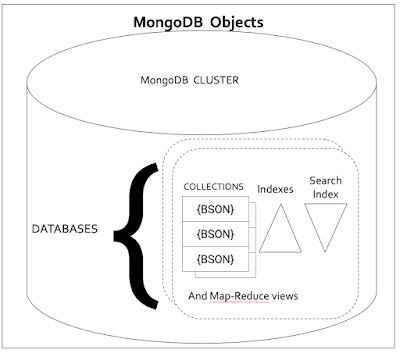
MongoDB developers and DBAs work with physical clusters, machines, instances, storage systems, disks, etc. All MongoDB users, developers, and their applications work with logical entities: databases, collections, documents, fields, shards, users, data types. There are a lot of similarities with Couchbase since both are document (JSON) oriented databases. Let’s compare and contrast the two with respect to database objects. Here’s the first part of this series comparing the architecture. MongoDB Organization A full list of MongoDB schema objects is listed here and here. A database instance can have many databases; A database can have many collections; Each collection can have many indexes. Each collection can be sharded based into multiple chunks on multiple nodes of a cluster using hash-sharding strategy or index sharding strategy. The MongoDB indexes are local to their data. Therefore, the indexes use the same strategy as the collection it’s created on. Couchbase Organization A Couchbase instance can have many buckets; A bucket can have many scopes; A Scope can have many collections, indexes, functions, search indexes, analytic collections, eventing functions. Each bucket comes with a _default scope and _default collection mainly for backward compatibility. You can create new scopes, collections, indexes, and functions using the respective CREATE statements. Comparison of MongoDB and Couchbase database objects MongoDB COUCHBASE DATABASE Each MongoDB instance can have one or more databases. The user can assume every database they need already exists. User simply has to issue a USE command on a database. If the database doesn’t exist, MongoDB will create one for you! USE mydb; That’s it. No other configuration is necessary. MongoDB sharding specification, replication is done by replica set management and collection sharding management. There’s no setting you can do within database creation which will make the sharding or replication automatic. But, the creation of the database using command line or UI is simple and straightforward. Once you issue the USE command, your session is automatically in the database context. BUCKET Within a Couchbase instance (single node or multi-node cluster), you can create one or more buckets. Within each bucket, you can have one or more scopes and within each scope one or more collections, indexes, functions, search indexes, analytic collections, and eventing functions (similar to AFTER TRIGGERS). CREATE BUCKET: You create a bucket either via Couchbase web console or via REST API. In the web console, you provide the information below. The user provides the following: Name of a bucket. Location of an existing data storage. Couchbase creates a directory with the bucket name underneath the specified directly. In this case, the CUSTOMER directory is created under/my/data. This directory /my/data should exist on every node of the Couchbase cluster with data (key-value) service. This is fixed and unchangeable. Memory is used in megabytes. This is the fixed amount of memory used to cache the data as you insert/load the data. The actual data in memory depends on your application access pattern. Usual LRU, MRU algorithms are used to determine which documents are kept in memory and which ones are evicted. For additional information on key eviction, see the link: Bucket Type Couchbase: JSON and key-value databases Memcached: Memcache Ephemeral: just like the Couchbase bucket, except for all the data, the index is only in memory. Replica: By default, there is one copy of the data in the cluster. You can have up to three copies of the data within the cluster. Under the CAP theorem rules. There are plenty of papers and talks on CAP theorem and its application to NoSQL databases in the public domain.Couchbase Bucket is a CP system. That means Couchbase chooses consistency over availability (C over A). Supporting partition tolerance is a requirement for these multi-node scale-out systems. See Couchbase documentation for full details on all the parameters and examples. http://bit.ly/2GrbMOw COLLECTION Hierarchy: Database->Collections A mongoDB instance can have multiple databases. Each database can have multiple collections. All collections in one database share the same namespace. Here’s a simple way to explicitly create a collection. db.createCollection("mycustomers", { capped : true, size : 5242880, max : 5000 } ) You can either create a collection explicitly or simply start using a new collection and MongoDB will create the collection for you automatically and seamlessly! db.mycustomers.insertOne( { "_id": "CX:3424", "Name": "Jane Smith", "DOB": "1990-01-30", "Billing": [ { "type": "visa", "cardnum": "5827-2842-2847-3909", "expiry": "2019-03" }] }) COLLECTION Hierarchy: Bucket->Scope->Collections In MongoDB, a collection is a set of BSON documents. In Couchbase, a collection is a set of JSON documents. While buckets and scopes provide namespaces, collections provide a mechanism to store and manipulate a set of JSON documents. Since JSON is self-describing, you don't need to define the schema before inserting or loading data into the collection. Example document INSERT via N1QL: CREATE SCOPE mybucket.myscope; CREATE COLLECTION mybucket.myscope.mycustomers JSON 1 INSERT INTO mybucket.myscope.mycustomers 2 VALUES("CX:3424", { 3 "Name": "Jane Smith", 4 "DOB": "1990-01-30", 5 "Billing": [ 6 { "type": "visa", 9 "cardnum": "5827-2842-2847-3909", 10 "expiry": "2019-03" 11 }, The INSERT statement looks similar to SQL’s INSERT statement except you specify the data in a slightly different way: You specify the document key and give the whole JSON document to insert. The collection is automatically sharded (uses consistent hash partitioning) -- nothing for the user to do. Couchbase SDKs also provide a simpler way to INSERT, UPDATE, UPSERT individual documents directly in each of the SDKs. Here's the Java SDK example. Document MongoDB stores the data as documents. These are equivalent of ROWs in RDBMS. MongoDB stores the document in binary JSON format called BSON. JSON DOCUMENT or a binary object JSON Document, with its document key. Each document can have a varying number of fields, data types, and structures. Since each JSON document is self describing, the field name (column name) is derived from the document and the type of the data is interpreted according to rules of JSON spec. Document key (user generated): "CX:3424" JSON 1 {"type" : "CUSTOMER", 2 "Name" : "Jane Smith", 3 "DOB" : "1990-01-30", 4 "balance": 48259.12, 5 "premium": true, 6 "overdraft": null} Considerations for document key design: http://bit.ly/2GnRwwV Key-Value pairs (or Field) MongoDB uses extended JSON format to represent the data. It has all the elements of a JSON – numeric, string, boolean, null, objects and arrays. It has added Decimal128, Timestamp and other custom types for its fields. The data can be converted into JSON and back, but needs an ETL process. Key-Value pairs (or Field) JSON is made up of key-value pairs. The key name in individual fields is similar to column names. In a relational world, you declare the column name upfront whereas, in JSON, each document describes the column name. And therefore, each document in a collection can have arbitrary fields with any valid JSON typed values. Example: {“fullname”: “Joe Smith”} {“name: { “fname”:”Joe”, “lname”:”Smith”} {“hobbies”: [“lego”,”robotics”, “ski”]} In these documents, “name” is a key, also known as an attribute. Its value can be scalar (full name) or an object (name) or array (hobbies). In Couchbase, you simply insert JSON documents, just like MongoDB. Each document self-describes the attribute (column) names. This gives you the flexibility to evolve the schema without having to lockdown the table. The data types are simply interpreted from the value itself: String, number, null, true, false, object or an array. Map-Reduce Views In MongoDB 5.0, views have been deprecated. aggregate() framework is the recommended way for users to manipulate data in MongoDB. The story is similar in Couchbase. Couchbase has JavaScript based views and is fully supported. Couchbase VIEW provides a flexible map-reduce framework for you to create pre-aggregations, indexes, anything else you want to create. See details here. The recommendation for most use cases is to use N1QL (query and analytics), Search features for your application. Database Triggers MongoDB provides asynchronous triggers via Realm Triggers. Users define the a set of JavaScript functions to be executed upon an event (INSERT, UPDATE, REPLACE, DELETE). These JavaScript functions are executed asynchronously and outside transaction boundary. The database triggers in an RDBMS is executed synchronously and within a transaction boundary Eventing Functions The database triggers in MongoDB and Eventing functions in Couchbase look surprisingly same, except that eventing functions are bundled, deployed and managed within Couchbase server. Couchbase Eventing provides a easy way to program down the stream actions. The big difference between database triggers and eventing actions are the eventing action is done asynchronously and outside the transaction that's updating the data. See detailed use cases and docs here. Constraints Unique constraint on the document key. The document key is referred to by _id. Documents can have references to other document keys. It’s simply storing the data and can be used in JOIN operations. The reference itself isn’t checked or enforced. Unique constraint on any arbitrary field in the document. Constraints Couchbase requires and enforces unique constraints on the document key within a bucket. The document key is referred to by META().id in N1QL. Documents can have reference to other document's key. It’s simply storing the data and can be used in JOIN operations. The reference itself isn’t checked or enforced. Couchbase does not support unique constraint on arbitrary fields. INDEXES MongoDB has a rich set of indexes to support quick lookups and range scans. Primary index on the document key field (_id) Single field index Compound index Multikey index Text Indexes 2dsphere index 2d index geohaystack index is deprecated in MongoDB 5.0. Hashed index Wildcard Indexes INDEXES Indexes in Couchbase come in two varieties: In memory and standard secondary. Standard secondary indexes are similar to the MongoDB indexes, but built using a lock-free skiplist data structure. You can have large number of indexes with large number of keys. Required portions of the indexes will be paged in as required. In-memory indexes are completely kept in memory and therefore will require proportional memory allocation. Indexes in Couchbase are also referred to as GSI - Global Secondary Indexes. A collection is a hash partitioned automatically, but the index indexes the whole (global) data of a collection. The index partition strategy can be different from the collection data partitioning. Hence the adjective, “global”. Both types of indexes are eventually consistent. Remember, Couchbase is a distributed system. The changes to the documents are available immediately for the data access (Couchbase is a CP system in the CAP regime) and index continuously catches up by using the change stream. The queries can set the consistency levels of the index and index will use the relevant snapshot. For each type of index, you can use variety of indexes using multiple features: Primary Index and Named primary index on the document key (Meta().id). Equivalent of MongoDB’s primary index (1). Secondary index on any field of the document. Equivalent of MongoDB’s single field index(2). Composite Secondary Index. Equivalent of compound index (3) in MongoDB. Array Index are equivalent of MongoDB’s multikey index (4) Search index in Couchbase FTS provide a superior functionality than MongoDB’s text indexes(5). MongoDB’s text indexes handle very simple text use cases using their B-Tree index. Detailed comparison is provided here. Later in the series, we’ll add a comparison of Couchbase FTS and MongoDB’s atlas search. Couchbase does not support MongoDB’s 2dsphere index (6) Couchbase supports spatial indexing and nearest neighbor spatial search. You can index GeoJSON points and search for nearest neighbor by radial distance, box and polygon. Couchbase does not have a full fledged support for spatial indexing. Geohaystack index is deprecated in MongoDB 5.0. The hash indexes in MongoDB is equivalent of Couchbase hash partitioned index. Designed to handle larger amounts of data in multiple nodes and scan in parallel. Partial Index are equivalent of MongoDB’s partial index (11) MongoDB wildcard indexes have some properties of flex indexing of Couchase, but it’s has way too many restrictions. For example, the wildcard index can only support one predicate from an index. That’s pretty limiting. Flex indexes are not available in MongoDB. Flex indexes are truly flexible – can index any number of fields – known or unknown – at the create index time, one or more array fields. The Query optimizer recognizes the possibilities and uses as many predicates as possible for the index scan. More details on each of these will be later in this series. For now, you can see the detailed blog: http://bit.ly/2DI1nAa All these indexes shouldn't worry you. Couchbase has an indexer advisor as a service and the feature is built into the product query workbench as well (enterprise version). Functions - map-reduce MongoDB used to support defining, storing and executing JavaScript functions in the database that can be later used by map-reduce functions. These have been depreciated. General guidance is to use aggregation framework. Functions - map-reduce Couchbase Views provide a similar framework. Users can defined map-reduce JavaScript functions and then query they using a simple API. The recommendation for customers is to use N1QL in query and analytics to write new applications and migrate their views into N1QL per convenience. User Defined Functions Within the aggregate() framework, users can define functions dynamically and invoke those functions ($function) as required. It’s all dynamic since the function definition is part of the query itself. MongoDB also includes $accumulator operator where you can define a user defined aggregation framework. This is quite useful in implementing business specific aggregations unsupported by the language. PostgreSQL, Informix supported this and were called User Defined Aggregates (UDAs). User Defined Functions Couchbase query service has two types of functions: - Simple SQL-based functions that can return expressions or run a SELECT statement to return values. - Javascript functions can be elaborate programs with complex logic and compute. You have to define both using CREATE FUNCTION statement and then use it in any of the N1QL statement where an expression is allowed. It’s still not allowed in CREATE INDEX statement as functional keys. Starting in Couchbase 7.1 (2022), the Javascript functions can also issue all of N1QL statements, can be part of transactions and can run transactions themselves -- just like Oracle PL/SQL and SQL Server T-SQL. And the developers agree Javascript is an easier-to-use language to the program! Couchbase N1QL does not support UDAs. If your workload requires it, Couchbase Views is the best option. Hashed Sharding Range Sharding Collections: MongoDB Collections are created on a single node by default (non-sharded). You can explicitly shard a collection using either hash or range based strategy. Hash strategy distributes the data evenly, but only provides shard elimination (aka partition pruning) for queries on equality predicates (also, a rewritten IN predicate… but I don’t know MongoDB optimizer well enough to confirm this). Range strategy stores data in sorted order of the shard keys. This enables the the optimizer to choose the shards the possibility of holding the documents matching the sharding keys for all of the range predicates: equality, in, greater than, less then, between. Indexes: MongoDB indexes are local to their data shards and use the same distribution strategy as the collection. Couchbase Partitions are equivalent of MongoDB shards. Collections: Collections are always hash partitioned by document key and automatically. There’s no way to change it. The data is partitioned into 1024 virtual buckets (vbuckets) and are the units of moving data around as the number of data nodes expand or shrink. Couchbase collection does not support a range based partitioning. Indexes: Indexes are global by default. A single index is created for all the data in a collection and this index can be on any couchbase node running index service. Hence the name Global Secondary Index. This index can be partitioned into N partitions using hash partitioning on any expression. This gives you flexibility on creating the indexes tuned to your workload. All of these indexes not only do the scans, but also grouping, aggregation, and pagination. This ensures the computation of the result happens as close the data. Reduction in amount of data transferred and manipulated is one of the key approaches to improving performance and reducing TCO for a workload. Couchbase indexes don’t support range based partitioning either. You can use expressions in partial indexes to provide effective range partitioning in limited number of cases. cbq shell [Official] Couchbase-cli [Official] Couchbase shell [Open Source]