“Virtual” grocery stores aren’t just for South Koreans anymore—a version of them exists in the US now as well. Peapod, which operates without commercial stores and delivers groceries to customers after they order online, is testing a new real-life shopping concept in Chicago and Philadelphia. But it doesn’t involve picking up products and putting them into your cart: instead, shoppers can scan barcodes for items plastered on the walls of a virtual store space and add those items to their online shopping carts automatically.
The second virtual Peapod store was introduced to Chicago overnight on Friday this week in the State & Lake CTA (Chicago’s train system) stop. I was tipped off to the “store” via the Chicago Tribune, and as a long-time Peapod customer, I was eager to check it out. The idea is that people will see products they need to buy as they wander through the CTA tunnel, lured by the colorful images of products in the same way people are lured when they enter a real grocery store, causing them to add the items to their virtual carts. Peapod offers an iPhone and Android app for this purpose, theoretically upping the chance that a user will impulse-buy something rather than specifically searching for it within the app.

Out on the street, you’d have no idea where to find the Peapod virtual store until you go underground.
When I went to see the “virtual store” on Friday afternoon, it was just before CTA rush hour—there was a steady stream of foot traffic, but not the flood that usually starts around happy hour. It didn’t take me long to find the Peapod tunnel.

Most passersby didn’t even look at the virtual store items…
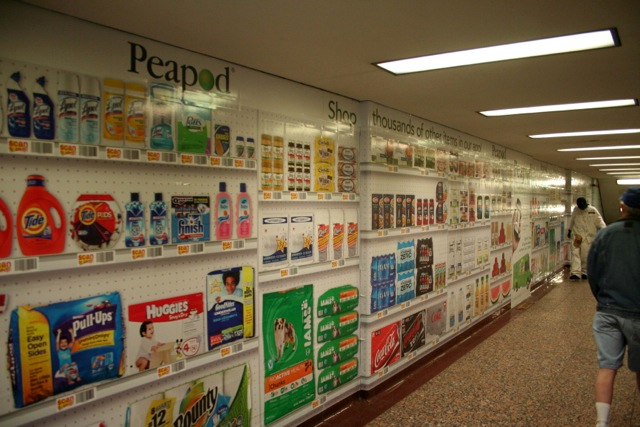
…but those who did often made comments about how it looked like a grocery store. At least they get it!
Both sides of the tunnel were plastered with images of branded products—70 of them, to be exact—along with standard bar codes below each item. For those who don’t have the Peapod app yet in order to scan the codes in the first place, Peapod also has posters up with QR codes that will direct you to the appropriate app. (Insert snarky comment about having to download a different app in order to scan the QR code so that you can download the Peapod app so you can scan the product code.) But once you have the app, you can begin scanning immediately.