With little to no compromise, these are now the Android phones to beat.
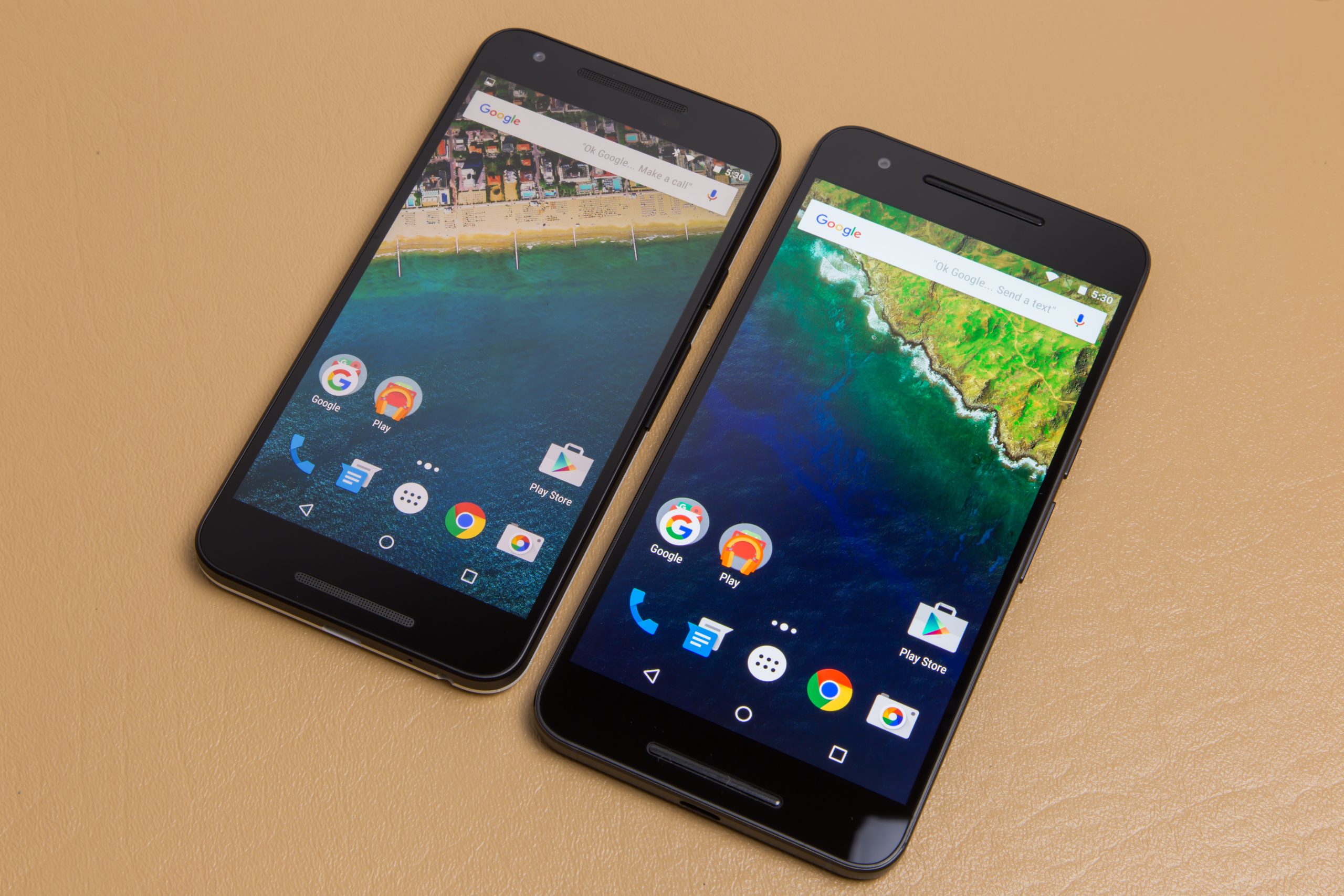
Hot off the launch of Android 6.0 Marshmallow, it’s time for Google to release the hardware portion of its Q4 release push. The Nexus 5X and Nexus 6P are the newest additions to the Nexus line, and, for the first time, users looking for a “pure Google” experience have a choice of devices. There’s the relatively inexpensive, plastic, 5.2-inch Nexus 5X and the premium, aluminum, 5.7-inch Nexus 6P.
The Nexus 5X and 6P are two of the best Nexus devices ever produced. It’s a common line that people say every year, but these are the first Nexus devices that don’t have a huge deal breaker attached to them. Google and its partners have finally nailed two of the things Nexus devices have traditionally been poor at. The camera is actually good—great, even—and can hold its own against the best mobile shooters out there. And the battery life is just as good as any other flagship as well.
With the 5X, the Nexus line returns to the “bang-for-your-buck” value segment, too. The 5X starts at just $379, only $30 more than the old 2013 Nexus 5. Besides all the usual smartphone features, these are also the first Nexus devices to pack a fingerprint sensor, which is a first-class, fully supported component in Android 6.0 Marshmallow. And speaking of Marshmallow, given that we’ve already written about it, we’ll direct you to that article for most of the software details.
Nexus 5X Design—LG’s loving homage to the 2013 Nexus 5
| Specs at a glance: LG Nexus 5X | |
|---|---|
| Screen | 1920×1080 5.2″ (423ppi) LCD |
| OS | Android 6.0 Marshmallow |
| CPU | Six-core Qualcomm Snapdragon 808 (two 1.8 GHz Cortex-A57 cores and four 1.4 GHz Cortex-A53 cores) |
| RAM | 2GB |
| GPU | Adreno 418 |
| Storage | 16GB or 32GB |
| Networking | Dual Band 802.11b/g/n/ac, Bluetooth 4.2, GPS |
| Bands | GSM/EDGE: 850/900/1800/1900MHz
UMTS/WCDMA: B1/2/4/5/8 CDMA: BC0/1/10 LTE (FDD): B1/2/3/4/5/7/12/13/17/20/25/26/29 LTE (TDD): B41 LTE CA DL: B2-B2, B2-B4, B2-B5, B2-B12, B2-B13, B2-B17, B2-B29, B4-B4, B4-B5, B4-B7, B4-B12, B4-B13, B4-B17, B4-B29, B41-B41 |
| Ports | USB 2.0 Type-C, 3.5mm headphone jack |
| Camera | 12.3MP rear camera with laser autofocus, 5MP front camera |
| Size | 147.0 x 72.6 x 7.9 mm |
| Weight | 136 g |
| Battery | 2700 mAh |
| Starting price | $379 |
| Other perks | RGB notification LED, NFC, fast charging, Android Sensor Hub, Project Fi support |
The Nexus 5X marks the Nexus line’s return to the value segment. The size of the 2014 Nexus 6 was definitely going a little overboard, but the most disappointing thing about the device was the huge $649 price tag. Starting at $379 for a 16GB version, the Nexus 5X is nearly as cheap as the 2013 Nexus 5, which started at $349.
The 5X definitely feels like an homage to the 2013 Nexus 5. It has the same minimal design and solid build quality for a dirt cheap price, and it’s even made by the same manufacturer as the 2013 Nexus: LG. The 5X offers a respite from the humongous flagship wars, which now all seem to field devices with screens in the 5.5- to 6-inch range. This is a “small” 5.2 inches, which seems to be the new smallest available size for a flagship phone.
The display on the 5X is a 1080p LCD, which at 5.2-inches is a more than adequate 423ppi. Surrounding the LCD is a surprising amount of bezel, which is one of the few downsides of this device. By our measurements the Nexus 5X is backing a full 4mm more vertical bezel than the Nexus 5, which feels like a step backward. It’s nothing iPhone users haven’t been dealing with for years, but we’ve grown to expect better from LG.
The sizable bezels leave plenty of room for top and bottom speaker grills, which look like they were taken straight from a Motorola phone. The speakers are covered by a mesh sheet that’s exposed via a cutout in the glass pane, which looks a lot like the tiny circle earpiece on the old Nexus 5. There’s also something about the speaker grill’s teeny, tiny holes that is very satisfying to look at.
There are technically two speakers here—one on top and one on the bottom— but the top one is used for calls and the bottom for media playback and notifications. The media speaker almost sounds like an internal speaker, rather than a “front facing” one. We say that because the back puts out just as much sound as the front speaker grill, and at high volume you can actually feel the speaker blasting away through the back of the device. Covering the speaker grill doesn’t seem to do much either—it sounds more like you’re blocking the speaker’s air intake, rather than muffling a driver. None of this is really bad, it’s just not what we were expecting and not what the exterior design implies will happen.
The good news is that the speaker will happily blast out sound whether it’s face up or face down. In terms of quality, it’s your standard tinny speakerphone that will crackle and sound kind of staticky at high volume. It’s fine for voice and notifications, and we even found it acceptable for some games, but it’s not something you would want to listen to music over.
The Nexus 5X includes an RGB notification LED in the center of the bottom speaker grill. The design of this is beautiful—the LED shines through the speaker grill, where it looks like a dot matrix display. It’s diffused into a square shape, so it lights up a perfect 3×3 square of holes in the speaker grill. The only oddity is that it’s disabled by default. You can enable it by going to “Settings -> Sound & Notification -> Pulse notification light.” Android really doesn’t make much use of the notification LED anymore, so if you really want to get the most out of it you’ll need to install an LED control app and create some settings yourself (or install third-party apps that use it).
To the left of the speaker is the front facing camera, and below the speaker is the sensor cluster for auto brightness and proximity. Usually the top camera, sensors, and speaker all sit in a line to minimize the top bezel.
The back is still a matte plastic, but there’s no soft touch treatment here—just a smooth, hard surface. The colored back panel curves up along the sides, and about a quarter of the way up it meets a separate panel which makes up the majority of the side and houses the screen. The back of the Nexus 5X comes in black, white, or light blue, but the side panel and front are always black. Given that you’re going to get black accents no matter what, we really like the black version.
The most distinctive part of the back is the “mountain” that rises up out of the case to meet the camera lens. The 12.3MP camera sticks out of the back a bit, and LG chose to extend the case with smooth, sweeping lines rather than the usual square bump. It’s a nice design touch and gives the otherwise minimal Nexus 5X a bit of personality. Just to the left of Mount Megapixel you’ll find a dual LED flash and the laser auto-focus component, a feature that is traditionally found on LG devices.
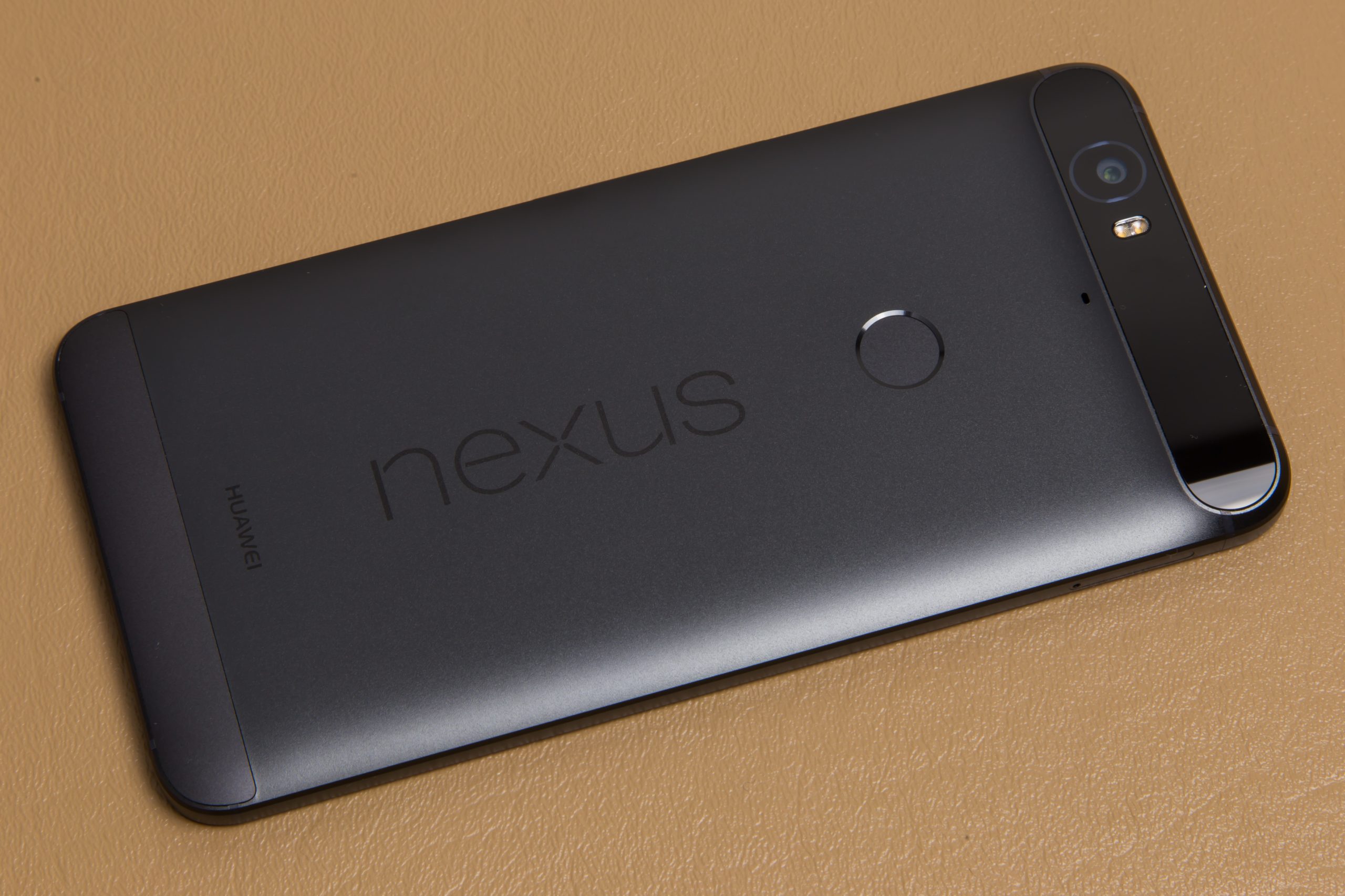
The Nexus 5 and 6 used embedded ceramic inserts for the rear “Nexus” logo, but on the 5X and 6P the logo is just silkscreened on. This definitely feels cheaper, but it’s a minor change. For some people these letters would actually fall out of their phone after a few months, so maybe Google decided the extra manufacturing steps and hit to durability weren’t worth it. On the Nexus 5X, the ring around the fingerprint reader is an embedded insert, though. It’s raised out of the back slightly, making it easy to feel out where the fingerprint sensor is. Hopefully it lasts.
Both the fingerprint reader ring and Nexus logo are coated in a metallic, reflective paint that really stands out. Together with the camera hill on the back, the Nexus 5 is a unique looking device.
The power button and volume rocker are a little different from what we’re used to. Rather than the usual rounded design, these are straight rectangular buttons with a very hard edge on the top and bottom that could almost be described as “sharp.” It’s not uncomfortable or even bad, just different from what most manufacturers would do. The strong edge definitely makes them easy to feel.
Overall, the Nexus 5X feels like a nice device. You’re not going to mistake it for an $800 phone, but it’s well-made and feels like it’s worth more than the ~$400-ish dollars they’re charging for it. There isn’t an ounce of give to the body, and, as plastics go, the finish is rather nice.
Nexus 6P Design—Huawei’s premium phablet makes a great first impression
| Specs at a glance: Huawei Nexus 6P | |
|---|---|
| Screen | 2560×1440 5.7″ (518ppi) AMOLED |
| OS | Android 6.0 Marshmallow |
| CPU | Eight-core Qualcomm Snapdragon 810 (Four 2.0 GHz Cortex-A57 cores and four 1.6 GHz Cortex-A53 cores) |
| RAM | 3GB |
| GPU | Adreno 430 |
| Storage | 32GB, 64GB, or 128GB |
| Networking | Dual Band 802.11b/g/n/ac, Bluetooth 4.2, GPS |
| Bands | GSM/EDGE: 850/900/1800/1900MHz
UMTS/WCDMA: B1/2/4/5/8 CDMA: BC0/1/10 LTE (FDD): B2/3/4/5/7/12/13/17/25/26/29/30 LTE (TDD): B41 CA DL: B2-B2, B2-B4, B2-B5, B2-B12, B2-B13, B2-B17, B2-B29, B4-B4, B4-B5, B4-B13, B4-B17, B4-B29, B41-B41 |
| Ports | USB 2.0 Type-C, 3.5mm headphone jack |
| Camera | 12.3MP rear camera with laser autofocus, 8MP front camera |
| Size | 159.3 X 77.8 X 7.3 mm |
| Weight | 178 g |
| Battery | 3450 mAh |
| Starting price | $499 |
| Other perks | RGB notification LED, NFC, fast charging, Android Sensor Hub, Project Fi support, dual front-facing speakers |
The “P” in Nexus 6P apparently stands for “premium,” and Google tasked Chinese firm Huawei with creating the higher-end Nexus. For a lot of people the Nexus 6P will be their first experience with Huawei, and the company has definitely created a device that makes an excellent first impression. It lives up to the “premium” moniker with an anodized aluminum unibody and only a minimal amount of plastic for insulation and radio windows. “Premium” also comes at a price—the 6P starts a $499 for a 32GB version.
The “P” could also stand for “phablet,” too, as this is a 5.7-inch device. A 1440p AMOLED panel consumes most of the front of the device, and—according to a Reddit AMA with members of the Android team—this is the “latest generation” panel from Samsung. The 1440p, 518PPI display is overkill for a smartphone. You will never, ever see a pixel, but we feel this is true of the 423ppi display on the Nexus 5X, too. The extra pixels are just burning battery.
By default the 6P display has that AMOLED-standard hyper-saturated color palette that some people like and others can’t stand. There is a software toggle buried in the settings to fix this called “Picture Color Mode: Use sRGB.” Toggle it on, and after completely freezing for a few seconds, the display will kick over to an “accurate color” mode that looks more like a standard LCD. Our comparison pictures at the end of the above gallery shows what a difference it will make. This is buried in the Developer Settings, of all places—was “Display” too obvious?
The display has a thick bezel a lot like the one on the 5X. The bloated bezels make the 5.7-inch Nexus 6P just as tall as the 6-inch Nexus 6. Again, when you look across the aisle to the iPhone, this is nothing that’s impossible to deal with—the 6P’s bezels are almost exactly iPhone proportions, actually. Still, we’re in Android Land, and bezels like this—a full 8mm more than the Nexus 6—are disappointing. Either Motorola did a much better job last year than Huawei, or this was some kind of cost-cutting measure.
The Nexus 6P has two speaker grills, and they’re both actually used for media speakers. This grill design looks a lot like the Nexus 6, with a bar in the center of the speaker slot and a ring around it from which sounds can exit. The speaker bars don’t stick out above the screen this year, though—they’re only as tall as the screen. These are definitely front-mounted speakers, as covering them blocks a good amount of sound. For quality you’ll get a noise that’s about as loud as the old Nexus 6, but not as high quality. The 6P is a cheaper phone with a tinnier sounding speaker set. Again this is all perfectly fine for speakerphone, ringtones, and games. There’s a disabled-by-default notification LED here as well, but Huawei employs a more traditional light to the left of the 8MP front-facing camera.
The aluminum finish looks and feels wonderful, and Huawei has even managed to make it look and feel unique. Rather than the rounded sides everyone else seems to be using, Huawei decided to chamfer every single corner of the device. The first chamfer you’ll run into is around the perimeter of the glass, where the aluminum body starts. A lot of designs would round the sides into the back, but Huawei went straight down on the sides, made a 90 degree corner to the slightly rounded back, and chamfered the entire perimeter of the back, too.
LG took the fingerprint sensor and surrounded it with a raised round insert, but Huawei took the sensor and embedded it in the phone and chamfered a ring around it. It’s a different look that serves the same purpose—a tactile, easy to find marker for the fingerprint circle.
Radio signals don’t really go through metal, so there has to be plastic somewhere, and, on the 6P, all the radio signals can exit via large strips across the top and bottom of the back. On the bottom is a plastic radio window that is flush fit to the back and aims for a tiny, invisible seam. On our black model the color doesn’t quite match the anodized aluminum, but it tries.
The top window is the most controversial design element of the Nexus 6P. It’s a camera hump that extends all the way across the back of the device. It’s definitely an odd design decision and seems like a rather expensive one. The camera lens isn’t a separate component on that glass, leading us to believe it’s a single, gigantic, 70mm wide camera lens. The camera hump here is very small, and looks a lot better in person than it did in the early leaks. The glass is always black colored, so our matching black model makes the glass a lot more palatable.
Hidden behind the glass are the 12.3MP camera, dual LED flash, and laser autofocus array, and they’re all clustered to the left side of the device. The other half of that huge swath of camera glass is strictly decorative.
Below the camera lens is the same silkscreened Nexus logo as on the 5X, but on our black model it’s not contrasting color—it’s just black on black with a slightly different light reflectance. In fact, everything on our black model is black—the body, plastic panels, camera lens, nexus logo, and front are all dark. It’s a stealth Nexus.
Along the side of the Nexus 6P are much more traditional rounded buttons. We’re going to guess that these are also aluminum, and the power button has a nice knurling texture to it. Also along the sides are the occasional plastic construction strips, which mesh well with the metal and have almost invisible seams.
The build and materials of Nexus phones have never really touched the upper echelons of premium phones, but the all-aluminum 6P has everything we could ask for in terms of build quality. It is rock solid and feels like it could double as a weapon or something. The design is a little odd, though. Even on our black version, the most eye-catching part of the device is that giant piece of glass on the back. It doesn’t look horrible, but it’s not particularly good-looking either. It just feels like a thing that large should be functional somehow, and it just isn’t.
Pricing, Storage, and Plugs
It’s kind of a bummer that the “cheap” and “premium” choice also comes with a size requirement attached. We’d jump at the chance to buy a “Nexus 5P”—a 5-ish-inch phone with a “premium” aluminum unibody and top-tier specs.
The starting prices of $379 and $499 would seem to make the 6P $120 more than the 5X, but remember the 5X starts at 16GB, and the 6P has a baseline of 32GB. Compare the 32GB 6P against the $429 32GB 5X, and there’s only a $70 difference for the aluminum body, larger screen, faster processor, extra speaker, bigger battery, and extra RAM. That sounds like a great deal, but we imagine some people will be willing to give all that up just so they can have a smaller device.
The Nexus 5X’s starting storage of 16GB is a little worrisome in 2015 and definitely something potential customers should think about. Out-of-the-box and fully updated, our 32GB model had about 23GB free for apps and media. Subtract 16GB from that and it looks like a base storage model would have 7GB free. That’s a workable amount, but it’s not for heavy gamers or people that want to carry around a lot of media files. It’s a basic model for basic usage that will work for some people but not for others. The 5X caps out at 32GB and while the 6P has 32, 64, and 128GB tiers. Of course there is no expandable storage, so choose your gigabytes wisely.
On the bottom edge of both devices is a fancy new USB Type-C connector. This reversible connector will eventually completely replace full-sized USB Type-A, Micro USB Type-B, and everything else, but for now you’ll be an early adopter and it’s an oddity you’ll have to plan around.
The Nexus 5X comes with a charger that takes USB Type-C and Type-C to Type-C cable, but if you want to plug the 5X into anything that has a “standard” Type-A port, you’ll need to buy a Type-C to Type-A cable yourself. That means out of the box, you can’t plug the 5X into most computers or any of your existing chargers, battery packs, or other accessories. The more expensive Nexus 6P comes with a Type-C to Type-C cable and a tiny, one foot Type-C to Type-A cable. If you do happen to get a cable that will plug into the phone and your computer, you’ll find that both devices only support USB 2.0 transfer speeds.
If you’re wondering what happens when you plug the Nexus 5X into the 6P—the 6P will charge the 5X at the super-slow rate of 250mAh. The deal is that eventually you’ll be able to charge your small USB Type-C devices with your big Type-C devices, but phone-to-phone doesn’t do much.
Neither device supports Qualcomm Quick Charging, but they do support USB Type-C’s higher power delivery, and come with a 15W (5V/3A) charger. In our testing, our Quick Charging plugs and accessories still pumped more juice than normal into the devices, so they’re not a total waste. Wireless charging isn’t supported at all, so if you’ve invested in that charging standard, you’re out of luck.
Fingerprint Reader
Setting up the fingerprint reader.
One of the big hardware additions to both Nexus devices is the new fingerprint sensor that Google has branded “Nexus Imprint.” On the back of both devices is a circular sensor that looks (and works) just like Touch ID on the iPhone. The big difference is that this sensor is rear mounted, which means you won’t be able to use the fingerprint reader while the device is sitting on a desk or table.
As we mentioned before, both devices have great tactile designs that make it easy to feel the sensor spot with your finger. These are also probably the biggest fingerprint readers on any phones we’ve seen. The sensor spot on the Nexus 5X is particularly large: 12 mm compared to the 10 mm button on the iPhone 6.
Both sensors are in a great spot, where your index finger naturally falls on the sensor. With the screen off, the sensor will also serve as a capacitive power button, so a single touch will turn on the device, read your fingerprint, and unlock the phone. This all happens lightning-fast—you never even see a lock screen. It feels about as fast as a power button with the lock screen disabled.
Fingerprint reading on both devices was super accurate, too. We never had a missed recognition. Google says the device is always learning about you with every press, too, so the more you use it, the better it gets.
Setup is about what you would expect. Tap a finger on the back a few times to register it, and you’re done. It only takes a few seconds. You’re limited in software to five fingers, but we only ever need two—our left and right index fingers.
The fingerprint sensor will unlock the phone, but the OS only ever uses it as a secondary unlock method. The device is still protected with a PIN, pattern, or password, which you can fall back to on the lock screen just by swiping up. Apps can use the fingerprint sensor, too, thanks to the new fingerprint API introduced in Marshmallow, and the Play Store is already set up to work with it. When buying an app, normally you’d have to enter your lock screen challenge, but now you can just tap your fingerprint and go. The same goes for Android Pay. It’s all pretty similar to the way the TouchID APIs and Apple Pay work in iOS.
The back-mounted reader is fine on when you’re holding the device, but if you’re ever trying to use the phone on a table, it’s not going to work out. Initially we thought this would be a big downside for anyone that works at a desk all day, but Android’s Smart Lock feature solves a lot of the issues we had. You can set the phone up to bypass the lock screen challenge anytime you’re in a “trusted place” like home or work, allowing you to easily use the phone on a desk. You can also skip the lockscreen when a trusted Bluetooth device is paired up or via your voice with the “Ok Google” trusted voice Smart Lock. Smart Lock will let some people work around the rear-mounted fingerprint, but for others the location-based unlocking will be too insecure, and the rear sensor will be a bit of an annoyance.
Always-on voice, Ambient Display, and the Sensor Hub
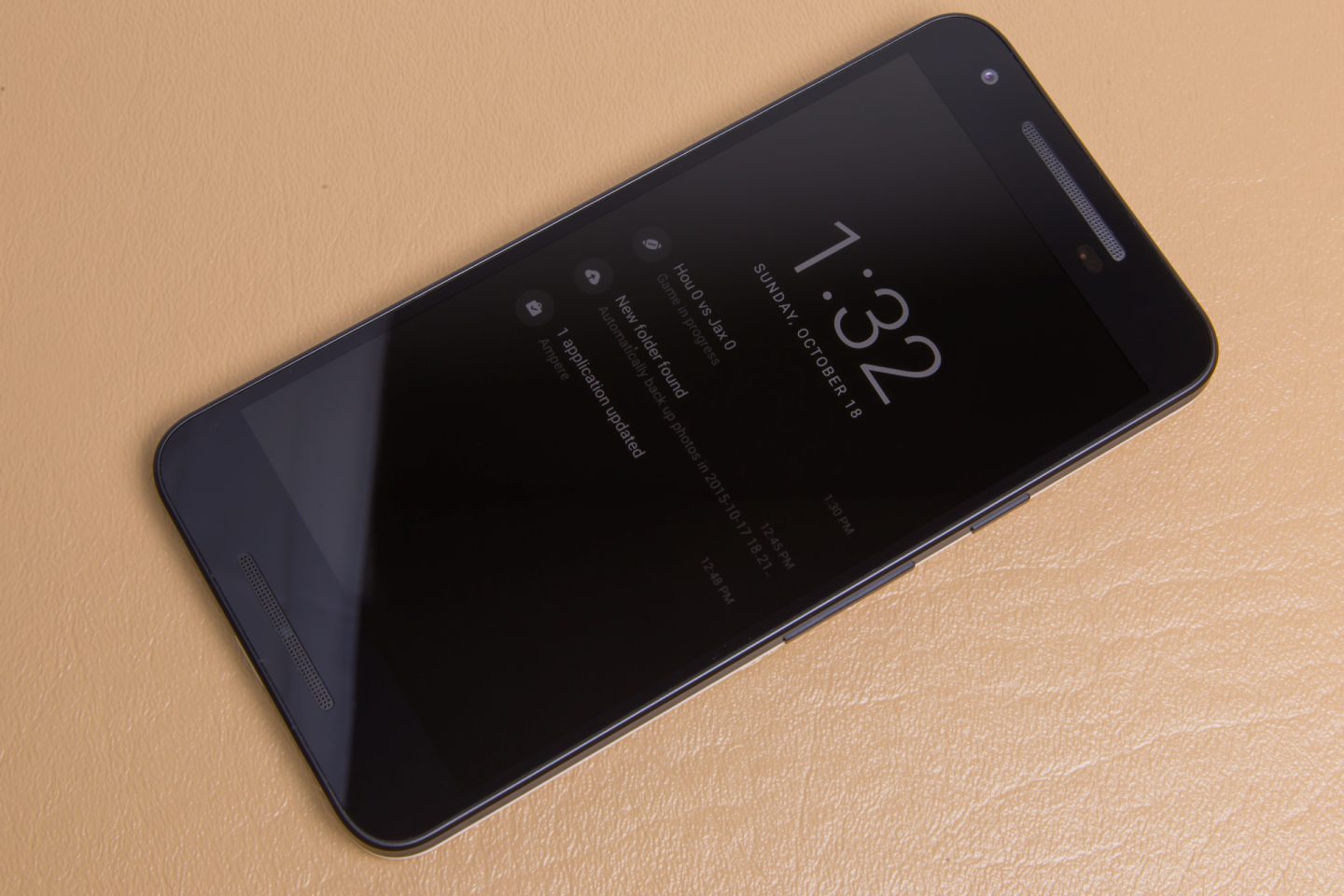
Ambient display on the Nexus 5X.
Ambient display on the Nexus 5X.
Always-on voice commands have been one of the best additions to smartphones in some time. It’s not something we’re too keen on using in public, but when you’re at home and want to quickly set a timer, reminder, calendar event, or make a phone call, being able to yell “Ok Google” at your phone to wake it up and do your bidding has been amazing. When we first saw it with Google’s full support on the Nexus 6, we were hoping all Android OEMs would make it a standard feature. Most did not though.
While many Android phones will support “OK Google” when the screen is on or the device is charging, very few are “always-on,” meaning the hotword works when the screen is off. Always-on Voice has really only been supported by Motorola and Nexus devices, including the Motorola-made Nexus 6. On the Nexus 5X and 6P, we’re happy to report that always-on voice commands are back. In Lollipop, Google added support for a low-power voice processor, and most recent Snapdragon 800-series chips include one built right into the SoC. After training, both phones will wake up from a screen-off state, a feature most other flagship phones don’t offer even though support is already built into the hardware and software.
With this round of Nexus devices, Google is introducing another separate processor for low-power, screen-off awareness: the Android Sensor Hub, which is similar to the motion coprocessors Apple has included in the last few iPhone generations. This processor’s job is to collect up all the accelerometer data on the phone and run it through Google’s “unique sensor algorithms” to create a background activity recognition service. Google says this will allow the Nexus devices to track fitness better, like a run or biking session, and will also allow them to detect things like being picked up. Because this happens on a separate sensor, the SoC can remain asleep, and all of this can happen without draining your battery. The new low power “Doze” idle mode also relies on detecting whether the device is moving or not, so we’d imagine this will help.
Another feature helped by the sensor hub will be the returning Ambient Display mode. Just like an Android Wear watch, move the 6P or 5X while the screen is off and the screen will light up in a low-power mode. This black-and-white mode will give you a quick glance at your lockscreen notifications. It also triggers for an incoming notification, so when your phone beeps on a desk or table, you can tell not only that you have a notification, but what the notification is, without having to touch it.
Security, updates, and stock Android
One of the best features of the Nexus line, and a deciding factor for many people, is the inclusion of unadulterated, stock Android. Updates come directly from Google, meaning you’ll get the newest software faster than any other Android phone.
Google supports Nexus phones with major updates for “at least two years” now, and security updates for “the longer of three years from initial availability or 18 months from last sale of the device via the Google Store,” which is better than any other Android OEM out there. After the Stagefright vulnerability cropped up, Google instituted a monthly security update schedule, and so far Nexus devices have gotten OTAs in August, September, and October, right on schedule.
Google posts monthly security bulletins for Nexus devices online and runs a security rewards program for Nexus devices, which pays bug bounties to security researchers for disclosing exploits to Google. These security programs provide some trickle-down benefit to the entire Android ecosystem, but they revolve around the Nexus devices. There is a no bug bounty program for Samsung’s TouchWiz skin, for instance, and Google’s monthly security disclosures put non-Nexus devices, which are often either patched more slowly or not at all, at a greater risk of being exploited.
If you want to buy an Android phone and care about security, a Nexus device is pretty much your only option. Everyone else is too slow and doesn’t have as comprehensive a plan in place as Google. The Android ecosystem’s update and security game has been weak for years now, and while Google can’t fix the problem for the likes of Samsung, LG, and Verizon (partly because they are the problem) it can fix the problem on its own devices. You can skip all the update wait time, abandoned devices, crapware, and poor security if you just buy a Nexus.
Stock Android is increasingly becoming more and more important, too, with the advent of Material Design. Traditionally, Android design has been a non-existent free for all, and third parties have done whatever they want. Since the release of Lollipop, though, Google has been pushing a standard design language on the Android app ecosystem, complete with continually updated comprehensive design guidelines, yearly design-focused conferences, and even an awards program.
Third parties have actually been listening, and a big portion of apps now follow Google’s design language. WhatsApp, Dropbox, Evernote, Tumblr, The New York Times, and many other app makers are listening. This makes stock Android more important than ever if you want a consistent, cohesive software experience. OEMs can’t change the Google apps, so those are going to follow the Material Design guidelines no matter what. With third parties on board, if you have a skinned OS, the odd man out is …your OS. When Samsung, LG, Huawei, and other OEMs take stock Android and skin it, all they’re doing now is taking a cohesive package and making it inconsistent and ugly.
The cameras—they’re actually good!
Both the Nexus 5X and 6P have a 12.3MP sensor with laser auto focus, and judging by the picture quality, seem to have identical camera setups. The good news is that those camera setups are excellent and able to stand up to much more expensive devices. We’re going to pit the 5X and 6P against the $700 iPhone 6s Plus, which amazingly the new Nexus camera can stand up to. We’re also keeping upgraders in mind and taking comparison shots with the old Nexus 5 and Nexus 6.
The Nexus devices both come with a new camera app. The icon is just labeled “Camera,” but internally this is called “Google Camera 3.” It’s a camera app stripped down to almost nothing. You can control the flash, HDR mode, and a timer. That’s it. There are no manual controls of any kind, and RAW isn’t supported on this app, which is disappointing. The devices support RAW, though. You just need a third-party app. Both phones will shoot 120FPS video, and on playback there are little sliders that will let you control which part of the video runs in slow motion. 4K is an option, too.
The new mobile camera strategy seems to be “HDR all day, every day.” The iPhone 6s Plus, Nexus 5x, and 6P all ship with “HDR Auto” turned on by default, so we just left the default camera settings well enough alone.
Here the Nexus 5X loses a little detail in the clouds compared to the iPhone 6s Plus.
—‚
This is Mocha. Cameras make her nervous but we’ll get through this Mochie. Please just hold still. Here the Nexus 5X does a great job, capturing a lot of detail.
A very sunny outdoor shot where the Nexus 5X and 6P both overexpose the sky, the ground is a bit too bright too.
A low light test, where the Nexus 5X and 6P perform excellently. You can barely tell the lights are out.
Performance
There isn’t much to report on the performance front. These devices use the same Snapdragon processors we’ve seen all year. The 5X has a 1.8GHz Snapdragon 808 with 2GB of RAM, and the 6P has a Snapdragon 810 with 3GB of RAM.
Spec sheet enthusiasts will whip out their spreadsheets and declare the 6P to be the superior device, but performance-wise there’s little difference you would notice in day-to-day use. The 6P runs hotter than the 5X, due to both the Snapdragon 810 and the heat-dissipating metal body.
Both Nexus devices come encrypted out of the box, with no way to de-encrypt the storage. Mandatory encryption with software-based decryption hurt the Nexus 6’s storage performance last year, but this year both Nexus devices rely on ARMv8’s special AES instructions to speed up encryption and decryption. Neither can stand up to Samsung’s NAND performance dominance, but both devices are very snappy.

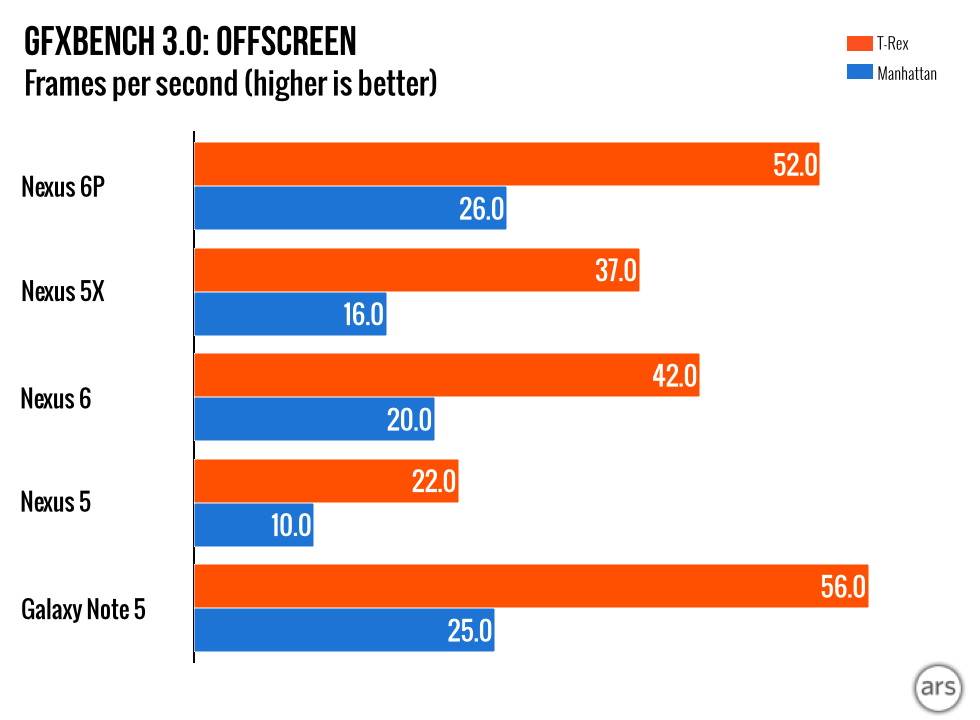


The battery life on both devices is fine. The 6P and 5X both scored respectably in our battery tests, which keep the screen on the whole time at a colorimeter-calibrated 200 nits. The Wi-Fi browsing test loads webpages until the battery dies, while the WebGL test is a little heavier and stresses the GPU.
The true flagships—all other Android devices are second-class citizens
This year, we see a gap widening between Nexus devices and every other Android phone. If you’re buying an Android device and want the fastest updates, the longest update support time, the best security program, zero crapware, the best software design, a cohesive app ecosystem, and the latest features from Google, you need to buy a Nexus. Every other Android phone pales in comparison to the Nexus 5X and 6P.
Before, buying a Nexus meant you had to deal with a bad camera or poor battery life, but the Nexus 5X and 6P are the first Android devices built with few to no compromises. The one thing you could complain about is the lack of wireless charging, but we can deal with that. The camera on a Nexus is finally good. The 12.3 MP cameras can hang with phones that are nearly twice the price of the 5X.
In some ways these devices feel like a combination of the best ideas from the Android ecosystem. You get Motorola’s ambient display and always-on voice commands, LG’s laser auto focus, and Google’s software design, security, and fast updates. This year’s crop of Nexus phones are devices that stand alone atop the Android ecosystem, with a combination of features you won’t find anywhere else. If you’re in the market for an Android phone, you’ve run out of excuses not to get a Nexus.
Good
- Always-on “Ok Google” voice commands are some of the best features we’ve seen added to a smartphone, and these are two of the few devices that support them.
- Ambient display allows you to see a notification without having to unlock or touch the phone.
- An excellent camera. That’s right, a Nexus camera is finally good.
- Stock Android’s material design means you’ll have a software package that is consistent with the rest of the Android ecosystem.
- The most secure Android phones. Three years of fast monthly security updates means that while the rest of the Android ecosystem is vulnerable, these devices should be OK.
- The fastest, most reliable OS updates mean you’ll get new features faster than anyone else and (hopefully) won’t be abandoned by your OEM.
- The fingerprint reader is fast and accurate, and the new APIs in Marshmallow mean apps should support it soon.
Bad
- Large top and bottom bezels feel like a step backward for phone design.
- Anorexic 8mm and 7.5mm bodies could have been expanded to fit more battery. The thinness war is dumb.
- The rear-mounted fingerprint sensor won’t work out for everyone.
Ugly
- No Qualcomm quick charging or wireless charging. If you invested in either of these power standards, you’re out of luck.

Ron is the Reviews Editor at Ars Technica, where he specializes in Android OS and Google products. He is always on the hunt for a new gadget and loves to rip things apart to see how they work. He loves to tinker and always seems to be working on a new project.