TextNut – a WYSIWYG markdown editor for Mac
textnutwriter.comI am creator of TextNut. Thanks for your comments. Some of my points:
* Price disclosed - Yes, it is not my false. No way to put price there. I don't want to baiting so I provide trial.
* File save location - You can export at current version, either in page or Library level. I am working on iOS version, after that TextNut will support icloud and dropbox.
* WYSIWYG - I believe this why TextNut is unique with others, it does not mix markdown delimiter with content, also provide a way to switch between markdown and rich mode
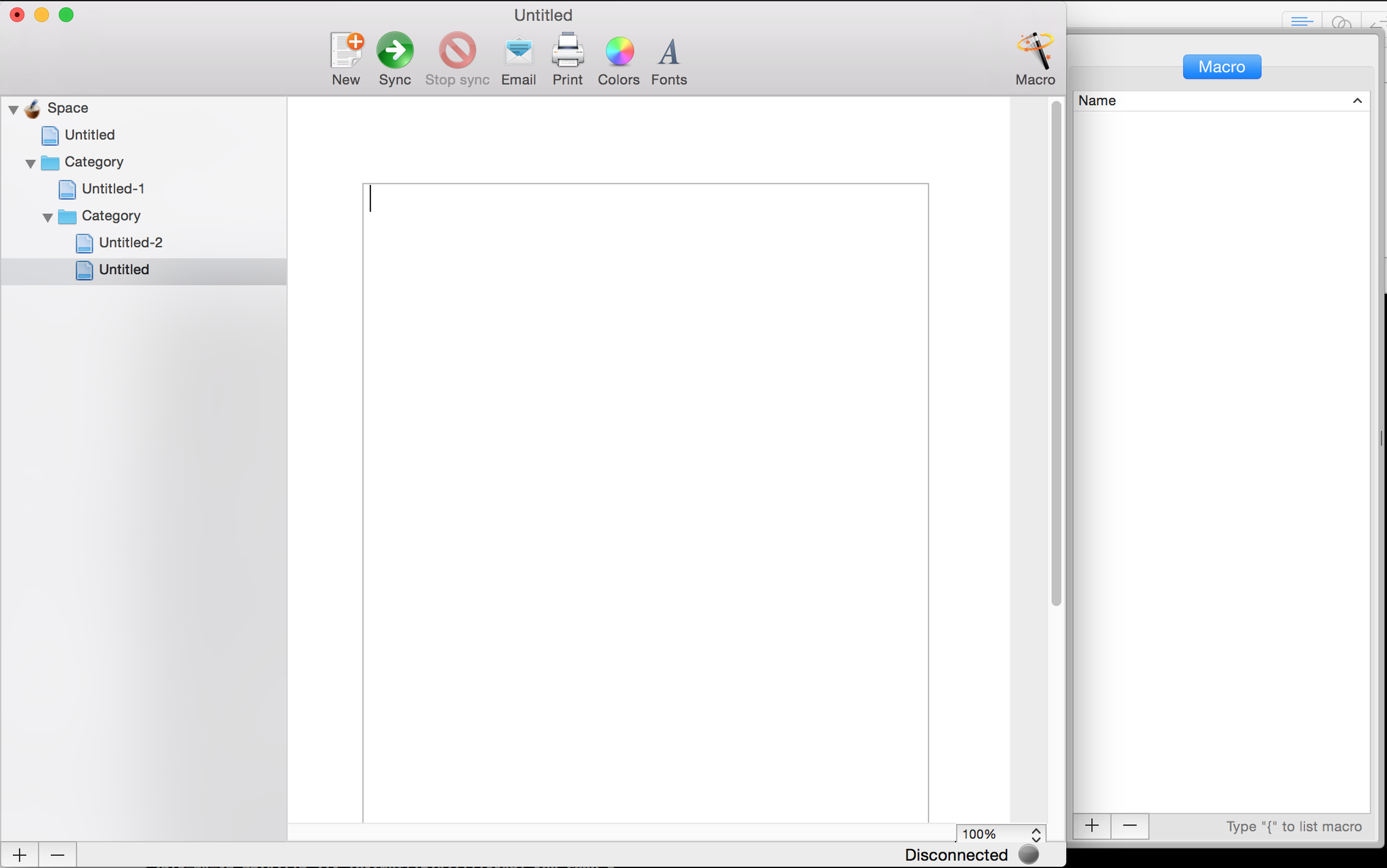
* Ulysses - unfortunately, after a few version upgrade, its UI more like Ulysses. Although I prefer you say I "rip-off" from Apple Mail most. Actually, I inherit most ideas from geniuswiki that I made since 2007. (That is why the link, image, footnote using curly bracket { to open popover!) I checked in first line code of TextNut in early of 2011, but I stopped only after very roughly UI code https://pbs.twimg.com/media/CDxHr19UIAEVArE.png:large. Although UI looks more different with current, but basic design idea never be changed since then, 3 panes: doc tree, editor, help(was call `Macro` from geniuswiki), doc title is updated by content, etc. I restarted TextNut dev since the middle of last year, I got a out-sourcing UI designer and give my first version design http://www.textnutwriter.com/img/1.png. After I add Theme in 1.1 version, I set the default theme as current light grey as it can accepted by most writers. In latest 2.1 version, Tree structure doc tree is supported, then final version looks like current. As independent developer, I only invest very small amount money for UI design. I hope users can more focus on core functionalities rather than colour palette at early stage.

So while this is common trend I really wish developers would stop using the "Download on the Mac App Store" graphic when it should be "Buy on the Mac App Store". Also there is NO MENTION of the price or even the fact this is not free (other than linking to trial which implies that). I really hate this practice of baiting and switching.
Blame it on Apple, they mandate using this button. I understand why they don't want to use prices, because those are localized, but agree that it should differentiate free vs. paid apps.
Odd, I could have sworn they provided a "Buy on the App Store" or similar but I just read through their marketing guidelines and you are right. Well then part of my argument doesn't hold up but still I feel like developers are doing this on purpose (obstructing the price and/or the fact it is paid not free) to hide that from you until after you get excited about the product/app.
The prominent trial button there is a near ideal experience to make it clear it's not free.
I get that but they are clearly hiding the price. I don't think there is anyway to argue against that.
I also appreciate transparent pricing. On the other hand I can hope the use of a global store allows then to localize pricing.
Files are saved in some undisclosed, unchangeable location (presumably the ~Library folder). This is a deal-breaker for me, since all of my documents live in a synced Dropbox folder (I could symlink the files over, but this should not need to be the case). This is more like a note taking application (like Notational Velocity), than a serious editor. Too bad, it looks nice.
Can't you just symlink it into your dropbox folder?
I shouldn't have to. Beyond that, what format does it save it in?
Or, if you only need to edit one Markdown file at a time, I also recommend these Mac WYSIWYG editors:
- Mou http://25.io/mou/
- MacDown http://macdown.uranusjr.com/
The latter is free and open-source.
MacDown is great! Thanks for the link.
Why are pretty markdown editors such a thing on Mac specifically? Is that the favored platform for bloggers, or something?
For one Gruber is arguably the most influential Mac blogger and the creator of Markdown. He and other bloggers like him have promoted and endorsed it. As for the pretty cocoa editors, I'd say the Mac App Store has had a lot to do with it, by allowing developers to get paid for wrapping what used to be a command line workflow into a nice yummy gui. There an entire category of markup powered editors sitting on a spectrum from minimalist "distraction free zen writing environments" (Byword et al) to more featureful writing suites (Ulysses).
Not only pretty markdown editors. Software applications tend to be prettier in general under OSX.
There's the financial incentive, as pointed out in other comments.
Then, what I think it is most important, the technology support. Take just Cocoa, Core Animation and Quartz Composer and you are already light-years ahead of the competition. I won't even talk about things like the Win32 API or the existence of Swift.
'Pretty' Windows apps, in particular, are a royal pain to create. Unless, maybe, if you target Metro.
You can make them pretty even on Windows. However,if you want to keep using native controls, the effort will be enormous. Many applications switched to using embedded browsers because of that. If you are not using standard controls, then you lose things like screen readers.
>'Pretty' Windows apps, in particular, are a royal pain to create. Unless, maybe, if you target Metro.
1. Learn how to work with XAML
(1.5. Know how to make good looking UIs)
2. Done.
Really. If you're forcing yourself to use WinForms, you're doing yourself a disservice. Any Windows Dev that wants to push out good looking application should learn how to use XAML. You can even ignore the databinding part if you want.
That said, TextNut looks an awful lot like OneNote UI wise.
I believe the major problem comes from the fact that most people developing for Windows are either doing it for free or for internal tools. There are very few tools that fit Apple's market of consumer focused applications, and the financial incentive clearly isn't there on Windows.
Perhaps one should try to create the same application on both platforms. I get a feeling that XAML (and WPF) are not a silver bullet and can't make up for deficiencies in other areas. Such as typography.
But my WPF knowledge is limited, so I'll try to keep an open mind and research more when I have the time.
That's been generally how things are on OS X for years (even before the Mac App Store). Small companies like Panic (much smaller originally) have found out that people are willing to pay for quality tools.
Except the Markdown editors phenomenon is slightly different. The tools Panic makes are complex and useful; but there seem to be a huge number of hugely similar "editors" for a format which was designed to be written in plain text. Typically these editors don't add much tangible value over a general purpose text editor and cost twice the price.
I believe the correct term is WYSIWYM ("what you see is what you mean"): editing happens in rich text mode, with pretty styles and no markup, however, those styles are merely part of editor's UI, not written into the document.
How does it save the files? Looks like they are kept in a database in ~/Library/Application Support.
This would be awesome for keeping notes in plain text that will stand the test of time.
As someone mentioned in this thread, Ulysses 3 can do this. You can "mount" local directories and it will save and show those files in "plaintext". Use Dropbox, Syncthing, BTSync whatever to sync between devices.
I'm really happy to see more What-you-see-is-what-you-mean Markdown editors. This previous HN discussion of Markdownify (https://news.ycombinator.com/item?id=9354653) alerted me to Texts.io, which initially looked extremely promising, but was riddled with bugs. I ended up having to go back to iA Writer Pro (which is a solid, normal MD editor). For pure writing activities, stripping away (hiding) as much of the syntax and chrome as possible is very valuable, which is why I moved to MD from Word in the first place. Two-pane write/preview editors are a terrible solution.
> Two-pane write/preview editors are a terrible solution.
I agree with you. You remind me there is a need in my editing workflow for a diff or divergence tool across my targets: github, PDF tooling and popular free editors where collaborators might be working.
I'm happy to learn in these comments about the http://commonmark.org/ effort.
That looks like a pretty close copy—or rip off, rather—of Ulysses (http://ulyssesapp.com/)...
Ulysses' problem is that, despite saving as Markdown, there's no "real" Markdown editing mode. Certain things, like images, can only be entered through the GUI, and its clumsy parsing means that certain formatting gets permanently mangled in a way that messes up copy-paste, since what you see when editing isn't actually Markdown. Among other issues, for example, it adds escape characters, of all things, to anything with a [.
Agreed. That's one of the reasons I'm not able to use it as much as I'd like to. Basically only works perfect well for basic Markdown (and adding images with their GUI)—if you need any extra code or tweaks on Markdown, you'll be escaping a lot of characters.
Still a nice app in so many ways.
That might be the case, but it doesn't make it ok for TextNut to clone 75% of their UI
Yeah the color palette is definitely too close.
http://www.foldingtext.com is my go to Markdown editor. Combine with Notational Velocity which reads from a folder on Dropbox, it is great. Especially since I can edit with Draft on my Android phone and tablet.
TextNut looks like it will combine the two (organization and editing) but I will wait until it has flatfile compatibility.
The website was vague: Can you "Open in TextNut?"
If so, this is useful. If not, this is a missed opportunity. I don't want you controlling where I store and open things, but I would very much enjoy a nice Markdown editor for writing things.
I find the "100% Compatible with CommonMark" a bit confusing, without looking I'd assume CommonMark was another product from the same people, and they'd done a re-branding, and wanted to make the association.
That said, whilst writing this comment it occurs to me that CommonMark might also be an effort I've never heard of to standardise out some of John Gruber’s original undefined spec behaviours, but as a developer Github flavoured markdown is the de-facto standard as it has many well written and well-tested implementations.
> We propose a standard, unambiguous syntax specification for Markdown, along with a suite of comprehensive tests to validate Markdown implementations against this specification.
You're right that it was an effort to pin down the markdown spec by not-Gruber people. And Github actually was involved, along with some other big names like Reddit, Stackexchange, and Meteor.
But it didn't take off because Gruber threw a spanner in the works by refusing to endorse it and insisting they changed the name.
Slightly related topic - what typeface (font) do you guys use for writing?
For programming, I use Adobe's Source Code Pro.
However, for writing non-code, what do you recommend?
I'm currently trying Adobe's Source Serif Pro, which isn't bad. There's also Source Sans Pro, but I would have thought a serif font would be better for non-code tasks, and more pleasing on the eyes.
Other recommendations?
If I had the time, one of my side projects would be to build something like this for AsciiDoc[1] that also includes a basic static site/pdf generator. It would be a nice way to build user documentation.
One of the best markdown writers I have ever used is iA's Writer for Mac (and iOS) https://ia.net/writer/mac/
They have an Android version as well, but I have not used it.
There is a misspelled word on the "View" menu, first item. It is "libary."
Thanks, I will fix.
Hmm... from a cursory glance, this looks very similar to Write[1]. Wonder how it compares?
[1]: http://writeapp.net. Incidentally, I've been using it for a few months and it's pretty nice.
Where is the library stored? Is there any way to select a custom folder for the library? It's possible in iTunes, in Preferences > Advanced > iTunes Media folder location.
This is a beautifully made application, very feature complete. Congratulations! Now my problem is to choose which one to use, with so many good ones!
When we have markdown, why we need WYSIWYG?
Looks like a rip off of http://www.ulyssesapp.com/mac/.