Show HN: Black-hole.js – Visualize black hole gravitational lensing in WebGL
github.comMay be of interest: Posts from Double Negative, the VFX company that did Interstellar: Blackhole: http://dneg.com/dneg_vfx/blackhole/ Wormhole: http://dneg.com/dneg_vfx/wormhole/
Thank you for sharing. Despite some scientific fumbles, I thought Interstellar did a great job portraying the gravitational lensing effects of black- and worm-holes. I just wish that the worm-hole travel scene would have been as short and strange as this proof-of-concept rendering. Will definitely pore over these materials later. Much appreciated.
I'd love to see the wormhole simulation implemented someplace I could play with it.
I did once the same thing[1] with canvas. However, this demo warps the whole picture instead of circular region which seems unnatural. Other than that, you did great job.
Your demo is excellent! If you don't mind, I might dig into the source later to compare our approaches. I'm thinking about doing a 3D visualization sometime, and I'm interested in seeing how other people solve the problem.
Great point about the warping issue in my demo. I use a solver to produce a quadratic polynomial that maps in-angles to out-angles. I feel like the coefficients produced by the solver don't fit the data very well for pixels far away from the black hole, resulting in zooming / warping. I'm going to dig into it a bit and see if I can produce a better polynomial.
UPDATE: Just made a quick change. The solver was only attempting to match data up to, but not through, the FOV limit, which meant that the polynomial did not fit data near the FOV limit very well. I updated it so that it now uses data up to and beyond the FOV. There is still a bit of warping for far away pixels, but there is substantially less than before. Thank you for the tip.
I think the distortion area is just a function of scaling factors -- crop the picture enough (limit the field of view), and it is "all" warped.
Yours is really cool, too! Thanks for sharing, since lately I've been doing a lot of reading/learning about black holes. But where is the hole in your demo? I see the distortion but I also can still see stars within the event horizon, if there is any.
I kept radius of blackhole very small ( ~3px) because many demos do so[1][2]. If you look into the code you will see it's a faux effect. It's canvas so you can imagine performance when comparing with WebGL :) It just replaces positions of pixels according to an effective radius and some simple mirror algorithm. Also to smooth effect I used smoothstep function.
[1] https://www.youtube.com/watch?v=FCoxYlpJq9s&t=1m13s [2] http://upload.wikimedia.org/wikipedia/commons/d/d6/BlackHole... [3] http://en.wikipedia.org/wiki/Smoothstep
Nice, I'm glad you hide the pointer on yours, it makes a big difference.
An excellent point. The pointer is indeed distracting. I just removed it from my demo, and it's much better. Thanks
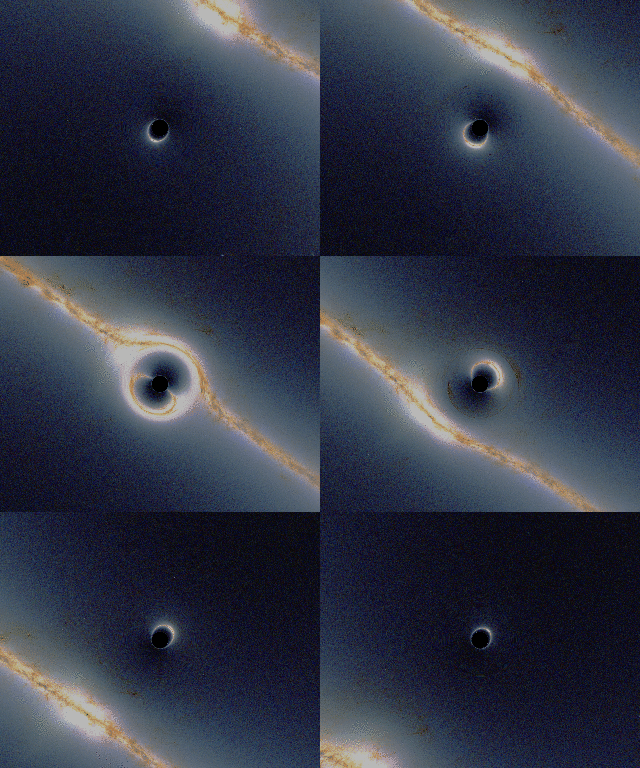
Came across this some time back: http://blender.stackexchange.com/a/23574
I can haz black hole, pleez?
Love the cat, visible over and under the focal point.
Would be fun to turn this into an art project.