Show HN: Fiddle.md – a collaborative writing tool by Swipe
fiddle.mdShameless plug: I worked on a similar tool mdocs [1]. The main difference is that is opensource, it supports authentication and authorization [2] similar to Google Docs. The authorization part allows you to share documents at company level.
It is a 100% client-side application, it uses Firebase as backend and Auth0 for authentication.
[1] https://auth0.github.io/mdocs2
[2] https://dl.dropbox.com/s/w6bmji4t698v8qn/ss-2015-03-25T10-40...

[1] was really confusing. It consistently errored when I tried to sign in, then when clicking the link for more details, walked me through creating an auth0 account. I did find [3] which made more sense.
[3] http://mdocs.io/
Interesting, looks like Firebase syncs the who record at a time, how do you avoid conflicts with 2 people editing at the same time?
It uses a theory called Operational Transformation [1] which is roughly the base for most collaborative tools like google docs.
My first attempt was using a library called ot.js [2], I changed it to support an async db since it only supported a in-memory store and I adapted to use mongodb. The experiment is in [3] and it has some bugs still.
Then I found out the guys at firebase adapted ot.js client side to work with their own db, and created something called Firepad [4]. So, I used that instead which was more stable and I added auth and authn.
[1]: https://en.wikipedia.org/wiki/Operational_transformation
[2]: https://github.com/Operational-Transformation/ot.js/
Collaborative editing is great, and I wonder if this project could be adapted as some sort of browser extension that would allow teams to collaboratively edit on pages that don't otherwise support it.
For instance, the project-management software my team currently uses does not allow us to collaboratively edit tickets. Sometimes we've resorted to writing tickets together in Google Docs and then transferring the text back into the project-management tool. It would be awesome if we could use Fiddle.md or a similar tool right there on the page, rather than having to transfer text between tabs.
Hey, I'm one of the co-founders at Swipe, thank you so much for the comment! That's a really interesting idea. Our scope with this is very narrow now and we wouldn't want to promise something like that at the moment. But it's something we haven't thought about before, it sounds really useful.
Would be nice if the tab key inserted a tab instead of jumping to the next field (for writing code, etc).
Thanks for the feedback. That is something we discussed, and we have it on the list of upcoming improvements.
.md is the ccTLD for my country (Moldova), which got me excited and confused for a bit - was trying to find the connection with music in Eastern Europe. I'm not sure how to feel about such ccTLD abuse and conflating TLDs with file extensions in general.
While it would be nice if websites always had some connection to the country whose TLDs they're using, I think that ship has sailed. I wonder what someone from Tuvalu would have to say about it though. They handed out a lot of the best TLDs before anyone had any idea what to do with the Internet.
I was thinking with this idea for some time and the killers features for me are:
- Allow custom CSS
- Post a json with the markdown content to a custom URL
Do you plan to open source it?
Yes, we plan to open source it :)
If we can allow custom CSS in a secure way, why not?
For custom CSS, a user-level workaround for now could be to style the domain with your userContent.css (Firefox) or the Stylish extension (Firefox, Chrome).
Got it working with on-the-fly yUML diagrams.
Example:
http://fiddle.md/c74bgs3vthgqm8mtt9kx3z
Not perfect, but wouldn't take much to make it play nicely?
Hey, I'm one of the people behind Fiddle.md. I think your example works very well, what do you feel is missing?
Hello there!
I'm using it today for a sales document, it's sweet.
Well, there are some more complex yUML diagrams on the yUML samples page that don't work. It's probably yUML's fault because the syntax isn't quite "proper". But it would be nice if fiddle.md had a way of embedding yUML DSL. E.g.
==== yUML Class Diagram ==== [Company]<>->[User] [Company]<>->[Record] [User]-.-[note: A regular user] ==== end ====
I'm confused how this is collaborative. If a friend sends me a fiddle.md link and I change the content of the document, how do they become aware of my changes? Do I send them my link back?
We tried to approach collaboration in a very simple way that doesn't require accounts and heavy realtime Google Docs-style co-editing. Our collaboration relies on versions and links. Every refresh creates a new version, so as soon as you pass a link to someone, they create a new version automatically. This way you're never editing the same version, even though you're editing the same "document". So it definitely is based on passing links around but making sure there are no conflicts. We're definitely looking into simple ways to notify you that there's a new version created by someone else so it runs even smoother.
You can think of it a bit like a tree system, where you start on the stem and as you share it with others you build independent branches. Hope it makes sense, we're definitely going to work more on that part in the future.
As an academic that writes in Markdown (usually solo, offline), this ticks so many boxes for me. I love that for once I may be able to convince my co-authors to collaborate in Markdown instead of Google Docs. Integration with Dropbox is crucial to accomplish this (most academics use Dropbox), but it is missing one step: IMPORT!
It's great to see that I can export to Dropbox, but then how do I roundtrip? Rather than remembering the URL (or copy and pasting from a desktop app), it would be great to be able to load up an existing document from Dropbox, send off a collaboration link, and then have the ability to send the completed (collaboratively written) text back to Dropbox.
As soon as the content is over a page long, the "preview" doesn't really work, since what is supposed to be previewed is out of bounds.
I had developed a few years ago a markdown editor with live preview, with a mechanism that synchronized the source and the preview, scroll-wise, so the preview would always display the part that was being edited.
It didn't take off (at all) so I let it go, but I wish there would be a standardized way to do this.
Other than that, great tool! Thanks for sharing.
It should be possible to scroll in the preview section, and then keep typing for more than one page length without any problems.
Which browser are you using? What is the bahaviour you're seeing? Does the preview "reset" to the top scrolling position?
Glad you like it :)
> It should be possible to scroll in the preview section, and then keep typing...
Yes of course, that works, but you have to scroll manually.
Maybe I don't write the way other people do, and that's why I need automatic sync and most people don't: I don't write linearly, I write "all over the place".
I constantly go up and down a document when I'm writing something: what's getting written at the bottom impacts what was written at the top. Also I think of better ways of saying something once I've written it, and once I do I need to make changes.
If, every time I change sections, I need to scroll the preview, it's incredibly distracting/annoying (or, useless: but then it's better to have no preview at all).
Also, once a document is of any serious length (say, over 3 pages), finding the part where you are in the preview can get a little difficult.
stackedit.io handles this part of it pretty well.
Looking at this, I was wondering why this team didn't just fork that for their intended collaboration use-case (which is neat!).
Many thanks for this, stackedit looks great. Although I don't understand why there are preview features in the edit pane as well as the preview pane.
The beauty of Markdown is that it's simple text; this is distracting and a little unpleasant.
The only thing that prevents me from using this that I can't make an account to save my documents, and I can't get that url bar to go away. The giant bar that says "fiddle.md/b836w36wh2h8mv3fj23t8r/edit" even though I can already see the link in my own URL bar. If there were a way to remove that I might use this. Looks great though!
Looks just like a bit more polished version of Socrates[1]
What about user accounts where we can keep track of Fiddles, so we can organize them with tags and categories?
That's definitely something we'd want to add. At the moment we wanted to release an MVP and see if people like it before adding accounts and other features. We didn't think it was crucial to getting the core experience with the product, but we're going to keep improving it over time. For now, you could save locally or to Dropbox to avoid losing revisions. Thank you for the comment, I'd recommend signing up to the mailing list to hear about when things like accounts would launch.
For me the only feature that's missing in Google Drive is not being able to use Markdown.
This is a great idea!
I love MD support, it makes writing things easy and looks polished, therefore I love this!
On top of that I believe It's going to make it onto swipe.to ? I hope so because it would be a a much needed addition tool for editing presentations and rendering it on the fly :D
These types of projects are all really awesome; I just wish they would support RestructuredText.
No offense and all (I'm a huge python guy) but... why? RST is a pretty god damn awful format. Markdown lacks a proper standard but that's really the only problem with it... I wish the python community would just adopt Markdown for good and stop trying so hard with rst.
I've wondered about the same question, and I also personally greatly prefer markdown. I got into Python in 2002, and my recollection is that RST was introduced a few years before Markdown. Thus RST was more mature than Markdown at the time when Python documentation was a disaster zone and people were looking around for technology on which to build Sphinx. So I think RST versus Markdown for Python is more or less a "historical accident"; by now, there's a massive amount of documentation in RST, and it's too hard to switch everybody over. This situation reminds me somewhat of how Python uses Mercurial instead Git (see [1]); many years ago it was unclear whether Mercurial or Git would "win", and in fact many people (at least myself included, with SageMath!) thought incorrectly that Mercurial would win. Hindsight is 20/20, and fixing making the wrong bet on which technology will win can be extremely painful (at least it was very hard for us to switch SageMath from Mercurial to Git).
[1] https://docs.python.org/devguide/faq.html#where-can-i-learn-...
Yeah you're absolutely right. RST was great when Markdown wasn't around, but Markdown is just better.
It's a bit of a toughie, the python community doesn't have much to deal with Markdown itself. pypi expects rst etc. There's also very few tools available in general, which is a huge shame.
Part of this is due to different Markdown "flavours". At this point though, Github being the largest provider of Markdown, a safe bet would be to standardize on Github's flavour and call it a day.
"a safe bet would be to standardize on Github's flavour and call it a day." - yes, definitely. That's precisely what I'm doing in SageMathCloud.
> I got into Python in 2002, and my recollection is that RST was introduced a few years before Markdown.
That's true: According to Wikipedia RST is from 2002 (so is AsciiDoc), Markdown from 2004. Perhaps also important though is that RST was introduced as a direct successor to StructuredText, which apparently, had some currency in the Python community previously.
Actually, I completely disagree. Rst can do things that markdown will never be able to do (at least, not any of the common dialects). E.g., you can create your own directives to do special formatting however you'd like. You also have a ton more functionality built-in (e.g., a directive for LaTeX-style math) that is also incredibly uncommon in markdown.
Furthermore, the document structure in rst is far more powerful (e.g., you choose your heading conventions).
As it turns out, I am not actually a huge fan of python (and there are plenty of problems with rst), but in the comparison between mdown and rst, the only argument I actually see in favor of mdown is that it's more commonly used (though the fact that commonmark has yet to completely take over actually mitigates that a fair bit).
It doesn't matter how much you can do with RST if the syntax is horrible.
The syntax is horrible.
I can see how you might feel that way about some of it. But I actually do not really find that to generally be the case. And plenty of it is far nicer than Mdown.
However, this is jumping into completely subjective territory; you, of course, do not have to like rst, just as I do not have to like mdown. So, I will stick with my original sentiment of wishing these services would support the thing I like :)
My syntax comment was a bit abstract, apologies about this. I'm referring to RST's strictness and how painful it is to deal with, for example, something as simple as links. I don't really care which way you bold or italicize words, really...
Yeah, this just feels subjective (which isn't bad, just not terribly helpful). I find the fine-grained control gives me more power (which I prefer to something that's simpler but less powerful).
Rst feels like a happy medium between mdown and LaTeX for me, which is actually very much how I use it. I use it in situations where I would have used LaTeX in the past (instances where mdown surely wouldn't cut it). Of course, there are some times (e.g., tables, figures and bibliographies) where LaTeX is the only sensible option, but for anything simpler, I'd still prefer the power that Rst gives me.
Additionally, I actually really like most of how Rst does URLs. It is definitely less simple than mdown, but it's so much more powerful and generalized.
> Markdown lacks a proper standard
http://commonmark.org/. Of course, you might already know about this, and just be playing the https://xkcd.com/927/ card.
On that topic, does anyone know what flavour of markdown is being used here (in fiddle.md)?
We use marked - https://github.com/chjj/marked - with some slight modifications.
Cool. Thanks for the clarification.
And here I thought I was alone on this. Glad to see that I'm not the only one who things RST is terrible.
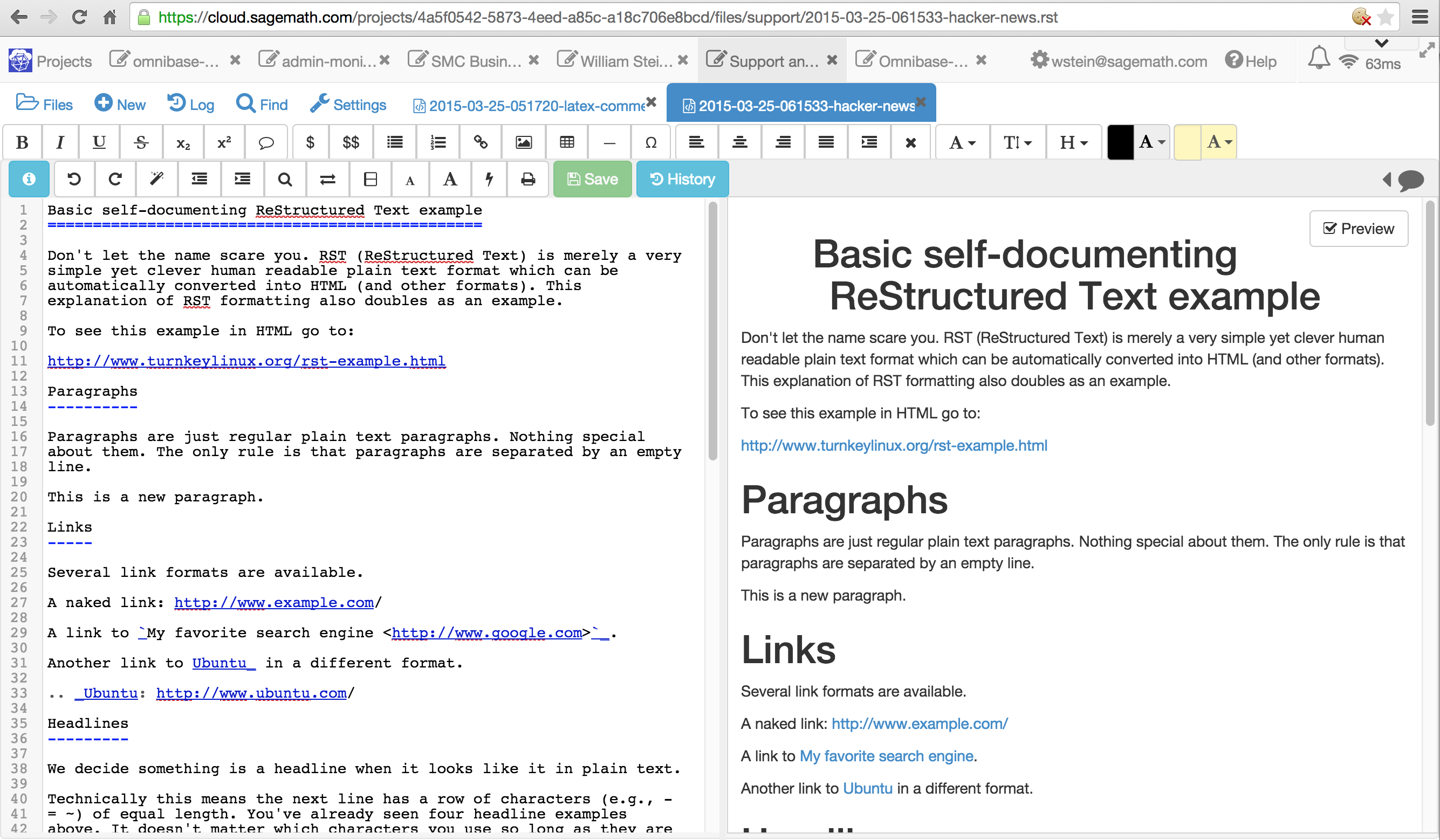
SageMathCloud (https://cloud.sagemath.com) has similar functionality (collaborative editing, preview) and supports restructured text. To try it, create an account, project, and new file that ends in .rst. It renders the rst server-side using rst2html in Linux, so isn't instant (since not in Javascript) -- are there any good rst to html converters written in Javascript? SMC also runs aspell (server side) when the file is saved. Here's a screenshot: http://wstein.org/misc/smc-rst.png of https://cloud.sagemath.com/projects/4a5f0542-5873-4eed-a85c-...
(Disclaimer: I started SageMathCloud and SageMath. SageMath uses Sphinx for documentation, hence we care about RestructuredText editing.)
Just as a quick note for you. Be aware that certain directives in rst can be security risks if you allow them to be run arbitrarily by users. If you haven't already done so, you should probably look into that.
This seems like an interesting service, I will need to take a look at it, thanks!
I've played a bit and it looks really interesting.
I see you currently support saving the fiddles to dropbox. Do you plan to add other storage systems?
I'm thinking it would be great to use that along with github to write documentation or even websites using jekyll.
Thanks for the feedback! We started with Dropbox because that is what we all use, but we do want to add support for other services. Your idea for GitHub integration is very interesting, and it's not something that previously occurred to us. It's something we'll definitely look into!
Looks interesting... Dark theme?
That's a very good idea, we've added it high up on the suggestions list. Very handy for writing at night probably. Thank you!
Don't forget that it also looks good :D
I love the syntax helper in the bottom. I've added markdown to a few projects and usually, I just added a help text summary near the input to remind users of the syntax; this is a much better solution.
Really like the design, especially the search/menu box. It would be very nice to add proper support for tabs, especially when inserting larger blocks of code.
I'm a fan of this - elegant and simple way to make markdown more accessible to those who would otherwise shy away from it's learning curve
Thank you for the comment! The project actually started as we were building a tool to teach people Markdown a la Codecademy. We realized this probably does an equally good job at that too.
Very nice! I love how easy you have made it to start a new fiddle, eliminating the signup. I'm all in for less signup walls on the internet!
Is it a feature or a bug that the page's title tag also toggles when you toggle the preview/html button?
It’s a bug we failed to spot, but it does look interesting ;)
> Over Quota > This application is temporarily over its serving quota. Please try again later.
We're working on fixing that now. It should be back up very soon!
Edit: It's back. Thanks for the patience.
Great! Looks very good! :)
Although, table-support seems to be very limited. The table is generated correctly, but it doesn't look nice enough. Take a look at LightPaper for inspiration.
The HTML generated correctly, but the actual table didn't render at all in the preview for me. Text was aligned...sort of, but there was zero white space, and no dividers. Maybe it's simply my rusty MD skills.
I think it just needs some CSS love. Switch to HTML and you can definitely see it's putting out a table—it's just not a very pretty table.
Yeah, we need to add some styles for tables. Thanks!
Definitely something that we missed. Thank you so much for pointing it out!
@ggordan : is it using etherpad api for backend ?
We're not using etherpad. The backend is written in Go and hosted on appengine, and on the front end we use React.