Xerox responds to the recent character substitution issue
realbusinessatxerox.blogs.xerox.comPrevious discussion: https://news.ycombinator.com/item?id=6156238
Follow-up blog post about a conference call with Xerox: http://www.dkriesel.com/en/blog/2013/0806_conference_call_wi...
Inadvertent downvote, I'm sorry! =(
(OT: how do you downvote on HN?)
You need >500 karma
That's amazing. Thanks.
Countered.
"We do not normally see a character substitution issue with the factory default settings..."
It shouldn't be seen with any setting. Nothing you can do to the device (short of involving a hammer) should change the content in any way. Compress, resize, zoom, do whatever, but it simply must not change the content at any time at any resolution/quality.
I'm just flabbergasted that such a compression scheme was ever implemented in the first place. Surely, there are alternative OCR based methods do compression that don't introduce these artifacts (that's putting it mildly) at lower resolutions.
So you only want non lossy compression as an option?
By "lossy" you mean "17" may look like a crappier "17" with reasonable confidence, but will never, ever, become "21" at any compression setting, then I don't mind lossy. That's not asking for too much, is it?
But the scanner isn't starting off with "17" (as in two ascii characters) it is starting off with a bit mapped image that your brain happens to interpret as the number 17. It is too much to ask that a lossy image compression algorithm never result in a compressed bitmap that your brain interprets exactly as the original.
Having various compression/quality options allows you to pick the tradeoff (file size/resulting quality) that is acceptable for your situtation. There is no perfect setting for all situations. Even the original bitmap is an imperfect (i.e. lossy) rendering of the original document.
It seems a bit too coincidental that images to which human beings assign semantic value are being transformed into images to which human beings assign different semantic value.
I don't expect the scanner to have any semantic awareness of the document content, so when I hear "lossy compression", my expectation is "image may become illegible", and not "image may remain legible, but become inaccurate".
This is hacker news -- I don't expect everyone to know how jbig2 or other compression scheme works. But before you insinuate that the scanner has semantic awareness of the document and is altering that meaning in a less-than-coincidental way, I would hope that you could have a cursory look at how such compression works.
The issue only involves small letters, because the compression scheme breaks up the image into patches and then tries to identify visually similar blocks and reuse them. Certain settings can allow for small blocks of text to be deemed identical, within a threshold, and thus replaced. That's all. Coincidence, not semantic awareness.
Hence the advisory notice to use a higher resolution -- smaller block sizes.
> The issue only involves small letters, because the compression scheme breaks up the image into patches and then tries to identify visually similar blocks and reuse them. Certain settings can allow for small blocks of text to be deemed identical, within a threshold, and thus replaced. That's all. Coincidence, not semantic awareness.
Copiers very commonly copy printed material. This sort of algorithm makes it likely that sometimes one character will be replaced by another, so it is a bad algorithm for the job.
Xerox should have known better.
>>This is hacker news -- I don't expect everyone to know how jbig2 or other compression scheme works.
As opposed to what, ImageCompression News where you can expect everyone to know it?
Or maybe comp.compression
I'm aware - I'm merely responding to the previous commenter's point about how the compression algorithm is "starting off with a bit mapped image that your brain happens to interpret as the number 17", and pointing out that if this were the case, the likely outcome should be a fuzzier-looking "17" and not a "21".
Clearly, the compression algorithm is designed around human perception (i.e. looking for visually-similar segments to, I assume, tokenize), and therefore does relate to the actual semantics of the document, albeit in a coarse and mechanical way. It did know enough to replace character glyphs with other character glyphs, but didn't know enough to choose the right ones.
My point is that it's not coincidental at all - this algorithm is obviously in a sort of "uncanny valley" in its attempt to model human visual perception.
You'd expect anyone who knows how JBIG2 works would also know it should never have been used for this
It's not a coincidence that the thing that looks most like a blurred number is another blurred number.
A document will be covered in numbers, and the compression algorithm looks for similar blocks it can re-use; the side effect is sometimes it says "that blurry 4 looks pretty close to this blurry two, so I'll just store that block once and reuse it"
The problem is that this is a minor side effect to a programmer and an absolutely massive issue to an end user that no-one had thought of previously, and now we all have to be worried that all our scanned documents might be incorrect. (just because this was found in fuji-xerox scanners doesn't mean other brands don't also have the issue)
Let's take that premise to OCR then. This whole debacle started with JBIG2 settings that I guess duplicated(?) one section and inserted it where similar text exists. Only it was marginally similar.
According to Adam (https://news.ycombinator.com/item?id=6156418) this is a known problem that Xerox, who call themselves document people for crying out loud, should have known and compensated for.
I don't believe that e.g. JPEG compression can ever take a clearly readable 17 and turn it into a clearly readable 21. Lossy compression implies changing the data, obviously, but it does not have to imply changing the data in that particular way.
JPEG will not do that, but MPEG at high compression levels might.
By default, sure, for people who don't know about these settings, they are setting themselves up for failure when a few numbers get transposed. They should ship the device with highest quality settings so your customers are impressed out of the box, instead of being disappointed that they have to tune the device to get a high quality copy. If you must save a few bytes in this age, then you can turn on these crazy settings as you like.
I can just see a legal loophole now for anyone using these devices, for example "the electronic document was modified by a Xerox and we don't have the original, those numbers were not what we signed, contract void".
No matter the case of an optional setting or the size of the font involved, this can have major consequences for people who trust the device to be an accurate representation in all cases, of what they put into it.
Of course! Lossy compression is tolerable for cat videos on YouTube where it doesn't matter if a few details are wrong. It is absolutely not tolerable for storage of important documents. This is something that should go without saying.
Looks like the company is trying to weasel out of it and there are going to have to be lawsuits. Though I didn't really expect otherwise; if the dice come up badly, the damage from this could exceed the net value of the company.
This is an absolutely hilarious technical response to a real world customer issue. The customer does not care one iota that their photocopier uses one compression algorithm over another. And the fact there is not one mention of the word 'copy' in that entire post, is very telling of the technical disconnect exhibited here. The 'Xerox devices' in question are completely broken from a usability perspective.
It's no longer a 'copy machine' at this point, it's an 'approximation machine' and can't even be trusted for legal purposes.
So they claim that the fine print warns about character substitution. But they still are willing to label the option with that problem "normal quality" and suggest using "high quality" to get strictly image compression applied with no OCR. They don't seem to understand that a photocopier should in its normal operating mode never do post-processing that creates such surprising and misleading artifacts - better illegible and obviously so than legible but incorrect.
Don't get me wrong - using OCR is a great compression technique, but if it isn't reliable enough, it shouldn't be the default or "normal" setting.
This has nothing to do with OCR. It's an issue with the JBIG2 compression re-using similar patches as substitutes for certain areas of the images if they're "close enough". This issue is exacerbated at lower resolutions.
The process that's in use and what you consider to be true OCR are very similar, differing mainly in the last step (where OCR maps to a standard character set, but JBIG2 creates one on the fly along with a corresponding font). However, the errors at issue arise from part of the process where JBIG2 and OCR are doing pretty much the same thing, so even if the analogy is flawed, it is still highly instructive. Saying this has nothing to do with OCR is quite simply wrong, since this is clearly very closely related with OCR even if it doesn't meet your exact (unspecified) definition of OCR.
Thats OCR...
Well, it doesn't go all the way, at least in this implementation (contrary to Xerox's statement, we've been told compression is not standardized), to actually recognize the symbols it finds. If it did, it would presumably make many fewer of these errors, maybe almost none since when it's uncertain it could just go with the original.
O-SubC-R then perhaps. Still is recognizing shapes/symbols which is the very basis of OCR.
This seems a bit hair splitty when the end result is the same as invalid OCR dictionaries.
Well sure, but then why don't we just call it "lossy GZIP"? OCR is a pretty specific subset, and produces characters - this does not produce computer-readable characters, therefore not OCR.
What are you on about? What does it produce if not computer-readable characters? Computer illegible characters? Are you saying it cannot read from the dictionary it creates? Or from the characters it is later optically recognizing off that dictionary?
Again from the JBIG2 wiki[1]:
"Textual regions are compressed as follows: the foreground pixels in the regions are grouped into symbols. A dictionary of symbols is then created and encoded.."
It seems not only is JBIG2 being deployed as OCR by Xerox for whatever reason, its implementation in this case is an absolute failure.
Does it produce ASCII? UTF? If no, it's not OCR.
edit: by the definition you seem to be going on, any facial recognition is also OCR, since you could consider a face a 'glyph' (edit: 'symbol'). The only 'text' thing here that I can see is that it is intended to be used on text, which lends some optimizations, nothing that it's actually text-based in any way.
If you make a font out of faces and use them as repeated glyphs then yes it's OCR. If you're not using identical symbols over and over than I don't think you have a sane definition of 'glyph'.
It produces symbols, not characters.
Say that the scanner internally splits the scan into regions of 10x10 pixels that it saves in memory. If another region differs on less than (say) 10% of the pixels it is assumed that the two zones are identical and the first one is used in the second place too. The regions have no semantic meaning.
OCR translates the scan into a character set.
The only thing that's missing is a mapping from 'symbol #28' into 'ascii #63'. Internally it's storing instances of symbols plus font data for those symbols.
Also, something to think about: an EBCDIC document accidentally printed as ASCII/8859-1 would have equally zero semantic meaning when fed into an OCR program. But I don't think anyone would argue it wasn't OCR.
That "only thing that's missing" is a very very big thing, and difficult to get correct. And where does it say it's storing font data for the symbols?
A font doesn't need to be anything more than a series of bitmaps. And then each character location on the image, ignoring errors, references one of these bitmaps. That's how documents with embedded bitmap fonts generally work.
That mapping isn't a very big thing. Sometimes text-based PDFs don't even have it, and you don't notice unless you try to copy out and get the wrong letters.
OCR per definition gives out text. Not binary data that resemble the bitmap of the input image.
OK down-voter. Read the JBIG2 wiki[1].
"Textual regions are compressed as follows: the foreground pixels in the regions are grouped into symbols. A dictionary of symbols is then created and encoded, typically also using context-dependent arithmetic coding, and the regions are encoded by describing which symbols appear where."
Then from the OCR wiki[2].
"Matrix matching involves comparing an image to a stored glyph on a pixel-by-pixel basis; it is also known as "pattern matching" or "pattern recognition"."
Furrow your brow and smash the down-vote arrow all you wish. It won't stop JBIG2 from doing much of what people consider OCR as doing today. Recognizing characters, just JBIG2 adds in making it's own dictionary which opened the path to this topic today.
[1] http://en.wikipedia.org/wiki/JBIG2 [2] http://en.wikipedia.org/wiki/Optical_character_recognition
There's no OCR involved here. None.
All it's doing is recognizing "similar" patches of the image and coalescing them, which is what it's supposed to do, according to the standard. Yes, it's too aggressive.
The stated goal of JBIG2 is to recognize 'characters' on the fly and compress them together. It's not traditional OCR but I wouldn't take such a hard line.
It is essentially OCR where the alphabet is constructed on the fly from the document itself.
A major and highly pertinent difference is that if this OCR-ish procedure incorrectly classifies two identical letters as being different, accuracy is not affected, and the only consequence is a larger file. With normal OCR, seeing two As and saying they're different would be an error, but in this case, it's fine.
What this means is that, while regular OCR is inherently error-prone, this compression procedure can be fully tuned anywhere between no errors and nothing but errors, with file size being the tradeoff.
The ability to run this algorithm in a way that produces no errors may be enough to disqualify it as "OCR", depending on your point of view. In any case, it certainly changes things from "that's just how it is" to "this is a royal cock-up on Xerox's part".
Whether or not we're calling it OCR has zero bearing on the point of this comment. I can't believe this entire thread is hackers bikeshedding about whether it's OCR or not - it's like the definition of pedantism.
> We do not normally see a character substitution issue with the factory default settings however, the defect may be seen at lower quality and resolution settings.
I might have read it wrong, but from how I understood it the default settings don't have this problem. It's when people adjust the quality settings to be lower. Am I wrong?
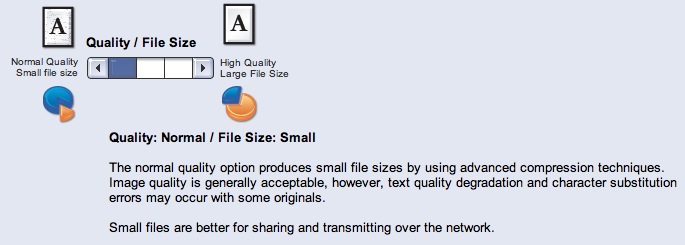
You are correct. The default setting is "high" or "higher"; I don't know which. The setting that may copy blocks of characters around is the lowest setting and is called "normal", and comes with some small print on the screen that actually warns you for the character substitution.
Xerox also explicitly recommends the lossy/lousy/normal setting if you need to send the scan over a network.
Oh wow, why didn't anyone mention this before? Or have I been missing it? I'm not being sarcastic, the fact that the warning about char-substitution is displayed to the user like that changes this whole story. I still think it a bad idea to even have that setting at all and Xerox should just remove it from future devices - but the user was warned, in as much as the average user ever reads warnings on computer screens......
Well, the person who changed the setting was warned. The warning does not appear on the main copying/scanning screen. And calling such a setting "normal" verges on criminal.
And even the support person didn't know about the consequences of the setting.
Also, it seems that the setting was also used when copying, not just when scanning (still seeking confirmation on that one), which would be quite useless.
That is an astonishing response. Reminds me a bit of the first time EMC pointed out that while it was possible to have your data corrupted in their hash based storage system, it probably would never happen.
I was expecting "Here is new firmware and we apologize for using JBIG2, won't happen again."
One wonders if JBIG2 is used in the storing of checks by banks (my bank these days only sends me images of my checks, never the actual check any more) or DMV records, or any number of things.
So in the previous thread I suggested a JBIG2 test image, now I want to build one that if you copy it, it goes from one thing to something else entirely!
This is an interesting story with lots of odd comments.
First of foremost, I agree that Xerox putting their name on a product which creates an unfaithful copy is corporate suicide. Such an ancient paragon of computer innovation should be able to come up with a clever algorithm that compresses but doesn't substitute image bits.
But...
- The original story[1] didn't mention that the product itself warns against the very thing they are reporting. Did they ignore that warning, did the copier not show it, did they use a setting that did not have the warning? Their further posts cover the issue, so it looks like somebody else set the resolution and ignored the warning.
- Calling what the JBIG2 algorithm does "OCR" is misleading. OCR is pretty much understood to be analog text (image) to digital text (ASCII, UTF-32). Matching to a real character set and outputting those characters is a defining part of true OCR. It's also confusing because the copiers have a true OCR function, and this is not related. What JBIG2 does, I would call it "sub-image matching and substitution."
- Calling JBIG2 "lossy" is also misleading. I suppose it is lossy by definition, but lossy is usually limited to pixel effects as seen in JPG, no image blocks.
- JBIG2 seems like an algorithm that shouldn't be used on low-res text documents. You might say it's just a configuration of the algorithm, but if engineers can't take it as a tool and use it correctly, you start to wonder if it's a problem with the tool.
[1] http://www.dkriesel.com/en/blog/2013/0802_xerox-workcentres_...?
When you read a scanned or copied document, your confidence in the information is based on its quality.
There comes a point when the quality is so poor that you no longer trust your interpretation. Is that a 3? An 8? If you can't tell, you will not act on that information without further clarification.
This compression algorithm destroys this process.
How can you trust what you are reading anymore? How do we know there isn't a bug that sometimes causes the content substitution when the source text is large and perfectly legible?
Disk space is not at enough of a premium to justify this.
I was curious to see how JBIG2 fares compared to JPEG, and found a benchmark from 2010 [1] comparing the file size of the resulting PDF:
  convert *.jpg JPEG.pdf -- 43777 kb
  convert *.png PNG.pdf -- 6907 kb
  jbig2 -b J -d -p -s *.jpg; pdf.py J > JBIG2.pdf -- 947 kb
  jbig2 -b J -d -p -s -2 *.jpg; pdf.py J > 2xJBIG2.pdf -- 1451 kb
[1] http://ssdigit.nothingisreal.com/2010/03/pdfs-jpeg-vs-png-vs...
JPEG is optimized for photographic images with lots of smooth gradients. It does badly with sharp edges, which scanned documents tend to contain a lot of.
Sounds like the "recognized industry standard JBIG2 compressor" is just about useless for copy machines. Why even give a user the ability to do this?
The only acceptable fix for this is to disable the ability to use lower compression qualities that have could EVER cause this to happen.
JBIG2 is not the problem. It is perfectly possible to do lossless compression with JBIG2. They just set its options to do some overly aggressive compression.
I would wager JBIG2 is the problem when Xerox couldn't implement it properly.
"Normal" is an overly aggressive compression setting? Is that an overly aggressive setting for the end-user or for Xerox to be implementing in their hardware marketed to law firms?
Xerox is oh-so subtly shifting the blame on to the user. How slimy.
I am quite disappointed by their response.
I expected something better from Xerox, instead it is a sort of: "You are a stupid costumer, leave it on default and stop bothering me, it is not my fault you find bugs when not using the default."
Standard idiot-box weasel-wording. Another case study to put on the enormous pile of examples of how not to communicate with your customers.
Pretend you care, blame the users, and don't take any action. Hey, what could be wrong with that?
These are multi function devices meant to be used by many people. If someone in your office has need to make occasional scans that need to fit in an email, isn't it natural to assume they might configure the machine for maximum compression? Why should that setting affect copies?
This may be an issue of giving people too much choice. Should users have the freedom to make terrible mistakes? Maybe in Linux, but not Windows. Similarly, you don't want an inexperienced secretary to get your company in legal trouble. Blaming the users can kill Xerox.
Off topic but it was awesome to see a link with "perl-bin" in it. I nice insight into what really does the important work in these big shiny corporations. :-)
Is this a real response? It is bylined as "Guest Blogger" and is not in an official-looking blog.
Xerox: You had one job.
"the device web user interface"
Why on earth does a scanner have a web interface