Mozilla's new Firefox Linux package for Ubuntu and Debian derivatives
blog.mozilla.org> Getting the latest version with features and security fixes is key to having a good experience whenever you use Firefox. Now, our new APT repository is directly connected to the Firefox release process, so you will receive the latest updates whenever we make them available. Tip: you will still need to restart Firefox for the latest version.
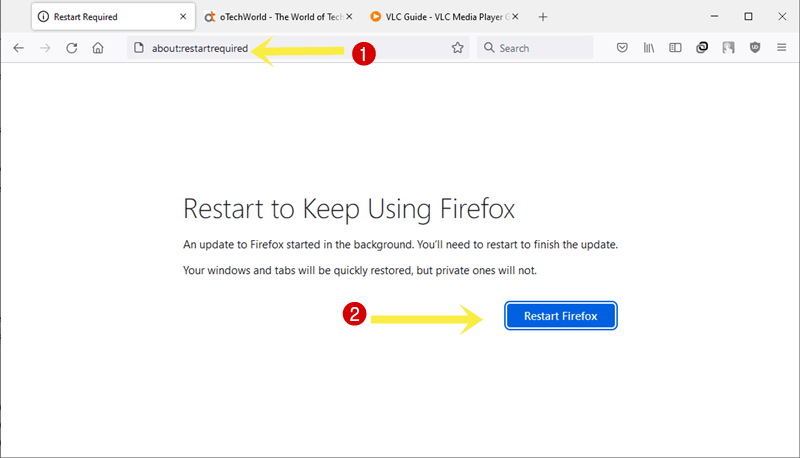
In the past when I've installed Firefox through a .deb, it has had this annoying habit of requiring me to restart my browser whenever it updates in the background. I'll be going about my day and all of the sudden every URL will redirect me to about:restartrequired [0] and I'll have to shut everything down to keep going.
It's not clear from this announcement if they've fixed that or not. If they haven't, I'll probably just continue to install Firefox from the .tar.gz files they provide [1]. If you drop them in a directory you have write permissions to, Firefox can auto-update itself the same way it does on Windows, without any forced interruptions.
[0] https://otechworld.com/wp-content/uploads/2022/04/restart-fi...
[1] https://support.mozilla.org/en-US/kb/install-firefox-linux#w...
I’m not sure about these stable packages, but for the nightly packages they introduced recently they explicitly mention on [1] that you can keep browsing:
> Following community discussions, we have updated the post to highlight that Firefox can continue browsing after an APT upgrade, allowing people to restart at their convenience.
[1]: https://blog.nightly.mozilla.org/2023/10/30/introducing-mozi...
Oh, that's great! Between that very clear statement and the fact that in this post they call out that "you will still need to restart Firefox for the latest version", it sounds like they've finally fixed it!
I expect this would still be a problem for this .deb. The package manger is doing the updating which is what causes the problem for Firefox.
The restart notice provides a way for Firefox to signal to the user that the binary on disk doesn't match the binary running. Without the warning Firefox used to randomly crash when creating new processes. The warning allows the user to perform an orderly restart (not great but neither are crashes).
As the parent states the tar.gz will avoid the problem as it uses Mozilla's update process that is used across platform. A minimum set of steps to use the tar.gz are
* Extract tar.gz to somewhere like /opt/firefox/
* Set the permissions so that the user or a group can read, write and execute /opt/firefox/
* Create or copy a Firefox.desktop file [1] and place it in the correct folder [2] so it shows up in your launcher
[1] https://specifications.freedesktop.org/desktop-entry-spec/de... [2] https://specifications.freedesktop.org/menu-spec/latest/ar01...
Mozilla implemented a fork server to fix this issue. It is enabled in the new deb packages, but not yet in "normal" Firefox:
Shameless plug: I wrote a tiny script to install Firefox from their tar.gz, without requiring root access: https://github.com/agateau/tmfi.
I remember that it required me to restart whenever I opened a new tab, or I wouldn't be able to use that tab. Anything in already opened tabs still worked. Then I switched from Ubuntu to Debian and I also installed the tar.gz from Mozilla. As you wrote, it updates itself.
As a welcome coincidence I checked the version right now and the Help, About Firefox dialog showed me an updating status. There is a updates/0/update.status file in Firefox directory that had the "downloading" content. It's "applied" now. The update.version file contains "122.0" and there is a 20 MB file names "update.mar". The file "last-update.log" contains many "PREPARE PATCH", "EXECUTE PATCH", "FINISHED PATCH" lines on shared libraries file and other files. Apparently the new version is waiting in the updated/ directory.
The About dialog still reports 121.0.1 and has a "Restart to update Firefox" button. I'll wait to see what happens and how long I can keep using the current version before having to switch to the new one.
> I remember that it required me to restart whenever I opened a new tab, or I wouldn't be able to use that tab. Anything in already opened tabs still worked.
That might have been the case. I almost invariably open every link in a new tab, so for my use case it would have felt the same as nothing working.
Tree Style Tab user?
You'd think so, but no.
The tar.gz build has exactly the same problem (it just doesn't complain about it): it needs to close the files from the old package and open the ones from the new package. Hence the restart. You can minimize the downtime by just restarting the browser and then using History | Restore previous session.
The flatpak build avoids this problem by keeping both versions on the disk, up until you stop the app. Only at this time, the old version is removed, and the next start will be the new version.
> it just doesn't complain about it
This is the key point. I'm assuming that it downloads the update and then waits for me to agree to install it, but however it works it doesn't interrupt my browsing while I'm in the middle of something.
This is how Mozilla's own updater works (if you use the .tar.gz version), but the distro package updater just overwrites everything without waiting and applications like Firefox have no control over that. As a user, you'd really want to disable unattended updates for such software.
It's not an issue for these .deb packages because they enable the (experimental) forkserver.
> The tar.gz build has exactly the same problem (it just doesn't complain about it)
You're mixing up two problems here. There's "please restart to update" that you can ignore/postpone, and there's "I have already updated and now going to sites is mostly broken" that you can't.
> You can minimize the downtime by just restarting the browser and then using History | Restore previous session.
I hated the required restart with a passion when they first started it because restoring the previous session often failed. Once that worked, it was merely miserable (you still have to log in to all your sites).
> you still have to log in to all your sites
Are you running very tight cookie/session settings or something? A restart definitely does not result in having to log in again for the stuff I'm logged in to.
The deb version does more than complain, it can also crash and have tabs crash due to needing restart.
The whole point of the about:restartrequired warning is to avoid this problem. If you're crashing, I hope you've been filing bugs.
That's a terrible user experience. I don't remember that happening when I used Firefox through .deb files or the Arch AUR packages. I don't want it actually updating in the background. I'm fine with it checking for updates and even pre-staging the update files for the next time I restart the browser. Swapping out the app files underneath a running browser process in the background, so no new content can be opened, sucks.
Maybe I didn't use the .deb files and just used the .tar.gz. I could see that. I know I used .deb files for Chrome but I can't recall for Firefox, now that I'm thinking about it maybe I did just use the .tar.gz. I remember having to create and edit .desktop files for it. Seems counterintuitive to have a better update experience through a manually managed .tar.gz unzipped directory than through a package file actually meant to be managed through a more formal package manager.
> it has had this annoying habit of requiring me to restart my browser whenever it updates in the background
This happens because Firefox detects that its files have changed underneath it while its running—this can cause problems due to, I guess, the multi-process architecture and sandboxing not liking mismatches between what is running and what it might start. The built-in updater performs updates in a way that doesn’t cause this. Package managers that do not update Firefox in-place (e.g. Nix) do not have this problem either.
As noted in a sibling comment, this new package does not seem to have the issue either. I wonder what they changed.
It does that on FreeBSD as well yeah. Not a huge deal for me as I only install updates when I'm not in the middle of things. I love an OS that doesn't force me to do anything <3
Disabling auto-updates on Ubuntu/Debian is, obviously, just a configuration option.
True, I was thinking more of Windows and MacOS.
I chose FreeBSD for a few things like jails, ZFS as first class citizen and no corporate "invented here" crap like snaps.
But I really hate coming back to my pc after a few days and find that it has rebooted to install an update, all my open work be damned. There's no good way to turn that off, nor the telemetry.
What is that option? I would love to disable firefox auto-updates.
For normal Apt updates [0]
or edit /etc/apt/apt.conf.d/20auto-upgrades.sudo dpkg-reconfigure --priority=low unattended-upgradesFor Snap [1]
Or for all Snap applicationssnap refresh --hold=forever firefox
(Various other useful options are documented, like only updating at weekends, or when the application isn't running.)snap refresh --hold=forever[0] https://help.ubuntu.com/community/AutomaticSecurityUpdates
[1] https://askubuntu.com/questions/930593/how-to-disable-autore...
This behaviour can be disabled by blacklisting Firefox from APT's unnattended upgrades. I wrote[0] something up on this last year if anyone is interested.
One of the benefits of kde offline updates is that this never happens, things are never updated while you are using them. You need to restart from time to time though, I do it weekly.
Restarting your whole system is not necessary for the firefox flatpak though -- updates are installed in a parallel directory and applied the next time the user re-launches Firefox.
Why does this even matter, when session restore works reliably?
So reliably that from time to time, when I want to restart for some reason, I'm killing it with all 9es from some already running htop.
Klicking the icon. Yah yah yadda yarr yarr, all new, no I don't wanna sync, no tour, FO! (meanwhile disabled all that shit)
Every tab there as it was before.
in the past, this was because firefox was very dynamic loadable (i.e. not keeping everything it needed in memory) so when you updated, you were overwriting data that it depended on.
I argued that this was a positive reason for snap (updating the image behind the scenes and only getting the new version when you restart). However, snap designers (in my not so humble opinion) missed the boat (to put it politely), as one can only upgrade a snap image when the application is not running. So one has to exit, update, wait, restart. This is missing one of the primary benefits of container based delivery for desktop applications.
I'm pretty sure that forced restart is from the snap package, and you don't have that without snap.
The snap package actually doesn't have this issue at all, it just waits for you to close the browser to switch to new version but you can keep using it for however long you want without Firefox complaining like it does if a package manager messes with some files while it is open.
Nope. There are many weird things about snap, but it actually handles Firefox updates very smoothly.
No, I guess we'll have to agree to disagree on that one.
I was already using the ~mozillateam PPA, because fuck Snap, but it'll be great to have an offical Firefox repository.
Ubuntu, if you're listening: fuck Snap. I'm never going to use it. I stripped from all my Ubuntu machines. If you try and force it upon me, I'm moving to Debian, no matter how much hurt that causes me.
You could also switch to Linux Mint, they have a very definitive anti-snap position. I would really like them to bring back an official KDE spin though..
With KDE Plasma 6 release just around the corner, it would be great to see more distributions providing KDE desktop environment as equal to GNOME, instead of "spin".
What hurt do you expect from Debian? Just genuinely curious as I've daily drove since my switch and would like your perspective
I'm using Debian Testing with KDE, after using Ubuntu with KDE, and it's basically just some lack of polish, and I also sometimes miss the PPAs. (I understand that it's technically possible to use software from Ubuntu PPAs in Debian, but as I'm getting older, I prefer officially supported ways of doing things, so that I can stay on the happy path as much as possible.)
So all in all, not much of a hurt, for me at least. My home server integrations, my software and my games work just as well.
I think that Debian is lovely, but as a person with a hojillion scripts and configs, I don't know how Debian and Ubuntu have diverged over the years in terms of filenames, paths, package names. etc., and I'll have to find out (for example, Ubuntu's /etc/cloud/cloud.cfg.d/ vs Debian's /etc/network/interfaces).
I was also going to mention ufw, but I see Debian ported it, so that's one less concern!
Debian is my choice too! I run Debian testing and it is great! I have up to date packages, a ‘rolling’ release and now even Firefox straight from Mozilla
PopOS is basically Ubuntu without enforced snap and better driver support, including having real Firefox packages. I personally use flatpak firefox because it adds a few extra safety bits, but I know that firefox "native" is there if I want it.
As someone who is quite new to Ubuntu, and recently just ran an install. I've seen this "snap" word thrown around and for better or worse I consider the opinion of random HN users to be better than the average opinion elsewhere on the internet.
What do you dislike so much about snap? Also any tips on how one goes about purging it from their machine if they too also decide they don't like it?
Snaps are self contained packages of software. They are mounted as a separate isolated file system when they start.
The good: Snap packages run on almost any Linux distribution, so they're an easier target. Distribution specific packaging can be tedious, and often involves a distro having to maintain packages themselves by repackaging the "upstream" package or software. With software that updates frequently, snaps theoretically mean a lot less work for distro package maintainers, because one package works on every distro. Snap packages are also sandboxed and have less access to the host system.
The bad: In practice, they don't work very well. Snap programs are slow to start up. Because of their sandboxing and universal nature, their integration into the distribution can be lacking.
For example, when I upgraded to Ubuntu 22.04, I was automatically moved to Firefox snap. It is painfully slow to start. Instead of the normal Ubuntu file browser when I went to upload or save a file, it uses a jarringly different file browser. I switched back to using the firefox PPA, and now this new package directly from firefox.
I also moved to the Slack snap, which also works terribly. I apparently can't upload and download files from it reliably, so I have to open it in my browser to do so. There appears to still be an official deb package, but they've hidden it on their site because they want you to use the snap.
Snap started as a method of packaging applications for servers, and that's still where they're most useful. Slow startup time and issues with desktop integration are not concerns for server side snap packages. For desktop graphical applications, Flatpak will likely be a much more useful universal package system.
Regarding the startup time, it has been massively improved since the initial Firefox snap release. It'll always have non-zero overhead for the reasons you mentioned, but it's already fast enough that it no longer bothers me.
The concept is fine, but implementation is quite obnoxious.
You'll have crap in your mounts list, process list, home folder, etc. As a reward for putting up with all that you'll have slower to start applications!
PPA, flatpack, and even "make install" are much more polite when you need a newer version of something, with good performance.
I recommend Mint these days. Easier than decluttering Ubuntu after every install.
This is a welcome addition for Chromebooks, because now you can install latest Firefox (not ESR) in Crostini without using Flatpak.
Sadly Mozilla still doesn't offer `aarch64-linux` builds for Firefox in their official channels, so for those that have a ARM64 Chromebook will still need to use something else to get Firefox running (I use Nix, but it needs some complicated setup to work with hardware acceleration, for example, using nixGL).
Hey, do you know a good resource to learn how to compile a binary for Linux Arm64 that works in a Chromebook? I would like to port some C code I have that I produce builds for x86 and Amd64 debian using GCC 4.8 and an old debian, I am curious what has to be done to produce a binary that would run the same in Chromebook.
Parent is probably refering to the dev linux environment, which is just Debian in a vm with seamless wayland/X11/file/usb passthrough.
So just target Debian 11 and 12 arm64. If you compile on an older version of Debian it should work fine too.
You're not supposed to have to do anything at all. Crostini on an ARM Chromebook is literally just aarch64 Debian, pointed at the upstream apt repos for basically all of its binaries.
How's your experience with Firefox in ChromeOS compared to Chrome ? Doesn't it feel second class ?
Since my Chromebook is not really powerful, yes, Firefox feels like a second class citizen. But I imagine in a better Chromebook it should work better.
I just use whatever is in debian testing or unstable, but it's trivial to download firefox _directly_ from mozilla which will then keep itself updated to the latest version.
This just chucks firefox in /usr/local but its straightforward to edit and use ~/, opt, etc., just make sure the created symlink is somewhere in $PATH. Desktop integration will depend on your DE/WM, but should be pretty simple to figure out if not automatic.
    wget -O firefox-latest.tar.bz2 \
      "https://download.mozilla.org/?product=firefox-latest-ssl&os=linux64&lang=en-US"
    tar xjf firefox-latest.tar.bz2
    sudo rm -rf firefox-latest.tar.bz2 /usr/local/bin/firefox /usr/local/firefox
    sudo mv firefox/ /usr/local/
sudo ln -s /usr/local/firefox/firefox /usr/local/bin/firefoxThis is what I do with Firefox developer edition. It doesn't have that problem where it refuses to work if it's been updated in the background, it just adds a little green dot to the hamburger menu that indicates that it wants to restart at your leisure.
As a user of the PPA packages (https://launchpad.net/~mozillateam/+archive/ubuntu/ppa), now I'm confused. Are these the same packages? Should I switch? I'd have appreciated at least a mention in the article.
From what I can tell, the “Ubuntu Mozilla Team” does not consist of people from Mozilla but rather just people packaging Mozilla software for Ubuntu. The latest packages in that PPA have been uploaded by Rico Tzschichholz, who does not appear to be affiliated with Mozilla.
> the “Ubuntu Mozilla Team” does not consist of people from Mozilla
Kudos to open source maintainers, the hidden heroes who make your life easier while expecting nothing in return.
This is confusing because it’s posted on Mozilla’s official site
The thing posted on Mozilla's website (the OP) is official. The PPA posted at the root of this comment thread isn't.
Get rid of your PPA package and use the official repo, it's 99.9% better in almost all cases. More details on google/youtube on how to do that, it's too much to type on HN and should be on the first page of google/duckduckgo. I would guess the people supporting the PPA will stop updating it after a while due to there being an official repo to use.
Debian/Ubuntu is also the sole chosen distro for Spotify and Signal first-party native packages.
I try to use Fedora whenever possible so have noticed that Debian tends to be the first choice, even for "client" type software, which makes sense considering the popularity and cross compatibility of Ubuntu+Debian.
(You can generally still get stuff on Fedora - they do their own Firefox package of course, Signal is a flatpak, etc)
> Debian/Ubuntu is also the sole chosen distro for Spotify and Signal first-party native packages.
I don't know about present, but in the past their .deb packages were updated later than the snap ones.
This is a great update from the Mozilla team! Please continue the hard work.
The only thing missing is a continued commitment to privacy and liberty.
What has changed since the infamous “We Need More Deplatforming (2021)”[1] article by CEO Mitchell Baker? I absolutely can not move past this and I think Mozilla needs to make a strong commitment to our civil rights.
1. https://blog.mozilla.org/en/mozilla/we-need-more-than-deplat...
> the infamous “We Need More Deplatforming (2021)”[1] article
That seems a misquote; the title of the article you link is "We need more than deplatforming", and it isn't apparent to me that it advocates for deplatforming at all.
Why do you think it has changed?
So, we have come full circle? There used to be a .deb repo, then there wasn't and now we have one again.
.deb packages, just like server side rendering, are the new hotness.
Nah, they never went out of style.
.deb packages have been the primary method of distributing programs on Linux for well over a decade at this point.
don't forget jquery and anti frameworks becoming cool again.
I don't remember Mozilla ever having a repo for Debian packages. Did I miss something?
The missed the key 5th benefit:
Allows you to
sudo apt-get purge snapd
I recently had a problem where snapd kept sigfaulting and the fix was to purge it completely. It turns out that everything I had in snap was available in flatpak, which I prefer anyway.
there is also appimage sometimes if you ever need something that isn't flatpak or system packages. It launches fast just like flatpak and unlike snap.
Don't forget `sudo apt-mark hold snapd` to prevent reinstalling it as a side dependency.
I believe lxd is still only available as snap packages on Ubuntu. I am not using it anymore but it's actually quite nice. Fortunately it's now been forked as incus and both Debian and openSUSE will have it. Probably a red-haty distro too.
You didn’t have to wait for this new Firefox package to stop using snaps, did you?
The Firefox deb in the repos redirected and did a snap install or some weirdness at least at some point.
Flatpaks are a perfectly functional option https://flathub.org/apps/org.mozilla.firefox
Must have been an Ubuntu problem.
I install Firefox via Debian's package, and have never had 'snapd' installed.
Yes. Ubuntu maintained their own deb package that redirected to a snap install.
Oh good!! Snap free <3
Is there really a point these days in having the very last release rather than the ESR version packaged by Debian? If so what are the benefits for end users?
In case of security fixes, you will stay unpatched for a bit less time. ESR is intended for places that really don't like any form of change like rigid enterprises and banks and such. End users should probably steer clear of that unless they have a good reason not to; which they generally don't. Except for a false sense of security.
I personally don't see a good reason to opt out of security changes for any longer than strictly necessary and that's exactly what you do when using ESR. First they get backported by Mozilla. That's after normal users receive them. This takes time. Then testing takes place because they don't want to push out a hasty fix for ESR. This takes more time. And then third party packagers need to pick up the changes and repackage (which is mostly pointless and adds more time). And then eventually it rolls out days/weeks/months after normal users have long received the patches. I don't seen any good reason for such lengthy delays for normal users. In some big companies where they manually review updates for workstations it's a compromise between the extra work and stability. But the tradeoff is timely access to security fixes; which ESR simply doesn't provide.
End users also have plenty of reason to dislike change. Change tends to mean things like exciting new spying and UI regressions. Meanwhile, security concerns are often overblown. If you're just using your browser for e.g. email, news, facebook, youtube, netflix, amazon, and your bank, and not venturing out into the seedier parts of the web, you're probably at ~0% risk of some RCE exploit. In any case, an adblocker is probably better protection than auto-updates.
Yep. vaapi was crashing on several builds in a row on a popos machine, till it magically stopped doing that 2 weeks ago. ESR though, worked just fine.
Change tends to mean things like exciting new spying and UI regressions
Or missing out on new anti-fingerprinting and anti-tracking improvements. Note that adblockers don't generally do the former.
I used the ESR version for a while because it was still deb packaged rather than a snap pack and the snap firewalling blocked a plugin I used that had to talk to another program. Unfortunately the ESR version has also moved to snap. So I am glad to here Mozilla team is moving to make a native deb package available.
I don't see a problem waiting for alpha- and beta-testing to finish first before the new code is distributed to actual normal users.
Note, the "normal users" you describe are involuntary testers who got forced into the role because keeping testers on the payroll is so last century.
The voluntary testers are the Firefox Nightly and Firefox Beta users, not the Firefox stable users.
I've been using the beta channel for ages. Never has been a problem for me. The stable channel is stable as advertised. It's rock solid. ESR is not so much about adding even more stability and more about just guaranteeing long periods without any changes whatsoever in order to cut down on testing cost that big IT departments have for any kind of change.
Insisting on an ESR release on what is effectively a poorly supported type of operating system where every install is basically a snow flake that heavily relies on it's users being able to fix all sorts of weird issues (i.e. every Desktop Linux distribution ever) is a bit weird and overly selective.
I said involuntary testers. The guys who sign up for the nightlies and beta know full well what they signed up for, but not the involuntary testers aka "normal users".
Your premise is flawed. The testers are the Nightly and Beta users, not the stable users.
They are always adding new stuff, but I use floorp which is based on ESR and well I'm still surviving and internetting even in January 2024. I think you're in good company. I really just need a browser, and firefox is my choice, but floorp is just a bit more customizable in appearence and I like that (no need to mess around with user.css). Let them test and debug the new fangled stuff and I'll get a super stable version by the time it hits ESR
My system, my choice. I'll be testing Mozilla's packages, for sure.
As for Debian's standard response to using non-Debian packages, they have the following wiki entry:
If you are a web developer, you would better develop your app using the latest dev tools and targeting the latest web specifications only.
Most companies don't prioritize legacy support, so there is no point in developing for Firefox ESR.
> Most companies don't prioritize legacy support,
On the other hand, the more legacy you support, the larger your potential customer base is. Also, if everyone else in the sector only supports the most recent release of only two browsers, you might have that extended customer base all to yourself.
> you would better develop your app using the latest dev tools and targeting the latest web specifications only.
That is one school of thought.
Another is that you should regularly use the oldest platform (hardware, OS, browser) that you want to support. That way you won't get to two weeks before release, decide you ought to test on a dual-core 4Gb machine like you were planning on supporting, and realise that although it technically runs, it's so frustratingly slow that no-one would want to, but there's not enough time to make the changes you'd need to get it working "acceptably". OTOH, if you were using it on hardware where it ran like a dog for you from the 3rd sprint, you'd probably have got round to making the changes for it to be acceptable on that era platform.
> On the other hand, the more legacy you support, the larger your potential customer base is.
It is more a decision about the trade-off between costs and benefits. Supporting really old browsers like IE is a pain in the ass.
> Another is that you should regularly use the oldest platform (hardware, OS, browser) that you want to support.
It is possible to manually slowing down your browser with dev tools. https://imgur.com/a/99XbwN9
> OTOH, if you were using it on hardware where it ran like a dog for you from the 3rd sprint, you'd probably have got round to making the changes for it to be acceptable on that era platform.
Or perhaps even made saner choices in the first place rather than rambling about "premature optimization".
ESR isn't -that- old. jeesh. If you develop on ESR and it works well it's definitely going to work in something newer. However every web dev I know tries in multiple versions and multiple browsers.
exploit patches
Firefox ESR will receive security patches too, so this argument doesn't apply IMO.
When I reinstall Linux Mint, I uninstall the apt package and install Firefox from the tarball using a custom script I made [1].
This way, I get the official Firefox package without Mint adding their own stuff on top of it, I get the official Firefox icon and not Mint's icon theme variation of it, I don't need to edit keyring files or import GPG keys, and it updates automatically without forcing me to restart the browser.
[1] https://github.com/sandov/sc/blob/master/install_scripts/fir...
Huh. I just migrated off of the Flatpak to the .tar.bz2 version because I ran into the fact that the Flatpak version has no functioning mDNS resolution. The impact of that is all the stuff that expects .local to work.. doesn't. Can ping etc from shell, but Firefox just goes "Nope, no idea, doesn't exist, give up now". Lots of discussion on multi-year old bugs, but no fix that I could find. I generally solved it by doing everything on .home.arpa (and run step-ca to have TLS), but there are some things that just default to mDNS announcements and produce URLs referring to .local.
I did a testing here and it’s working now.
Very welcome addition by Mozilla. Thanks!
I have been using Mozilla builds of Firefox on Linux for years, and they tend to just be higher quality. They talk about the performance engineering that goes in the build process briefly, but IMHO stability is also improved. It's also updated on restart (see the About window), so you never get issues because changing the libs that can be dynamically loaded right from under a program is never a good idea.
My only wish would be that they finally propose official Linux/aarch64 builds, for example for Asahi Linux.
I see linux/aarch64 builds at https://treeherder.mozilla.org/jobs?repo=mozilla-release&sea... so it seems like they exist. Maybe they aren't packaged for apt?
They are packages by distros, but not considered a tier 1 platform by Mozilla.
I didn't see those builds on your link, only android/windows/osx aarch64 builds, what am I missing ?
Oops, looks like you're right. I mixed up "Linux x64 Shippable" with AArch64.
PSA if you want to upgrade to these from snap (and I would encourage you to do so), do your research:
Ubuntu likes to replace installed debs with snaps without consulting the user and you need to configure it not to do so.
And the profile folder for the snap is in a different place than for the deb, so make a copy of it etc.
I'm not going into full detail as these things are easily found via Google as long as you're aware of them.
It's documented: https://support.mozilla.org/en-US/kb/install-firefox-linux#w...
If you uninstall the snap, it's not going to overwrite your firefox installed from this deb. Never had it do anything like that unless you are upgrading to a major new release and then it disables ppas, so I suppose it might happen at that point, but most people don't do major upgrades that often, if you do then it's on you to keep track of them because that's just the way that Ubuntu handles it
https://www.omgubuntu.co.uk/2022/04/how-to-install-firefox-d...
Step 5: Set the Firefox package priority to ensure Mozilla’s Deb version is always preferred. If you don’t do this the Ubuntu transition package could replace it, reinstalling the Firefox Snap:
This happened to me and it wasn't as part of a dist upgrade.
They don't seem to be packaging the LTS version, Firefox ESR. Am I missing something? Is there a separate Mozilla repository for that?
You can use https://launchpad.net/~mozillateam/+archive/ubuntu/ppa/, but that's no official Mozilla repository.
They're already done by the Debian people.
Well, some Debian derivatives have been moving to .deb alternatives for the current browser -- snap or flatpak -- which may be the reason for them creating "official" .debs for recent releases. (Experience with the snap and flatpak versions has been ... less than completely smooth for some users.) Not sure that's the case for the ESRs yet.
Yeah but that's not necessarily a good thing. Packaged browsers from a package repo don't have the best track record. I mean they are fine but there's a reason why some want their packages to come from the people who actually made the software especially in this case. Does the ESR Debian package support updates without asking for restarts? Granted it matters less for esr but if it avoids the issue , why not.
Feels like an excellent track record to me: https://tracker.debian.org/pkg/firefox-esr ;) And Mike is also a prolific Firefox developer.
Ahhh I wasn't familiar with this package in particular. I just have had a bunch of ... weird issues dues to some quirks in some packaged browsers. Basically it was never a standard install, and it sucked for ironing out issues. Glad to hear the Debian packages are doing great, not surprised either!
> there's a reason why some want their packages to come from the people who actually made the software
Not necessarily either. Think of the Audacity fiasco. We were very comfortable using the Debain package but not their Flatpack and obviously not the snap. I realise I'm replying to a subtext but the context is the same.
Perhaps I'm missing something, but like 6 years ago, I downloaded firefox on linux from mozilla which came as a tar file that I extracted into my home directory and made shortcuts to. It has been working fine and auto updating ever since :shrug:
I don't see what the point of this is.
It's handy if multiple users use the same machine, or if you're on a managed system.
Has anyone tried mirroring their apt repo yet? Using apt-mirror on Debian stable, I'm seeing errors:
Processing indexes: [PPPPPPPPPPPPPPPPPPPPPPPPPPPPPPPapt-mirror: can't open index packages.mozilla.org/apt//dists/mozilla/main/binary-amd64/Packages in process_index at /usr/bin/apt-mirror line 891.
  deb https://packages.mozilla.org/apt mozilla main
  clean https://packages.mozilla.org
I wonder if they’ll keep this up permanently.
Tempted to switch (maybe I can remove my system’s Snap infection), but redoing bookmarks and extensions (and getting my ublock config and OneTab bookmarks) is a pain. And I’ll have to figure out how to not lose my passwords this time.
What a pain.
You can just use your old Firefox profile. Copy it from
to~/snap/firefox/common/.mozilla/firefox~/.mozilla/firefox/Oh dang, nice.
I ended up exporting everything and then re-importing. But it was not as annoying as I expected. I think I was mostly dreading it because I’d lost passwords in the past to this sort of thing, because I wasn’t expecting it, so I didn’t export beforehand. Just bad associations in my brain.
Why would you do that? Your firefox config should be kept in .mozilla/firefox (or is it .config/mozilla now?) and simply picked up by the new firefox binary. The only time this doesn't work is when you install an older version whose configuration "format" is not compatible with the newer version's one.
Edit: a sibling commenter just made me aware of the config for the "snappy" version actually resides in another directory. That said you can manually copy the files to the standard place
I did that because I didn’t know where the snap files were stored, or that it was different from the normal spot.
Does FF still not use KDE’s native file picker without installing a (not readily available) package to modify it? I stopped trying to use FF on Linux a long time ago, but seeing a headline with Linux in it made me perk up.
This bothers me too, very much. GTK and especially Firefox UI is so awkward and out-of-place in KDE (and in general, IMO). I even tried switching to Falkon.
This seems like great news. Managing software through one distro supported interface is less mental burden on me, the user. For developers, it's more work, I get that.
Why do people have such strong opinions against snaps? I've been using it for the better part of a year and don't mind it at all. I don't understand why linux people are so strongly opinionated on things like this, it's a packaging system not a sports team. This aversion is really weird to see.
Snaps allow for the base system to be stable while having the latest version of an application in a sandbox.
In my case it's because Canonical is once again going against the flow by adopting yet another in-house Ubuntu-specific solution that fragments community efforts and makes Linux less attractive to packagers. It's hard enough to get people to do builds for Linux, and it's clear to me and that nobody has the time and resources to package both for Flatpak and Snap.
They write "advanced compiler-based optimizations"; I guess that doesn't fall under open source?
Think of it more as "we compile with -O3". If you installed with the .tar.bz2, you'd get that already. If you use a 3rd party produced .deb, they might build with -O2.
That's just an example; the blog is probably referring to PGO and/or LTO: profile-guided optimization and link time optimization, which require some fiddly setup that I believe third parties have traditionally not bothered with.
And yes, it's all open source. You can see all of the bits that go into producing that .tar.bz2. You can even see the full build log if you like, eg by going to https://treeherder.mozilla.org/jobs?repo=mozilla-release&sea... . Pick your platform, click on Bpgo, click on B, select the "log" link down in the lower left.
There are plenty of Mozilla-related things to complain about, openness of the browser development process is not one of them.
Gentoo users like me fiddle with such things, they're just flags you can turn on before compiling. It's been a while since I experimented though, I didn't notice any advantage, with a disadvantage being an increase in compile time. I haven't tried on my newer machine yet though... but I suspect I wouldn't notice any difference.
In this case, it's not just a flag. Unless you're going through the Mozilla build system, in which case it kind of is. But what's actually happening is that it compiles the browser once, then runs it against some very small examples while collecting profiling data, then recompiles it while using the profiling data to guide optimization. That part about running the browser in the middle is what makes it complicated. (It can't do that when cross-compiling, for example.)
Takes 7 steps to install Firefox this way as opposed to apt-get install.
This comment doesn’t make any sense. Installing a deb file is done with apt, what are you actually referring to when you say “apt-get install”?
apt, apt-get, aptitude and synaptic are all front ends to the same package management system.
I’m well aware of that. How is that in any way relevant to the question I was asking?
apt-get install will automatically download and install the deb for you.
Are you insinuating that this would not happen with the instructions from Firefox?
Not unless you create an automated script for the instructions. Am strictly picking on the guide.
1. Add the apt repo
2. Add the repo's public key
3. apt-get update
4. apt-get install firefox
What 3 steps am I missing?
Counting “steps” is inane to begin with. Those could all be done with a one-liner, does that make it one step?
You could do this with a one-liner I suppose, but the Firefox guide still gives you 7 steps to accomplish something apt will do with a single command.
You are either trolling or you have a very fundamental lack of understanding for what those seven steps actually do and how package management works.
Am simply saying the alternative to doing this is a "one-click" apt-get install. Not sure why you have your panties in a twist.
but you are on an older version of ffx
*temporarily delayed version. This is a complicated nuance depending on the release cadence of your distro.
Is there more technical information than this article provides? Did Firefox not have a .deb package until now? It's been a few years since I used Ubuntu, but I find that really surprising. I'm not sure what this new package is or how it differs.
* In the ancient past, when dinosaurs roamed the earth, Ubuntu distributed Firefox as a .deb
* Recently (well, in the last 2-4 years) to boost the uptake of Canonical's "snap" packaging system, Ubuntu switched to only distributing Firefox as a snap.
* There are a lot of snap haters around. Not least because canonical fucked up the update mechanism in the first year or two, had a bunch of performance problems (now mostly solved?), and made a bunch of weird broken snaps for things like docker.
* An unofficial firefox package for Ubuntu was then created, so people who didn't want to use the snap could avoid doing so.
* By some accounts, Mozilla is keen on controlling the entire release channel, so security updates don't have to wait on volunteer maintainers. (IDK if this is true or not, but I've heard second-hand claims)
* This new package lets Mozilla release to users directly, and lets snap haters avoid snap without using unofficial packages.
Yeah the Snap package is still annoying. Like every day it pops up and tells me to close Firefox to update it. So I close it, and then nothing happens. Then I wait, and nothing happens. Occasionally, it notices that I closed Firefox and applies the update. But it's a frustrating annoyance.
It's not just a matter of love or hate. Firefox starts for THREE MINUTES on 22.04 as opposed to a few seconds on 20.04
Ed: actually, yes, that makes me hate SNAPs
I thought the decision to switch to snaps was made by Mozilla. Did that turn out to be false?
Depending on your distro, the Firefox package you see in the official repo is ... well packaged by the repo maintianers and some distros will include customizations like adding in bookmarks to the distro's welcome/docs/pages/etc. Sometimes even more things like feature settings are changed. It is usually not anything major and usually things that you might prefer like disabling pocket, etc.
What Mozilla is calling out here is a seperate, Mozilla-direct repo. This means you skip the official repos.
Everyone should think carefully about what this means.
On Ubuntu, Firefox is packaged as a snap, not as a normal .deb. It is pretty bad.
Mozilla is officially releasing a .deb for Firefox now. The one in the repos is not maintained by Mozilla.