Rio: Terminal app built over WebGPU, WebAssembly and Rust
github.comI have news for whoever did that screen shot: 256 colours is not "all colours" nowadays. (-:
There was a real push, which must be approaching a decade ago at this point, to get all terminal emulators able to understand the ITU-T T.416 control sequences for direct 24-bit RGB colour. Even if they implement it really badly, and some do, almost everyone tries to support this colour system now.
See the screenshot of the old syscons FreeBSD kernel built-in terminal emulator at https://tty0.social/@JdeBP/110424206935120790 for what I mean by really badly. It still does understand the control sequences, though.
Apple didn’t get the memo it seems. Terminal.app has been unchanged in many, many years.
I still stubbornly use it as my daily driver for some probably terrible reason.
I switched to Terminal.app from iterm2 almost 10 years ago because of horrific scroll and input latency for iterm2 after one of the osx upgrades (maybe Mavericks or Yosemite?). For the last few years I've been using kitty, which works well and for my setup allows me to eschew tmux. But Terminal.app still mostly just gets the job done so if it's working for you, I'd say stick with it.
I've tried a gazillion terminals but I always come back to the built-in Terminal.app. I appreciate that it has no bugs (that I know of).
Also, Terminal.app is really bad at rendering Unicode block characters correctly. It doesn't space them correctly vertically, so if you have a lot of block chars it looks like total garbage. iTerm/kitty/etc. all render it correctly.
Have you tried messing with the line height in preferences? The font panel will allow you to set whatever you please
Yes, but I shouldn't have to do that, particularly when it works correctly in most other terminals.
Spare a thought for we developers of terminal emulators. The block and line drawing characters have been being bodged since the time that IBM added the extra 9th column in hardware.
I have a fairly trivial bodge for them in mine. Kovid Goyal over a period of 7 years has built up an extensive system for overriding the glyphs for block and line drawing characters that are supplied in fonts and replacing them with ones that Kitty constructs itself, all started because they just didn't line up when using what the fonts supplied.
* https://github.com/kovidgoyal/kitty/issues/16
* https://github.com/kovidgoyal/kitty/blob/28b84a2d5b2720b88fd...
I’m sticking to Terminal.app for the reasons stated by you in this thread. It works, it’s fast and text renders beautifully with whatever theme you fancy.
However, it could use some love from Apple. Better keyboard-only text selection, horizontal and vertical splitting, True Color (not Cyndi Lauper style)…
I love that Terminal.app, out of the box, changes the colorcheme depending on your desktop dark or light configuration. iTerm does this on new versions, but only on 10.14 and later, which my company doesn't support yet :-p
With iTerm.app, getting a message that "your system ran out of application memory" is a reason for me to stick to the Terminal.app.
It's a 96 GiB of RAM machine, for chrissake! That ought to be enough for everybody!
How on earth have you had iTerm use up so much memory it's given you an error? I've been using iTerm for years on some absolute crap machines, abusing iTerm with tmux and numerous customizations, and have never received that error.
Unlimited scroll buffer + compiling something large with verbose logs non-stop?
Unlimited scroll buffer, but good scrollback hygiene (I clear scrollback after I don't need it), and it ran out of memory by just sitting there — I was using something else during that time and all terminals had been at the shell prompts.
Well just limit the scroll buffer then
Such advice is not helpful. The infinite scroll buffer is useful for some people with long lived terminal sessions, and that helps them with their respective workflows and habits. I am one of them.
The parent ran out of memory with iTerm not because of the infinite scrolling buffer but because of iTerm having memory leaks. The memory leaks in iTerm used to be a big issue, and it appears they still have not fully fixed. Other terminal apps can swell up to over 1Gb of the RSS, yet they do not crash. Provided there is sufficient RAM available, the inifinte scrolling can prove to be benefecial.
I used iTerm on a 2011 iMac with 6GB of mismatched RAM until 2018 at work, and a crappy 2012 MBP with 4GB RAM (subsequently upgraded to 8GB) from 2012-2016 without issue. This is not normal at all lol
I've never had that issue before, but I switched awhile back to wezterm.
That sounds very wrong to me, I used iTerm fine for years on 8GB
I actually have the opposite problem. I’d like to limit terminal apps to just the 16 colours I have defined in my terminal settings (which is actually 3 colours in my case), but some apps (like the rust compiler e.g.) emit escape sequences which slightly change the shade in some places, in 256 colour space. I’d like to disable those 256 colours and limit everything to 16. I don’t think I can though.
I think you can set how the terminal presents itself in both tmux and regular Terminal.app
If the app doesn’t check for support and simply spills the control characters, there may be garbled output.
I've tried switching this setting in Terminal.app and all it seems to do is change the value of the TERM environment variable. I haven't observed any other effect.
It’s that value that apps should check. I know vim does.
As a rust programmer, you can explain to us where in this source code the rust compiler is emitting these escape sequences for colours outwith the AIXTerm 16 colour set.
* https://github.com/rust-lang/rust/blob/master/compiler/rustc...
I don't see it here, but one example would be help messages saying "consider introducing lifetime `'bla` here", which are preceded with a source code quote saying something like:
According to cat -v, <'bla> is preceded by ^[[38;5;10m, which, according to [1], "applies extended color value to the foreground", and further that 38;5;<s> sets "foreground color to <s> index in 88 or 256 color table".fn foo<'bla>(...)[1]: <https://learn.microsoft.com/en-us/windows/console/console-vi...>
Oh dear. You will I hope not be too embarrassed by learning that the 10 in SGR 38;5;10 (that control sequence) is colour index 10, which is less than 16, and a member of the very AIXTerm 16 colour set that you want. Thus the rust compiler is not in fact using a colour outwith the 16 AIXTerm colours.
Then I don't know how it happens, because I only have yellowish background + black and red defined in my terminal (also white, which I don't see used anywhere). And here is a screenshot from my Terminal.app, where the lifetime is gray: <https://0x0.st/HqVq.32.png>.
I've checked and the 10th colour is set to #000000 in my Terminal.app settings.
If SGR 38;5;10 is not producing green, which it isn't, then it must be following your palette. My educated guess is that for some reason it believes that it should lighten the palette-specified colours from 8 to 15, and it's lightening your black to a very dark grey.
Did anyone actually send Apple a memo? At https://github.com/termstandard/colors#not-supporting-trueco... there are pointers to where people have asked, when they have. There's nothing for Terminal.App.
(That's the big push that I mentioned. Going since January 2014.)
I don’t know where or who we would address it to. “Feedback” is such a black whole.
Is Apple making Microsoft look good by comparison, again? (-:
Microsoft Terminal has a whole open GitHub issues system to itself.
Microsoft is all warm and fuzzy towards developers. Developers, developers, developers, and some old CEO used to say.
Apple seems to have forgotten we exist.
I think the reasons are often good: https://lobste.rs/s/fikvmn/farewell_macos#c_swz7p7
256 colors ought to be enough for anybody.
That’s like 254 too many.
Sounds like writing code in notepad.
Sounds like terminals as they existed for most of the life of computing. Honestly I’ve never found color added that much to my experience with a terminal and often ended up with poor contrast for certain things and a bunch of time tweaking color palettes.
Since eMacs and vi has been two color for a lot of its life, I’d say it’s more like writing code with pretty bog standard code editing tools.

Sometimes "now with added GPU" is not the issue at all.
There's a demo program that comes with libcaca, called cacademo. It can either output text to standard output with ECMA-48 control sequences, or crank up a built-in X client that displays a very simple text window.
I SSHed into a remote machine with it from a local machine that had an X server. Tunnelled over the SSH connection, the X version of the demo was a little slower than running directly on the remote machine's own display, but mostly didn't drop frames. The mode where it sent ECMA-48 control sequences over the SSH connection to a local terminal emulator was woefully slower, to the point that it was displaying less than 1 frame a second sometimes, and visibly tearing the display. I tried it with both Microsoft Terminal and MobaXTerm to see whether it was the terminal emulator. It wasn't.
Sending colour information as ITU-T T.416 RGB control sequences, or even as AIXTerm 16-colour control sequences, to be interpreted by a control sequence state machine in the terminal emulator and turned into a display buffer and graphics drawing commands, turns out not to be as efficient over SSH as the X protocol over SSH. Yes, X11.
The X path was going through an X client library to the X server. It was probably using the old X11 primitives for text, rather than doing client-end rendering. The terminal emulator path was going through ncurses, then probably wasn't being batched up very much over the SSH connection, and then was going through a decoder that had to (amongst other things) parse numbers from human-readable to machine-readable thousands of times per frame because ECMA-48 uses decimal-character-encoded values in control sequences, and the cacademo program outputs lots of colour changes, frequently a colour change for each successive cell.
Just use a non-graphical ssh session if you just want a shell on the remote machine
Did you try ssh compression to see if it made any difference?
No. But it was like for like. It was the one single SSH connection in both cases, simply running cacademo with and without a DISPLAY environment variable.
I think that part of the problem lies with SSH: the lack of batching as I mentioned, which might also be at ncurses' door too. Of course one wants terminal output to go over the wire as soon as possible, and not wait "until we have a buffer-ful". But not in this case.
Rather, batching up the control sequences to change colour, cursor position, and then output the relevant character into a single exchange over the wire would be better. That would be equivalent to a an X primitive to write character X at position Y with attributes Z, which presumably goes as a single message over the wire.
But a combination of whatever output buffering ncurses and libcaca are doing, what happens in the pseudo-terminal and sshd at the remote end, and then what happens at the local end when ssh is outputting to its pseudo-terminal, are all almost certainly strongly militating against that.
... In addition to converting lots of numbers from machine-readable to human-readable, then back to machine-readable again. (-:
I should mention that at one point I was transcoding from AIXTerm to ITU T.416 colour control sequences. The latter are about 4 times as long as the former, and that noticeably slowed things down even further. Yes, I'm in favour of 24-bit colour like the other terminal emulator authors, but it does come at a measurable price.
Cool! Porting to the web is an interesting idea. I can’t help but imagine going back to the 70s and trying to show someone that yes, everyone has this full colour, mouse-supporting, GUI app platform accessible on any device and interlinked between billions of similar interactive documents from around the world… but it was really important that we set up a TTY. The smug (or horrified) look on their face would be priceless.
My question is what's their selling point, I used the past few years few terminals that have pretty good features:
- Alacritty minimal and blazingly fast
- Wezterm with batteries included
- Warp even batteries included
Yeah I'd love to know what this is aiming for over WezTerm, which already supports both WebGPU and OpenGL rendering. Maybe just that it is closer to being able to run in a browser?
I have to take a moment to just evangelize WezTerm a bit. I switched over from iTerm in the last few months and IMO WezTerm's absolute killer feature is its Lua-based configuration. You can do so much with it, down to running scripts on key binds, and the API is powerful enough to do virtually anything you want. For example I have some key binds that act differently when the active pane is running emacs vs. a shell.
I love how WezTerm feels consistent between my Linux and Mac machines. Lua config took me a while to figure out, but keeping it simple works well...
+1 for WezTerm. Switched from iTerm2 a while ago and have been very happy with it. Its configurability is next level.
I'm also a WezTerm user for awhile now, Lua based config is definitely rad.
Meanwhile I have to wonder what's the selling point of these over good old urxvt? It has an ecosystem of perl plugins, which has all the batteries I need and more. In its daemon/client mode I can have 20+ terminal windows open and they consume sum total of like 30MB memory, with embedded perl interpreter and everything. I feel like one or two instances of these modern incarnations is enough to completely dwarf that number.
GPU rendering is really cool, but I don't really understand what might people be doing where CPU rendering in terminal is anywhere close to being a bottleneck. People lose ability to comprehend way before that, why would I want gibberish to be printed even faster? Redirecting output to a file (or /dev/null) is almost always what I would want?
Well, if you search for these projects yourself and read the first few paragraphs on their websites, you might learn the selling points. Warp has a lot of features that are just not possible in urxvt.
Having seen them, there are two things I have to say:
1. I wouldn't say there really is much that would be "just not possible" in urxvt. If you drop down to Perl level, you can do almost everything (albeit you would have to write Perl).
2. The reason urxvt doesn't have majority of those selling points is because they arguably aren't the concern of terminal emulator at all. Things like better autocomplete menu, command editing, history browsing etc. historically fell under purview of the shell. You can have all these things with say zsh and a few chose plugins.
Kitty has the lowest latency and is the best terminal in the market, but they are not on windows.
Kitty is my favorite but acts weird when ssh-ing into other machines for reasons discussed on their github. (To do with setting the $TERM correctly)
Had that problem for a while too, but you can actually really easily set the TERM variable for every ssh connection separately from your local TERM. Just put the following in your ~/.ssh/config:
Host * SetEnv TERM=xterm-256colorKitty isn't "xterm-256color". That's something that Thomas Dickey, and I, and others, have pointed out time and again. It's just plain wrong to say to programs that something is XTerm when it isn't.
Kitty is, unsurprisingly:
https://invisible-island.net/ncurses/terminfo.src.html#tic-k...
The problem that people have is different anyway. When they're doing things correctly, and setting the correct terminal type, they then face "But my terminfo on that Linux distribution DVD that I got isn't up to date!", or "But my termcap on FreeBSD isn't up to date!".
The answer to that problem is to point out that terminfo supports a local ~/.terminfo/ if one needs one, and FreeBSD termcap has a TERMPATH environment variable that one can point at a ~/.termcap.db file, or indeed one placed anywhere else, if the system termcap database isn't up to date.
I'm not sure what to make of this. The terminfo you linked suggests to me that kitty provides at least the same capabilities as xterm-256color, unless I'm understanding the "use" capability wrong.
Most machines I've SSHed into didn't have kitty's terminfo installed, which results in many things not working. Using xterm-256color as a safe fallback has always worked for me however. It would always be possible to define the TERM variable per host and use TERM=kitty for hosts that have the correct terminfo installed. Is there a drawback to that apart from not being technically correct?
It's plain not correct. There's no "technically" about it.
Yes, you have misunderstood what xterm+256colour is. It's not xterm-256color. Notice the plus sign. What entries with plus signs in are is actually explained in commentary in the terminfo source file itself.
The full difference between the two entries is obtainable with infocmp, but that's just details. The simple fact is that for anything that isn't XTerm the xterm entries in terminfo/termcap are wrong. The few terminals that are close enough to XTerm to be for practical purposes compatible are the ones that were actually branches of actual XTerm at one point. All of the others, especially the recent ones like Alacritty, Kitty, and the like, are markedly and intentionally different.
The drawbacks in general are various and range from the subtle (e.g. some supposedly compatible terminal emulators mix up the home/end key codes with the find/select key codes, or they'll use different codes for higher numbered function keys, or for keys with modifiers) to the blatant (e.g. there are stark differences in indexed and direct colour support amongst terminal emulators). There's plenty of just plain odd along the way. I used the wrong TERM value for something the other day, and suddenly the Z shell's line editor was putting the cursor in column 80 all of the time.
The thing to remember is that one isn't helpless with respect to getting a proper terminfo/termcap entry installed on systems that don't have it. It's 2023, and not only has terminfo had the ability for users to supply extra terminfo entries for a long while, but historical termcap has gone away, and the few remaining systems such as FreeBSD that still use termcap can also just plonk in user-supplied termcap entries. They, too, nowadays have a mechanism for this. There's really zero excuse for not just copying the proper entry over and using it if it isn't there, nowadays. Indeed, Kitty even reportedly has a helper utility for hand-holding one through the process.
`kitty +ssh me@example.com' installs the termcap file (or is it terminfo?) on the remote host for you
Kitty also has the benefit of supporting much better keyboard handling through key codes. This includes things like button press/release/repeat, other keyboard modifiers and better escape handling. More details: https://sw.kovidgoyal.net/kitty/keyboard-protocol/
It's really a shame that more terminals don't support this protocol, because we could have a lot more sophisticated terminal applications.
Install WSL and then Nixpkgs on Windows11. Kitty away!
Thanks for the recommendations! Since switching from Kubuntu to Ubuntu, I have been looking for a replacement for Konsole and had finally settled on Terminator, but one major gripe I have with it is searching the scrollback, which is a bit buggy (results aren't highlighted, search is case sensitive even though it's not supposed to be). I just tried Wezterm and it seems to tick all the boxes. Now I just have to figure out how to configure it, seems a bit more complicated than most other terminal emulators...
This is anyway a niche market on Linux - you can go really far with gnome/kde default terminals, and even slimmer ones like xterm/urxvt/st are more than enough to perform all the necessary tasks.
Perhaps, on Mac, you badly need an alternate terminal app , because the default one is unbearably slow.
> the default one is unbearably slow
https://danluu.com/images/term-latency/loaded-terminal-laten...
Input latency might be good with Terminal.app, but it really chugs when there's a lot of output scrolling on the screen, especially if you use a terminal multiplexer. The last time I 'lived' on macOS, I had to ditch Terminal.app within a day, just from having a few apps compiling and printing logs in a tmux window.
- st, the most terminal we could fit into 3000 LOC
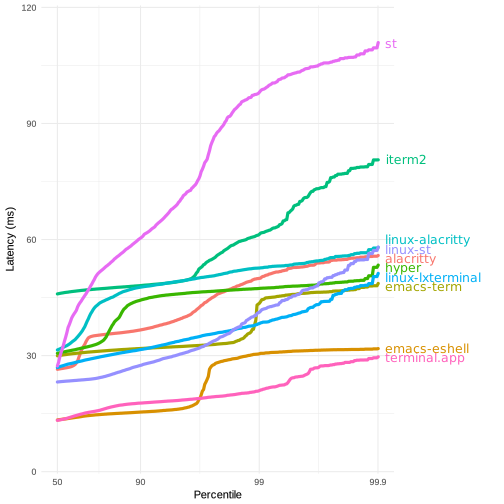
As someone who still just uses whatever terminal emulator my desktop environment provides, what are the advantages of choosing another terminal emulator application? Also, what's the point of providing GPU rendering on the terminal? I've never experienced latency or any problems otherwise related to rendering, so I wonder why some terminals nowadays pride themselves in using GPU rendering. Am I missing something?
Also, which terminal emulator would you recommend?
Some older terminals are slow enough to rate limit text output from things like streaming logs. I don't think that's specifically a GPU versus CPU, though.
I use Terminology, from the Enlightenment WM team. It's fast, supports unicode, is easily configurable, and behaves how I, personally, prefer. But if you don't really have a preference, I don't think fancy different terminals are going to be that important.
It may have something to do with this mind blowing exchange between Casey Muratori (a highly experienced game engine developer) and the Microsoft Terminal team.
https://github.com/microsoft/terminal/issues/10362
It really highlighted how crappy software gets written in large corporations. They told him rendering monospaced fonts on the GPU would involve a multi year PHD research project.
Apparently they then went on to infiltrate his discord server so they could ask questions. Then write up a blog post calling the change "trivial".
As it turns out, the thing Muratori suggested absolutely _didn't_ work for a large variety of edge cases. That was experimented with for a couple releases before being even _more_ substantially rewritten: https://github.com/microsoft/terminal/pull/14959
I hate that what was definitely intended as a joke originally turned into this massive miscommunication and flame war. Admittedly tone is hard to convey on the internet, and italics is no replacement for a good old fashioned ":P". But this could have been a good place for everyone to work together, rather than flame one another.
It's certainly an experience that everyone can learn from.
I think it is a little like when people trick out their honda civic with led lights, and new speakers, etc. It is fun, but you can get to all the same places just as well with a stock honda civic. IOW it seems there are a subset of hackers that are sort of terminal hobbyists.
You never seen a case where a slow terminal would throttle the app running because it couldn't render output fast enough ?
I use JetBrains IDEs and honestly their built in terminal emulators are embarrassingly slow. VSCode is buttery smooth in comparison. Sad state of things.
I use Terminator. I like all of the configuration that's possible with the layouts that can be done, plus it has right-click to paste, which I got used to with PuTTy. The default Terminal in Debian is very bare-bones by comparison.
This is the first GUI app I've seen built with WebGPU. This is pretty interesting, could this be the future of cross platform GUI frameworks?
AFAIK wezterm[1] and warp[2] are built on top of the WebGPU
I thought Warp was built with GPUI from https://zed.dev/, which is built using Metal (thus macOS only).
edit: found the reference at https://twitter.com/nathansobo/status/1619398212712022017
Thanks for the clarification.
wezterm added support for it but that's not the only option. I don't really know much about webgpu but as far as I know wezterm does not run on the browser. https://wezfurlong.org/wezterm/config/lua/config/front_end.h...
Flutter uses canvas, AFAIK. Similar concept, but 2D
It's only available on mac
Check the roadmap, it's macOS desktop -> web browser -> linux desktop -> windows desktop -> nintendo switch (??)
I'll switch when it runs on my Tamagochi.
What's the implication of using WebGPU? Better terminals in the browser? Better electron terminals? A quirk for better native portability?
Probably portability, it's a pretty good low (but not too low) abstraction layer over the systems preferred graphics API. I'm not a graphics programmer but my understanding is it's closer to vulkan or metal in terms of control over the hardware compared to OpenGL, which has rocky support on Mac now anyways.
It's not a clear win though. You gain some portability and lose some to platforms not supported by WebGPU.
What platform do you have in mind (given that WebGPU has at least 2 OpenGL backend, including one that supports WebGL)
I suppose it is just a question of time
VSCode's terminal is rendered with WebGL (a cousin of WebGPU), since VSCode is an Electron app
WebGL is not really related to WebGPU in any way. WebGL is almost a strict subset of Gles3, WebGPU is a completely different API, sharing on a few concepts. They're about as related as Java and JavaScript
They're different APIs, but they have similar goals and benefits: expose native-adjacent performance for GPU tasks in a highly cross-platform API supported by browsers and other host software. The original poster was asking "why [vs native graphics APIs]?", and I think the "why" is the same for both.
Also- VSCode is literally an example of a use-case where you might do this in WebGPU, they just didn't
Maybe building better virtual environments inside the browser
How does one get full CJK Input Method Editing working for a project like this?
I've sort of been looking into it and it doesn't seem there are cross platform libraries for handling IMEs and not many people talk about even the platform-specific APIs.
I can't wait to have the terminal fully compiling to WebAssembly and runnable in Wasmer! [1] [2]
[1]: https://wasmer.io/
It always seems like this kind of thing will suffer from accessibility issues?
Anyone see how to run it in browser? Would love to try that out.
edit: seems like most of the wasm stuff is some tests within this lib: https://github.com/raphamorim/rio/tree/main/sugarloaf
There are screenshots, but not a real thing to try (in browser). This is somewhat discouraging.
Looking forward to trying the web version on a chromebook and comparing to hterm.
I hope it gets modules to make it look as awesome as Cool Retro Term:
I'd love some sixel support to embedded graphics in the terminal
Or some terminal graphics protocol, which is more efficient than sixels: https://sw.kovidgoyal.net/kitty/graphics-protocol/
That be fine also. I've been playing around with sixel and it's a great way to add plotting to a repl.
I would love it if I could run this in the browser over SSH to a remote server... Is that possible?
Not presently - browsers prevent access to ports like SMTP, telnet, SSH[0]. Which you definitely want by default - you don't want a random website to be able to access services like that from your machine.
[0]: https://src.chromium.org/viewvc/chrome/trunk/src/net/base/ne...
There are things like it for sure:
https://tailscale.com/blog/ssh-console/
https://twitter.com/bradfitz/status/1585678043515084800?lang...
https://leaningtech.com/webvm-virtual-machine-with-networkin...
I know, I was thinking specifically for this project.
Maybe Xpra would work?
Xpra doesn't have a browser client as far as I can tell
Kinda off-topic: what's the fastest terminal for macOS these days?
Nothing to back this up, but alacrity?
Yeah I am using it already. But recently I saw a thread here on HN that measured terminals by other means than what Alacritty advertises... and it was actually one of the slowest. Hence I got slightly curious but not enough to pursue deeply.
in their README:
> Is it really the fastest terminal emulator?
Benchmarking terminal emulators is complicated. Alacritty uses vtebench to quantify terminal emulator throughput and manages to consistently score better than the competition using it. If you have found an example where this is not the case, please report a bug.
Other aspects like latency or framerate and frame consistency are more difficult to quantify. Some terminal emulators also intentionally slow down to save resources, which might be preferred by some users.
If you have doubts about Alacritty's performance or usability, the best way to quantify terminal emulators is always to test them with your specific usecases.
But.. why?
Couldn't you just use Rust + OpenGL/SDL2/.. or even AppKit if macOS is the only supported OS?
Yeah, it’s yet another webshit forcing things into their preferred tech stack no matter whether it meets the needs of the problem domain or even whether the tech stack itself is sensible.
JavaScript doesn’t belong anywhere in anyone’s tech stack, and unless you’re making a web page neither do HTML or CSS.
> JavaScript doesn’t belong anywhere in anyone’s tech stack, and unless you’re making a web page neither do HTML or CSS.
Rio uses none of these things?
Feel free to use those things