New Mac Mini
apple.comI can't use my M1 mini with non-retina monitor because of how blurry it is.
They stopped providing font anti-aliasing (default on Windows) few years ago in MacOS to make retina displays more relevant.
Does this fix your issue? When I use my wife's Air on my Dell non-retina monitor, I can either have crisp but tiny text, or big and blurry. This utility perfectly solves it for me. https://github.com/waydabber/BetterDisplay
They didn’t stop antialiasing. They stopped sub-pixel antialiasing and snapping stems to the pixel grid, which is less relevant on retina displays, to avoid artifacts when text is translated and animated.
Also subpixel antialiasing doesn't work if you rotate the display, like a phone, iPad, or Pro Display.
It also requires you to know the pixel geometry, so may not work correctly on OLED or TVs or other display technology.
It works fine if you adjust for it.
I had the 24" 1920x1200 Apple Cinema Display for several years, and I vividly remember that text looked objectively worse after I upgraded from Mavericks to Yosemite.
I now use a 27" 1440p monitor and I'm always struck by how bad text looks on it compared to my 2009 MBP that's stuck on Mavericks until it dies (not due to text reasons, it's just slow as hell/no benefits to upgrading).
They did something that was relevant to 1x displays, because it used to be better.
One of the artifacts is weird colors at the edges
Surely the artifacts are better than blurry text?
Yeah, you can really tell no-one at Cupertino uses @1x displays. I don’t find it to be unusable, but jesus christ it’s ugly—far uglier than the same monitor driven by a Windows machine. It’s not just text either, throughout the UI a lot of scaled images (e.g. App Store preview images) look awful. You can tell it’s just not a priority.
The problem is my alternatives are a 4K display with non-integer scaling on macOS, or a 5K Studio Display that my Windows work laptop can’t drive which costs almost as much as my MacBook again[0]. So I guess I’ll stick with what I’ve got.
[0] I’m intrigued by the recently announced 5K Samsung ViewFinity S9, but I’m not expecting it to be meaningfully cheaper than the Studio Display considering it’s a captive market.
Is this because the computer is sending YPrPb color instead of RGB? It seems to be a common problem on Dell monitors. A hacky work around: https://github.com/sudowork/fix_m1_rgb
This is strange, my M1 MacBook does have anti-aliasing. Not as good as the windows cleartype one though.
macOS still provides anti-aliasing — I assume the OP is referring to the removal of subpixel rendering/antialiasing.
See "The subtle death of subpixel antialiasing"
https://arstechnica.com/features/2018/09/macos-10-14-mojave-...
https://cdn.arstechnica.net/wp-content/uploads/2018/09/Scree...
The one thing I appreciate about windows is that you can completely disable cleartype/anti-aliasing, if you'd like. As far as I know of, it's not possible to do that in any version of macOS (including Ventura).
In fact Checking "Antialias text" in the Terminal.app settings profile just didn't do anything on a non-retina external monitor for 2+ years.
https://i.imgur.com/nRLReww.gif
https://i.imgur.com/fu08mPa.gif
rdar://FB8901170
It's difficult and memory-expensive to do subpixel font rendering in the presence of things like transparency/colors/blur effects - eventually you'd end up in a situation where it's just missing half the time anyway.
How expensive would it be? Windows XP (circa 2001) does it without GPU acceleration with ease on a 512MB ram machine. Windows Vista runs on 2G of ram, with transparency everywhere (to the point that it is distracting).
A lot worse than that. They didn't have 5K HDR 120fps displays and macOS has some significantly more demanding things than plain old transparency going on.
I find it hard to believe it would overwhelm an M chip.
You get used to it. I went back to a nonretina 2012 mac as my daily driver. From 2 feet away, you can't see any pixels so it really doesn't matter much. Enjoy the increased performance from driving fewer pixels.
This happened to me the other day when I plugged my MacBook Pro into an external monitor. Sadlky I cannot use it in laptop mode at all anymore as it has a butterfly keyboard so of course not all my keys work.
It's unusable with text that blurry. I thought something was broken at first.
I guess they want to force us to buy a Pro Display XDR. No thanks, instead I'll buy a new computer and run Linux.
EDIT: My mistake, they now have the Studio Display for "only" 1500£
If you can’t use the keyboard but want to keep using the laptop display, these are good:
Your keyboard might be under warranty still
Does Apple even sell any product with a non-retina display any more?
I think the last time was in 2020, when you could still get the non-retina MacBook Air?
That said, the Mac mini and Mac Studio are reasonable to consider here, since they're sold without displays and I'd be shocked if the majority of them aren't used with regular 4k displays. (We're less than a year out from Apple having a first-party retina monitor at a vaguely reasonable price-point, still.)
No, but you can use Apple products with external displays that may not be hidpi. And of course with the mac mini an external display is the only display option.
This answers my question - In recent years I have used MacOS with 3 different external displays, and have never had a problem. Their resolution was always QHD.
It usually doesn't look as good, but it's not like distractingly bad.
I think the mac mini fits that category.



Is the RAM and SSD upgradeable? The baseline model is 8GB / 256GB, and very reasonably priced at $600.
Upgrading to 24GB is a whopping $400, and to 1TB is another $400. The $700 baseline seems reasonable. $1500 for a minimum usable machine seems more than a little excessive.
Apple's pricing is pretty interesting. On the low side they annoy with a hobbled option (256G storage); on the high side they price things to ask "do you _really_ want 2T ssd in this thing?" In the middle is the product they'd like to sell the most.
An $800 box with a power cord. Spend the same and get a therma-throttled cpu with iOS and display (iPad); a little more and get a monitor (MBA). Spend double and get a larger monitor with a keyboard and mouse (iMac).
Maybe the primary question is if the user is cloud first (minimal storage) or classic filesystem packrat (better buy big).
With a desktop device, the classic filesystem packrat might be best off just buying an external HDD with double-digit TB worth of storage and leaving it plugged in all the time.
Or a petabyte of NAS storage. It's not like you need millisecond access times to every terabyte of your data anyway.
That presupposes that the user knows how to deal with that. I did it for my wife’s current Mac Mini and never again. Photos is all janky and anything that causes an inconvenience is my fault.
"I understand that the way I set things up doesn't jive with your workflow. So I'm going to just step back, and let you take care of things exactly how you like. Just keep in mind that I'll be hands off no matter what."
So you're answering my question here with a no?
"Is it realistic to have an external drive for photos that integrates seamlessly with the native Photos app?"
Apple disagrees, and I would take Apple's advice over some random anecdote. There is no reason that an external photo library would be inherently worse than an internal one.
If that person actually did use a hard drive (not an NVMe SSD), then yes, the experience would probably be janky. I don't think modern Apple Photos is built to handle slow spinning rust very well.
If someone uses an external SSD with equal or greater performance to the internal SSD, then it would naturally perform as well or better than the internal photo library would have. Apple was putting a ~3GB/s SSD inside the M1 Mac Mini, which is hardly cutting edge and can be matched by an external thunderbolt NVMe enclosure. $120 for the enclosure + $70 for the SSD is still way less than the $400 that Apple is charging, and it can actually be upgraded down the line. Or someone could get a 2TB SSD for $130 (+ $120 for the enclosure). Apple wants $800 for 2TB of storage!
Even if Apple upgraded to faster SSDs for the new M2 Mac Mini (which is not clear at all), 3GB/s would still perform exactly as well as it did on the M1 Mac mini's internal SSD, which is to say... it would perform plenty well.
> I don't think modern Apple Photos is built to handle slow spinning rust very well.
Apple's software is garbage so I'm sure you're correct, but modern hard drives can do several hundred MB/s of throughput. How is that not fast enough for a freaking photo application? For Apple not to test/support this use case is inexcusable.
Modern external hard drives are more like 120MB/s, not "several hundred" MB/s, last I checked, but that's only for sequential access.
Scanning and accessing a photo library is extremely random I/O and has nothing to do with the peak sequential throughput. Hard drives are awful at random I/O.
If Apple kept proper indexes and thumbnails somewhere (especially somewhere fast, like on an SSD), maybe it would be fine, but I have heard some bad things about Apple Photos on hard drives, so they might not be doing things optimally.
The pain many people experience with using external hard drives and Apple photos is photos building that index and those thumbnails. Huge amounts of io that apparently need to be rebuilt constantly [1]. Probably also happens on SSDs, but you can’t tell because you can’t hear.
1. https://discussions.apple.com/thread/251365140 And many, many like it.
Thanks for the tips!
Yeah. For a desktop system, I'm not sure there's a good reason to pay a big premium for a really big SSD.
A lot of people use Mac Minis as headless home servers, and for that use case I think the starting configuration is just fine and well-priced.
As I mentioned here[0], it is worth considering using an external, upgradeable SSD instead of paying Apple's exorbitant prices for more internal storage on a Mac mini. For a laptop, you would definitely want to upgrade the internal storage.
This is not a worthwhile solution. The jacks on mac laptops are prone to fail after a few years of regular use in my experience. I have to imagine usb-c ports are even more fragile than type a.
The point is that you wouldn’t be removing it… ever. It would be your primary OS drive, sitting on the table forever with your Mac mini desktop. How would you wear out a port by leaving something plugged in?
I’m not talking about laptops. I specifically said that.
Regardless, USB-C has the springs in the cable, not the port (unlike Lightning), so the port should never fail with regular use anyways, but you may need to replace the cable at some point. You may need to clean the port out eventually, since gunk build up could make the connection feel looser with enough cycles, but then it should be fine again after cleaning. But again, I’m not talking about a laptop where you would be removing and reattaching the drive constantly, so this is completely off topic.
From https://www.anandtech.com/show/8377/usb-typec-connector-spec...
1,500 connect/disconnect cycles for A
5,000 for the Mini
10,000 for micro and type-c
What about when the laptop on your lap slides slightly off and the connector is now being torqued against your leg and the couch? Factor in the use from plugging it in and out, then also the wear and tear from a laptop being a mobile computer, and those cycles will diminish a lot sooner than what was extrapolated from lab testing.
Not upgradable. But "minimum usable" all depends on usage - for a lot of users, 8GB / 256GB is sufficient, especially in office or education.
Nope, soldered.
Nope, in the same package as the CPU and GPU.
>>> Is the RAM and SSD upgradeable?
>> Nope, soldered.
> Nope, in the same package as the CPU and GPU.
The SSD certainly isn't in the same package as the CPU and GPU, so your comment is simply wrong, given the question that was actually asked. Whether the RAM is on-package or not is irrelevant to the question asked further upthread. It is soldered. Neither the RAM nor the SSD can realistically be upgraded after the fact. That's the answer to the question.
I don't understand the purpose of your comment.
The SSD controller is part of the SOC, so you're both half-right.
True, but it is a rather lame excuse for soldering the SSD, considering Apple's SSDs have not really performed better than anyone else's SSDs for a long time. Moving the controller into the SoC is a cost saving measure for Apple, but none of the cost savings are passed onto the consumer.
Something as huge as the Mac mini could easily have a regular m.2 NVMe socket. Apple could presumably still do their proprietary thing with direct NAND access through the same physical socket, while still letting you swap in your own SSD that brings its own controller... but this would interfere with their goal of profiting from crazy upgrade pricing.
For Mac Studio, the NAND actually was socketed; it just used a proprietary connector instead of letting you bring your own SSD, so it still offered no aftermarket upgrade path to extend the life of these machines.
Integrating the ssd controller into the soc allows for it to scale with the process used for the soc and also removes what is essentially a multicore system from being an external, potentially compromised unit. This way there is never any chance unencrypted data is written to the flash.
Not the best reason but it's there. Thunderbolt 4 is fast enough to attach external flash anyway.
> This way there is never any chance unencrypted data is written to the flash.
That has nothing to do with the SSD controller. The OS never has to send unencrypted data to the SSD in the first place. Offloading encryption to SEDs (self encrypting drives) is probably more helpful in server environments where you have dozens of disks and mind-bogglingly large amounts of data flowing around, but SEDs are completely uninteresting for consumer applications, and if Apple is integrating the SSD controller directly into their SoC, then it's effectively no different from using an integrated crypto accelerator prior to sending data to an external SSD controller.
Fair point, accepting the nitpick: packaged.
Welcome to Apple pricing.
If you max out the configuration of an M2 Pro mini with upgraded
it costs $4,099, which is exactly the same price as a base configured Ultra Mac Studio with12-core M2 Pro processor 19-core GPU 16-core Neural Engine 32GB memory 8TB storage 10Gb ethernet 4 Thunderbolt ports
or two base configured Max Mac Studios with20-core M1 Ultra processor 48-core GPU 32-core Neural Engine 64GB memory 1TB storage 10Gb ethernet 6 Thunderbolt ports
So, clearly, Apple doesn't want to sell maxed out M2 Pro minis with 8TB SSD because an M1 Ultra Studio will likely beat the M2 Pro, or at least match it with more resources, and two M1 Max Studios will wipe the floor with both the M1 Ultra Studio and M2 Pro mini.10-core M1 Max processor 24-core GPU 16-core Neural Engine 32GB memory 512TB storage 10Gb ethernet 4 Thunderbolt ports
I really love the idea of Mac mini, but when you add some more RAM and disk price is almost the same as for MacBook PRO, where you get almost the same hardware a superb display and a keyboard built in. And you can carry it around with you. These machines almost make no sense because of that.
Yes, these are more niche than a laptop. I explicitly chose an M1 Mac Mini however (as opposed to a Macbook) for several reasons that have less to do with price/specs:
- I do not like the laptop form factor for doing actual work at my desk; I strongly prefer a bigger and better positioned screen, an ergonomic keyboard, etc
- 10Gig ethernet
- HDMI (wasn't available on Macbooks at the time, also couldn't plug in two external displays)
- If your computer is docked close to 24x7 (as was the case with most of my previous laptops), the battery becomes a liability
- Better cooling (I know these barely ever get hot... until you actually try to push them)
Plus also any kind of headless application, like a server rack where you also want the box to be a bit more more rugged.
I always imagined a 24x7 docked laptop was a good setup for a couple reasons: 1. built in UPS due to the battery. 2. easy to grab and go in an emergency situation.
Could you tell me more about the liability it creates? Is it a fire hazard? Decaying battery performance?
I don’t know about the current M1 CPU, but my last work computer was a 2015 MBP and the fan was always on. Plugging a monitor enabled the dedicated GPU. So I had to keep it plugged so it does not crawl to a stop due to throttling. Being in tropical weather did not help either. The battery bulged within one year. And the one I replaced it was deteriorating fast. My current mac mini has much better thermal and I bought an MBA for light and mobile uses.
> Plugging a monitor enabled the dedicated GPU.
There's the problem.
Dedicated NVidia and AMD GPUs are the cause of a solid 50% of issues or instability with laptops. Including for Apple.
I get that some people really need them, but having one built-in to your laptop is just begging to have way more problems than if you left it out. If you want/need a high-reliability machine and can afford not to have a dedicated GPU, leaving it out is a really great way to instantly improve your odds a ton. Integrated GPUs used to be so bad they were a liability even if you weren't a gamer, but that hasn't been true in a long time. Hell, my base-model-with-a-little-extra-memory 2014 MBP could play Minecraft at high settings and Kerbal Space Program just fine on the integrated Intel GPU, plus a bunch of other Unity games. I know those games don't exactly represent the cutting edge of graphics (and didn't back then, either) but it was surprisingly capable.
Actually, now that I think about it, at least for me personally, GPUs are probably the cause of about half my problems on desktops, too.
The mba doesn't have a fan or any moving parts, which was one of the reasons I chose it over the mbp
The M1 Macbook Air was a revelation. Finally, a fanless laptop fast enough for most everyone.
> Plugging a monitor enabled the dedicated GPU
Is this still true if the lid is closed?
The battery will be useless in 8-12 months if you keep it plugged in nearly 24/7.
Depends on the actual usage patterns, whether you keep it charged at say 100%, 80%, 40%, etc; its temperature (hot=bad), age, number of charge cycles, technology, how often you actually unplug it, etc - but yes, if you mistreat it, it can get dangerous.
My old 2017 MBP met that fate after mere couple of years, these machines tend to run annoyingly hot (I can hear it right now from the other room - partner is still using it). When it was mine, I kept using it with the lid closed (because the internal screen+keyboard were useless to me). I totally wasn't expecting the battery to suddenly become a spicy pillow! The Apple tech was a little bit scared to touch it, said it's gonna take a while to repair, I guess they can't open this sort of thing on site.
Of course some things changed with M1 (less hot) and later macOS updates (smarter/delayed charging), but the general advice applies to literally any device with a battery.
Some relevant links for Macbook and Thinkpad owners: https://github.com/davidwernhart/AlDente-Charge-Limiter https://www.thinkwiki.org/wiki/tp_smapi
That's not my experience for almost any recent (last decade) laptop I've owned (or used for work). They pretty much live tied to a charger, but I occasionally move them. Some battery degradation but all had decent battery for 5+ years. Note: all of them were Macs.
What is the mechanism by which you think that'd happen? My understanding is that if you did that, the macbook would stay 80% charged and would use the power supply directly to power itself.
So the battery stays about 80% charged and gets topped up to 80% intermittently when it naturally discharges. Is that not basically they optimum case for battery longevity?
I have never heard of this functionality. Is this some magic setting somewhere? When I plug in my MacBook it charges to 100% and stays there. This isn't a Tesla: this is a laptop. When the pandemic started and I stopped traveling the battery in my MacBook very rapidly nearly fully died.
Regardless, all of my MacBooks eventually have battery problems whether they were plugged in all the time or not: it is extremely common for MacBook batteries to eventually get so damaged they start to swell and either need to be replaced or crack the case (and that's ignoring the fire hazard).
Its described here https://support.apple.com/en-md/HT212049
I'm pretty sure that article is talking about the feature where, if MacOS realizes that you always plug in your laptop at night, and unplug it every day at 7 am, it will pause charging at 80% until like 5:30 or whatever time it needs to, such that it will reach 100% exactly at 7 am.
Right, it tries to guess and it's not very good at it. But IME if you do pretty much always use it plugged in as was being discussed above, it will just stay at 80%.
This hasn't been true for a very long time. You lose 15% capacity per year just like with any other lithium ion battery that you store at close to 100% charge.
For UPS applications you can use 3rd party software to force the battery to stay at 80% charge and lose less capacity per year.
I haven't found this to be the case. The OS is fairly intelligent about charging so this doesn't happen. Probably not ideal, but the flexibility is more than worth it IMO
> where you get almost the same hardware a superb display and a keyboard built in.
I just priced out a 24GB RAM/2TB storage M2 mini, and it's still $1kCAD cheaper than the equivalent Air.
There is definitely a large "screen and keyboard" upgrade tax if you're actually considering it.
I don’t think apple would allow that to happen. The same configuration of cpu and ram between mini and MBP differs by $700, unless you are comparing base MBP to speced-up mini.
Yeah, I mean it’s not exactly the same price. But after you pass a certain price point adding few hundred $ is not making a big difference. While what you get - mobility, battery, great keyboard and display, speakers, webcam, touch-id, etc is quite a lot of stuff for 700$. If you just add a good external display, it’s easy to pass the price of MBP. At the same time you loose nothing. It’s not really a desktop machine, that would be much faster or allow part replacement. It is just a laptop without a lot of parts.
But they do have better cooling than a Macbook Pro, so probably somewhat better sustained performance.
Apple is the undisputed king of never putting actual benchmarks in their info-graphs
Yup unless there's a LINPACK comparing it to VAX 11/780 it's deeply unserious.
Unfortunately I am a noob and even after googling I don't really understand the connection. Could you enlighten me?
"Available starting 1.24"
January the 24th? January 2024?
I wish the US would start writing dates in a sensible way!
They only have 1 unit available. And the CPU of the second unit.
I wish the US would start writing dates in a sensible way!
Looks like standard big-endian notation to me.
I realise you're joking, but no, not without the year.
It's not even standard for the US! Did they decide "/" wasn't Apple-y enough so they had to use "."?
disappointed to see them still selling these with 8gb RAM. More than a dozen chrome tabs and a few discord servers has been enough to crash/significantly slow down my m1 mac mini
edit: the ad says up to 24/32GB of ram, but seems like 8gb/16gb models are the only ones available for pre-order at the moment.
> More than a dozen chrome tabs and a few discord servers has been enough to crash/significantly slow down my m1 Mac mini
On the other hand, maybe there should be pushback against shitty inefficient software?
I remember a decade ago being able to have a dozen browser tabs and instant messaging clients on 4GB of RAM just fine, and neither the web nor instant messaging experience has changed significantly enough to warrant the extra memory consumption (the majority of today's day-to-day browser-based tasks have been done just fine in 2010 on that era's hardware).
> On the other hand, maybe there should be pushback against shitty inefficient software?
How would that work? You whine on an online forum over how bloated a software is, and in the process opt to be deprived of it's usage? Or would you continue to complain about bloated software while using it? Because none of those scenarios offer a compelling reason for the software maintainers to rearchitect their whole application.
Meanwhile, a 8GB stick of RAM can be bought for what? 40€?
Way fucking cheaper than 40. Closer to $16 unless you really need DDR5. Even then, it's still around $29/8gb if buying 32gb or more.
The issue is that Apple is integrating the RAM in the SoC. Personally, I'm not really a fan of "smart-phonification" of my desktop computers.
I get that the mini is in a bit of a weird spot, since it's still got fairly challenging size constraints, but still... not my cup of tea.
> The issue is that Apple is integrating the RAM in the SoC
Aren't there legitimate technical reasons for including the RAM in the SoC such as better bandwidth?
The integration into the SoC is partially responsible for the amazing performance. The extra travelling distance for a click-in ram stick adds up, in terms of latency, quickly
Not really less latency so much as the signalling can be run at much higher speed and/or much lower power without having to worry about stuff like the optional termination, the electrical properties of the socket->dimm connection itself, and much shorter track lengths. It also allows you to have as wide a bus as you want, limited by cost of packaging and die sizes on the package, instead of dimm size and board layout, which naturally has a much higher trace pitch than the package.
The higher speed "may" cause lower latency, but it's likely secondary at best.
Memory latency on the M1/M2 is no better than other systems. Other things are better, but not that.
The memory bandwidth is a hell of a lot better than that $16 8GB stick mentioned upthread, though. 100GB/s on the M2 or 200GB/s on the M2 Pro. It may be possible to find actual comps with similar performance at a much lower price than Apple charges, but that $16 stick ain't it, or even close.
That should happen in the future, but so far Apple hasn't really taken advantage of the massive improvement in signal integrity and their latency is similar to desktop x86. If someone figures out how to overclock one of these machines, we can find out if they're just being extremely conservative or if the memory controller is extremely weak compared to what you see on x86 desktop CPUs.
Intel minis have upgradeable memory and their internals took up way more space compared to the (old) m1 mac mini at least.
Not saying you're wrong but specifically to address OP's memory usage issue when running over dozen tabs in Chrome, I'd suggest testing it against Firefox for start. I'm not proud of this bad habit, but I have an order of magnitude more tabs than that with FF running on a pre-M1 8GB Macbook and it's pretty great most of the time. I use Chrome mostly for development but wouldn't dream of keeping it running as many tabs as I have open on FF (perhaps that's a good thing if I want to get rid of my tab hoarding habits now that I think about it.).
Maybe because Firefox automatically suspends old tabs, Chrome needs a extension for that. If you reopen FF it reloads only the tabs you actually visit.
FYI Chrome is trialing that feature natively titled "Memory Saver". It's available in my laptop's settings, but currently still not in my desktop's.
"Meanwhile, a 8GB stick of RAM can be bought for what? 40€? "
Ha! Not if you want to get it in your MacMini. 8GB will set you back $200!
The Apple Cult has gone all in...
What's the memory bandwidth on the 40€ stick? Apple charges a premium most of the time, sure, but there's a loooong tradition of the loudest voices complaining about the so-called Apple Tax also failing to actually compare like-to-like when drawing their conclusions about e.g. "The Apple Cult".
Interesting, how are you planning on adding those extra 8 gigabytes if RAM to an M1/M2 Mac? Do you know of a mod that will make the motherboard take DIMM slots?
Simple, you don’t use Chrome and use the bundled browser that is much more power and memory efficient
> Meanwhile, a 8GB stick of RAM can be bought for what? 40€?
I think the M2 chips use on-chip LPDDR5. is it a 6400MT/s LPDDR5 stick for that price or a 2133 MT/s SO-DIMM?
Yeah, people have been making the argument about inefficient software for about 4 decades now.
I remember a decade ago buying a 16GB Mac Book Pro, and listening to people complain that 8GB wasn’t enough, so I’m not sure what world 4GB was enough.
That same 16GB laptop still works great today.
A few years back I was given an old 4GB Macbook to use temporarily when I started at a new job. Thing is, I could have kept using it indefinitely for the actual work, for which it didn't feel slow—but Slack (Electron) and Asana (project management... webapp, thing, that liked to eat tons of memory & cycles for no reason, at the time) were must-use tools and just having them open with nothing else brought that poor machine to its knees.
Cut out webapps/Electron and it was entirely fine, though. Like if we'd just used XMPP or something instead of Slack I might even have been able to make it work without serious issues
I had an employer hand me a macbook with a small HDD (not SSD) with 4GB or 8GB of RAM. It was incredibly slow, especially with slack. It's somewhat symbolic of why I'm glad I don't work there anymore.
Get ready for AR apps written in react native. The reason we have shitty inefficient software is because Apple, Google, and Microsoft haven't standardized on a performant cross platform framework other than the browser. Don't blame people writing software for not wanting to waste their lives translating the same logic to 3 different platforms and then maintaining 3x the code for the rest of their lives.
> Don't blame people writing software for not wanting to waste their lives translating the same logic to 3 different platforms and then maintaining 3x the code for the rest of their lives.
If you decouple your UI from your business logic, then you only have to re-write the UI. If you must use a web-based UI, then consider using the platforms native browser control rather than bundling electron.
Ok, you decouple UI from business logic, have some state machine written in language X let's say that can compile ios, android, and wasm and allows for interop with the kotlin, swift, and js. Even then, the view code is often the most complex and bug prone part of the app. Business logic is easy by comparison (in my opinion).
Electron itself is not really that bad though. Sure there is not insignificant overhead but you can still make fairly resource efficient apps with it if you actually want to (and you can use Tauri if you want to go even further).
Also Slack, Discord etc. are not really using React Native (but rather normal web react if they are not using another framework). You don't really need Chromium for React Native which significantly reduces memory footpring (in fact a react native app can be close to indistinguishable from a "normal" native app in most ways). You can probably reduce React Native overhead to not much more than 100-200MB compared to purely native apps which seems reasonable.
I was just using the original poster's language when I was referring to "shitty inefficient software". I'll say it does bother me that we are standardizing on typescript with react being the default for cross platform development.
When I first started using react I loved it compared to what existed at the time, the ease of composing everything and the fact that it just used JS instead of a DSL for templating and it didn't mandate all these cargo-culted framework patterns.
But the warts are really starting to show up, writing React today with useEffect hooks everywhere reminds me of writing VHDL in college to simulate an automated train controller and now I'm reaching for things like XState to handle almost all state management (I have a feeling this complexity ends up appearing for all complex UI interactions though).
Also we are taking on a type system (which is good) but not seeing any of the performance benefits that could bring. Why is golang more than 100% faster than typescript? Both are statically typed languages but TS doesn't get any compiler optimizations because of the JS baggage.
That being said, I'll take JS with React + React Native if it means I can write apps once and ship to all three major platforms. It's exciting that ui frameworks like Tamagui allow for close to 90% code sharing.
So exactly how do you create a performant cross platform framework that takes advantage of all the platforms features? What happens when one of them create a new feature for their operating system?
When has there ever been a performant cross platform framework?
The abstraction doesn't have to be perfect. Most apps don't even take advantage of native platform functionality.
So now you’re going to have half assed cross platform products that you still have to have a bunch of #if ios preprocessing statements and won’t take advantage of the native features.
As a developer you will always have applications that are behind and have to wait on the third party.
This has been the case with every cross platform framework ever. See also JNI.
Nothing's perfect and often when there are platform inconsistencies like that someone abstracts the functionality away in a package so the application developer doesn't need to worry about it. I'd rather have 80% code sharing across platforms than no code sharing.
Have you ever done GUI development of a large app that was meant to be cross platform using Java?
What happens when it isn’t just an inconsistency. But a feature doesn’t exist at all? They have different number of parameters?
How do you handle the different permission models?
The apps are never as good. You still will have just as many shitty half assed apps as you have today with Electron.
Both Google and Facebook have both decided that cross platform apps weren’t good enough.
https://blog.xojo.com/2021/10/12/google-switches-to-native-o...
THIS
You're being downvoted because upvoting is the desired alternative to THIS spam...
> On the other hand, maybe there should be pushback against shitty inefficient software?
I think that war has been lost. Apple should just allow more RAM to be put in.
I’m using a M1 and it is very performant with Brave and unlock origin with only 8gb ram and XCode opening in the background. I try to stay away from Discord and Slack on the desktop as years ago they would cause my system to slow down
> very performant with Brave
To add to that, my 8GB "late 2014" Mac Mini is very performant with (the modern) Linux on it. (It was barely usable running a recent MacOS.)
> On the other hand, maybe there should be pushback against shitty inefficient software?
Agreed. Some might say "RAM is cheap" but that line of thinking is why one day 64GB RAM won't be enough for a dozen browser tabs.
What was the resolution a decade ago? Just having the Web in 4K is going to require significantly more memory. And something like Discord is not exactly comparable to an IRC client.
A lot of Discord’s memory usage is because it uses Electron/embedded Chromium. I agree that it does a lot more then IRC clients do, but I think it uses a lot more resources and is a lot less snappy then a native app.
"no one needs more than 640k of ram"
Well it seems like for more than a decade, Apple seemed to think that nobody really needed more that 8GB of ram.
Apple offering 16GB is a clear counterexample to that. We can only say that Apple feels 8GB is enough for a significant fraction of users...
I think it's much more related to market segmentation and upselling. If they started shipping 16GB in the base model they'd probably have to price it closer to the current price of the 8GB one than to the 16GB to stay competitive.
8GB is probably enough for most users in most cases currently (not necessarily in a couple of years, which means they'd update earlier) but the cost for adding 8GB would be pretty low for Apple.
I have a Mac Mini from around 2010 that I saved from the recyclers recently. Dusted it off, put in 8GB of RAM and an SSD, and it booted up Windows 11 just fine. However, as far as I can tell there is no up to date MacOS available for it because Apple considers such a thing too obsolete to support.
You might be able to install latest macOS using OpenCore-Patcher (it's just bootloader IIRC it does not modify the OS itself in anyway so it should be pretty safe). I've used it on 2011ish 17" mbp and had no issues.
Thanks, I'll take a look at that. Next thing I was going to try was host a VM under Linux and see if I could make a "hackintosh" on real Apple hardware.
Actually, my M1 never uses the 16gb (8 at most), even though I have several IDEs running (also browser of course). I'm not sure what generate such memory consumption for some users.
Running IDEA, a Java backend, a nodejs frontend, a secondary nodejs frontend and a browser with dev tools open has caused my computer to hit 32GiB of RAM usage easily. I didn't decide the tech stack, unfortunately, but this has become a real problem.
Personally I think 8GiB should be more than enough for any normal end user though the Electronification is taking a real toll these days. However, this is the M2 Pro, labeled for professionals, and professionals generally need more resources. Capping the machine at 32GiB means I can't even comfortably run my current stack without swapping. I can only imagine what this will do do professional video/photo editing.
my M1 with 64GB is pushed to its limits from time to time. Running a couple of vms and database servers for local development takes up a lot of memory.
Like always, it depends on your usecase. For some 4GB will be enough, for some it wont.
Full stack software development (background servers, database, redis, often under Docker).
I will go a step further and state that they appear to top out at 32GB which is asinine. These are not manilla envelope laptops, but semi-compact bricks where the form factor in other brands can commonly take 64GB or more.
Its sad for me that my initial reaction to this is where previously a corp Windows laptop was for email and MS Office, and the Mac was for "actual work", now Mac's are headed to the "email and Office" role, and a halfway decent machine running Linux is where "real work" happens.
I'm sure Apple would point you in the direction of a Mac Studio instead…
That's kind of a problem, too.
A top-spec M2 Pro Mini on CPU and RAM (12-core CPU, 19-core GPU, 32GB unified RAM) is $1,999.
A bottom-spec M1 Max Mac Studio (10-core CPU, 24-core GPU, 32GB unified RAM) is $1,999.
Since the low-end Studio has 10Gb Ethernet and four Thunderbolt ports at the same price, and neither has upgradable RAM, there's no reason to buy the high-end Mini.
The mac mini is less than half the size which may be important in some cases.
> and four Thunderbolt ports
The Mac mini with M2 Pro includes four Thunderbolt ports too, just FYI.
I know — the only thing a new M2 mini might've theoretically brought is going all-in on Thunderbolt ports vs. the Studio, even at the cost of the HDMI or built-in LAN ports, but it doesn't do that either.
Same RAM, same performance, slower built-in LAN, less storage expansion, same price. Is the smaller form factor really worth it? If not, why would anyone who'd consider that spec not get a Studio (or wait for an M2 Studio bump to get a M2 Max)?
For $100, you can opt to have 10Gb ethernet as well, so it's not really slower LAN. Personally, I think choosing the higher end M2 Pro doesn't make the comparison more fair than the lower end M2 Pro, so you can get 10GbE and "save" $200 (compared to the Mac Studio) by choosing the base M2 Pro Mac mini for the comparison and including 10GbE.
But, I agree. I don't understand the purpose of the M2 Pro Mac mini very well.
Apple is charging way too much for the M2 Pro upgrade, which makes it a confusing option. Is the fully enabled M2 Pro chip really worth $600 more than the base M2 chip by itself? That's the cost of an entire base Mac mini! I don't understand why Apple is charging this much. I think $200 for the base M2 Pro chip and $400 for the fully enabled variant would have been a more sensible price structure. Still a bit expensive, but less confusing.
My NUC11Pro has 64GB of RAM and 2x SSD, and is way smaller than Mac Mini. Not sure why Apple thinks they need to dumb down smallest form factor for market segmentation reasons.
It's way smaller, but only if you ignore the external power supply. The Mac mini has an internal power supply.
(I was wrong here! oops!)
(not relevant anymore)
Oh, you are correct! Sorry! I didn't even realize I was selecting the "Max" when going through the configuration screens.
Oof - once you bump the base model to 16GB RAM and 1TB of storage it doubles the price
Apparently Mini RAM hasn't been user upgradable since the 2014 model
On the plus side, with a desktop like this that isn't going to be moving frequently, there's really no compelling need to upgrade the internal storage. You could attach an external 1TB (or bigger!) NVMe SSD and you should be able to install macOS on that. You could just use the internal SSD as an extra storage drive. AFAIK, you're not required to use the internal SSD at all.
Is it realistic to have an external drive for photos that integrates seamlessly with the native Photos app?
I've had my 2.4 TB Photos library on external solid-state storage for six years now with no issues. Four years were via a laptop and so the drive was only connected when needed (to import photos into it or to back it up). The remaining two have been with it permanently tethered to a Mac mini. Of note is that I don't use iCloud Photos, though. Not sure how macOS would handle things if I did. If you had it always connected I bet it'd be seamless. If not, probably There Be Dragons. IIRC back in the days when I didn't have my Photos drive always connected, macOS would occasionally instantiate a fresh Photos library in ~/Pictures on the internal drive for Photo Stream (which I have turned on) photos.
If macOS is installed on it, Photos won’t even think of it as an external drive.
However, yes, you can: https://support.apple.com/en-us/HT201517
Big question for me is - how will it behave when you also use icloud photos as well? And what if it's an encrypted disk?
I'm asking because of the following:
Let's say your laptop is 1TB, but everything except photos and for example dropbox is under 512gb.
If you then need to restore, your new laptop has to be able to contain the full restore (1TB, or whatever is used). This also means you can't just run to the store an get a standard model (instead of built-to-order) and restore, unless you buy something that has enough storage.
Having multiple apfs volumes helps here, and I'd love to have all cloud storage off of my main one.
I’m not recommending any of this for laptop users, at all.
If the external drive won’t be connected 100% of the time, there are all sorts of headaches that can occur because Apple doesn’t really design their software to handle intermittently available disks, in my experience, except (for obvious reasons) for Time Machine.
Even Time Machine has issues with intermittently available disks: https://news.ycombinator.com/item?id=33762254.
Oh, I see. I thought of MacOS installed on the internal drive, supported by an external drive for extra storage. Thanks.
Photos would work that way too, as shown in the help article I linked.
I have a 1TB SSD connected to my Mac Mini M1 via USB3 and the speed is great. I have no complaints. It was about $80 from Amazon.
similar here - 2tb. partitioned it to 2 1tb drives - one as time machine backup for internal, and the other for 'extra' stuff.
Just have a NAS serve the files. I keep about 1/2 a 1TB collection of personal pictures and videos. When I add new folders for an event I rsync them to by NAS. If I need to I will rsync folders to my windows machine for editing (have a new 16 core 7950x I’m playing with).
>with a desktop like this that isn't going to be moving frequently
When I owned a Mac mini it moved all the time: I took it on the bus with me to and from my girlfriend's house 100s of times.
(Although it died faster than it would have if I had left it in one place, it did last almost 9 years.)
Obviously using an external drive as your boot drive might not be the best idea in that situation, but that situation does not sound fun at all.
Commuting by bus in not particularly fun (I assume that that is what you mean, though I'm not sure) but it wouldn't've been any more fun with a Macbook Air than a Mac mini: they weigh about the same, but if I had carried an Air I would have had to carry a charger or buy a second charger to keep at the girlfriend's house. And of course the Air costs more (even after accounting for the cost of the extra monitor, keyboard and mouse I kept at her house).
External NVMe?
Yes. You can buy an NVMe SSD and put it into an external thunderbolt enclosure.
Here is one random $115 option for a thunderbolt external NVMe enclosure with seemingly good reviews: https://www.amazon.com/dp/B0BB74BQVN
Realistically, you probably don't even need a thunderbolt enclosure to have a good experience with an external Apple Photos library, but this option is still way cheaper than the prices Apple charges.
I was really looking forward to thunderbolt accessoires, until I saw the prices. An external bay for a GPU (just a piece of junk metal!!) was over $400 when I was looking at it.
At this point I don't need it, and I prefer USB, because I don't like the idea of hot swapping something directly on the PCI bus
Wouldn't it bottleneck on usb. I thought the entire point of nvme was that it puts solid state storage on pcie lane.
No, it wouldn't. Thunderbolt versions 3 and 4 are giving you 4 lanes of PCIe 3.0 on an external connector. You can easily get 3GB/s from an NVMe SSD in a Thunderbolt enclosure, which is the same performance as putting a PCIe 3.0 SSD into your computer.
We don't yet know how fast the SSDs are in the new Mac mini, but the M1 Mac mini was using ~3GB/s SSDs, which is the same speed you get from PCIe 3.0, and realistically.. that's plenty fast for this discussion regardless.
It was upgradeable in 2018, but they the teardown to reach the RAM needlessly complicated: https://www.youtube.com/watch?v=gQq4hLKv1Cc
You can walk into an apple store and buy 8GB models all day long but 16GB models are special orders...this has always seemed sketchy to me
Think it varies by location... I know the N. Scottsdale Apple Store had 16gb with the M1 models at launch.
The 2018 model has socketed RAM.
And could do 64GB too.
Another anecdote: I have a M1 air and an m1 iMac both with 8GB and have never run into a problem.
I think 8gb is still the sweet spot for casual users.
Can you define "sweet spot" in this case?
Usually I see that term used when the thing being considered is a pricey upgrade, and you need to strike a compromise between price and performance.
In this case, we're talking about an extra 8GB of memory, which would add perhaps $10 in cost to the bill of materials for the machine (or maybe less in sufficient volume). Given that Apple is also overcharging by at least 3x current standard retail price for SSD upgrades, my guess is that there's some room to bump up the wholesale cost a bit.
Not doing so is, IMHO, insulting to users, and given the non-upgradable nature of these machines, bad for the environment, counter to all of Apple's talk about being environmentally friendly.
Worth noting the M1 memory is MUCH faster and higher bandwidth than x86 options at launch (about 2x). That accounted for a lot of the difference in perception. At least for general usage... for Docker + containers, it definitely uses a bit more.
Did you intend to reply to a different comment? The speed of the memory has no bearing on the capacity, obviously, so I'm not sure how this is relevant to what I said.
It's relevant because you are assessing value.
The original M1 (I assume that's what GP meant by "at launch") uses LPDDR4x DRAM modules, the same as many x86 laptops that have soldered RAM. You can literally look up the part numbers based on the photos of the M1 CPU package. Maybe I'm misunderstanding but I'm not sure why it would be any more expensive than x86 laptops' memory, and it might even be less expensive just due to the volume that Apple is likely buying.
My point was the configuration with the M1 has much higher throughput (more channels) than typical laptop/desktop configurations. This allows for allocation/deallocation to go more quickly, so while working it is less noticeable for many workflows. It really depends on what you're doing though.
The pricing structure Apple charges for more memory and storage is F'd up... I was just making a point that one doesn't need as much as you might think depending on the bandwidth and workflow.
Majority of users are just going to be using web, email and photos.
There is simply no need for more than 8GB for those use cases.
Why would you not want an extra 8GB? The point is that it's dirt cheap to add, and Apple's refusal to do so is an insult to its customers.
Also it makes it much easier for Apple upsell upgrades and increase their margin through market segmentation.
> There is simply no need for more than 8GB
I don't really agree. But let's say that the case. Will it still be the same in 2-4 years? Possibly not? Great Apple can just sell another mac.
my personal machine is an 8GB M1 Air. I don't usually do dev work on it, but always have dozens of Safari tabs, often a bunch of Chrome tabs, a bajillion Slacks, and other apps. And I'll do light dev work on it, mostly for personal things. I even play the occasional game.
In other words, I think I'm well beyond what you're even describing. And while I do wish I had bought the one with more RAM, but usually I don't notice it. The swapping is that good.
16GB M1 mini here. I've had memory issues exactly zero times. Current memory usage is at 15%.
I've had games running with full on tab-hoarded browsers and IDEs open among with any other crap I haven't bothered to shut down.
I have a 16gb m2 MBA. I’ve hit memory issues exactly once.
I had FF open with a ton of tabs, Capture One open, and I was stacking 400 frames in PixInsight.
The fact I had to push that hard was immensely impressive.
I doubt that. Almost every app out there uses at least 200MB of memory. I would say 16GB is a sweet for casual users. 32 a minimum for devs/tech people and 64 an optimum if you happen to be using a lot of k8s/docker stuff.
8gb might be okay for casual use on M1, given the higher memory bandwidth... but for Software dev, spot on. I've got 128gb in my desktop, and have gone over 64gb only once or twice with a lot of data loaded.
It feels like they're always wasting the potential of the Mac Mini. I assume the whole point of the product is to be the cheaper desktop option (I could be wrong), but when you compare it to any Windows desktop, it's a bad value. The base model has lame specs, if you upgrade to something reasonable, it's no longer competitive on price, and most components can't be upgraded later, which is half the appeal of buying a cheaper desktop.
If you're looking only at idle power usage, the difference is around 20 watt compared to an idle pc. That's 0.5KWh. With the currency energy prices in NL (40ct/kwh, subsidized by the gov btw, because it's actually around 70ct now), this will save you €73 per year when idling, and even more when it's in use.
So the macmini essentially for free after a few years compared to your windows machine
meh, only if you run it 24/7 and only if you live in Europe with very high energy prices. If the machine sleeps for 16 hours a day while the user goes to sleep or goes outside, you'll never break even. There's also no guarantee that next year will be as shitty as the last one regarding electricity.
If you're actually using it 8 hours a day then it's 30 watts for the mba, and 150 for the pc + 30 for the display. So the difference is 1.2kwh per day. For 200 days of work in europe, that's 2001.2.4 = 96 per year.
In the US that's 235 working days per year at around $0.20 (13 - 25ct), so about $50 per year.
The mini hasn’t been meant to be cheaper in over a decade. The mini is meant to be for the odd use cases.
Once you start adding memory and ssd, it makes more sense to just get a mac studio. You basically get less for more with the mac mini. Once you max out the memory and CPU, the entry level mac studio is cheaper and comes with the M1 Max instead of the M2 Pro. A bit of a toss up which is faster but for 230 euro extra you jump to 32 GPU cores, which is not an option with the mini.
> edit: the ad says up to 24/32GB of ram, but seems like 8gb/16gb models are the only ones available for pre-order at the moment.
I see both 24GB and 32GB configurations on the Apple Store configurator. Not sure what you're looking at.
8 GB is perfectly fine for most people who just use the web, office software, and play media. Even when I have dozens of Chrome tabs open it's always been zero problem on my 8 GB M1 Air.
Also, starting last month, Chrome aggressively unloads tabs in the background with its new "memory saver" feature [1]. So if you were having issues with 8 GB before because of your tabs, you might not anymore.
[1] https://blog.google/products/chrome/new-chrome-features-to-s...
And a whopping £200 to add an extra 8gb. Ouch.
This is the real problem. M2 is just using LPDDR5. The memory modules themselves don't appear to be anything special; it's just the memory interface bus that is different. Apple is charging multiple times the actual cost per GB, and they do the same thing for SSDs. The entry-level product is a decent value, but the upgrades are ridiculous.
> Apple is charging multiple times the actual cost per GB, and they do the same thing for SSDs.
Yup. I just checked Newegg, and laptop form factor DDR4 (not DDR5ᵃ) RAM is selling for $126 for 64 GB (2 x 32 GB).
So market price for 1 GB of DDR4 small form factor RAM is $1.96 per GB.
ᵃ DDR5 is almost twice the cost.
Apple is charging 200/8 = $25 per GB.
Apple charges 12 times the retail price of DDR4, and about 6 times the retail price of DDR5.
It's crazy, but they get away with it by soldering these chips down.
If we could legislate a working effective Right to Repair bill, we might be able to fix this predicament.
Soldered chips are here to stay. DDR5 already struggles on 4-slot desktop mobos and laptops with SODIMM slots. You can use 2-slot mobos and CAMM to solve those problems for now, but I would be unsurprised if the DIMM/SODIMM DDR6 never sees wide adoption and everyone moves to soldered RAM by 2030.
> everyone moves to soldered RAM by 2030
This would be really horrible, and I hope it never happens. I was just readin up on CAMMᵃᵇ, and to me, CAM looks really promising. It solves the challenges with SODIMM, and the article says:
> We mentioned the faster DDR5 speeds above, but it is thought that CAMM could really take off when DDR6 arrives. Another appealing variation might be for adding LPDDR(6) memory to laptops. Traditionally LPDDR memory is soldered, so the new spring contact fitting modules might mean much better upgradability for the thinnest and lightest devices which tend to use LPDDR memory.
I'd like to see legislation passed (even if at the state/regional/provincial level) that forces laptop (and other device) manufacturers to use user-replaceable CAMM memory modules instead of solder-on modules (unless solder-on memory is absolutely needed/justified by a high technical need for it – and the bar for this should be high). Similar legislation for batteries, device screens, etc. – mandate standard interfaces and easy replacibility.
This will likely increase BOM, but it shouldn't add more than $10 to the overall average retail price of various devices.
ᵃ https://www.tomshardware.com/news/camm-to-usurp-so-dimm-lapt...
ᵇ https://www.pcworld.com/article/693366/dell-defends-its-cont...
Realistically, higher end manufacturers will just stop selling devices to that state/region/province and people who live there will figure out a way to buy what they want. There's a reason why the single most popular laptop model in the US happens to be a macbook and the iPhone is the most popular smartphone here.
There will always be laptops with DIMM slots in the future just as there are laptops that have CPU sockets today. But the bulkiness and performance gap will only increase every year. CAMM has about the same thickness as a single SODIMM slot so it only saves space if you need 2 sticks worth of RAM. Also compare 2 slot vs 4 slot DDR5 overclocks on desktop to see the impact of signal integrity.
Apple has always charged those kinds of prices for RAM and storage upgrades. They don't care that their devices aren't a value purchase. And as long as people buy their products and pay those kinds of prices for upgrades, they really have no reason to change.
At one time, the prices kind of almost made sense. Apple just hasn't really "remembered" to update their upgrade prices for the last 5 years or so, and now they really don't make sense. I expect Apple will adjust upgrade prices to reflect reality at some point, but they will certainly milk this "forgetfulness" for as long as they can.
At one time Apple had to be competitive with aftermarket upgrades.
They have, but it used to be the case that these components were user-upgradeable.
16Gb is minimum on M1 I found. I hit problems on my 8Gb machine regularly. It’ll work fine but you do get heavy pauses.
The thing to be careful of is if your custom config breaks then the turnaround to fix it can be a couple of months. Ergo only buy stock configs. That makes the market somewhat less friendly.
Agreed, 16G on my 2021 M1 Pro macbook is just enough for software development. I'm definitely upgrading to 32G when the M2 Pro is released so I can have more headroom.
Also worth mention that 64G is pretty cheap on desktop and that's what the Mac Mini should be compared to.
Same here. I've heard people argue that 8gb is enough for web browsing, and while that is true, I genuinely struggle to imagine a use-case that doesn't max out the memory within 30 minutes of usage.
I have the 8G M1 and my typical use-case is building huge notebooks in Observable, including one I’m looking at right now that has over 100 million datapoints loaded from a USGS web service into hundreds of separate plots and it’s fine. I’ve never run into the supposed limits.
I also have over 200 PDFs loaded in preview in the background, related to a law suit I’m researching. Still no issues.
ETA: I’m likely to replace my m1 with the m2 since the m2 gets +30% scores in common web benchmarks and heavy JavaScript hacks are my main thing. That should bring it up to par with my Linux box that has the top of the line Intel CPU.
Before buying my M2 MBA, I had the opportunity to try one out that had 8 GB of RAM and another that had 16 GB of RAM. I set up each as a restore of my main laptop, which included hundreds of browser tabs, slack, email, messages, calendar, notes, keynote open at all times. There was no noticeable difference whatsoever.
I ended up getting the 16 GB machine (my RAM usage was around 12 GB most times, and never north of 15 GB), but I would be fine recommending an 8 GB machine to my parents. Even from a future-proofing perspective, their use is so lightweight (some photo editing, web browsing, and email) that they would never need more than this.
I could see a case for offering the new version with 16 GB and up, but keeping around an old M1 version with just 8 GB. But I don't think it's necessarily in everyone's interest to pay more for that much RAM.
"disappointed to see them still selling these with 8gb RAM. "
I can assure you that the shareholders are not disappointed. The premium you pay for more RAM (and SSD) is insane.
Besides that fact that no one is making a computer for the ordinary user anymore. Hardly anyone needs that much power in a computer.
My 8GB M1 Air kicks my 64GB 10-core iMac’s ass in most scenarios. Don’t think I even know how to use less than 30+ tabs open at the same time. Smooth as butter.
I was really hopeful for these, but so disappointed.
I have a triple monitor setup, and there's essentially a 117% surcharge to add support for the third display.
There are workarounds.
https://www.macworld.com/article/675869/how-to-connect-two-o...
I know, but they all require granting full screen recording access to third party software on an ongoing basis, which is a complete non-starter in my case.
How does DisplayLink require recording access?
https://www.reviewgeek.com/75284/everything-you-need-to-run-...
Almost none of the YouTube/blogs recommending this mention it or seem to be aware (or have just clicked through and granted the permission without thinking about it), but it absolutely does require screen recording to operate.
The DisplayLink driver requires your admin password to install, and installs itself as a background process that records the screen constantly in order to software render the extra display. There are other similar products, they all work this way.
From DisplayLink’s own website:
https://support.displaylink.com/knowledgebase/articles/19509...
I am not sure using a screen recording api/permission in a driver is really the same thing as "screen recording". I.e. The recording is not being saved to a file. It's just a way to access the display pixel buffer.
But if that makes you uncomfortable, well you're going to have to pay$$$...
I run an M1 mini with 16GB with 10 discord servers and hundreds of Safari tabs. Chrome is the hog here.
Maybe people still want 8gb models for affordable-ish CI/CD runner farms?
Well Apple could add the extra 8GB keep the same base price and still have higher margins than any other PC OEM.
Of course why would they do this if they don't have to...
> dozen chrome tabs and a few discord servers
This is absolutely not normal...
Huh? It's completely normal (on the low range of normal, I'd wager), especially in the market of people buying desktop computers in 2023.
Huh? I can easily have 40 - 50 tabs open.
I don't know what a discord is though.
Only thing tighter than Apple is a frog's butt and that's water tight.
They really should be upping this to 16GB RAM. There's just no reason not to.
I have more than 18 servers in discord, 8 tabs in iTerm, Textual IRC, iMessage, Music, Signal, TextEdit, VSCode, and two different browsers running right now on an 8GB M1 Mac mini, with no issues. Then again, neither browser is Chrome.
Safari has twelve tabs open across two windows, and Arc has sixteen tabs open.
Checking "memory pressure," I'm in the yellow zone, so I definitely agree that 8GB is not enough. But perhaps you should look at alternatives to Chrome in the meantime.
Indeed, but then again, it says more about the apps really. No real reason why they should consume so much memory.
> disappointed to see them still selling these with 8gb RAM
Doesn't Microsoft still sell laptops with 4 GB of RAM?
This is whataboutism, but yes, the Surface Go 2 base model has 4GB of RAM. It's shameful, but that laptop is also half the price of the cheapest Mac laptop, and doesn't absolve either company of blame for ridiculously high memory and storage prices.
Never had an issue with Firefox on M1. Time to give it a try?
You have to pick the higher CPU variant apparently.
At checkout you can add memory, up to 32GB total.
Why take away consumer choice? They've always been available with at least 16GB.
I'm perfectly happy with 8GB on my M1 and it was fine on my 2016 13" Pro.
Because the alternative is to add literally a few dollars to the bill of materials for the machine, double the memory, and give everyone a better experience. This also means the machine will last longer and likely not end up in a landfill as soon.
$200 to add 8GB of memory is _insane_, and framing it as "consumer choice" is bad when consumers are being gouged so badly. It's literally at least a 20x markup on the wholesale cost. You can buy 8GB of DDR4 at retail for $20 or less.
But this is an M series system, it's not running of off-the-shelf Kingston DDR4.
Yes, and? Apple's wholesale RAM cost is likely even lower than a computer with socketed RAM, due to economies of scale and fewer parts overall (RAM soldered directly vs. RAM on a separate PCB, plus a socket soldered to the main board).
Then it's probably cheaper to add RAM.
You seem to believe that doubling (or quadrupling as suggested elsewhere) the installed DRAM has no energy cost. Adding several watts of mandatory 24x7 idle power consumption to a machine mostly celebrated for its energy efficiency seems odd.
Citation needed for your claims, please.
My understanding is that at least for the lower-end machines, there are no additional DRAM chips in the 8GB vs. 16GB machines, they just use chips that have double the density, so the power consumption remains the same.
Even if I'm completely wrong on the above, I seriously doubt that adding 8GB of memory to a machine that consumes 7W at idle in total[1] would add "several watts of mandatory 24x7 idle power consumption."
[1] https://9to5mac.com/2021/01/28/m1-mac-mini-power-consumption...
Running Chrome on an Apple product is downright wasteful.
1. You can add more
2. New RAM is not like old RAM.
Macs are dramatically more optimized than they used to be.
I have a MacBook Air (M1) with 16GB of RAM and it runs more smoothly than older systems that had twice that much.
8GB of RAM today feels like what 32GB of RAM used to. 8GB of RAM can handle very process-heavy tasks, like... running Chrome ;)
> 1. You can add more
Tell that to Apple so they can do that out of the box.
> 8GB of RAM today feels like what 32GB of RAM used to
No. I think you're confusing memory speed with capacity. Making ram faster doesn't mean it can magically store more.
> Making ram faster doesn't mean it can magically store more.
For real. This myth that "Unified RAM" doesn't need as much capacity as "regular RAM" needs to stop being perpetuated. Intel-based Macs already had memory compression and SSD swap.
My M1 MBA with 16GB of RAM was definitely limited by the amount of RAM a number of times throughout its life, and my 24GB M2 MBA has a much better balance due to the additional RAM.
8GB is fine for someone who doesn't do anything but basic web browsing and word documents, but I'm not comfortable recommending 8GB of RAM to anyone who intends on doing more than that. I'm honestly a bit uncomfortable with 16GB these days, but it is tremendously nicer than 8GB.
If Apple hadn't just lowered prices by $100 on Mac mini, I would say that 16GB should be the minimum, but for $599... I think 8GB is probably fine for what you're getting.
If it's running an SSD, at least the swap speed won't be as crippling. Assuming it uses any.
Everything you said is true; I'll even add that MacOS is probably the best functioning Desktop OS under low memory conditions!
However the parent is right, it's disgusting how much memory capacity is needed to run a basic environment.
Maybe having exceptionally fast machines with limited ram will cause people to actually think about their resource usage.
> the answer to bloated apps
RAM is dirt cheap these days. Bloated apps are bad, but 8GB really is simply a joke that punishes many people for the sake of product categories, at least until RAM is indistinguishable from storage.
Not all RAM is dirt cheap. RAM in DDR4 sockets is dirt cheap.
8GB of general-purpose RAM, regardless of form factor, is dirt cheap. In fact, not having the sockets might make it cheaper than socketed RAM in volume, since there are fewer parts in total.
Except, with Apple's new kit here, the RAM isn't simply some external chip soldered to the main board, it's actually on-die with the CPU silicon (and everything else in that silicon: GPU, memory controllers, etc).
So yes, arguably there are fewer parts (just one), but in the event of e.g. some bad RAM during manufacture, it's far more costly to throw out the chip containing that bad RAM.
No. It is not possible to make DRAM on the same silicon process as high-performance CPU logic. It is a myth that Apple Silicon includes the RAM on its die. Apple uses external LPDDR packages, just like everyone else, which you can clearly see in this photograph of the mac mini's CPU module: https://valkyrie.cdn.ifixit.com/media/2021/01/28102657/m1_ch...
Thanks for the correction, appreciated.
I don't think this is correct.
https://www.macobserver.com/analysis/understanding-apples-un... is an article which describes the architecture. It's not on-die, it's next to the CPU, basically as close as it could physically possibly be without being on the die.
Here's a photo of an M1 CPU:
https://www.techinreal.com/wp-content/uploads/2021/05/2feddf...
Those chips on the right side are LPDDR4x chips (which you can verify by googling the part numbers visible on them). They are "off-the-shelf" so to speak, not custom on-die memory.
Thanks for the correction, appreciated.
> best functioning Desktop OS under low memory conditions
Not it's not. Gnome or KDE can have 2x if not 3x memory overhead.
> with limited ram will cause people to actually think about their resource usage
Why? Memory is cheaper than designing new CPUs. 8GB in the base model is just a way for Apple to upsell upgrades and improve margins through market segmentation. If they shipped 16GB in the base model they'd have to cut prices or lose customers. It's a simple as that.
GNOME and KDE are desktop environments, not operating systems.
Linux (probably the operating system you mean) performs terribly when there is no available memory. Solaris run (ran?) GNOME and was also excellent when there was low memory
Why force people to build software more efficiently? Because I have a desktop with 64G of ram and it is doing the same thing my desktop from 2008 was doing, only a few more pixels, a few less animations and a whole bunch of people thinking that hardware can pick up the slack from development companies externalising their costs (since devs cost money, right!?).
well. hardware costs money for us. fix your software.
> Linux (probably the operating system you mean) performs terribly when there is no available memory.
I assumed you were talking about system with low amounts of memory rather than well almost all available memory is already used. You might be right about the second case (of course why would anyone have a new Linux PC with just 8GB of memory. Linux laptop OEMs charge the same for an upgrade to 64GB as Apple does for 16GB)
Why do you need to buy the latest macbook with a very fast CPU? Well you wouldn't, if software was more efficient. It's exactly the same argument as with memory.
> doing the same thing my desktop from 2008
Similarly to how your desktop from 2008 was doing the "same" job as a Windows 98 machine? Except it's not really doing the same job, expectations consumers have on software have changed dramatically over the last 15 years.
> well. hardware costs money for us. fix your software.
Yes it does cost money. Because Apple charges extremely high margins on memory upgrades. If you could update your own RAM or if Apple's upgrades had the same margin as the base model itself additional 8GB wouldn't be more than extra $50 (maybe a $100 at most if the memory Apple uses is so 'advanced' AFAIK it's not..).
Send messages to people, write some code, do some online shopping. I don't see how much has changed except battery life and a few more pixels.
8GB of ram is more hardware cost than 16,32,64- thats just how it goes.
Now, I dont want to make it sound like I am an apple fanboy, but iPhones have less ram than android phones, and for some time this had a material impact on size and battery life: the reason they got away with this is because in order to make software for iPhone, you had to deal with what you were given.
the situation today is: “everyone has 16GiB of ram, why would I spend company resources prematurely optimising”, and since every fucking company has this same mentality it leads to slack, teams, asana, jira - fucking everything basically, using more RAM each than my first computers had disk space.
The state of hardware progress has slowed, for most of the last decade you could barely buy a laptop with more than 16GiB of memory, I had to buy some godforesaken workstation laptop to get 32G in 2017- It is not OK to externalise this cost on people, and some downward pressure is needed.
I’m not really defending Apple like you think I am, I’m saying 8G is enough for doing most things, but our apps have become bloated as fuck and make us think that 8G is nothing.
My last linux laptop used 300MiB (not including filesystem caches) for everything, including mail, chat, development (but that bursted during compilation); until I opened discord, teams, a web-browser with all of its integrated product suite, or slack.
then I was up to 12 or even 15GiB of resident memory.
I wont apologise for that and force my hardware vendors to give me more ram at a lower price because of that.
The better performance of the CPU helps everything, battery life (race to idle) included.
More RAM helps people who don't close tabs; and people making software that does not even attempt to constrain its resources.
> Send messages to people, write some code, do some online shopping > I’m saying 8G is enough for doing most things,
All of that can be technically accomplished on Windows 98 machine with 128MB of RAM can't it?
Why shouldn't 4GB be more than enough for most things (maybe even 2GB? That would have been a huge hard-rive several decades ago). I mean I do agree with your main point, but the cost of additional 8GB at this points is not really significant compared to the cost of the entire (~$1000+) device which alone is IMHO a pretty good argument to ship 16GB in the base model.
> The state of hardware progress has slowed, for most of the last decade you could barely buy a laptop with more than 16GiB of memory
Through most of that decade you could upgrade most laptops yourself. Even macbooks until ~2012, I had a 17" MBP from 2011 and I had no issues installing 16GB RAM myself back then.
But yeah I agree that there is no good reasons for Slack, Discord etc. to use 1GB+ memory. The web apps use a bit less I think and they doe pretty much everything (including notifications) though, Safari and Firefox also seem to be much more memory efficient than Chromium.
> The better performance of the CPU helps everything, battery life (race to idle) included.
> More RAM helps people who don't close tabs; and people making software that does not even attempt to constrain its resources.
Well you have different preferences than some other people. Also there are perfectly legitimate reasons to need more than 8/16GB RAM besides more open tabs (what's wrong about wanting to open more tabs though?) or using Electron Apps.
Also I can both agree with you that software could and should be more efficient and think that Apple charging this much for memory and storage upgrades is objectively outrageous. They can only get away with it because they purposefully made their HW non upgradeable and because people who use macOS simply have no choice than to pay that much.
its not about preferences really.
as a developer myself I can justify the extra cost of RAM, I can make use of it (IDEs for example need a lot of RAM) but the company I work for should really pay for this. With that in mind: $200 is almost nothing.
Overall, I think we agree, mostly I’m absolutely pissed off about runaway hardware requirements for running basic software, leaving no room for me to run my specialist tools; even with top of the line laptops. (leading to me buying an absolutely overjacked desktop, which apparently is not enough soon?)
As mentioned, most of the 2010s I ran with the most RAM you could reasonably get in a laptop, but still felt the slowness because of these “productivity” programs which are often completely proprietary.
My main argument here is that I don't think we should all be running 256GiB of RAM, but it feels like the consensus is that “we need more RAM” and that continues to be an argument, because “we cant do much with 16G”.
I say we agree, because as you say “why is 4GB enough” I am saying “when is it ever enough?”
> $200 is almost nothing.
What I'm trying to say is that even with decent margins extra 8GB does not cost anywhere near $200. Apple is just price gouging their customers cause they are a monopoly in the macOS market.
> I am saying “when is it ever enough?”
I'd say as long as it's relatively cheap. Most people buying $700-1000 machine would be willing to spend $50 for 8GB of RAM. That's pretty reasonable. So the "minimum" amount should be based on what's generally affordable to 80-90% of consumers buying new hardware. Anyone buying a laptop (or a screen less device based on laptop components like the mini) in the price range I mentioned would afford 16GB of memory if they could install it themselves or if Apple sold upgrades at with margin similar to that it puts on the the base device (and not 200% they charge now).
Anyone who is using an old device should be able to upgrade it's memory without having to buy a new one. The fact that Apple is selling computers that could be obsolete in a couple of years is deplorable from the perspective of the environment (obviously great for Apple's shareholders).
That developers are writing inefficient software doesn't really justify this in any way.
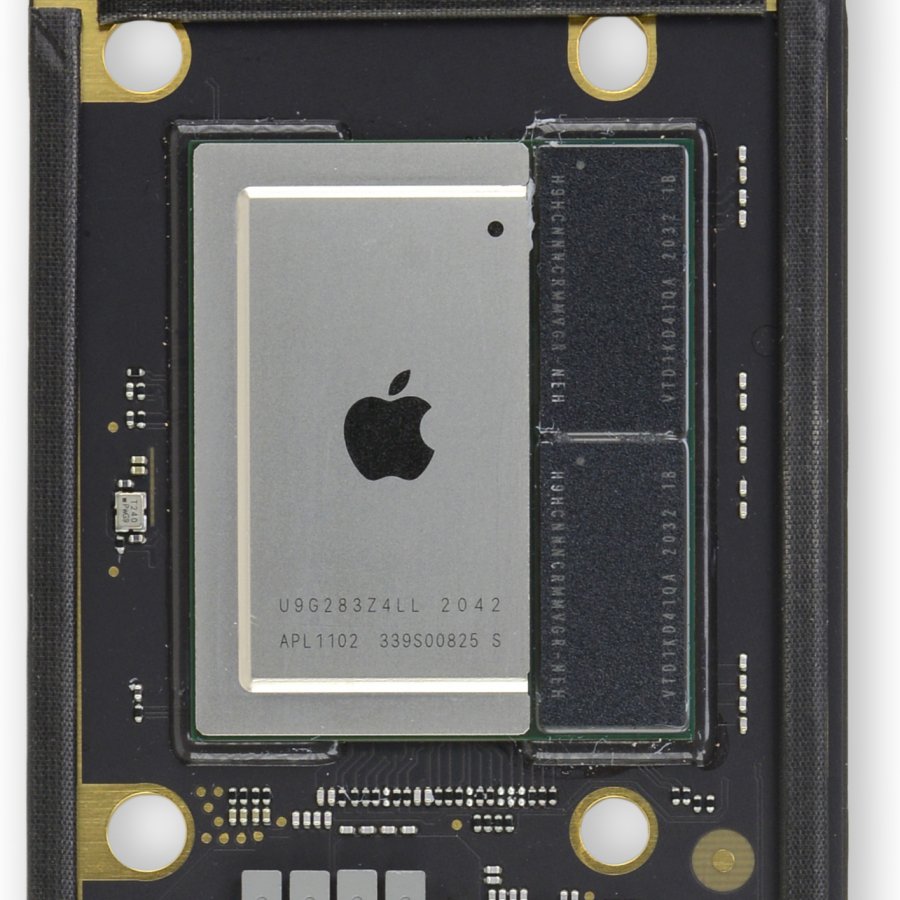

I'd still like a few more ol' fashion USB-A ports on there. I have so many things I need to plugin to USB-A ports still. My Mini only has 2 and it's just not enough.
I feel like now it is just a given that I’ll hook up a hub to everything.
Even my thunderbolt 4 hub / dock … has another hubs for “lesser” devices.
Yeah, I bought one of those fancy hub/stand thing that was built for the Mini, I'd still rather have then ports built it. I got greenscreen crashes for a while any time I had it plugged in, which meant I was stuck with the built in ports.
Totally understandable desire for what is supposed to be a static desktop experience.
its understandable for a laptop. I look forward to in 10 years when I no longer have a USB A device.
Can I ask what they are? And are they devices with removable cables where you could move some to a native USB-C cable instead of adapting?
>Dive into a multiplayer gaming session with SharePlay
How many AA multiplayer games are available on Mac? Not streaming, no VM, no Wine/CrossOver. Legit playable games. I know Minecraft, WoW, Civ6, and CSGO. Probably there is more but clearly not the target of Apple and the devs either
No Man's Sky and a Resident Evil reissue are the two big ones currently that Apple is touting.
More-or-less this generation's Tomb Raider and Monument Valley, if you ask me. It's nice that Apple reaches out to AAA developers to prove that Metal ports aren't impossible, but it's a lost cause today. No Man's Sky and Resident Evil both work out-of-box on Linux without any intervention from their developers. Apple's efforts are entirely misplaced and it's obvious that they're going against the grain of the rest of the games industry.
I'd argue Apple shot themselves in the foot by depreciating 32-bit libraries as fast as they did. If they had Proton, the Macbooks could be enjoying the same surge in gaming popularity the Steam Deck has.
> shot themselves in the foot by depreciating 32-bit libraries as fast as they did
My relatively anemic "Mac compatible" list of games, in my Steam library, went from about 20 to 3.
> How many AA multiplayer games are available on Mac?
Remember that all iOS games work on Macs, too. Here's a list of AAA iOS games from last year, for example.
https://www.reddit.com/r/iosgaming/comments/t1iqlh/a_list_of...
Why get the M2 Pro Mini when you can just opt for Mac Studio with M1 Max? They're roughly in the same price bracket.
Maybe this wouldn't matter to a lot of people but the M2 Pro Mini has HDMI 2.1 while the M1 Studio does not. You need HDMI 2.1 to get more than 60hz out of a 4k monitor.
That’s very interesting info I didn’t realize. Makes me want to wait for M2 refresh of the Studio.
M2 Pro is faster than M1 Max for CPU bounded tasks. When they release the Mac Studio with M2 Max, it'll be faster in GPU department & have 10Gbps ethernet, more ports, probably for the same price.
If you need 32GB in your Mac Mini the price difference is
$1999 for the Mac Studio vs
$1699 for the Mac Mini M2 Pro 32GB.
Indeed that's a tough sell for the Mac Mini. It shows how much Apple is charging extra for those capacity upgrades.
To truly be Apples to Apples, I would factor in the $100 option for 10Gb ethernet, which brings the price difference down to $200... and the extra $200 is getting you an M1 Max.
The big thing is the Mac Studio is an out of box config and the M2 Pro is custom. It's risky relying on custom Apple configs from experience as the turnaround for repairs is much longer.
Plus I’d assume the M1 Studios will now get discounted in preparation for M2 refresh in March.
Apple don’t do discount for latest gen unfortunately. On a related note: if the USD stays strong and you live outside of the US, you will get a price bump when they refresh the product line.
You aren't wrong. The difference between base models if you put 32 GB in the Mini is about $300. But you get 8 more GPU cores in the M1 MAX. And an SD slot.
That's my current dilemma, but now I think I'll just wait for the Studio with M2 Max.
I am pretty sure it will be released in March along with Mac Pro which will undoubtedly be one of the headline releases. I am going to wait and pick up an M2 Max Studio.
Yup, I’m doing the same.
I think the Mac Pro will be announced months before it releases, announcement at WWDC then fall release.
There's a $700 price difference but I'd say it's definitely worth it if you can swing it.
Isn’t it $300 difference at 32GB RAM?
That wasn't specified in OP's comment
The thing that's truly insulting is their trade-in offer for a late 2020 M1 8G/512G is only $330 vs. an eBay average selling price of over $500.
Resale prices on eBay have always been significantly higher than any trade-in for any product for any company -- this isn't an Apple thing.
And remember that eBay charges a selling fee of 12.9%, and you have to go through all of the time and effort of photographing, listing, selling, packaging, shipping, and dealing with a (small) risk of buyer fraud.
On the other hand, Apple takes it off of your hands hassle-free, risk-free, and you pay no sales tax on the trade-in value (which in NYC is 8.875%, for example).
There's nothing insulting about it.
Well, Apple resells the trade-in mini as a $750 refurb, so it's a pretty substantial margin they are asking for.
They also give it a brand-new housing so it looks brand new, full testing/inspection, and provide a one-year warranty. It makes sense you'll be paying more for those, none of which you get buying on eBay.
Apple: please give your customers ECC RAM, we take data integrity seriously.
That would at least help them justify the current RAM pricing!
Serious question, what difference does ECC make on a laptop? I thought it’s only useful on a server or for situations that are critical (aircraft computer).
On Mac Mini, ECC is useful for OpenZFS/data storage integrity.
Kind of shocked how many people here on HN are like "I'm totally fine with 8GB of ram on my mac". What? Isn't this hacker news? What are you guys doing with your computers? Are computers just toys now? Is HN no longer a space for professionals and hackers?
It's like a plumber saying they are totally fine using a $2 Walmart wrench. I just don't get it.
I have about 20 Safari tabs open, an IDE, Excel, Slack, Discord (web), Tableau, mail/calendar/etc, and some terminal windows. Activity monitor says I'm pretty much maxed out, but this is all I need, daily.
Memory compression is a thing, and these SSDs are fast, but I still don't understand how this is working so well. I was fully expecting to exchange this for a higher memory model, since it's supposed to be a temporary computer. I'm keeping it, for now.
Sad how much the price ramps up beyond reasonable for what it is when you bump ram and storage.
First Mac to support 8K explicitly (in M2 Pro config)
The real news here!
https://www.apple.com/mac-mini/specs/"One display with up to 8K resolution at 60Hz or 4K resolution at 240Hz over HDMI"This also applies to the new MacBook Pros as well, to be clear.
Cynic in my wonders if they finally have an 8k display they are ready to sell then.
The previous Macs supported so many 5k/8k display at once, they arguably should be able to drive a single 8k display, technically.
Example, Mac Studio supports up to 4 x 6k displays AND 1 4k at once. So that is 4 x 18M pixels + 8M pixels = 80M pixels
8k displays are 32M pixels, so Mac Studio is arguably already able to push 2x that many pixels...
Or maybe it's related to the HDMI chipset they chose specifically until now.
No, this seems to have nothing to do with Apple's own monitors. Apple just didn't support the proper display connection standards previously.
Now they support HDMI 2.1, based on this announcement, so they're finally catching up to everyone else. It would have been dumb for them to fall further and further behind on a display connector regardless of what monitors Apple has in the pipeline.
I miss getting real innovation from Apple like in the 90s and 00s. For laptops, I still understand the appeal of serious power with all day battery life, here I am just getting less software choices and less upgradability than a Windows desktop for same price. It used to be that software innovations like running UNIX out of the box, automatic full backups and good music/photo/video tools made up for it. Now Windows and Chromebooks have all of the above, has to be something new to differentiate Macs. Like machine learning support in Applescript, so that it can select files that are likely to be my favorite, or photos of a person by name, or content relevant to current date/time/location... Or something different entirely, but exciting and useful in substantial ways. Sony and other Japanese companies used to be very innovative, now it's just overpriced stuff with compatibility issues, Apple is heading the same way. At least Dyson still makes products that are different, despite their narrow focus area, wish more companies were like that.
I've thought the same but I'm not really sure what else I'd want in my laptop. With the M1s they've just hit such a sweet spot.
Battery life is great, the laptop is fast enough for everything I need. TB 3 hubs allow me to use external peripherals, two 4k 27" monitors, plenty of real estate.
Update: I just saw a couple other comments – camera for sure. A much better camera than the garbage they include nowadays.
Agreed for laptop, but how much will power efficiency make a real difference on a Mac Mini?
Quite a bit IMO. My Mac Mini is silent, even my gaming PC with expensive BeQuiet fans doesn’t stay silent. My Mac Mini also outputs no noticeable heat (although in the winter I kinda wish it did)
A M2 Pro Mini with a few spec bumps puts it at a similar price than a M1 Max Studio.
I was waiting for the Mini refresh but now I think I'll just wait for the Studio refresh and get one with M2 Max.
With the Pro Mini, I wonder if the lower-end of the Studio "moves up"... $X00 more, but with an M2 not available on the mini?
The Studio uses the Max and Ultra variants, so my guess is they will continue the trend.
Mini = M2 and M2 Pro | Studio = M2 Max and M2 Ultra. | Mac Pro = M2 Ultra and ??? (or maybe 2x Ultra)
Kind of surprised to see a 10G Ethernet port as an option on these.
It was available on the Intel Mac Minis, nice to see it making a comeback.
It was also available on the M1 Mac Mini, just not at launch: https://9to5mac.com/2021/04/20/apple-silently-updates-m1-mac...
But it adds a month to the lead time.
First time I've really been aware of an Apple product not just being like-for-like $->£ but actually a higher £ number: £649 vs. $599. For reference, $599 is £489.
Well us Brits have it too good with our train strikes, high taxes, crumbling NHS, and labour shortage. We need taking down a peg
The UK price includes VAT at 20%, so it's really £540.84 vs $599.
Interesting! Is this because the exchange rate (currently 1.23 GBP:USD but has been lower recently) is fluctuating in the same range as the VAT rate (20%)?
They raised all the international prices last year. For example iPhone 14 is $800 / £850
VAT?
Anyone know if the cheap model can handle 4k60 444 10bit over HDMI? "4k 60hz" is almost meaningless without more information. There are some reddit threads where people have issues with 4k60 444 10b on the (now) previous gen mac mini.
If they've fixed that, I would consider using this as an HTPC (as Otpimus and Movist are the only desktop video players I've found that seem to actually fully support HDR, my windows box isn't cutting it).
That still bugs me. Apple broke DSC in the first beta of Big Sur, and it hadn't been fixed when I switched monitors about a year ago, a little less.
Catalina on my cheesegrater Mac Pro would happily drive 2 4K 10-bit screens at 144Hz (via TB3)
Big Sur? Not so much. Had to downgrade DSC from 1.4 to 1.2 on my monitors, and even then I could only get 120Hz at 8 bit, 95Hz at 10bit, IIRC. Still not "shabby" but annoying. Really seems like it was broken as something to do with the Pro Display XDR.
The new model has been upgraded to HDMI 2.1 as opposed to HDMI 2.0 on the M1 model. Not sure if that helps or not.
Yes, thank you. 2.1 should have plenty of bandwidth, so unless there's some other limitation, it can probably handle 10 bit 444.
can this run dual monitors?
My experience with the M1 mini is a bit iffy dual monitor support wise. Thunderbolt -> USBC/DP/HDMI is best bet on high resolution monitors since it offer more scaling options. HDMI does't offer as many scaling options, I prefer 3008x1692 scaling on my 4k screens but alas, only one of them can be scaled like this since HDMI is 4k (not scaled), 2k or 1080p scaling only.
All of the Mac minis can do 2 monitors, the new M2 Pro one can do 3
Wait, what ?
I am looking at the rear ports of the M2 pro and I see 4x TB4 ports and 1x HDMI ... can't this drive 5x displays ?
If not, why not ?
Yes, but you need to pay the extra $700 for the Pro to add a third display unfortunately.
There's hacky third party solutions to this, but they all involve giving questionable applications permission to record all your screens.
This has never been the case for the Mac Mini.
Yes it is.
The Mac mini M1 requires a displaylink driver to support a third display, which in all cases requires uninterrupted screen recording permissions to function. M1 laptops require the same to support more than ONE external display, regardless of whether or not the laptop is in clamshell mode.
Apologies, missed the third display qualifier and thought you were referencing dual displays.
Almost certainly. The Thunderbolt spec requires any port labeled "Thunderbolt 4" to support dual 4k/60hz displays.
You'll note that, for example, on the Macbook Air (both M1 and M2 versions), Apple labels the ports "Thunderbolt / USB 4," which is confusing and IMHO downright misleading. Either way, the reason they do that is that those ports don't support dual displays, so they only meet the Thunderbolt 3 spec, which doesn't mandate dual displays.
A better label for the Macbook Air might be just "USB 4," or "USB 4 with Thunderbolt 3 support" (though TB3 is part of the USB 4 spec, so that's technically redundant).
USB/Thunderbolt standards are fun.
USB standards are a giant clusterfuck. I don't know how they managed to get it to this point.
Yes, in tech specs:
https://www.apple.com/mac-mini/specs/
And up to three monitors for certain models.
thank you everyone, it was very unclear to me based on past releases.
It has hdmi and thunderbolt so you could connect to both at a minimum most likely.
My first thought for this thing is to download Linux, Steam, and all the emulators you can and you've basically got a conveniently sized and priced home theater PC that can play any video game from 1990-2010 or so
You're better off buying an older Intel-based Mac Mini, then. Asahi Linux (Linux for ARM Macs) only supports OpenGL 2 atm. They'll definitely get Vulkan and later GL versions eventually but it will be awhile.
You are better off getting an intel 16" mac and running bootcamp.
Just get a steam deck and use EmuDeck.
Does anyone know if Mac Minis integrate with Xcode to perform distributed builds? It would be superb if a small software team could expense half a dozen Mac Minis to handle the team's build jobs.
Yup, that works.
I remember the first time I heard about someone getting a 1 GB hard drive -- I was astonished. I mean, I just could not believe it. Now people are complaining about only having 8 GB of RAM, lol.
"Today we package the same technology in our standard form factor, ram sizes, and we haven't innovated on design for years! it's new!"
Is it still huge? This thing should be much smaller now.
Technical limitation supporting quad monitors?
The different SoC configurations have different display controller counts.
Technically they want more money
All devices should be upgrade-able and repairable by customers, we paid for it and we own it, we have the rights to change it easily. We need to enforce the right-to-repair law fast, and please sue Apple if it does not conform to it(along with its only-me and pay-me-30% apple app-store policy)
Apple have a Self Service Repair program.
Not only is the self-service repair program a sham, but doesn't actually address the parent's point about upgradability - the repair program, if your part is actually covered by it (good luck getting individual system board components so you don't have to replace a $700 board because of a $5 blown IC) it will still be a like-for-like replacement with no upgrade.
Already ordered. Been waiting a long time to get 32gb in one of these.
I feel like adding the Pro makes the Studio increasingly niche.
Seems the differentiation factor would be RAM. Mac mini maxed out at 32 GB even with M1 Pro, where I am expecting 48 GB.
The differentiation factor is expandability. But with the Mac Pro rumored to have no user expandable RAM you can only add more storage and switch GPUs and perhaps plug in that Apple ProRes accelerator card.
Studio M1 Max has 2x memory bandwidth of the M1/M2 Pro. And the Ultra bumps that to 4x.
Wow, that's pretty weak. 32 GiB memory limit? In 2023 ?
You might be looking for the Mac Studio.
When you start pricing the Mini toward where you're concerned about the 32gb memory limit, you're approaching the Mac Studio pricing tier, anyway.
They do sell a beefier computer, the Mac Studio if 32GB is not enough.
Whatever happened to the Mac Pro line?
I looked at the Mac Studio, and would still like to switch from my cheesegrater, as it's obvious where things are going (and in my home office, the Pro is a heater). Although now I suspect I'm going to hold off for the M2 Studio.
Apple is still doing its old tricks, though. Out of curiosity, I put my $13K Mac Pro in as a trade-in to see what it'd contribute (and to be clear, my expectations, I thought, were reasonable... was thinking $3K). 12 core Xeon, 192GB, 8TB, W5700X 16GB.
$3K? No, $1,050. Ouch.
Double ouch when you go to the Mac Pro store and find that exact same configuration is still being sold by Apple today for $12K.
Mac Pro per the rumors is definitely coming this year, probably around WWDC.
The M-series doesn't have regular PCI-E or other internal expansion options so "regular" Pro line is kinda out until they solve that issue.
It's overdue.
It’s called the Mac Studio now.
Not really, the Studio was more of an iMac (27inch / Pro) replacement.
Mac Pros are coming.
So should I buy this or build a PC?
$4,500 maxed out. $4,500 for a Mac mini. God. They really think people are going to pay $4,500 for a Mac mini, don't they?
No, it's $599, with a load of extra customised options that allow people to add what they want, you cannot even buy this one in a store, you have to do a custom order, your regular user, walking into an electronic store will buy a base model.
You've specced it up with every customisation possible, that 999.999999% of buyers won't do and won't need and then complain at the cost in an effort to bash Apple,
I'm not trying to bash Apple in bad faith, but let's be real the $599 model is inadequate. 8GB of RAM and a 256GB SSD in 2023. There's plenty out there on the M1 Mac mini's 8GB being a bad idea even for casual users. I had an 8GB M1 mini when it first came out and returned it because it was swapping to the SSD with like 3 apps open (nothing like an IDE or Docker or Adobe X Y Z).
I just find it humorous that you can spend several thousand dollars on a Mac mini, Mac Pro, or Mac Studio. It seems like there's a lot of product overlap to me.
> let's be real the $599 model is inadequate
For most of the folks on HN, that's probably true. We're an edge case.
For my parents? A Mac mini is gonna be more than enough. There are folks happilly using Chromebooks with a tenth of the power.
But why would you buy them a Mac mini of all things?
Because I've fielded all sorts of "my PC has a virus / isn't working right" calls, but near-zero numbers of them for their Macs, and they don't need a laptop that's 2x the cost.
256GB of storage is more than enough for me personally. I'm also the kind of person for whom 64GB is more than enough on a phone.
My 2016 Macbook air had 8GB of RAM and a 256GB SSD, and that was bad for 2016. You can buy 1TB NVME SSD for $100 to upgrade any off-the-shelf SFFPC. There's not much excuse why Apple can't do the same, other than to get you to subscribe to iCloud storage.
The $599 model is for a basic user who barely does anything more than browse the web and send emails (which is to say, a lot of people). It's not a pro machine.
I feel this website is a strange bubble. I use an underpowered laptop from 2013 for all my daily tasks including light photo, video and audio manipulation and I have no problems. Why does it always have to be about videogames, heavy creative work, multiple VMs or compiling gigantic codebases?
One thing to keep in mind is the demand of the specific OS/applications you are running. For example, 1GB of RAM is plenty for Windows XP, but 4GB for Windows 10/11 is abysmal. This is more or less why Linux is such a popular choice for repurposing old computers.
I feel like such a "basic user" would be better-served with an iPad or even a MacBook Air, unless they happen to have a monitor, mouse, keyboard, speakers and webcam from, say, their old PC. Historically Apple has marketed the mini as a "gateway drug" to Macs. Cheap, and people can just reuse the peripherals they already have. Even now I wouldn't recommend an entry-level mini to that "email and web" crowd.
I'm a "pro", but don't do 8k video editing.
Still haven't maxed out the M1 mini. Except when Zoom or Discord start taking weird amounts of CPU for literally no reason :D
I know from personal experience that if you are using the mini for anything of substance, and only have 8GB of RAM, you are using your SSD as "RAM" more than you probably realize.
Many people use 8GB/256GB happily.
It's like a faith amongst some people that this is bad, but the idea seems to lack evidence.
"many people" is as anecdotal as it gets. I don't know anybody who A) only needs 8GB/256GB and B) isn't better-served by an iPad or something similar. I think if anyone from Apple Marketing is reading this thread, they are laughing at how people are so instinctively buying into the entry-level Mac mini. The biggest value-add the $599 Mac mini has is that Apple can say Macs start at "just $599".
There will always be some non-zero number of people who either want or are genuinely best-served by something like the entry-level Mac mini, but that doesn't equate to it being a generally-good option.
> "many people" is as anecdotal as it gets. I don't know anybody who...
lol
I got ya beat. You don't know anybody who meets that criteria, either.
The onus is really on you to back up your claim that 8GB/256GB isn't enough.
I don't see what iPads have to do with this at all. Surely tablet vs desktop is an entirely different decision.
It's just ironic that some people here are really pushing a $599 Mac mini as a valid option, while ignoring tablets. The argument that a Mac mini is a great alternative to a PC in that malware isn't an issue is totally valid, but iPads benefit from that too (and are often less than $599).
As I'm sure you know, there are many articles, threads, et. al. out there about whether 8GB is enough for a Mac. We can link articles back and forth all day, but here's what it comes down to: with only 8GB of RAM, even light use will see the Mac offload to swap much more often than if it had 16GB to work with, and one of the first "scandals" that arose from the M1 Macs was that bytes written to the internal SSD was much, much higher than it should have been, because of that swap usage.
Dell's XPS tower starts at $749 (8GB RAM, 256GB SSD, Intel 12400) and can be maxed out (not including support contracts) for $5200. Heck, a Ford Maverick starts at $22,195 and can be customized maxed out at over $40,000. This is not an uncommon pattern.
True, but I would argue that it actually makes some sense for the XPS, Dell's only "pro desktop" option (does Vostro count as "pro"?).
That the Mac mini can cost either X or ~10X is more like saying "a car starts at $15k and can cost $150k". Throw in that it clearly overlaps with the Mac Pro and Mac Studio and I can only ask "why would I pick X, Y or Z?" It seems like the Studio is the way to go vs a mini configured above or around $2000, unless Apple is simply peddling to datacenter customers with Mac mini server racks (which hey, maybe).
XPS is Dell's premium lifestyle model. OptiPlex is their enterprise/pro model (which starts at $499). I didn't talk about "a car" in the generic sense, I talked about a single model--not even multiple models from the same manufacturer (Apple:Ford::Mac Mini:Maverick).
That's my point. Within the same model is a variance in price expected of the entire industry at the macro level.
You can't argue that XPS is "premium lifestyle", that's what Dell says it is, but that's not what it ends up being in reality. I will say XPS/Optiplex are both the "pro" stuff (pro as in MacBook Pro, not necessarily Pro as in "used in corporate IT most often").
Will there be a M2 Max Mac Mini?
The Max one is 185W
Nice hardware.
Too bad I can never put it in one of the industrial machines my startup builds, as these Apple computers are completely oriented towards end-consumers, locked with an AppleID, etc. in summary totally useless from a builders perspective.
It is quite sad that top tech companies nowadays produce mostly consumer electronics.
Last decade called, they want their base RAM spec back.
Nice upselling tactic to get 32GB of RAM ... /s