KDE beats macOS
old.reddit.comHow does this particular list of very minor gripes get so many upvotes? And it's not just minor gripes, half of them are wrong. Some of them have been addressed by others, but:
* Taking screenshots requires to click the preview in order to copy to clipboard, which also causes to save it to Desktop.
No, it doesn't.
* Surprising lack of apps in the store
Says someone defending KDE? But hey, strangely enough I'm typing this in Firefox. I've got Teams running, and Zoom. There really is more than one way to install an app.
* The stupid amount of app icons in the "tray" bar. Not collapsible, not hideable.
What does that mean? There's no tray bar. Is it the menu? Is it the Dock? In both cases, it's untrue, or the writer means something else.
* No easy way to open a path in Finder
Cmd-shift-G or Go > Go to folder isn't easy enough? What's KDE's super brilliant solution?
* Finder: no side by side view for easily moving stuff between unrelated folders/paths
Can't open two windows?
And even if all were true, it misses so many other points, it's embarrassing. What OP means is: I've got a fixed workflow, and now I have to learn a few new shortcuts.
Agreed one hundred percent. Why extremely biased rant from specific DE subreddit (also biased) gets so many upvotes? Who cares?
My additions:
* Poor to non-existing window tiling (at least Rectangle has very good defaults and works well)
There are apps for that, like writer mentioned - so what's the problem? I'd argue that using Expose, Mission Control, Multiple desktops and controlling them with touchpad swipes is faster, more convenient, more intuitive and flexible than tilling window management, but it's personal biased opinion, just like the writer's.
* Missing native Alt+Tab and individual window switching (only does app switching)
I either don't understand the problem or what's wrong with `cmd-tab` for app switching and `cmd-~` for app window switching.
* Finder keyboard shortcuts not shown in context menu (makes them far less discoverable)
Most, if not all, apps have their keyboard shortcuts shown in the menu bar next to menu bar items.
* Lack of native clipboard
To be fair - I am intrigued what does writer mean with `native clipboard`? Some sort of built-in app for clipboard management?
* Finder's weird shortcuts for rename vs open file (no way to open a file with keyboard?)
`cmd-o` to open, `enter/return` to rename, `space` to quick look. Just because OP is not used to different shortcuts - does not mean it's weird. Also many shortcuts are very consistent throughout whole system and throughout different apps.
After writing all this - I feel like I fell for the troll [0], but will leave my opinions as it may help for other Macos beginners. IMHO it's just a thing of muscle memory and learned workflows.
[0] I think it's trolling, because clearly he/she haven't read anything about Macos, because there are plenty of sources (even official ones) for first time Macos users. Something like hiding menu bar and/or dock are the most easiest things that you can do while skimming through `System preferences` on your own. Original writer seemingly opened Macbook for a first time, it didn't work same as KDE so he/she decided to rant about it on reddit. ¯\_(ツ)_/¯
> I either don't understand the problem or what's wrong with `cmd-tab` for app switching and `cmd-~` for app window switching.
The fact that they have two different shortcuts and you need to think about which one to use. It's a reasonable complaint in my mind, if you're used to only thinking about windows, now you have to spend extra brain power on thinking if you want to change app or window within the same app.
The reverse also applies, if you're always thinking in terms of windows grouped by app, then being forced to iterate all windows is annoying.
It really comes down to your mental model and what you are used too. If you try something else, it will most likely require deliberate effort to get used to it.
It's why I can only work in Linux. I'm too old to change my ways at this point, it's not worth the effort. When they finally kill X in 10-15 years, I'll hopefully be retired.
> * Lack of native clipboard
> To be fair - I am intrigued what does writer mean with `native clipboard`? Some sort of built-in app for clipboard management?
You don't know native clipboard? It's like a universal second, "quick" clipboard in Linux. You select something somewhere - copied. You middle click somewhere - pasted. It's so much faster and super convenient, it supports terminal and is independent of the "main" clipboard so that you can (ab)use it to gain two clipboards at the same time if you so wish.
Being a Linux guy and having used MacOS for the last few years at work. I think what the OP is talking about is the clipboard history. It was one of my missing features when I start. I found Maccy [1] and that solved any issue I had.
Do keep in mind in macOS you have `pbcopy` and `pbpaste` at the command line, though, for interoperability, and with Linux-style mere highlight, you wouldn’t then be able to type in a terminal without losing the selection.
macOS Terminal actually supports middle-click insert. It's quite nice, but it only works inside Terminal. It's useful as a second clipboard.
> `cmd-o` to open
I always use Command+Down.
>Cmd-shift-G or Go > Go to folder isn't easy enough? What's KDE's super brilliant solution?
Not sure about KDE, but every OS (admittedly not many), other than Apple's macOS and previous iteraitions I've used, have had an address bar with the file path. Both of the options you mentioned weren't obvious to me and I only found out about them from your comment.
This isn't only an issue of familiarity but also an issue of features being discoverable.
It's not obvious to me that the address bar in windows explorer sometimes behaves like breadcrumbs and sometimes becomes a text box. It's a very subtle behavior, but I'm sure for windows users it's totally discoverable and intuitive.
Finder has a breadcrumb you can enable. It's in View > Show Path Bar. It's for sure a discovery issue. MacOS assumes you've always been using it.
Discoverability is a holy grail. With a list of features that has been expanding since 1984, you can't expect them all to be discoverable. And this one isn't a very frequent use case for normal users.
KDE does have a different target audience from macOS and Windows, but even as a dev/architect/sysadmin, I'm not sure if I would have found it. I've got a GNOME setup at work, but no idea if it has a similar feature.
As a person, who is using Mac for close to three years, I have to admit that discoverability of keyboard shortcuts (or even existence of such - navigating apps' menus, for example) on OS X is close to zero.
> And this one isn't a very frequent use case for normal users
The Finder's Go menu seems like a reasonably discoverable location.
That being said.... I kind of wish you could type and tab-complete paths in the Find window (cmd-F in the Finder) and Spotlight (cmd-space in any app.)
> What does that mean? There's no tray bar. Is it the menu? Is it the Dock? In both cases, it's untrue, or the writer means something else.
They're clearly talking about the area on the right of the menu bar. You know, the one you can't (temporarily) hide entries for without a third-party app, which is functionality that exists in both Windows and KDE.
You can drag cmd-drag them out, or configure them via their settings (system icons are in the Settings app, others in their own apps). Some applications don't support that, and are always present, that's true.
For moving files between folders tabs in Finder works fine, you don't even need a new window.
> How does this particular list of very minor gripes get so many upvotes?
By being on kde subreddit. Obviously the post is preaching to the choir there.
> Taking screenshots requires to click the preview in order to copy to clipboard, which also causes to save it to Desktop. > No, it doesn't.
How do you take a screenshot that saves the screenshot to a specific spot that isn't the Desktop and ALSO stores the screenshot in the clipboard?
cmd+shift+3/4 doesn't store the screenshot in the clipboard. It just stores in on the Desktop. You can click the preview and it will move it into the clipboard as well as save it.
The other method, that puts the screenshot directly into the clipboard with ctrl+cmd+shit+3/4 but it doesn't save the screenshot.
What's the single keyboard shortcut command to take a screenshot and have it saved to your machine as well as have it stored in your clipboard?
I'll enjoy watching people down vote learning and knowledge sharing.
The save location for cmd+shift+{3,4} can be configured through the command line.
There is apparently a settings menu inside the Screenshot app now that allows this as well, though I found the above solution before the settings in that app came about.defaults write com.apple.screencapture location <path>For those wondering: cmd-shift-5 is the shortcut the very configurable Screenshot app, which allows you to do things like save to folder, clipboard, or straight to mail and more.
I remember Mac fans making a big deal when that app came out, decades after KDE got the feature. The disproportionate celebration and the impressively un-mnemonic, un-discoverable shortcut both stood out to me at the time.
> How does this particular list of very minor gripes get so many upvotes?
It gets upvotes from the hurr durr Apple bad crowd.
I mean the title should read "Man confuses personal habits with a product design degree"
Intuitiveness is just what you are used to at this point. If you've been in the Apple ecosystem your whole life, then their UX seems intuitive to you.
If you haven't, then it makes absolutely no sense. I first touched an apple device in my 20's, there was nothing intuitive about it. I couldn't do anything and was extremely frustrated. I'm sure the same applies to apple folks trying gnome/KDE/windows.
People are getting introduced to touch devices from a young age now days. I bet they will find things intuitive based on the devices their parents gave them. It's kind of like religion at this point, did you grow up using Android or iOS? Switching would be a deliberate effort, like not following your families religion (with hopefully significantly less judgement).
I don't really agree. The really interesting part of intuitiveness is how it scales once you became familiar with the basic set of UX primitives.
At least from my experience with ~15 years of mac, ~15 years of on-and-off linux and windows, macOS has remained more consistent, because the primitives are much more universal.
Take, for example copying. You can alt-drag a surprising number of things across many different apps and have them just work. Or holding alt in menus to show additional entries. Or holding shift or alt to resize items to preserve ratio on one or two sides. Or take dragging and dropping references to the current file from the proxy icon in the window top bar. Or dragging and dropping selected text as snippets. Or looking up words in the built-in dictionary.
The amount of effort the mac team invested to re-use ux interaction modes is really crazy coming from other platforms, and it extends to abstractions such as disk images. One of the things that impressed me the most was how you could clone mac volumes to usb or firewire disks, boot from them, clone volumes to compressed images and restore them - all seamlessly, without messing with disk sizes, sectors, boot records or bioses - and it would just magically work.
Granted, the story is no longer that easy with APFS and M1/M2 macs, but I still think this is a bar that no other operating system has reached.
> I don't really agree. The really interesting part of intuitiveness is how it scales once you became familiar with the basic set of UX primitives.
Is intuitiveness the right word? I make the same arguments about Vim, that it's one of the most logically consistent editors once you learn the basic set of primitives (not perfect of course). But I don't think anyone would call it intuitive.
> Take, for example copying. You can alt-drag a surprising number of things across many different apps and have them just work.
Why do you need to alt drag? Why can't you just drag? You can drag a lot of stuff in windows and it "just works".
> Or holding alt in menus to show additional entries.
Why does it not show all the options all the time? How are you supposed to know to press alt?
> Or holding shift or alt to resize items to preserve ratio on one or two sides.
This is pretty universal.
> Or take dragging and dropping references to the current file from the proxy icon in the window top bar. Or dragging and dropping selected text as snippets.
I have no idea what you mean, but you can drag lots of stuff in windows to different places and stuff happens.
The disk image stuff is cool I guess, but I'm guessing it's possible because Apple controls the hardware and software. I'd be pretty pissed off if some tool automagically changed my boot records.
>I have no idea what you mean, but you can drag lots of stuff in windows to different places and stuff happens.
On macOS, there's a concept called "Proxy Icons". These are little icons that are shown in a title bar of a document-based applications (e.g. "[ICON] My File.txt"). You can interact with these icons as if they are an actual file on the disk.
For example, you have "My File.txt" open in TextEdit, and you want to reference them in Terminal, you can just drag the icon into Terminal.app window and it will resolve the full path. Or you're editing the file, but realized you need to make a copy of that file before making changes, you can alt-drag on the icon and copy it elsewhere. Or you're working on a file and want to navigate to the containing directory, you can right click on the proxy icon and it will show the full hierarchy for navigation, etc.
This is something I missed quite a lot when using other OSes.
Things like this actually works in KDE, I can take a file from the file manager and drop it into konsole and it will copy the path.
It's how copy/paste intents are supposed to work, the receiving object or program might want to use the object sent in various ways so you can extract image data or path if it's an image for instance. Konsole just grabs the path from all that is sent to it that is not clear text.
I did try your text file example from kate (text editor), but that didn't work. otoh, kate does provide the path to the file for easy copying right below this icon :)
I can drag the file from kate, however konsole doesn't accept the object. I suspect kate doesn't encode the path in the copy/paste object, perhaps something I should fix.
Drag n drop being something you can actually use and that usually does the thing you'd expect, rather than something you train yourself never to do outside things like moving files around in Explorer or whatever, because it usually breaks things, is one of the things that makes it hard to switch away from macOS once you're used to it. Last time I tried KDE a couple years ago I crashed an app in the first five minutes by trying to drag n drop, and was like "oh yeah, that's why I didn't used to ever try to drag and drop things".
And yet they redesigned preview and hid the damn icon. You can still get the drag thing sometimes, but every time I struggle to find what to drag... is it the title text or just next to it? Sometimes it doesn't work with anything, did I forget where to drag from or does it not work from this file? Who knows, it's very frustrating.
It was very frustrating when they hide the proxy icon behind an obscure modifier key trigger and a delay in Monterey. Thankfully enough complains were made, and they've since added a toggle in Monterey 12.1 to always show proxy icon (Accessibility -> Display -> [ ] Show window title icons).
Terminal equivalent:
defaults write com.apple.universalaccess showWindowTitlebarIcons -bool TRUE
and to think, they caused all this problems just to make mac app window titles look more similar to ipad apps...
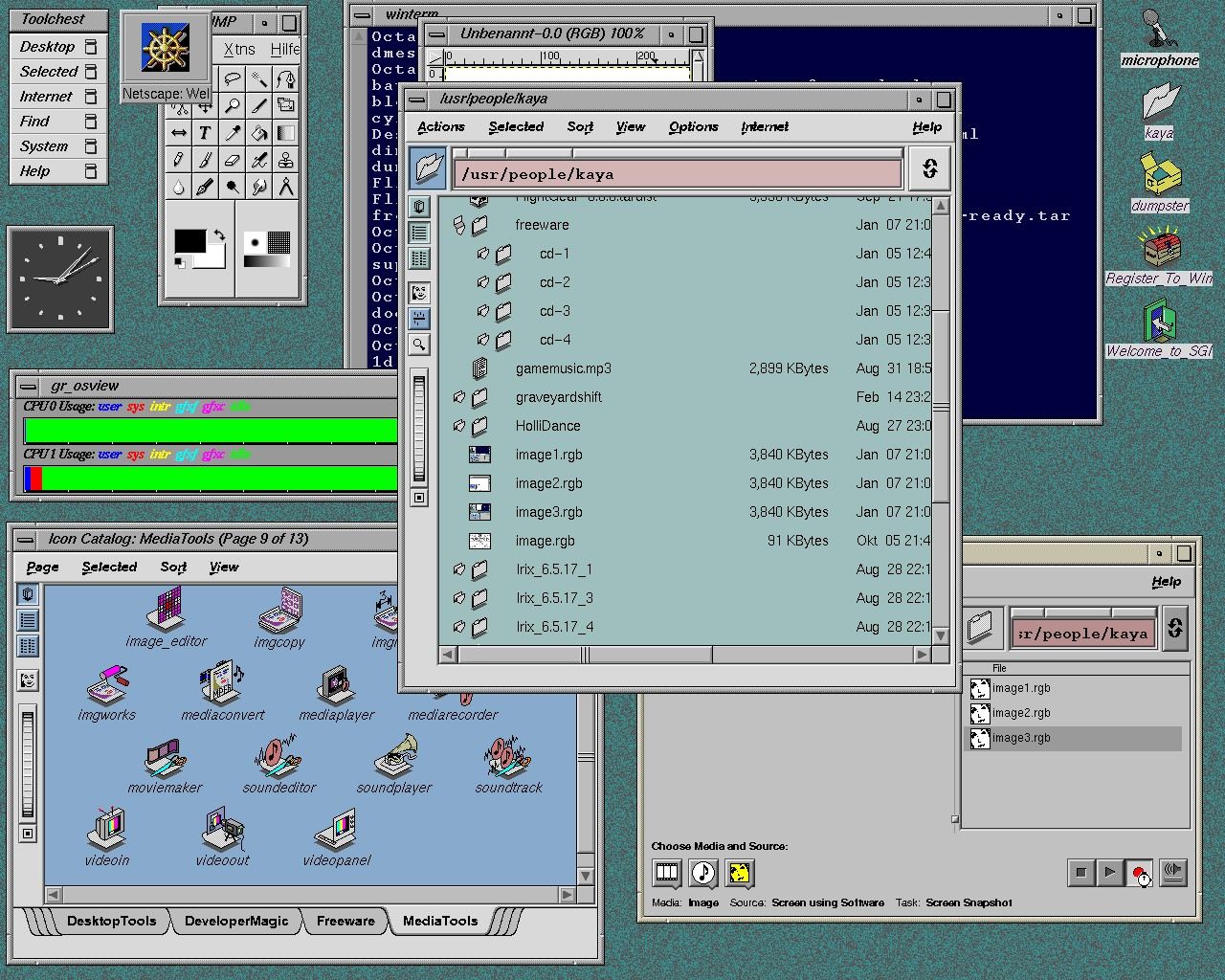
One of the nicer ui elements on sgi's was the drop pocket. a specific identifiable spot where dropping a item would do something, it is a ui feature I wish had been picked up by other toolkits.
The other really nice part about the sgi file explorer were the little buttons above the address bar to quickly go to a specific part of the hierarchy. Windows got this in 7(10 years later) and it works well but is via a hidden state. I am less familiar with mac's finder but I think it can do it, again via hidden state.
https://software.majix.org/irix/screenshots/screen.5.big.jpg
here you can see a drop pocket(the blue folder icon to the left of the address bar) that takes paths. and the very nice irix address bar.
Sounds a lot like drag and drop saving, which as I recall was a feature first introduced in RiscOS. That UI was way ahead of its time.
> Why do you need to alt drag? Why can't you just drag? You can drag a lot of stuff in windows and it "just works".
You can "just drag", but if you alt/option drag you get a copy operation instead of a move operation.
Sure, using option/alt to get a copy isn't "intuitive", but that wasn't the point. The point was to note that the consistency in macOS is such that even less known things like alt dragging has been consistently implemented essentially everywhere.
IMO this consistency and composability is a large part of intuitiveness if nothing else. It does help with a different part of the learning curve than what people often are obsessing about with the word “intuitive” though.
> Is intuitiveness the right word? I make the same arguments about Vim, that it's one of the most logically consistent editors once you learn the basic set of primitives (not perfect of course). But I don't think anyone would call it intuitive.
As far as I know, VI is actually an acronym that stands for Very Intuitive
> At least from my experience with ~15 years of mac, ~15 years of on-and-off linux and windows, macOS has remained more consistent, because the primitives are much more universal.
I'm having a hard time understanding this, even with your examples. It might be possible that I simply haven't figured out the primitives, or an underlying logic to the OS?
In my experience, MacOS is the worst offender (excluding Windows) of inconsistencies. MacOS is filled with UI elements that, as far as I can tell, only appear once. (For example, the green 'status light' when activating SSH, compared to the slider buttons used everywhere else in the OS.)
My experience is roughly ~5 years MacOS (mostly as a child), ~10 years Windows, ~10 years Linux.
In all, it feels like Apple demands a "larger" language one needs to learn, compared to various Linux distros.
I do agree with a lot of this.
What should not be forgotten, however, is how much of the basic UX primitives are being thrown away with the new Catalyst iOS style apps.
I think the key is that macs are optimised for this workflow. As someone who uses the terminal a lot, I often find it difficult to get the information I want from any GUI, compared to piping terminal output through different utilities. After all, if you're talking about consistency, you cannot beat the UNIX philosophy.
However, most people would balk at this workflow. Workflows are just very personal and a reflection of how one thinks. How one thinks is also influenced from what they've used in the past, especially in formative years. Trying to justify why any user interface as unequivocally better than another is an exercise in futility.
I have used/owned the macs at various points in my life. The user interface has remained consistent over the years, but it has poor usability compared to even Gnome due to the accompanying legacy baggage.
Here's an example. Closing all document windows doesn't close the app. This is a design decision from 1984 (at which point we knew far less about the usability of Desktop UIs than we do now) which imho hasn't quite aged well. What's the point of keeping an app open without documents? Most people open docs from the File Manager or Desktop (which might load the app as well if there isn't one already running). And not by going to an inactive app (with a hanging toolbar) and then doing File -> Open.
>Closing all document windows doesn't close the app
I love this about macos. Its consistent: eg, you close documents with cmd+w one by one, until they're all gone. Then you press cmd+n to create a new document. This is consistent and logical. On other OS, cmd/ctrl+w does something different if you're closing the last document.
Another example of the inconsistency it causes is in browsers when you close the last tab and it asks you "closing the browser will cancel the in-progress download, are you sure?" and so you have to keep an arbitrary tab/document open to keep background downloads going.
Also in a practical sense it is useful for slow-starting applications to be running and ready to load a document without needing to keep open a blank document.
The equivalent behaviour on other systems is achieved by MDI applications which are much less elegant IMO. Or for apps that have to keep running but don't have a specific window to show, they implement something similar to mac anyway where the application appears in the system tray.
Familiar != consistent. Mac is app-centric, all other mainstream OS's are window-centric, and they're all internally consistent. If you grew up with one system, the other feels alien and broken.
For example, on MacOS, alt-tab not cycling through the list of windows feels so absurdly broken to me that I don't even bother trying to use that shortcut anymore. Focusing apps that don't even have a visual presence on screen is also a source of heightened frustration.
When keyboard shortcuts that control window/document lifetime sometimes also control app lifetime depending on context, that is an internal inconsistency in the abstraction. Familiarity can help you deal with it just fine, but I don't think I was confusing the two.
“Magic windows” is something that bites me fairly often under Windows/Linux. “Well I’m done with this page, might as well close the browser wi— oh wait that’s right it’s downloading something.”
I wish there were Linux distributions that took an app-centric approach similar to that of macOS. It just gels with my brain better.
I'm the opposite. Just the other day I was trying to find if I could keep an application running without any window on KDE Plasma :-)
I want to keep some applications running so it continue to receive its own thing in the background, but I do not want to accidentally open the window during Alt-Tab, e.g. my email client, my chat application. (On macOS it's still showing up on Cmd+Tab, but selecting the application doesn't activate the window).
I think this design decision still makes sense in 2022. On Windows and Linux, applications can have no window open by installing a background service (ugh) or hide to status bar, but application need to explicitly implement the behavior. On macOS, this is the expected behavior.
You can pretty much do anything to a window in KDE Plasma: you could force it to stay behind, force some arbitrary state or geometry upon it, add a setting that hides it from the apps bar, or even from the alt-tab list - or you could do all of this, it's just a couple clicks away under the window title bar icon, other actions, configure... I'd wager to say you have much more control in KDE than in any other DE, macOS and Windows included.
> On Windows and Linux, applications can have no window open by installing a background service (ugh) or hide to status bar, but application need to explicitly implement the behavior. On macOS, this is the expected behavior.
Yeah, but the number of apps which require this behavior is far less than those which don't. Hence in my view, not a good reason to default to it.
Personally, I found the opposite to be true. Given more and more applications require constantly polling backend server (not only social apps, e.g. a TODO list, note-taking application, a time tracker, etc.) I much more prefer this behavior being the default.
That said, I still like KDE Plasma more than macOS as a desktop. But this and the proxy icons are two things that I missed the most.
> Given more and more applications require constantly polling backend server (not only social apps, e.g. a TODO list, note-taking application, a time tracker, etc.) I much more prefer this behavior being the default.
Why are desktop versions of TODO lists, note-taking applications, and time trackers constantly polling the server in the background? Social apps and web apps I understand.
I personally do not like using web apps and usually try to use desktop version whenever possible. Of these examples:
- Obsidian for note taking. Configured to sync with Obsidian Sync.
- OmniFocus as my personal GTD. Configured to sync with Omni Sync Server, and also sync to my phone (though on Linux I use OmniFocus for Web)
- Clockify (Desktop) for time tracking. Required for work.
Well, on macOS, my note-taking, reminders and calendar apps all sync with my phone and tablet. Having it poll in the background means I don't need to wait for it to sync when I next open it.
Your legacy baggage is my favorite feature. I may not need any documents open for an app right now, but what about 5 minutes later? Why would I wait for photoshop to start up again just because I was doing something else for a bit. It’s called multitasking and there’s a ton of working memory these days to the point of rarely having to check, not like the legacy days you refer to.
> Why would I wait for photoshop to start up again just because I was doing something else for a bit.
This is a part of what I was saying. Apps are cold-starting much faster today than it was back in the days of disk spindles. There are also ways to keep it hot, while not being active.
I am a professional artist who has been working with Adobe's tools since the turn of the century and let me assure you: Adobe's apps always take forever to cold-start. Always.
I recently got an M2 Air and Illustrator loads the fastest it ever has - I'm staring at the splash screen for all of five seconds before it's ready to get to work. Normally it's been more like 20-120 seconds for the past decade. I am quite sure Adobe will find a way to make their apps take several minutes to start up on the M2.
As a consequence, Illustrator cold-starts when I log in; the only time it stops running is if it crashes, or if I need to quit it to update plugins or the app itself. If I go off and do something else for a while it quietly gets swapped to disc by the system; the instant I switch back, it gets swapped into memory, ready to get back to work.
Not closing the app once all windows are closed is not 'legacy baggage', but intentional design. An app can do more things than just display stuff in windows, e.g. playing music, or downloading stuff.
It may be less intuitive that apps can run with few or no visual indicators.
I actually switched to an iphone around 2.5 years ago since teams wouldn't run properly on my old android and the offerings from my company instead of iphone (huawei and samsung) didn't really appeal to me.
Now 2.5 years later I switched back due to not being able to make friends with the apple UI despite trying for that long. It feels so constrained and inconsistent to me.
The pixel phone I got now is a dream in comparison. The keyboard just works, sharing between apps just works. Keepass didn't really integrate with ios, in android I can select it as my own "autofill provider". I can have firefox with ublock. The
Switching either way was not really a pain for me as I never go all in on something so I just had to find app replacement.
As a note to the article itself, I also run KDE on arch linux on both my work and private computers and since it matured from the 4.0 transition mess it has just been great I think. Having used linux as my desktop os since ~94-95 I am just a huge question mark when someone puts me down in front of mac os!
For context: I'd been a "linux person" since undergrad (mid-90s). I picked up a really early Android model after my BlackBerry expired.
I have almost the exact opposite experience as you describe: I switched from Android to iPhone a couple of years ago for two reasons: 1) my Google phones (I had a pixel at the time: previously had written it was a Nexus, but it was not) kept bricking; 2) I got an old model iPhone (it was an iPhone 8) to use as my work phone.
The iPhone 8 performed better and had a much better UX than my then-current Nexus. It just wasn't even a fair comparison, really. I upgraded my personal device to the latest iPhone and haven't looked back. I haven't even touched an Android phone since then, and unless something really compelling happens to force it I probably never will again.
Same thing with my laptop, actually: around the same time I decided to give a macbook a go. I haven't regretted it at all.
Apple fits a lot of people, just not me :)
I think for me the major issue is that I don't like any of the default options in the iphone and the 3rd party keyboards kept bugging out, even swiftkey and gboard would act really weird. Also the undocumented gestures drove me nuts.
And not being able to just have a normal browser with proper ad block and simple things like that.
Similar here, learned on DOS and Windows (3.1-98se) then used desktop Linux alongside Windows for about a decade, and when I eventually got a smartphone started on Android (because it was cheaper) before finally getting significant experience with iOS and OSX because I started working at a mobile dev shop (dual-platform, not just iOS). Once I got used to OSX/macOS (took maybe six months) I wondered WTF I'd been doing with my life, and seeing tons of Android and iOS devices side-by-side every day, and working on apps for both, made it really clear to me which was better and what I ought to be using, and it wasn't even close.
I've got complaints about Apple and they make mis-steps all the time—and I'm really worried about their getting into ads more heavily—but everyone else doesn't even seem to be trying to compete with what they're doing, so there's no real alternative.
I am glad that you are content with iPhone, and that it works for you. - It's what really matters. But I just want to point out that the latest nexus phone is from 2015 and iPhone 8 was released in 2017.
You're right: it was the next line after Nexus, Pixel, that I had. I edited my original comment.
FWIW, fellow Android->iPhone escapee here. I am not planning to get an Android phone for a while, unless iOS becomes much worse or Android much better.
> Keepass didn't really integrate with ios, in android I can select it as my own "autofill provider"
I've been using an iPhone for almost exactly 2 years now and I didn't realized until like a month ago that you can change the default password manager. Unless Keepass just didn't tap into the API (which would surprise me), but Enpass works like a charm and I felt like an idiot for manually going into the app and copy-pasting this whole time.
Settings > Passwords > Password Options
And then set "allow filling from" to your password manager
Even if you don’t change the default manager, third party managers automatically appear as options for auto filling password fields.
I’m thinking that whichever keepass client OP was using (there are multiple on the App Store) didn’t actually take advantage of the password API.
Which ties into why I haven’t been able to switch to keepass: client quality is all over the place and even if you find one you like, there’s no telling when it’s going to go dark and if you’re lucky get forked.
On the pixel phone "it just works" with keepass.
But yeah I didn't know about that option either in iOS after 2.5 years.. It says something about the UI I think.
I don't know. My password manager just told me to change the option there and it was never an issue. They have to put the setting somewhere. Alternatively a password manager could register itself with the OS, but that has a certain security risk (even with a dialog, which we just tend to dismiss).
> The keyboard just works, sharing between apps just works. Keepass didn't really integrate with ios, in android I can select it as my own "autofill provider". I can have firefox with ublock.
Password managers work without any issues, I'm using Bitwarden happily.
Sharing between the apps is also a thing? I'm not sure what exactly do you mean but I have zero issues navigating, copying stuff between the apps, the only issue is with Google Photos when you remove them from local storage, as sharing in iOS won't detect those unless you manually download them again or share from within Google Photos. Learned to live with that.
I agree with lack of uBlock for Firefox, though new Safari has 'mods' and Hyperweb helps.
Keyboard is something I genuinely don't understand. How a company the size of Apple can make such a shit keyboard app is beyond me. It's nearly impossible to use if you speak two languages, their dictionaries are terrible and general feel is generally lackluster. I switched to GBoard which I like, even though Google doesn't care enough to fix few bugs and clear performance issues in it.
It's funny you call iOS UI inconsistent while most iOS apps are way better designed, actually adhere to styling guidelines and are much more intuitive to use once you get used to iOS gestures and behaviours. Unlike Android where it's literally wild west and Material Design changes so quickly that no sane developer is able to keep up with new 'redesigns'.
I switched from Android over a year ago as an ex-fanboy(I also worked as an Android Developer for a while) and I would never come back. Amount of shit that constantly goes wrong in Android ecosystem is baffling, while Google got ahold of permission system, insane battery degradation is still my main issue. Even though I loved my S9, barely a year in it wouldn't even hold a day on a single charge. Even after battery replacement, it just barely did. Android is so poorly optimized that background services can do practically anything they want. People learned how to work around Doze years ago, hell, I made commercial products that did exactly that. Apple's politic regarding background use is way more pro-user. The same thing happens to every Android phone I ever had, it works great for a year, then battery and overall performance goes to hell slowly over the next year, until it's just annoying to use. I actually considered buying a Pixel device but Google is clearly too small of a company to offer their products in more than few countries and the amount of issues on release made me go with Apple. I'll pay premium if the thing just works and does what I want it to.
> If you haven't, then it makes absolutely no sense.
In the Lion era I was issued a Mac as a work laptop on a contract. Plugged into an external monitor, and that worked fine. Maximised one screen and... the other one displayed only the brushed metal background. Because, obviously, intuitively, you would only be able to have one maximised app at a time, right? Right?
For a Linux (by choice) and Windows (under duress) user who'd totally bought the "Macs have better usability" myth before that it was astounding.
My father had a lot of trouble getting used to his Android phone (he came to smart phones late) despite a highly technical background, just because a lot of stuff wasn't obviously something you could tap on. He did get used to it, but it was a slog for him to figure out. The death of skeuomorphism was a tragedy and I hope it comes back.
Personally I also miss proper manuals. There's so much software I use where googling around for someone who was trying to solve the same task is a more productive solution than reading the meagre documentation.
Lion was a bit of a stinker in that regard, prior to that there was no “full screen” applications in that more traditional sense, only borderless full screen for video and games - anything else used “smart maximise” where the window size would increase to fit the content (again a bit of a poor choice, but that’s my personal opinion)
That makes sense in context - but I think it reinforces the parent's point; if you don't arrive with that context it's just plain weird!
Older mac applications used to have the running state of an application utterly divorced from the windows the application presents.
This has fallen away with time now, which saddens me.
MacOS is interesting in that I know regular users who have used it for over a decade who still don’t grasp some of its basics.
For example, the post actually makes a mistake when mentioning macOS doesn’t have Alt+TAB window switching. It does. You just have to do Alt+’. That being said, even though the OP is wrong, there’s a massive kernel of truth in that the majority of ordinary Mac users are unaware of this.
Another one is that many regular users cannot distinguish between closing all windows and closing the app. See a regular users desktop and you will often see open but unused apps sitting in their dock because they closed all the windows and didn’t realize they had to do something different to close the app as well.
And to add to the point, Alt+’ is not the same as alt+tab, which will switch between all the available windows while the former will only switch between the windows on the current selected application. And it’s also even worse, because Alt+’ as a natural partner of alt+tab won’t even work if you use a different keyboard layout; and it won’t even work if you set an application on a workspace.
The keyboard layout issue is very real!
If you do have a regular layout, the 2 ALTs are indeed supposed to work together.
I remember when I first used a Mac in like 2004 I thought this was fantastic. That’s because at the time Windows (or at least the machine I had windows on), was incapable of rendering individual windows when Alt+Tabbing… So you’d Alt+Tab and try and distinguish between the window you wanted by the name or just plain luck.
However, computers ar better now and are capable of showing little images of the windows in Alt+Tab. The MacOS style is strictly inferior at this point IMO.
> For example, the post actually makes a mistake when mentioning macOS doesn’t have Alt+TAB window switching. It does. You just have to do Alt+’.
Alt-Grave is not Alt-Tab. Alt-Grave only cycles between windows for a particular app. Standard Alt-Tab behavior should cycle through all possible windows. Apple copied the behavior incorrectly.
> MacOS is interesting in that I know regular users who have used it for over a decade who still don’t grasp some of its basics.
This is true for every OS. Go observe non-tech office workers using Windows some time. I'm not certain things like hierarchical FS layouts (you know, the way every halfway-common filesystem and file browser works, and has approximately since desktop computers started existing) are really understood by a majority of people who've been using computers for a decade or more, let alone deeper concepts.
Like, lots of absolute useful option are hidden by default unless you hold [option]? It always both me that why mac ever want to make the [move] option be in the hidden menu at first place. Isn't move/copy 90% of the reason user ever want to open finder?
Windows surely also have lots of hidden function. By I never see it hide something that is so critical to a hidden menu or something similar.
and the thing is, the alt-tab is not even really a native idea for macs - Exposé is the way to switch windows (which, for me is the 4 finger swipe up on the touch pad - but some people can choose to use hot corner on the screen, or the dedicated hardware button).
Plasma has a feature like Exposé/Mission Control as well, but it's much better in one crucial way: it does fuzzy filtering as you type.
Besides directly summoning windows with hotkeys I've assigned, it's pretty much the only way I ever switch windows on Plasma.
There's a mix, I think. Some of it is what you are used to, and some things just plain make more sense to humans.
I remember when I first came to macOS from Windows (around 2003), these were the things that made me wonder why they were ever done any other way:
- Volumes simply had names! No "C:/" drive or "D:/" drive. Just "Macintosh HD" or whatever name the mounted volume was given. I felt the names were more intuitive than arbitrary "drive letters"
- Installing an app: drag it into /Applications. Uninstalling, delete it from /Applications. Felt way more intuitive than Windows
- File organisation felt more sensible. There was /Library for all my system files, and then ~/Library for all my user level system files. Each one had the same directories, it was really easy to understand
- Not having to install drivers
- Every app appeared to have the same shortcuts and the same common menu items. Preferences was always Cmd+, or App Name -> Preferences... in the menu.
- Drag and drop appeared to work everywhere. The OS clearly indicated via the icon being dragged, previewed things, in a way that Windows never did
- My Mac laptops went to sleep when closing the lid. And woke up instantly when opening the lid. I don't know if you remember Windows laptops in the 2000s and even the 2010s, but they did not sleep consistently, wake up consistently, they would crash, etc.
These were a few of the things I found more intuitive on Mac. There were other things I liked better (but weren't necessarily more intuitive)
Absolutely this. UIs have been "good enough" for a very long time now. There were some minor breakthroughs/inventions along the way, but half of them were probably just responses to shifting usage patterns. You build up muscle memory and you're set.
One example that comes to mind is more powerful/prominent search features. In the 90s, as a home user, you had a folder with some documents and in total, the number of installed games plus apps was probably around a dozen. So it was ok that on Windows, searching for files was hidden in a sub-menu and rather slow. Today, you have a bazillion tools and apps, games, documents from 30 years of migrating to a new system, backups, so you make search faster to access.
People value consistency and gradual development, not failed, half-baked overhauls like the Windows 8 debacle. And obviously that stuff actually works. Which is continuing to be a big downside of KDE or Linux in general. Too many components working together, maintained by different teams and ever-changing. It's basically up to the Distros to find the perfect combination of library and software versions to get a good experience.
I don't agree. I have an Android, and when I go to a product page on the app store, there is this huge "install" button clearly in a different color. Very good UX.
I remember receiving a company iPhone years ago. I went to an app store product page, and couldn't find any install button. Totally confused I looked for some menu options or whatever. Turned out you had to click the "free" text behind the app title. Not a button at all, not clear at all. That is just bad UX.
To expand on this, when you click that install button, you get a progress bar and a notification with that progress, so you can know what's happening and where it's at.
Just got an iPad through work, and i tried to install an app - there was just a loading circle animation, without any context or information. Guess what, it didn't work (but of course it wouldn't say it isn't working, it just kept spinning for tens of minutes), i had to set up a payment method first (for a free app, Obsidian, that supports payments for extra features). What the hell? Why no error message? Why no actual status instead of a useless animation?
Similarly, on macOS, the scroll direction cannot be changed between mouse and trackpad. There is a parameter in both menus, but they switch each other.
Yes, that is terrible UX.
> Similarly, on macOS, the scroll direction cannot be changed between mouse and trackpad.
Ha that's funny, because I'm also struggling with that one!
The general idea that Apple is good at UX is very wrong.
Probably iOS 7 or shortly after. They murdered what had been hands-down the best UI for non-nerds of any OS I've ever seen, with that version. Lots of "buttons" that were just text and other terrible flat-UI garbage. They undid some of that since, but it's still not back to being as good as 6 was.
> Intuitiveness is just what you are used to at this point.
No, it is not. The word "intuitive" is defined by Merriam-Webster as "readily learned or understood" and "knowable by intuition". If the UI is not one of these things, then it is not "intuitive" in the general sense of the word.
I think their point is that what is readily learned or understood (and one's own intuition) are both informed by what they're already used to.
So many of us are used to the UI of one or more ecosystems that you're going to report on the subjective intuitiveness of any UI based on what we're already used to.
For all intents and purposes intuition is subjective and so is "intuitive".
There's value in building things that are "intuitive" to people who are used to existing UIs/systems _even if those existing UIs are bad_. There is also value (harder earned, for sure) in ignoring those existing patterns and bringing something truly better to the table...but you'll have people CORRECTLY pointing out that it's counter intuitive along the way.
there are few intuitive things other than a mother breast.
Take doors handles or light switches. Must be learned.
I disagree. Both of those are relatively simple mechanisms with one, perhaps two degrees of motion, and provide immediate feedback when operated successfully. Take an alien who’s never been to Earth and give them ten minutes to master each of those, and they’ll be able to.
Counterpoint, a not tech friend of mine, switched to a macbook air M1 from Wintel, she's loving MacOS and keynote, couldn't be happier. Was pretty intuitive for her.
That's a bit silly. I was a Linux user from 1996 to 2015ish, then went to use macbooks almost exclusively. Apple's UI immediately made sense, even if it was remains tad unoptimal for serious use, when comparing to UX masterpieces like i3 and sway.
KDE has always been bit of an awkward horror, and I've given it a shot now and then for their whole existence. The latest incarnation, Plasma, is quite a lot better than it used to be, granted.
The reason KDE looks horrible to you is probably due to the history you use computer. KDE is just 90% similar to the logic you use windows. The system tray area, task bar, start button works just like the way you expect in windows.
It probably has the least resistance to use if you are a windows user that try the linux desktop the first time.
I recall Snow Leopard was quite intuitive after Windows, and iPhone 4. Definitely not what MacOS and iOS have become.
The most intuitive UI that I have ever used is Intuition on the Amiga. It's in the name, after all
Another hard disagree here.
My daily driver personal laptop is a macbook, it's the best machine I've ever owned & my next laptop will most likely be a macbook. My work machine is also a macbook.
But they are not intuitive nor highly "usable". After many years going through various osx/macOS transitions, it's an OS with objectively bad ux in many ways.
That's not to say it's bad software. Apart from the hardware of my personal laptop being great, I also like the OS for a few reasons. UX has multiple components outside of intuitiveness & ease of use:
1. reliability. Things work. It has its bugs but generally speaking the utility functions within the OS work well much much more frequently than windows or linux. Peripherals work. Suspend/sleep/hibernate work. Wifi works. Bluetooth works. Everything works. Without fiddling.
2. Builtin apps are sensibly functional & comprehensive. Disk tools have been built-in & better than Windows forever (even Linux usually has none unless you install gparted). Preview supports pdf editing & annotation (& saved signatures!) - these are things that literally every person needs at some point & I'm not even aware of any windows/linux apps that do these other than paid Adobe Acrobat. That's absurd. Screenshot/image preview support better image annotation than Windows (& still trying multiple linux utilities for this that don't have any annotation at all). Very basic day-to-day shit like this has actually been priorities and covered.
3. Unix-y stuff is good enough. I'm a linux guy so this is still a bit of a step down but it's actually fine. Anything that takes place in a terminal is very comparable to linux (& the builtin emulator is a lot better than what comes bundled with many linux DEs).
But. Everything about the macOS desktop experience is terribly unintuitive and bad. Maximising doesn't work (not configurable, ctrl-click remains hassle forever). Multiple windows within one app is badly supported. Finder window closing behaves different to everything - alt-tabbing to it rarely brings anything to the fore. It took them years to add a way to manually lock your screen without a hot corner.
All of these things are bad for both experienced users & new. There's no trade-off: you don't get some hidden benefit by learning to work around these difficulties. They remain bad.
TL;DR: People use macOS for good logical reasons, despite its objectively bad usability.
Just wait until your very expensive laptop no longer receives OS updates.
Not because it cant run them, but because apple doesn't want you using that machine anymore.
Legacy opencore patcher is proof that these machines can run the OS but the installer blocks it.
For frame of reference, I moved from using linux exclusively to MacOS around 2 years ago. I'd avoid buying real mac hardware over this because it is expensive planned obsolescence. I have a laptop running Ubuntu which is like 8 years old and still runs the most recent version just fine. How long will your mac continue to receive updates?
PS - Question for you. Why are there so many threads on the net on how to install linux on a macbook?
I'm not sure if you're making some assumptions about me being an Apple fan or something, but my comment was critical of macOS (specifically usability is bad): I didn't make any points about software lifecycle support (neither in favour nor against).
> PS - Question for you. Why are there so many threads on the net on how to install linux on a macbook?
There really aren't relatively speaking. Asahi is a fantastic achievement but most mac users use macOS. For better or for worse. Fwiw I've run Linux on an ancient macbook pro in the past (which was past supporting osx/macos): it worked great.
"Everything works" :D
Yeah, try to use an external non-Apple mouse with your macbook - your mouse will scroll in the opposite direction - changing it in setting will reverse the direction of your touchpad. Additional buttons will also not work.
or try to connect an android phone to your macbook via USB-C. You will not be able to access the file system to copy files or do anything else.
Printing doesn't work, unless you use Airprint... which will require you do disconnect from internet...
Half of Apple devices use USB-C and half of them - obsolete Lightning cable...
Many people have issues with Airpods connecting to the closed macbook.
and I don't even talk about Docker working 20x times slower than on windows and 100x slower than on Linux.
> try to use an external non-Apple mouse with your macbook - your mouse will scroll in the opposite direction
I use a Logitech mouse with my macbooks. Natural scrolling is available in Windows & Linux these days (as it's a user preference many have grown to prefer of late, on all platforms). I also use a Magic Touchpad 2 with a Linux machine & changing natural scrolling settings there will also affect both mouse & touchpad equally, so not sure which of this is specifically a mac problem? This is an odd complaint - scrolling on macbook touchpads presumably works in reverse to your own non-mac machine but you don't seem to have noticed?
> Additional buttons will also not work.
wfm ¯\_(ツ)_/¯
have had more issues on Linux here: all the many ways to get them to work do work fine I think, they're just a lot of fiddling. Piper's a cool project but doesn't seem to support many models in practice, GHub installation is patchy, which leaves fiddling with XOrg/xmodmap... if you're not on Wayland...
> connect an android phone to your macbook via USB-C
I've done this a lot to use adb, but haven't had a lot of need to copy files directly, so haven't noticed this issue. Does it just not show in Finder as a device or is it some deeper issue? Is it related to the USB connection mode in Android's settings?
> Printing doesn't work
wfm ¯\_(ツ)_/¯
Never used AirPrint. Dunno what that is.
> obsolete Lightning cable...
True. This is awful. As are all of Apple's (many) hw lock-in practices.
> don't even talk about Docker working 20x times slower
Entirely a docker problem.
---
I'm contradicting a lot of your points but generally Apple are terrible in many ways. No disagreement there (and as I said one of them is usability). It's a trade-off though & in my experience (& I hear most people's) one of the things they do get right more often than others are things "just working". Windows actually used to be better at this I feel (did I imagine this?), but maybe regressed.
Small quality of life things like builtin pdf & image preview with annotations and signatures, a readily available pop-up dictionary, smooth gestures, built-in screen recording, quick preview for all types of files when you click the spacebar, sharing files quickly via airdrop, a good email reader, not to mention the whole creative suite and so on. Folks using windows and linux just don't know what they don't know, they don't miss it because they've never experienced it. They miss clipboard managers and windows snapping ¯\_(ツ)_/¯.
>Multiple windows within one app is badly supported. Finder window closing behaves different to everything - alt-tabbing to it rarely brings anything to the fore.
How so? Finder seems to behave the same way as other multi-window apps, if you cmd-tab to it and a window is open, it will appear, and if there isn't the app will focus and you can press cmd-t to open a new window. This is consistent and in line with how macos deals with apps vs windows/documents in every app.
> How so?
Finder behaviour is technically consistent, all things being equal, but it's inconsistent in practice as a knock-on effect of other limitations: the root of this is the (inability) to quit Finder*. If you never quit any apps you ever use, you could probably get consistent behaviour across them, but broadly speaking if you do quit apps you're not using, opening those apps will tend to bring up a new window. Since Finder can't be quit, "opening" it afresh constitutes switching to it in its windowless state. Technically consistent (same as switching to any windowless app) but inconsistent in practice (switching to any other app you have quit will bring a window to the fore).
I suspect this is one of those engineers-vs-ux things where engineers will close this as "works as intented" without considering that the "way it's supposed to be used" isn't necessarily a good model for actual user behaviour. The other potential excuse is "but Desktop icons", which is just rooted in the leaky abstraction of devs tending to DRY-ify desktop rendering by hard-linking it to the app that provides file mgmt. windows.
*: You can work around this with the `com.apple.finder QuitMenuItem` setting at the cost of Desktop icons, but we're talking default settings here.
Are you sure the inconsistency isn't because you have QuitMenuItem set? With it unset like default, Finder will launch a new window in the foreground when it's run from eg. Spotlight, even if it has no windows open, which is consistent with other apps. The only difference is that you can't actually close it. When QuitMenuItem is set to true and you actually quit Finder, that's when starting it won't open a window.
> Are you sure the inconsistency isn't because you have QuitMenuItem set?
I don't have it set - it's got drawbacks (aforementioned Desktop icons) but mostly I prefer to run with defaults so I'm less annoyed at fresh installs :)
> Peripherals work. Suspend/sleep/hibernate work
Counterpoint: no it doesn't. My work MBP cannot sleep (even if i click on Apple -> Sleep), and my Sony headset always connects to it even if it's in my backpack supposedly sleeping.
> Builtin apps are sensibly functional & comprehensive
Yes, with builtin features such as saving in a different, proprietary format. Open a .doc(x) in Pages, Save it and you get a .pages document instead of the original being updated.
> KDE beats macOS hands down
"If you've been using KDE for years and are new to OSX." should be appended to the headline.
I'm not going to defend OSX here. It is as obtuse as any other GUI system.
My dad was always a KDE fan, I suspect because he had CDE/CDE like GUIs for a long time, and muscle memory is hard to overcome. I never really liked it, however for the longest time it did have more features and polish than gnome.
I really don't like modern gnome (>3) its a pain in the arse to make it do what I want. However if you use it as the gods of UX intend, then its reasonably friction free.
I've recently come back to windows 10. Its fine, has virtual monitors, keyboard shortcuts and powershell. I imagine that with me bothering to learn WSL it would be really rather quite good.
However I have nothing really against OSX, apart from it insists on stacking windows ontop of each other, which is deeply annoying.
Personally windows stacking on top of each other is one of my favorite things. As usual YMMV I guess
Ha! thats the thing, one person's annoyance is another's killer feature, something along the lines of https://xkcd.com/1172/
I have to say that WSL is an absolute nightmare. I just cannot stand it. Not only that, but Microsoft has deeply embedded Hyper-V into Windows, to the point that you can't run another hypervisor. I tried to get away from WSL by using VMware Workstation and found that Hyper-V was still under the hood and bogging down the system. All the documents I could find, including recent official ones from Microsoft, on removing Hyper-V so you could run another hypervisor were incomplete. I eventually got the VMware hypervisor running though, and it is so much better.
WSL was a nightmare for me too. Hacks piled on top of other hacks, required to make Linux CLI work on Windows but it's just that, a hacky way to use Linux.
Sometimes the system broke, sometimes the filesystem limitations and the performance was always bad, especially with anything involving a large number of files. It was just an awful experience all around. I think anybody who uses WSL over real Linux is only doing it because they either do not want to learn something better & different or they have hardware issues with Linux.
So glad I moved to a real installation after wasting a whole month on WSL. Couldn't be any happier.
Yeah, it doesn't have to be so hacky though. I really don't understand the architectural choices Microsoft made to make it so kludgy to work with, and half the problem is just that Hyper-V is slow and buggy compared to VMware's hypervisor. VMware Workstation just works, quite well, when it gets to use the proper VMware hypervisor.
Given the friction and cost involved in getting that working, it's probably smart to just run Linux bare metal unless you're doing work akin to what led me to that (e.g. needing to work with a Windows corporate environment while configuring Linux test clusters).
> (e.g. needing to work with a Windows corporate environment while configuring Linux test clusters).
I don't wanna imagine this. Would be too stressful for me to use Windows for development, PTSD.
That would explain why my recent-ish attempt at running an ubuntu VM in windows was so bad. I was kind of shocked, how could performance have degraded so much over the years?
10 years ago I was running that workload just fine, but today, on a ryzen 5950, it's slow?
I wonder if Hyper-V is the culprit.
Probably. Also make sure the proper configuration are set in VMWare, more specifically, the Virtualize AMD-V/RVI option. If it gives you an error when enabling that, MS Hyper-V is most likely the culprit.
You can try running it with Hyper-V directly, or disabling Hyper-V (although that doesn’t seem to work on my Windows 11 box, perhaps because of the fancy virtualization-based security features?)
It is possible, but a bit difficult to fully remove Hyper-V. It does have to be fully removed or the whole OS will actually be sitting under it from boot time and you won’t be able to run another hypervisor. You’d have to search around the VMware Workstation forum for the solution though.
The last time I looked into doing that there was no good way to support anything but headless due to the lack of GPU acceleration.
To be honest I stopped caring what OS I'm running as long as it is not windows.
I have a terminal open 99% of the time and I almost never open finder or Gnome Files.
pacman or brew? really I don't care. Both install what I want with one command.
VS Code is basically the same on every system.
Gnome/KDE/MacOS all of them have there pros and cons.
Right now what wins for me is the apple silicon. I can develop stuff without a fan running for 8 hours.
Once Framework laptops come with a ARM Laptop were I can run gnome I can consider to switch again.
> pacman or brew? really I don't care. Both install what I want with one command.
As long as you don't care about the fact that brew is slow as hell, or can't actually handle versions and dependencies properly (installed `gpg` the other day, it updated Python and SQLite and 50 other packages to the latest version, regardless of major or minor), yeah, it's a package manager. Kind of. It still boggles my mind Apple haven't replaced it with a better, official version.
MacPorts is going strong. Homebrew has more packages, but packaging for MacPorts is not any more difficult than packaging for Brew.
It's a desktop, not a server, you should only ever install latest packages instead of relying on fixed versions. If you need a specific version, install a version manager. I use brew with everything latest, except for node which I manage with nvm and it works great.
Brew is actually my favorite package manager for this reason.
Yes, you should only install latest versions. That's not an excuse however for Brew to upgrade everything to the latest version any time you install an unrelated package. Even desktop software, especially for software developers, which are supposedly a big part of Apple's MacBook "Pro" customers, has dependencies and breaking changes in major updates.
Linux user since 2000 or so. Mandrake, Fedora, Debian, Ubuntu, and Gentoo, all heavily, with a little use of some other distros (Void, Arch, probably some others I'm forgetting about).
All around, Brew's my favorite package manager I've used. And yes, I started with Macports, so I've used that too.
Why? Objectively, it has huge flaws compared to Linux package managers (permissions, sudo, capricious renaming of binaries).
Been using it since 2012 or 2013 across a half-dozen devices and I'm not sure what you mean by any of that.
You can 'rm /usr/local/bin/*' without sudo. Or replace /usr/local/Homebrew/bin/brew with something malicious. That's laughable and I don't know how it gets a pass from everyone.
> You can 'rm /usr/local/bin/*' without sudo.
... so? I can also rm most or all of my home directory without sudo, and that's far bigger problem. If this happened it would be a minor annoyance at worst. Also, this is 775 on my system, and most of the contents are 755, so it's not even true except for one of my users.
> Or replace /usr/local/Homebrew/bin/brew with something malicious.
If I go out of my way to make that globally writable, sure. I just checked mine, though, and it's not.
Unless you mean that a program running under my user could replace that file with something malicious without my knowing about it, but there are a bunch of other ways it could accomplish similar things if a malicious program is running under my account, so yeah, I'm gonna give it a pass on that. About the only thing it makes a little easier is putting malicious code in the hands of other users on the system if the compromised account has write access to that file, but hell, if the same thing happened on a Linux system the malware would probably have my sudo password and a ton of other even-more-important info before long anyway, so it's not like that's any better.
> [Homebrew gives your user ownership of /usr/local.] That's laughable and I don't know how it gets a pass from everyone.
A big part of it is that Mac users don't generally think of or treat macOS as a multiuser operating system. It's a single-user Unix, baby!! (:
But even without that choice, malicious aliases for brew, or PATH changes and a malicious ~/.local/bin/brew would be possible.
I unfortunately have to agree with brew criticism
It would be good if it was a bit smarter like the linux ones.
I try to not install specific version but always the latest.
Also to not install something that needs sudo.
On windows I used Scoop. I installed fonts through scoop and to update them I first needed to uninstall them and then install them again.
But sure in the end nothing is better then pacman with aur.
Slow as hell doesn't even begin to describe it. Running `brew update` regularly hangs (no output, even with maximum verbosity) on something for more than 2 minutes before moving on.
Even Windows is the right choice for lots of people. For example, if you want to play some new game, chances are it will work best on a Windows machine with a monster GPU.
I agree with you though - all of the modern OS’s are mostly good enough and have been for quite a while. It feels like a solved problem.
The person who wrote the comment on Reddit may love KDE, but that doesn’t really matter if they need to run XCode. Application requirements drive OS choices and the OS may dictate the hardware.
I still have a razer blade for gaming but i mostly use my nintendo switch these days. Mostly playing "DorfRomantik" and "Mini Motorways"
As a side project I work on a flutter mobile app.
So one of the best features of MacOS is how easy you can simulate an Iphone compared to android. I wanted to setup a Pixel 6 with google play services and I for the love of god could not figure out how to do that. So I needed to go with the Pixel 4.
You might want to look at the Lenovo X13s Snapdragon [1]. People have, with some unofficial engagement from Lenovo's Linux technical lead, gotten Linux running on it [2][3]. It is basically a laptop version of the Microsoft ARM Developer Kit, and was released early this year.
1: https://www.lenovo.com/us/en/p/laptops/thinkpad/thinkpadx/thinkpad-x13s-(13-inch-snapdragon)/ 2: https://www.reddit.com/r/thinkpad/comments/vh1xse/setup_linux_on_x13s_snapdragon_thinkpad_megathread/ 3: https://youtu.be/YWRbNogRBTw&t=1755Yes I looked at that but the software support is not there yet.
Also for the price the performance you get is questionable at best even compared to a m1.
I'm also a burned child by the build quality in the last years by lenovo. My t480s was at best good. But not as good as a macbook or a asus zenbook
Yeah, the performance of the 8cx Gen3 is more compelling in a $600 box than a $1200 laptop, agreed. Would also like to see something with full, official Linux support that's at least M1 class.
I would like to see something that is as fast as the M1 (Right now I'm on an M1 Max).
I also hope that Frame.work will release some day a good laptop with an good ARM chip.
But I think this is like 3 years away.
How does the 8cx Gen 3 compare to the M2/M1 Pro/M1 Max? (this is a rhetorical question)
Not rhetorical answer: It's about 2/3 as fast as M1.
+1 to this … I’m so over endless discussions individual philosophical and aesthetic preferences in o/s and window managers. As long as I can be productive and not have to ‘fix’ things constantly
I used MacOS full time for a month or two (coming from Windows), and more recently Ubuntu for about a month. My preference is Windows with WSL, but for the most part it's all just a trade-off of which quirks you prefer. Most of my work is in VS Code or a web browser. I prefer window management on Windows (snap, and I really don't like the full screen view on Mac) and think Explorer is better than Finder. But again...get used to one set of quirks vs another. It's totally* fungible. My next machine will probably be a Mac for the silicon, unless AMD's 5nm Zen4 really shines next year.
*Except for Outlook on Mac, what a useless turd compared to Outlook on Windows.
I almost agree with this, except that the shared clipboard between my phone and computer on iOS/MacOS is so useful I'll often switch to my MacBook from my Linux desktop because of it.
Once you've got used to it you just can't go back.
What you're looking for is KDE Connect or GSConnect. The pairing mechanisms are also extremely more flexible than what MacOS allows. The iOS client just launched this year.
It seems possible that might work, although without image support at least 50% of my use-case is gone:
> Clipboard
> "Share the clipboard between devices."
> With this, you can simply copy text from your computer and it will be immediately available to paste on your phone, and vice-versa. This does not work with images though.
Also I'm hesitant to even try it. I use PopOS and I've never managed to get a plugin to work properly, and the crazy "you need to install a browser plugin that can read all your data to use plugins" puts me off a lot.
Wouls you care to elaborate a bit as to why you would care if the OS you are running os Windows?
Not him but I share the same opinion. I've recently tried Windows 10 and 11 and the thing is trying to make you sign in to a Microsoft.com service from the moment you finish installing it. Dark patterns everywhere during the setup and in order to create a local account you must do weird stuff like inserting invalid Microsoft.com accountname or disconnecting the computer from the network during setup. Are you sure you want to have the """limited""" Windows experience?
Third party software also doesn't help. I shit you not I had to install some Asus software that legit started sending me offers through the main OS notification widget.
Using Windows is like walking through a very crowded Chinese market with lots of nagging merchants trying to pull you in plus AI enhanced security cameras everywhere. SIR HAVE YOU TRIED THE NEW EDGE BROWSER? WHY ARENT YOU USING EDGE?
It's an ad platform that can run program nowdays. I might start calling it BonziBuddyOS.
Now if you compare it with the clean default desktop macOS popular Linux distributions offer out of the box it makes a lot of sense for someone to avoid Windows.
> Not him but I share the same opinion. I've recently tried Windows 10 and 11 and the thing is trying to make you sign in to a Microsoft.com service from the moment you finish installing it.
I'm sorry, but doesnt MacOS do this too? You can skip it in both MacOS and Windows but MacOS will prompt you later to create an account.
MacOS also wants you into its "iCloud" service badly....
There is a button to skip and use a local account. Windows wont't allow you to skip cloud account unless you put something invalid on the account field (like user cancel pass cancel) or run setup unplugged from the network.
I agree, but will add that you can avoid most of the consumer-focused adware junk by just installing Windows Server 2022. E.G., it is compulsory that the first account is a local account named "Administrator". Overall, it is a very minimal default install, with the focus being on reducing the attack surface.
According to https://www.microsoft.com/en-us/windows-server/pricing a license costs 500 dollars. Linux is free as in beer and MacOS is a free complementary feature if you have the proper hardware.
Windows is free. I refuse to believe you actually pay or have paid for it before. Mac is free sure, only with the purchase of a $100000k MacBook.
Yeah, if cost is a matter, then Linux always wins. Just saying if you really need Windows, there's an option that's not adware still. It is also the same as the consumer editions in that the only limitation if you don't activate is the watermark and inability to customize the desktop.
Correct me here but Server and Enterprise/LTS have a proper evaluation period (180 day?) that upon expiration shutdowns the machine after 1 hour of use.
It seems you're right and I was mistaken.
https://digitalitskills.com/how-to-stop-windows-server-auto-...
I always wondered if some really detailed and maintained script or ansible book could make the expiration date a minor issue. Just install it again assuming there is no hardware id of sorts involved in the trial activation.
The link I posted says you just disable the service that does the restarts shrug.
The problem with that, aside from the licensing questions already raised by siblings, is that some things don't work on it, although they do work on regular win 10 / 11.
One such example is the Fortinet VPN client. It refuses to connect when running on Win 2019 and 2022 for some reason.
Every time I use Windows I have the distinct impression that the creators hate me. Every dark pattern imaginable is built into the OS now. You have to have a Microsoft account to sign into the computer, changing your browser is a huge pain - and they nag you constantly, everywhere to change it back - there are ads and clickbait in the start menu!
I still use Windows for gaming because you have to even the support under linux/macos got way better.
For development I tried WSL and WSL2 both have problems.
Last time I installed WSL2 with ubuntu on it I could not figure out how to connect ubuntu to the internet because of some strange DNS setup in WSL.
Windows Terminal is a good way forward but CMD is not as good as bash or zsh.
Scoop/WinGet/ect are nice but way way way behind brew or pacman.
I could install npm/node/git/etc directly on windows but its just so much more painful to setup and keep it running
Windows and its legacy/new/newNew/window11 ui is just to messy for me.
>I have a terminal open 99% of the time and I almost never open finder or Gnome Files.
Haha, true i once made a bet that i can survive a week with 9front/Plan9 at work..well it worked since 9Front has SSH and i was always on servers. ;)
Someone gets it https://old.reddit.com/r/kde/comments/yvxz2l/kde_beats_macos...
I had to stop the job interview when suddenly they said that I must use Mac. They ship MacBook to you and you have no choice of using Linux or anything else. Corporate policy. It's literally unusable for me after 15+ years on Linux with KDE (mostly). Tried Mac for 4 months at one of the previous jobs but escaped to a comfort zone. Sometimes habits are too strong, and alternative is not appealing enough.
I find some of these "use a mac at work" companies do it because boring companies are trying to be "hip and cool".
One place i know uses Java exclusively, but the devs all have macbooks because they are cool?
How/why does a macbook improve java app development vs the standard issue Lenovo's?
It is like these old and boring companies think that by using macs they are suddenly "trendy and hip" and the millennials will flock to them?
It’s all down to taste. I loathe Lenovos and would never want to be forced to use one. I’d tolerate an ASUS ROG laptop or even a Dell XPS. But Mac would easily be the best quality. It has nothing to do with being hip or cool, it’s a taste preference. If anything, Linux is the hipster preference.
Many smaller companies also prefer managing Macs rather than Windows. Though I’ve rarely seen a technical company reject Linux outright.
Again, individual experiences vary and this is not my experience.
What does it mean when a company buys a few dozen macbooks, but has zero mac experience and when they fail they end up in a drawer because no one knows how to fix them?
To me this screams "poor planning". When the lenovo's failed they were sent to the in-house tech team, usually they were simply reimaged and put back into production. One of the macbooks sat in a desk for ~8 months due to some "boot issue".
If it boils down to "taste" and your entire company is based on Lenovo laptop/desktops then moving to a mac would seem odd. Again more odd once you realize you cant support them.
It is dramatically, nearly infinitely easier for an IT team to support a single platform, and forcing all employees to use Linux is an absolute non-starter.
Oh, you say, I'll maintain my own Linux laptop! But no, all company-owned computers must be managed by IT, and many of the tools they use to do so don't support any flavor of Linux. So what you're asking for is really quite a lot more work for IT, if possible at all, and not worth it, despite occasionally losing people as an employee.
I think in this case it was more about prejudice about security and standardization (yeah, in full-remote international env). Like, what if an evil virus steals the client's data from my PC, and the chances of this happening somehow higher on Linux than on Mac
I never own a macbook, but wouldn't a default install with only one application installed being an hypervisor to run a linux vm work for you? I guess that is totally what I would be doing if I was asked to use MacOs, using all but 2GB of ram to the VM.
I have no idea which is available for Mac but I think all modern hypervisors support multiple monitors nowadays.
same here, if I'm told I must use Mac at work, I'm out immediately.
This seems so elitist that seems crazy to me. Maybe you're not as good as you think you are if a GUI change will literally make you "Literally Unusable".
Especially with the mac terminal being Darwin which is virtually just Unix, and with Brew you can install literally anything you need for your workflow.
I use arch btw.
It certainty is elitist to a degree of laziness and 2021 job market. B/c why switch to something new that I know I don't like. But who knows what else year 2022 brings us, I wouldn't mind switching to Mac if this is literally the question of survival. Luckily not yet
I hate the Mac*, but even so, nothing on that list of complaints is valid.
Here's an example of what I consider a valid complaint: the placement of a Mac's app menubar at the top of the screen, instead of the top of an application window, is wrong. Two pieces of evidence: (1) it leads to confusion with multiple monitors and (2) new Mac users invariably have trouble remembering to look for app-specific choices at the top of the screen. Mac-users rebut this by claiming that Apple's design adheres better to Fitt's law, but time has proven the disadvantages outweigh that. If one chooses a window metaphor for an app, the app's controls should appear in close proximity to that window.
In contrast, the list items here are mostly just wrong ("Lack of native clipboard") or superficial ("Can't create new file from Finder context menu").
*though imo Mac OS was lovable as recently as a decade ago.
Fitt's Law is a factor, BUT I think the always-on-top menu bar made more sense when smaller screens were the norm. With a 4K monitor at the highest-possible resolution, it can take a loooong time to get the cursor all the way up there from the window I have tucked on the lower half of the screen.
I'm not saying you're right, but you're less wrong than you would have been when low-resolution monitors were the norm. That is, when Fitt's Law was developed.
Agreed. The problem was murkier in the 1980s.
Another factor: there wasn't much reason for the original Mac team to think about multi-tasking. If the original Mac had supported multiple app windows open at the same time, they might have designed menubar behavior differently.
The former is true, KDE ships with a clipboard manager with history, macos just has copy/paste. You need something like Maccy to manage history.
I love the irony of complaining about missing a native functionality that's available as a third party app, but turning a blind eye to general lack of productive software on the linux/kde platform. It's like little smug kids teasing other kids with petty things "ha ha, my OS doesn't have a decent commercial photo editor or video production software, but you don't have a native clipboard manager, ha ha".
It's pretty simple: third party, commercial software isn't an OS feature. It's not part of the desktop environment. Things like the clipboard and its behavior are.
And the macOS desktop environment is missing a ton of shit that you can take for granted across a dozen Linux desktop environments. They add up to a sense that the desktop itself on macOS is neglected and barren in its very fundamentals.
It's probably missing a couple of practical things, not a _ton_ of shit. Most of those things are solved with 3rd party addons.
On some linux environments I can't take for granted that I will see an image preview in the file picker, so there is that.
> On some linux environments I can't take for granted that I will see an image preview in the file picker, so there is that.
That is indeed a jarring and annoying limitation! I'd count that as likewise failing to meet reasonable minimum expectations.
I don't really have some complete, ideal feature comparison in mind. If you take an experienced, dedicated (that is, not having used other computing environments regularly for many years) user of macOS and an experienced, dedicated user of Plasma and sit them down at each other's computers, both might reasonably feel like on balance, things are missing and the experience is lacking.
I have strong intuitions about what parts of a whole desktop computer system are 'operating system features' or part of 'the desktop environment'. But the reality is that the demarcation (and whether one cares about it) between is cultural. My view of that is shaped by my own experience and preferences.
Still, the impression is overwhelming when one comes to macOS as a power user from elsewhere that lots of the basics are missing, and that the majority of Apple's efforts go into the integration of applications that sit on top the core operating system and desktop environment rather than the software that comprises those things. That impression is made much more grating by macOS high reputation as well-designed and something that 'just works out of the box'.
For me, at least, some of the third-party applications which add back in macOS' missing features just irritate me more. Consider what has to be done to disable mouse acceleration on macOS, for example. Why does that OS care so little for flexibility or accommodating common use cases that a precarious driver hack which intercepts my mouse input events and relays them to the operating system as tablet presses or some crap is necessary for such basic configuration as linear mouse movement? Should I be grateful that I can pay for the privilege of a workaround that Apple will almost certainly break in some future OS update? And what about the depressing process of discovering, first, that none of the still-documented `defaults write` secret config changes work, and neither do any of the other third-party drivers or utilities? Often, the bit of missing functionality comes with its own miserable journey of discovery. The Plentycom developer is great, SteerMouse is brilliant and I'm glad they figured out a way. But nothing about that situation leaves me with a positive impression of macOS itself!
If that's what the author meant by 'native'... okay. It rubbed me the wrong way since a big thing about the Mac going back to the mid 1980s was its native clipboard support.
I understand where the author is coming from but after going through the list of complaints it became obvious that they haven't fully read the manual as a few of the things that they say is lacking is simply not true.
The rest of the points go about design choices and decisions made by Apple, which is fair enough: some opinions you will agree with. Some others you won't. And that's ok.
> a few of the things that they say is lacking is simply not true.
I would be interested in hearing precisely which things you are referring to (just out of curiosity on my part).
KDE is the last bastion of GUI customizability.
Everyone else is absolutely horrified by the idea of maintaining a UI option used by less than 20% of the user base. For things that are used by more than 20% of users, they actively make it worse so that people stop using it and they can justify removing them.
Heck, even KDE is unfortunately losing features (requiescat in pace, Desktop Cube, I'll never forget you), the days of a PC being very P may not last too much longer.
funny enough, i just moved back to linux after using macOS for almost a year.
i decided to install KDE just to see what was going on and holy damn, it's SO GOOD. the only thing i installed (and configured) was a tiling window manager (bismuth https://github.com/Bismuth-Forge/bismuth/) and that was it.
everything is working perfectly, it looks great and it's suuuper smooth.
People tend to forget MacOS is BSD under the hood, not a Linux distribution. So the way it handles installation software is going to be different. I personally think the way BSD handles software is better, Linux blurs the line between 3rd party software and system dependencies and that causes all kinds of issues when it’s time to update or remove stuff.
>Linux blurs the line between 3rd party software and system dependencies
How does BSD avoid this? I guess package manager installed software does get lumped in, but is that really 3rd party software in a meaningful sense? I very much like how it's all in one place.
User-installed software usually gets installed into /usr/local or /opt, which is separate from the system-managed trees.
I agree.
After using both for a long time, I have to say KDE is less painful and faster in operation.
MacOS has a lot of inconsistent or weird keyboard shortcuts. There's no proper window management, HDMI volume cannot be controlled, can't launch apps like VSCode or Terminal using keyboard shortcuts like Ctrl+ Alt + C and Ctrl + Alt + T. The shell takes like 2 seconds to load when opening terminal.
Yes, MacOS is more beautiful OOTB but KDE hands down wins in the workflow and UX department.
You can always install Quicksilver. It's pretty handy. I've bound it to ctrl-alt-space, and F is enough to launch Firefox, M to launch Mail, I enough to launch iTerm, etc., without creating shortcuts or editing settings. And if you want to launch some application with overlapping initials, type one or two more characters. And it's free.
I installed ZorinOS instead and it's working great now but thanks for the recommendation, I'll give it a try.
Unintuitive things about macOS: the bar at the top is used both for app-context menus and for system-context settings. Wuh?
If you want to scan something, you have to go via system settings instead of running an app. Wuh?
They keep breaking drivers for important things, especially USB things, especially if it so happens that they decide to sell them themselves (like external keyboards). About a year ago I had an issue where previously functional USB UART drivers stopped working, result being I had to buy a Linux laptop for firmware work. Then, just last week, my Cherry mechanical keyboard stopped working, the windows key had previously functioned seamlessly as 'command' but ceased to do so. No amount of fiddling seemed to fix it. At this point I'll never buy another Apple device.
Fixing anything hardwareish requires remembering undocumented key combinations at boot time.
No rollback support on config changes.
One could go on...
> Unintuitive things about macOS: the bar at the top is used both for app-context menus and for system-context settings. Wuh?
Not unintuitive different to what you are used to.
> If you want to scan something, you have to go via system settings instead of running an app. Wuh?
No, you use Preview.app, which is the default image viewer in macOS, and always has been.
> They keep breaking drivers for important things, especially USB things, especially if it so happens that they decide to sell them themselves (like external keyboards). About a year ago I had an issue where previously functional USB UART drivers stopped working, result being I had to buy a Linux laptop for firmware work. Then, just last week, my Cherry mechanical keyboard stopped working, the windows key had previously functioned seamlessly as 'command' but ceased to do so. No amount of fiddling seemed to fix it. At this point I'll never buy another Apple device.
No different to any other OS. Fedora managed to break my wifi drivers in the last update. More often, it's hardware manufacturers dragging their heels.
> Fixing anything hardwareish requires remembering undocumented key combinations at boot time.
https://support.apple.com/en-gb/HT201255 looks like a duck and quacks like a duck...
> No rollback support on config changes.
Sort of, though using Time Machine is very effective.
> One could go on...
One could, and one woud still be mostly wildly incorrect...
To clarify, I've been using the damn thing 10+ years (always in parallel with other OSs) and I still find it unintuitive.
> Not unintuitive different to what you are used to.
At the semantic level it's fundamentally mixing two separate concerns. Further, resolving this quandry requires opening a next-level menu and further analysis, it cannot be done immediately/visually. IMHO, this sort of thing is the objective definition of "unintuitive" in an interface.
> use Preview.app [to scan]
Never heard of using this to scan, and you even said it's an "image viewer". So that's unintuitive also. I now see it has an 'Import image from scanner...' function. Wow, that's ... not what I was looking for. I will always scan many pages at once.
> No different to any other OS.
Incorrect. I've never seen Linux drop support for hardware except ultra-ancient hardware (>40 years). What you describe with wifi is likely a closed source driver with special binary blob firmware requirements. These are the fault of the device manufacturer, often because they've bought closed IP for their chip. Dropping open source drivers or published third party drivers is the fault of the OS/distro. Linux doesn't claim to be easy to use, but it can be configured to be very stable. This is much preferable to OSX which IMHO every 6 months likes to "upgrade" you to a non-working system without recourse.
> [Somewhere on the internet has information...]
Yeah, great. If you're such an Apple documentation fan, try finding out how to fix my keyboard on the Apple site then. I'll send you a hardware gift if you can solve that one. Tried everything hinted at on the internet, no help.
> Time Machine is very effective
I don't trust closed source single vendor systems with my data, sorry.
To clarify, I've been using Macs since 1987 and macOS in it's various guised for 21 years.
> At the semantic level it's fundamentally mixing two separate concerns. Further, resolving this quandry requires opening a next-level menu and further analysis, it cannot be done immediately/visually. IMHO, this sort of thing is the objective definition of "unintuitive" in an interface.
No, different to what you are used to. For nearly 40 years it has worked this way in the OS. I have no problem with you not liking it, but your reasoning isn't reasoned.
> Never heard of using this to scan, and you even said it's an "image viewer".
You didn't look very hard, clearly. It was used to scan when it was part of NeXTStep. In fact, in the olden days, when scanners were still a thing for most people, you would 'preview' the scan first!
> I now see it has an 'Import image from scanner...' function. Wow, that's ... not what I was looking for. I will always scan many pages at once.
Wow. It says 'scanner' in the fucking menu item. What more do you want! I know, I know, "work like my favourite OS".
> [Somewhere on the internet has information...] Yeah, great. If you're such an Apple documentation fan, try finding out how to fix my keyboard on the Apple site then. I'll send you a hardware gift if you can solve that one. Tried everything hinted at on the internet, no help.
You claimed that you needed "undocumented key combinations at boot time." I linked to official documentation! Would you rather a printed manual autographed by Steve Jobs? And if you tell me what's wrong with your keyboard (i.e. symptoms of the issue) instead of whining about it, I, and many others could help.
> Incorrect. I've never seen Linux drop support for hardware except ultra-ancient hardware (>40 years).
I gave an example of hardware that was broken. I couldn't give a shit that you think it's the manufacturers fault. The rest of us don't feel the need to Open-source all the things. We just want shit to work. Not including binary blobs is idealism at its worst. Fundamentally, an update broke it. This came from the distro. It. Is. Bad. User. Experience. And that lies with the distributor of the OS as much as the hardware vendor.
I haven't reinstalled macOS since I took the 2018 machine out of the box. It's running Ventura now without issue.
> I don't trust closed source single vendor systems with my data, sorry.
Right. That's, like, your choice, man.
All in all, save for the possibility that your keyboard issues are genuine, everything you listed isn't down to the system being 'unintuitive', it's down to your ignorance and at times not RTFMing. You are stating opinion as fact which doesn't lead to constructive conversations.
This brings to mind a proverb, "对牛弹琴", since the Han Dynasty.
Yes, you are so much cleverer than I. Ad hominem is ad hominem, however you try and wrap it up or disguise it. Arrogance is an ugly thing to display. Sometimes, you have to Read. The. Fucking. Manual.
The truth is that you have struggled to understand something largely due to pre-existing bias. You had learned a way to do something and expected to be able to map that to a different workflow without any learning. It really is that simple. It made you feel stupid, and you are confusing that with something being unintuitive. macOS isn't perfect, far from it, but claiming it's unintuitive because you couldn't immediately scan a document is nonsense. Scanning a document in KDE requires additional software to be installed, which is also an option for macOS, but with Preview.app, it's already there. Lack of familiarity is not the same as unintuitive. Claiming things are undocumentented when it takes 30 seconds to find official documentation on that very subject is nonsense. Moving the goalposts after being shown something is a asshole move.
Perhaps recall the context of the discussion was "intuitive", which is the anti-definition of RTFM.
Documentation is an admission of failure. - Eric S. Raymond, The Art of Unix Usability (2004)
Secondly, please accept my humblest apologies for a poor choice of proverb; a better one may have been 井底之蛙 whereupon the well in question is Apple-land.
> Lack of familiarity is not the same as unintuitive.
Biggest burn I had:
Drag and dropping a named folder on the desktop where a folder with the same name already lived resulted in the desktop folder content being replaced with the dropped folder content and the loss of all its content. I was expecting a merge or a copy/overwrite dialog, not the overwrite of the desktop folder content.
Hope you had timemachine on which allowed you to instantly recover the contents?
That is absolutely, stunningly bad UI.
Early this year, I finally made the switch from using primarily using Windows to using Linux. I went with Fedora after hearing good things about its reliability, but was bracing for a bit of a clunky front-end. Needless to say, I was shocked by how far it'd come and how nice it was. The key point I remember feeling at the time is that it felt like MacOS despite not having used a Mac in over a decade.
Fast-forward to a month or so ago, I finally decide to get a mac to try it out, and the really strange thing about it was, Fedora felt more like MacOS than MacOS (or at least, it felt more like my vision of what MacOS would be). I do really like my Mac and I'm still using it for now at least, not saying either one is categorically better than the other, but that has stuck with me.
I should probably try out KDE now as well, it looks a bit more windows-like but could be interesting
Alternative title: KDE is different than macOS, hands down
I guess I'd agree with more discoverable shortcuts for context menu items, but damn if 1 more button press for what is actually quite capable screenshotting just doesn't bother me at all.
When I use Windows, I notice immediately that the thematic direction of Windows 8 and onward is just a sad and shallow veneer over a mountain of legacy icons and other cruft they don't believe matters, along with spyware and adware built into the stock os image, and the likelihood of needing to completely reinstall at some point. By comparison, this list of issues seems rather petty, and I guess that means macOS is doing pretty well. Nobody likes being forced to use something they're not familiar with or desire though, so I do sympathize.
Haven't installed Ventura yet though...
Several of the things listed are false (like the lack of ability to open files with your keyboard, which you can do with cmd-⬇) and app window switching (cmd+~)
If you say the author's issue is invalid, then please explain:
How can you configure macOS to have a keyboard shortcut that also makes sense on ISO keyboards to switch between all windows of all apps in a single UI?
Please closely read my comment again - I said "Several of the things listed are false", not "the author's issue is invalid". The author would have had a stronger case had he not listed things that are just not true.
Maybe you missed it, but I'd ask you again to explain how the author's complaint of traditional Alt-Tab (as described in my comment) missing is "false"
Why do you think that "windows" are the appropriate level at which to consider things, rather than a hierarchy in which one first choose the appropriate "application" and then switches between windows for that application, if more than one exist? Using a "single UI" to do two different things seems like an odd choice, albeit clearly one you're used to.
Not the GP, but I routinely have use-cases where I switch back and forth between (say) two windows of one app and one window of another app. That, is, for a given task I have a “working set” consisting of windows of different apps, involving more than one same-app window for at least one of the apps. It would be annoying to have to switch between different keyboard shortcuts, instead of just getting LRU behavior within that “working set” of windows with a single keyboard shortcut. Which app the currently active window belongs to shouldn’t matter for switching back to the previously active window (or the second orevious one, etc.).
My experience on MacOS is that whichever window for a given app was current when you last switched away will be current when you switch back, so it's still a single combo-keystroke to switch as you're describing.
My point was that people tend to favor whichever approach they're most used to. Switching only at the window level does "lose" information about the hierarchy, while switching with the hierarchy in place requires one to track the hierarchy which they might prefer not to do. One is not necessarily better than the other, and there are use-cases for both.
> whichever window for a given app was current when you last switched away will be current when you switch back
The problem is “for a given app”. If I want to switch back to the previous window, I have to use a different shortcut depending on whether that window was from the same app or not. Similarly, if I want to switch back to the window before that, I may have to first use one shortcut to switch back to the other app, and then use the other shortcut to switch within that app. If the windows represent documents, this roughly means that when switching between documents, you have to use a different shortcut depending on whether the type of the document you’re switching to happens to be the same or different from the one you’re currently on. This isn’t really intuitive, and arguably entails more cognitive overhead.
I agree that a lot comes down what you’re used to, but there are also good reasons to prefer one approach over the other.
Beats macOS ...at what? Serious, not facetious, question.
The only answer I can think of is "running on non-Apple hardware"
Being usable out of the box?
With KDE I don't need to go find a 3rd party app for decent window snapping, I don't need a 3rd party app to put files on my Android phone over USB, I don't need a 3rd party app to have the trackpad and scroll wheel mouse directions be "natural" and "unnatural" at the same time, I don't need a 3rd party app to be able to use the volume buttons to change the volume level of a sound device connected by HDMI or Display port, I don't need a 3rd party package manager to get the software I actually want to use, I don't need to give my terminal permission to display my fucking documents folder, I don't need to give every 3rd app I install special accessibility privileges to be able to it's damn job, I don't need to do things like manually copy over my R binary so I can use a debugger attached to it, etc.
> Being usable out of the box?
It's interesting that you bring up this point in defense of KDE, because that's exactly my problem with it, especially when contrasted with macOS. Every issue I have with KDE boils down to: "there are too many options, and none of them make the system feel right".
> decent window snapping
In my opinion, no window manager gets it right. I've made a shot at it with my Hammerspoon config[1], it will move/resize/tile floating windows in a 2x2/3x3 grid using custom hotkeys. It's annoying though, that the code works on macOS only - I could probably refactor it to work with an X11 window manager.
[1]: https://github.com/rollcat/dotfiles/blob/master/.hammerspoon...
> put files on my Android phone over USB
I think integration within the Apple ecosystem is what really outshines all competition. I've never had to plug my iPhone over USB to a Mac, and yet I can just copy on the phone, and paste on the computer, like they are one device. Files, mail, contacts, calendar, photos, notes, todos, bookmarks, are all synced - heck I can use the phone camera as a webcam, all out of the box.
> I don't need to give my terminal permission to display my fucking documents folder
Sounds like you never had to fight SELinux or AppArmor. Personally I'm happy that desktop OS's are trying to improve end-user security (why do I have to type the root password to install a game, but I don't need one to run a cryptolocker?), but let's be honest, all attempts so far have ended up half-assed. The root of the issue is that desktop OS's must remain general-purpose tools, otherwise we could just as well call PCs glorified toasters.
> I think integration within the Apple ecosystem is what really outshines all competition
That may be, but a good OS should offer the same level of integration with devices of all kinds. Like the good old "Mac vs PC" ads suggested back in the day.
KDE has KDE Connect for shared clipboard, sending files between devices, and such functionality. Which even supports Windows on PC, and allows syncing between multiple mobile and desktop devices, so you can have a shared clipboard across all your devices from all manufacturers.
I have no doubt KDE Connect works on more platforms - which is great, but this is exactly my point vs OP's claim: all of these things work on Apple devices out of the box, whereas on other platforms, you have to (at least) install a third-party app.
Windows actually has very good support for Android devices built-in and at least some OEMs like Samsung ship with what's needed for the two to connect out of the box for features like SMS message forwarding, copy/paste etc. They actually support things that Apple doesn't. It's possible to use apps from your phone on your PC for example.
And while you do need to download KDE connect to get the fancier features on KDE, out of the box you do still get USB file transfer. Which is great when you want to give someone a file that's on your phone. They don't need to download anything, link accounts or need a device from the exact same manufacturer as you. Unless they use MacOS.
> They actually support things that Apple doesn't. It's possible to use apps from your phone on your PC for example.
And you can run iOS apps on macOS, so nope, this argument is invalid.
Basically every argument about things "not working" OOB on macOS can be reversed and applied to Windows: yeah, macOS won't transfer files over USB to Android, but Windows won't talk to an iPhone either. We have two huge silos (you can keep arguing who's done a better job, but the key point stands: "cross-play" is not here), and third-party efforts like KDE Connect, that require more setup almost by definition.
> They don't need to download anything, link accounts or need a device from the exact same manufacturer as you. Unless they use MacOS.
I know it's another Apple-only tech, but have you seen/tried AirDrop? It uses Bluetooth (for discovery) and a custom variant of P2P WiFi; transfers are insanely fast and you don't need to install anything, link accounts, etc - you just need to be in range of another person's device. People I know who are working in the video industry (>100gb files being common) swear by it, and throw rocks at any and all cables.
Again, most arguments end up applying to both Windows/Android and Apple; as soon as you step outside of your silo (e.g. by choosing the independent KDE), things are getting complicated. Perhaps we should be angry with the whole of Microsoft+Google+Samsung+Apple+etc all doing their own things, rather than sitting down in one room and agreeing on a strategy that benefits the users of all of their devices?
> And you can run iOS apps on macOS, so nope, this argument is invalid.
No, it's not the same. That's ARM only, is a limited subset of apps and is NOT the literal app on your phone with whatever data/state is there.
> I know it's another Apple-only tech, but have you seen/tried AirDrop?
Yeah of course. I did try going all in on the Apple ecosystem. It was fine when it worked. At one point I could do all my devices together (iPhone, MBP, Mac Mini and iPad) except the iPhone and the Mac Mini refused to talk to each other. Why? I have no clue all the devices were +-1 year of being introduced from one another and all ran the latest versions of their respective OSs. And yeah you need the ridiculous expectation that everybody is using the same manufacturer which severally limits usability. Google and MS do also have a similar feature they both annoyingly call "nearby share" (the two aren't compatible with each other).
Windows failing to be able to transfer files to an iPhone without iTunes is Apple's fault. Apple is the one who decided they should use whatever proprietary crap to do it. You'd have a good point if the iPhone was using some well established standard MS was just being jerks about not implementing but that's not the case.
You're right that there's plenty of siloing done by all the big tech companies but Apple is the worst and the least likely to play ball. They do the absolute bare minimum.
> Perhaps we should be angry with the whole of Microsoft+Google+Samsung+Apple+etc all doing their own things, rather than sitting down in one room and agreeing on a strategy that benefits the users of all of their devices?
You mean, standards like USB-C, WiDi transfer, MTP, etc?
Because it's Apple that refuses to use those standards. I can use the same standards, no matter if Windows Phone (RIP), Android, Sailfish.
As long as you're outside of the Apple Silo, everything works fine, no matter the phone, no matter the OS.
It's only Apple that intentionally does its own thing to lock you in.
You mean like when Apple introduced (and standardized) HLS, so everyone else immediately jumped to create DASH - a literal hell of an over-engineered kitchen sink of NIH? Or when they created/contributed to CUPS, mDNS, Webkit? Or as they continue committing to Lightning 10 years in, while the rest of the world kept flailing between USB micro, USB mini, USB-C, and random proprietary cruft of the month?
I don't disagree that Apple is often the worst offender, but let's not pretend like the rest of the industry isn't pulling all sorts of user- or developer-hostile crap all the time.
"The rest of the industry" - when apple creates actual standards, the rest of the industry follows.
Linux uses CUPS, even Chromecast uses mDNS, and KDE famously invented WebKit (and still uses it).
It's not these standards people complain about, it's the custom, walled-garden, proprietary stuff.
Like Lightning, which could have been a global standard, if it didn't encrypt all transfers with custom chips, a custom handshake and custom protocol, all of which only apple controls.
These are all very specific complaints. By the numbers, does KDE answer the question "how do I interact with a school/volunteer/work .docx/.ppt/.xlsx file without likely breaking it?
That's a pretty specific complaint.
You can use the web version of Office. You can install Office under Wine. I personally have Office 2010 installed on Linux. It works.
lol I love how the specific complaint is what 99% of businesses do in practice while the OP post complains about coping an R binary.
OnlyOffice works great too.
Let me explain why the window snapping thing is a problem. https://patents.google.com/patent/US9239667B2/en?q=window+si...
It's such a dumb complaint. OSS is just infringing the patent, that's it. That is why no other commercial OS has it out of the box.
As for the rest, sure...but like a lot of them are just silly complaints. Android uses Microsoft's PNP connectivity for data transfer. Once again...OSS.. The Scroll wheel direction thing is eh, personally I use both natural but I get it. The volume button thing has to do something with the display. I have a number of displays including a TCL TV that do have volume control. But fair. That 3rd party bit is a little silly and based on software acquisition preference, Windows also falls into that. I would rather a system that doesn't assume access to user data, it prevents malicious scripts on normal user's machines from just reading data willy-nilly. The accessibility thing is a little silly and needs better names on Apple's part but needing to give software permission is a strong security model.
So paid commercial apps like Better Touch Tool that implement snapping are also infringing?
MS developed MTP but at this point it's a part of the USB standard. Many Android devices lack exFAT support but do support MTP which suggests to me it's not patent encumbered. Google has an app for Mac OS too, so no it's not just OSS once again. It's more like Apple deliberately knee-capping non-iPhones to steer users towards iPhones.
Windows 11 includes a package manager, winget.
None of what you describe here makes Mac "unusable". If your idea of "usability" is not needing to ever install extra software on a machine because it perfectly suits your particular niche set of demands for said "usability", then you are subscribing to an idea of usability that is probably out of sync with what most people would understand the word to mean (especially people on Hacker News who are more likely to tinker with their setups and want to customise things than most).
Also Macs taking a more cautious approach to app access to your filesystem and accessibility privileges is a good thingTM actually?
Mighty strange definition of "unusable" you've got there. These are nothingburger complaints for 90% of typical Mac users. Sure, they might be annoying for you, but most users will just shrug at that list and think, yeah, but I can easily watch Apple TV on my Mac while I'm working.
Trying to settle in on a Mac coming from Linux yields a ton of moments like
> What the fuck? The window manager can barely manage windows!
> What the fuck? The volume mixer can't mix volumes!
These are the core functionality of the desktop environment. It's a whole host of absolute basics that are missing.
This also extends to lower levels. The filesystem has huge chunks of functionality missing to the point that it seems to basically defeat the point of running a CoW filesystem at all. Containerization support is pitiful. What the hell happened to multimonitor support?
Setting up your first Mac as a Linux user ends up feeling like a ton of work involving a ton of disappointing dead ends. That's what GP means by 'unusable'.
It's worth noting that this is not about being accustomed to doing things only one way. Most of these unmet expectations in DE functionality are part of a common minimum among Linux DEs. Sitting down at a GNOME desktop and getting to work is not nearly as frustrating for a Plasma user as trying to limp along with the builtins on the desktop that macOS provides.
Again, nothingburger complaints for the vast majority of Mac users.
I'm not sure what point you're trying to make with that comment. That macOS has an audience? Obviously it does. That the macOS audience is largely unaccustomed to niceties that macOS lacks? Of course it is.
How is that a meaningful or interesting defense of macOS? How does it enrich (or challenge) anyone's understanding of the ways that given a different context, macOS can actually seem not just alien but shoddy or incomplete?
None of this has any true value, it's all just taste, human memory and preference. All you can do try try various systems and pick what works for you, while also remembering that you're not the only person in the world, and sometimes a not-as-good experience for yourself can mean a much better integration with the people you live and work with.
This. Hell, if you, as a skilled user, can't do your job on any OS just fine then the problem is you, not the software. You need to learn the software and adapt. Yes there are exceptions for some tasks where the hassle isn't worth it due to missing apps but with WSL on Windows, zsh on macOS and any various linux distro the average dev can do their job just fine. There are corrections for window snapping on macOS like Magnet. Hell the way macOS does hidden files is just straight linux. You learn to work where you are, not complain and bash the software, they are all perfectly good enough for a modern dev. I jumpped between macOS, Windows, Ubuntu and even chromeOS as a FE dev and all of them have a terminal, VS code, and even good Git Gui apps. That doesn't mean some tasks are not easier or that hard to use software design is the fault of the users, it's just that the complaints are pretty silly coming from someone who had to learn KDE's quirks and yes there are great solutions for this on any OS.
Comparing KDE and macOS is weird. One is a DE, the other an OS (and a hardware commitment.) I would never buy a Mac for myself. I can't justify the cost for a new one.
I use KDE - it works well, it's full-featured and lighter in resource usage than GNOME. I have a older macbook, but I don't like the lack of default UI features I just got used to in KDE. (Window tiling, robust clipboard, the more than acceptable file manager, the underlying OS's package manager, simple way to put graphs and monitors in my panel(s)). It's not all perfect, but 'perfect' is not a problem to solve. I can't justify using macos with these things that just work well enough.
Also, if I had to use a Mac again as a daily driver, the first program I would install is a VM and install like Debian or FreeBSD on it and then setup KDE.
I made the switch from Linux to KDE a few years back. It takes a while to learn all the new keyboard shortcuts—in fact most of the missing bits quoted in the article are present, just not where/how you were used to them in KDE.
What really sold me on MacOS though was multi-finger touchpad gestures, like three-finger drag and four finger desktop switch. It's difficult or even impossible to get that on Linux (at least it was a couple years back when I last tried).
Then there are other small things like the consistent availability of emacs-like keybindings. I'm using Ctrl-t to exchange ('transpose') two adjacent characters all the time to fix typos in-place. Under Linux this is very much hit-and-miss and depends on the app toolkit.
Bottomline: one you're used to MacOS it's not worse than KDE (which is still great BTW).
Maybe from user point of view.
It is also missing the whole development experience with XCode, Swift, Objective-C, Metal, Instruments,.... versus KDE Frameworks and KDevelop.
> for the first time in my life I was finally forced to use MacOs daily
Okay, thanks for letting us know up front that you went into this unwillingly and you aren't interested in doing a balanced review. I was able to close the tab very quickly!
I've been using computers since Windows 95 and I personally find KDE to be the most confusing and broken DE that I've tried.
Simply try to edit/move the bottom bar in edit mode, or change the global theme, and watch it fall apart.
macOS UI capabilities aside, I have to mention that the latest Kubuntu 22.04 Long Term Support (LTS) 2022 release with KDE Plasma 5.24 is a fantastic upgrade. The system is snappy, much more so than under the previous Kubuntu 20.04 2020 release. Moreover, the 5.15 Linux kernel seems to be handling huge memory allocations for virtual machines an order of magnitude faster than the previous 5.4 kernel.
If you are tired of macOS, I wholeheartedly recommend giving Kubuntu 22.04 LTS a try. (You can always buy a second GPU and run macOS inside a QEMU virtual machine, 99% stable at native UI speeds with GPU passthrough.)
Snaps aren't snappy though. I switched to Linux Mint and put KDE on it.
It's possible to run the entire Kubuntu system with `apt` and/or local `deb` packages only - I uninstalled `snapd` a long time ago.
Right, but if you remove snapd, you then have to find somewhere else to get those packages. With Linux Mint, all the packages are in the default repo.
The article seems ignorant of native tools built right into macOS. For example, it claims macOS is missing:
> Missing native Alt+Tab and individual window switching (only does app switching)
This is simply false, and the whole list is by someone who just hasn't made an effort to learn how to use a new OS they are not familiar with. For example, I just use Command-tilda, two keys right next to each other, to switch between windows of the same app, and Command-Tab to switch between different apps altogether. Is this not what the author wants?
When I first switched to osx many years ago, this was a pretty jarring change. I was used to alt+tab switching between all windows, and had muscle memory tied to that.
Today, however, I couldn't imagine going back. Having separate toggles for switching apps vs. switching app windows is so much faster and useful - once you get used to it. But it does take retraining muscle memory.
What I don't understand is the author of this article making statements like this that reveal they have not put in any effort to learn a whole new OS. Imagine if I switched to KDE and soon wrote an article bashing KDE because I just couldn't figure out how to do basic things. Some effort is necessary to see what an OS offers, and this author clearly hasn't done it.
macOS has no customizability, claiming that this makes it more "intuitive" and you don't need "effort to learn" it.
If you need to spend "effort to learn" anyway, you might as well just go with something like KDE, where on top of having learnt the environment, you can now also customize it.
> claiming that this makes it more "intuitive" and you don't need "effort to learn" it.
just out of curiosity opened: https://www.apple.com/macos/ventura/ . Not a word on intuitiveness and effortlessness.
The author wants a single key combo that cycles among all the open windows from all apps, because that's what he's used to. There's a terrific free macOS app called AltTab https://alt-tab-macos.netlify.app that does it.
What keyboard combination do you use to switch between all windows of all apps in one single UI?
(Note: that keyboard combination should also make sense on ISO keyboards and be available without third-party apps)
By default that's Control+F4 (switches focus between all visible windows in all visible Spaces) and it "making sense on ISO keyboards" is irrelevant because (contrary to your claim in a different comment that macOS is not customisable) you can in fact change every keyboard shortcut that shows up in System Preferences > Keyboard > Shortcuts as well as remap your modifier keys in System Preferences > Keyboard > Modifier Keys.
IMHO this poster have put it well: https://old.reddit.com/r/kde/comments/yvxz2l/kde_beats_macos...
> It's a different way of thinking about desktop hierarchy. Physical screens, virtual desktops / fullscreen apps, applications, and windows are separately navigable items on macOS. On KDE it's essentially just windows, regardless of where they belong logically or physically.
There are a few other options for doing that -- the two that come to mind: if both hands are on the keyboard, the standard Command-Tab combined with the down arrow key allow you to cycle through both apps and windows of a single app. Better though, a simple three-finger swipe up on the trackpad show all windows as thumbnails for easily getting to the window you want from any app. I use the latter constantly, saves time if you have a lot of open windows as you don't have to cycle among them all to get the one you need.
Also by default Control+F4 will cycle through visible windows of all apps.
macOS has a lot of keyboard shortcuts, and you can add even more from both apps and Applescripts
At work I use Gnome and at home I use MacOS - I am used to both environments. I am a C++ developer and spend most of my time in a terminal. Of course, it took some time over the years to have everything customized for my needs, but at the moment I feel equally productive on both.
However, if I had to choose one, I will likely stick with Mac though. The performance of the new Apple Silicon chips is amazing and it's going to get even better.
Why would hardware have to dictate your choice of software though ?
Ideally it shouldn't. But at the moment, I cannot use Apple Silicon on anything else other than Mac OS and I believe the performance of these chips is unmatched and it will not be anytime soon.
Because software runs on hardware...... Currently, some software runs INCREDIBLY FASTER and more efficient on M1/M2 Chips (ARM) vs running on X86-64.
I mean, sure some of those things are crap in MacOS. Some he is mistaken about or are super niche. He does have some valid points but you can't take a few annoyances and say "KDE beats macOS". I could easily find the same number of annoyances in KDE. Probably many more. He's just made peace with them.
> Impossible to create a dotfile from Finder (only terminal)
Yeah most people don't need this ever. If you're making dotfiles you know what the terminal is.
> Lack of native clipboard
Not sure what this is supposed to mean. It obviously has a clipboard.
> Finder's weird shortcuts for rename vs open file (no way to open a file with keyboard?)
Cmd-Down I think, but I agree the shortcuts are super weird.
> Taking screenshots requires to click the preview in order to copy to clipboard, which also causes to save it to Desktop. There is a global shortcut to save directly to keyboard, but it requires 3 button presses. With KDE you can setup the preferred behavior and always copy to clipboard while at the same time saving to a specific path (and not always Desktop!)
Mac's screenshot support is really good. Yes it requires 3 modifier keys but I still miss it on Windows.
> Surprising lack of apps in the store (Firefox, Bitwarden, Zoom, Teams, VLC are all quite popular, yet only Bitwarden is there). The others require download from the website (basically a Windows-like experience)
True but try installing an app that isn't in "the store" (which one again?) on Linux. There are pros and cons.
> Finder: no side by side view for easily moving stuff between unrelated folders/paths
You can open multiple windows.
> True but try installing an app that isn't in "the store" (which one again?) on Linux
Typically Discover or Gnome Software. They integrate with several package managers (Apt, pacman, etc.). Discover does even more; being a single stop not only for apps, but also DE extensions.
There is no paid app store, if that is what you meant, except on ElementaryOS.
Some apps are still download-and-run or download-and-install. MacOS is strictly superior in the former case, as you can install apps by dragging them to the Applications folder (in Gnome and KDE you need to 'find' .local/share/applications). Downloading and running does generally work, unless you're on something without a standard FHS (e.g. NixOS).
Overall, MacOS is strictly worse (as a development machine) than Linux in this regard: it has no native package manager.
Containers are also still a fucking nightmare, even with the heroic efforts of the people behind Colima/Lima.
> Mac's screenshot support is really good. Yes it requires 3 modifier keys but I still miss it on Windows.
Then you haven't tried KDE's, which is so good that people started packaging it for other desktop environments as well.
I wonder. Does KDE still delete and redraw all tray icons when one of them updates? It was distracting as hell last time I used it extensively.
Perhaps that's why the OP needs to hide them.
You can find something to complain about with any DE.
I vote to ban reddit links from HN
> I recently quit a job that made me use a Mac after less than 3 months, and I'm not even kidding, that was part of why.
Imagine quitting your job over an operating system.
The only UI difference I find truly maddening is the inability to open a terminal in the current folder. On other operating systems, I can right click in the empty space to open a terminal in that directory; on macOS, I must instead right click on a subfolder, open a terminal in that subfolder, and then navigate up one directory (`cd ..`)...
...unless the current folder contains no folders, in which case I have to navigate up one directory (via keyboard shortcut -- this cannot be done natively in Finder) and then right click on the target folder (especially annoying if the parent folder contains many directories).
I can only assume that I'm misinformed because the current paradigm makes no goddamn sense.
Finder > View > Show Path Bar (Option + Command + P). Right click on the folder in the path bar > Open in Terminal.
Yeah its annoying. If you enable the pathbar status bar thing in finder, you can right click the current folder which is always visible there and launch the terminal. However if the folder has no contents there is still no way to do it with the keyboard I think.
Thanks!
It would be better if you could do it that way but your workflow surprise me a bit. Maybe it is because I use column view in finder so folder and sub-folder are both one click.
I use mac because I like (Next/Open/Gnu)Step so maybe that is why things are more intuitive for me.
I use forklift as my main file manager, it has a lot of power user features, and a button to open terminal in the current folder is one of them – https://binarynights.com/
Personally… gnome is where it’s at. Much better keyboard driven workflow than any other environment
I am in the same boat.
For me it is either gnome or i3/sway + rofi.
I love that kde exist and is a great alternative for the people who don't like gnome but it is not for me. I hate windows and am confused by MacOS which feels totally unintuitive to me.
Now that's funny...come back at me bro when your laptop, desktop, tablet, and mobile handset devices talk to each other. Until then, don't forget to take care of yourself, including showers, vegetables, and sunlight. Toodles!
I don't know how to use X yet, so what I used before is better - the post
> Linux is great if you don't value your time
Continues to be one of my favorite quotes. Yes I can spend endless hours getting arch installed with only the packages I want/need making sure it's totally optimized and then what, every single other part of my workflow now has to work around the limitations of linux. One day perhaps, but for now, macOS will do.
Or use literally any friendly distro? Fedora, PopOS, Ubuntu require the same amount of work to set up as a macbook. Just because arch takes time to set up (by design) doesn't mean all Linux distros are this needy.
Sure, for Fedora you have to add the Flathub repo (1 click on a website) and if you have a nvidia gpu, then you have to enable the RPMFusion repo (also 1 click on a website).
I'd argue installing Homebrew requires more effort.
Time to set up is comparable, or even better for linux. The issue starts on the longer run, the moment when after one update hibernation stops working or bluetooth has issues and needs to be restarted with rfkill. I fully understand that its not fully linux fault - those are proprietary drivers and so on, but from the user perspective I would love to have a system that just works.
> the moment when after one update hibernation stops working or bluetooth has issues and needs to be restarted with rfkill
I'll hype Fedora Silverblue/Kinoite once again for solving that.
Don't like the new update? Messed up /etc in any way? Tried a questionable third-party RPM and what a surprise, it doesn't do what you wanted? Roll back in a single command, even from the boot screen.
If 'ostree admin' was usable from the GUI [0], showing a screenshot of it would blow the mind of people using other operating systems.
The downside is that upgrading RPMs now requires a reboot, but your apps are going to be Flatpaks (or AppImages, or Podman services) so they don't have that limitation.
[0] Which will hopefully arrive soon to KDE: https://invent.kde.org/plasma/discover/-/merge_requests/166
Personally, my issue with KDE is bugs. It seems I always have little things that are broken, freezing, crashing, or dying of neglect. My issue with most Linux distributions in general is a severe lack of polish. With macOS, I have experienced a handful of show stopping bugs since around '02. With Linux this is somewhat constant. I can usually iron them out within a day or two, but that is time and effort spent on something that isn't exactly "fun" to do.
As already mentioned in the comments, I will take any OS other than Windows 10/11, but my preferences are macOS and Intel's Clear Linux. If Clear would work on non-Intel hardware in a full featured way (that is, with support for AMD's virtualization) or on M1 at all, I would likely use both every day. As it is, I just use macOS. It more or less works.
Additionally, I love that people will hate on macOS for lacking features and therefore requiring helper programs but will at the same praise GNOME Shell which requires even more.
MacOS is great if you don't value your time.
I could spend hours downloading third party apps to add basic functionality like windows snapping or tiling, HDMI volume control, Cm + Opt + T to launch terminal, package managers like brew or I could just use Linux and get all those things out of the box.
See how that argument works?
Honestly I use macOS because I like my MacBook Air and having access to a somewhat proper version of Office but all these discussions are weird to me.
Installing Linux takes literally the same amount of time than any other OS and if you are a developer, it just works. It was on every machines at a previous company and well, it worked fine.
To be honest, even Windows mostly works fine nowadays. I’m still puzzled by why the animation of their expose equivalent takes so long but apart from that I don’t remember feeling that an OS was in my way for ages.
> Installing Linux takes literally the same amount of time than any other OS and if you are a developer, it just works
I don't believe you've ever actually used (or maybe setup) linux because I don't know of a single workflow that your average linux distro ships ready to develop on. You still need to download packages, dependencies, editors/IDE's to do anything.
Linux is still leagues better than windows. But it has nowhere near the reliability and software support as macOS. Anyone saying it does is outright delusional.
Believe what you want. I have used Linux for years and still have a server on it in the corner of my room.
You need to download a development environment on any platform if you want to develop. MacOS used to come with widely outdated versions of Python and had you download Xcode before being able to do anything interesting. Plus you have to use homebrew which is a pile of garbage. Relatively speaking it’s easier on Linux.
Seriously without being delusional, I enjoy macOS for the rest but the development experience on it is approximately the same than on Linux.
Perhaps you are using Gentoo or any other complicated distro which needs to be configured manually even for basic requirements?
With user-friendliers distros like Ubuntu, you usually are "plug and play", ready to go.
I'd love to Linux 100% for work, but unfortunately as a mobile dev I need Xcode.
How do you set up a macos box from scratch? Don't you end up having to either manually install a bunch of apps, or wade through installs via brew or macports?
I'm a little salty as just after I had a working setup on macos, the ventura upgrade crashed and I had to wipe my system partition to be able to install ventura - and then had to set up most things all over again (minus a few config files I had in a git repo).
Say what you will about Debian/RedHat/SuSe - but at least they come with thousands of binary packages that are tested together and generally work out of the box, and come with a stability guarantee and security patches.
I'm not going to say what I want about Debian or Redhat, as it could take a while, but I'll say this about Suse: their decision to go whole hog on btrfs so we get root filesystem snapshots on update? Good show.
With so many mature distros available, I don't think it's true anymore. Valve has also proven it wrong by launching a mainstream linux device that just works out of the box.
I tried using Linux for my laptop at Google but it was a torment due mainly to the wonkiness of the trackpad driver. I've been happily using Macs ever since. Linux is for servers.
Isnt this just different choices on customizability vs uniform polished approach.
Most of their concerns are addressable by external apps like Rectangle, AltTab and Maccy. Try those, they are free and open source 10x productivity boosters!