Miguel de Icaza: Learning Unix
tirania.orgI would like to add the Advanced Bash-Scripting Guide (http://tldp.org/LDP/abs/html/) as an incredible resource. It's obviously geared towards scripting but most of what it teaches is extremely useful for working in an interactive shell as well. I had been using linux and bash for years before I read it and I still picked up quite a bit when I finally got around to working through it.
The only thing I don't quite grok is that, as the complexity of a given bash script increases, it moves ever-closer to looking exactly like the well-written-by-90s-standards Perl I remember from when I was just learning Unix.
Given that Perl's about as ubiquitous as bash (and arguably more so, since I literally don't know any mainstream *nix that ships without Perl in the core, and I know several that ship without bash), why not just use Perl in the first place? This is exactly what it was designed to do well, back in the beginning.
Learning the different things you can do with bash scripts, especially the string operations, made me a lot faster at doing batch tasks from the command-line.
For longer-term scripts over a few lines, it's easier to use a powerful language you're comfortable with (maybe one of Perl, Python, Ruby) than to waste time (re)learning shell scripting whenever you need to extend the script.
Since OP's subject is becoming a better Unix hacker, I recommend staying away from Bash's more advanced (or just useful) features. The more Unix you touch, the more you realize you can't rely on Bash to work how you expect it across all different systems (if they have Bash installed). You will end up relying more on sed, awk, grep and your shell scripting will become more generic - but more portable.
On the other hand, Perl rarely changes. If you find yourself forced into a Perl 4 system you can still use the basics of Perl 5. IMO, if you have a relatively complex job to perform, Perl is going to be more reliable than Bash.
I tend to agree with you. When I write scripts, I target sh, not bash. If it doesn't fit in sh, then I look at a dedicated scripting language (perl/ruby/python) that will almost certainly be a better fit.
Most shell scripts are a collection of undeclared external dependencies. You can't really rely on sed, awk, and grep to behave the same way on Linux as they do on Solaris or AIX.
It seems like if you're concerned with portability, you shouldn't be writing a shell script in the first place.
Au contraire, shell script in a (real) POSIX environment is one of the most portable things... It's interpreted and there's always some kind of shell on any Unix system, unlike other interpreted languages. That's why lots of 3rd party vendors use shell scripts to package their setup tools.
Yes the tools behave differently on different systems, but 99.9% of the time there's very basic syntax that is respected across all versions of the tools. Stick to BSD4.4 C Shell syntax (http://docs.freebsd.org/44doc/usd/04.csh/paper.html), don't rely on regular expressions in grep, and stick to the very basics of sed and awk and you can go pretty far in Unix.
Any of the following commands which existed on some archaic version of Unix will still exist and their limited but useful functionality can be extended in lots of ways, and is pretty darn portable. https://secure.wikimedia.org/wikipedia/en/wiki/List_of_Unix_...
Except that Perl changes often. There are regular major releases of perl itself, and countless actively maintained modules.
> since I literally don't know any mainstream -nix that ships without Perl in the core, and I know several that ship without bash
FreeBSD doesn't have Perl in the base system (but of course has it in the ports). Same with Bash though, but the Bourne shell is of course in the base.
Agreed. The string operations alone are, while not sed level awesome, pretty amazing. Also, indirection, in bash, is pretty useful. ${prefix_*} is nice to have around.
"Nobody really knows what the Bourne shell's grammar is. Even examination of the source code is little help."
— Tom Duff
For anyone interested in an overview of the Bourne-Again Shell's source code, look at http://news.ycombinator.com/item?id=2969751
Hm, instead of MC I prefer dired+ within Emacs, I have never used anything more powerful than this (particularly with TRAMP and the regex features.) So, if you are already learning Emacs, I think it pays off to at least take a look at dired(+).
(Minor remark: for smaller tasks [and instead of launching a terminal window] I prefer to use the DirOpus clone "worker" on UNIX.)
Does anyone else find it deliciously ironic that, in such a pro-Unix article, Miguel recommends Mavis Beacon? According to Amazon, it's available only for Windows and OSX :p
I'm surprised he didn't recommend gtype, it's probably the best and fastest way to learn how to type in that there are no unnecessary graphics and you need not ever touch a mouse. Fits the Unix approach much better imo.
apt-get install gtype didn't work ;-) Googling for it led to a couple false hints, dead-ends and lots of information about viruses (not the computer kind)
gtypist -- http://www.gnu.org/s/gtypist/
Thanks!
oops, sorry about that :). I guess my inability to remember names extends to software as well.
I had to spend several years in Middle School with Mavis Beacon and it didn't do anything for my typing abilities. When I was done with my computer classes I still couldn't hit 35 WPM.
Then I picked up computers as a hobby. With all the random typing I did as part of the hobby I quickly found myself in the 70-100 WPM range.
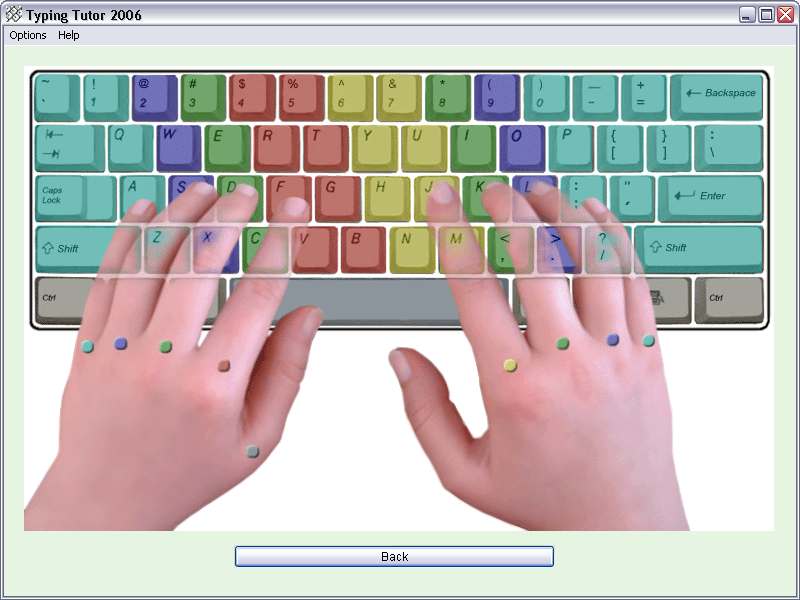
You don't really need a typing tutor program with its learning modules and fluff. You just need to spend time typing. I recommend printing out a color-coded image[1] of a keyboard that shows which fingers to use for which keys and just spending a little time on http://typeracer.com every day trying to stay on home row and follow the color guide.
I still have my copy of UNIX for the Impatient I bought in 1997 and I still find myself referring to it occasionally (less so these days, with Internet references being more accessible generally). Quite a thing for that book to stand the test of time so well to still find it recommended -- 1995 edition and all. The C equivalent would probably be Advanced Programming in the UNIX Environment.
I loved this:
> Save yourself the embarrassment, and avoid posting on the comments section jwz's quote on regular expressions. You are not jwz.
I personally though this was quite hilarious:
"But unless you touch-type, you are neither awesome, nor you are in a position to judge the qualities of the world as an oyster or any James Cameron movies."
Thoroughly enjoyable read I must say.
Are most people not touch typers? I've noticed my boss isn't really a touch typer, despite programming since before I was born, but I always assumed the majority of CS people were.
I'm a touch typer, but not in the standard sense. I don't look up the keys while writing and use most of my ten fingers, but I don't use them like it's taught in touch typing. I know exactly where all the keys are and I intuitively press them with some fingers depending on which is nearest or easiest at the specific moment. According to [1] I can easily type faster than 600 keys per minute, more than all other people I know.
I don't think I should learn touch typing to further increase my typing speed. Right now most of the time my pondering over coding problems is limiting my typing speed, not my ability to move my fingers.
But maybe it's worth learning touch typing to reduce the stress on the fingers and be more egonomic?
Actually, from an ergonomics perspective, you would probably be worse off touch typing.
Traditional touch typing trains you to hold your hands in a consistent position over the keyboard. It's the act of holding your hand in the same position all day--whether that's over a keyboard or around a mouse--that leads to carpal tunnel syndrome.
(For the record: I touch type mostly the way I was taught to. My wrists do occasionally bother me. I'm 24. YMMV.)
You'd be surprised how many senior-level people are hunt and peck typers. I've met several software engineers with 10+ years of experience who don't type with all 10 fingers (assuming they have that many).
Yes. Actually, I don't understand why people emphasize on touch typing here. Engineering is not a data entry job.
It's not so much "touch typing", it's being efficient with the main tool (the keyboard) that you use to interact with the computer. You don't need to be a 60 wpm typist, you just need to be able to communicate without stopping everytime to find out where the "@" symbol is.
Hmm.. interesting.I actually touch-type, but definitely have to look up the symbols. maybe i should learn that part too..
This is not about typing faster. This is about lightening cognitive load. For instance, I don't use my vision to type. Rather, I think "stretch my right ring finger to get the [O]" (except I don't actually verbalize it, it became automatic now).
That mean my vision is free to concentrate at the screen. That means that my short-term memory don't have to memorize what I am currently seeing at the screen. This means I have more precious short-term memory to do whatever important task I am doing, like, programming.
Subjectively, touch typing is surprisingly comfortable. So even if I'm completely wrong about the above, I still feel better, and that alone is worth the investment.
Why am I belaboring the tuning thing? Because learning how to tune your guitar properly is basically a tools issue. Many guitarists are perfectly happy to get by with poor tuning, but then they sound bad even if they're playing well. Developers are often content to use whatever tools they've got, without digging in and figuring out how to "tune" the tools for maximum efficiency. Mastering the tools of the trade is an important part of every professional's ability to be effective. - Steve Yegge
http://sites.google.com/site/steveyegge2/practicing-programm...
Faster typing is more code is better. Seems pretty straightforward to me.
Now, does doubling your typing speed also double your productivity? No, of course not, you spend time thinking, looking through code, reading specs, searching for solutions, compiling, etc. But I don't see how improving your typing speed would not result in at least some productivity gains.
I can touch type in the sense that I don't look at my keyboard when I type, yet I don't really use ten fingers. I was never properly taught to type.
Coincidentally, I'm trying to learn real touch typing as I think it could help me in Vim.
I don't think that you really have to be, I think it helps less than in regular writing.
Personally my style is very anti touch, using 2 fingers for the majority of letters, which I don't have to look at the keyboard for but I probably take more glances at it that a touch typist. I think though in being proficient in navigating the symbols on the keyboard mostly makes up for the loss in outright English typing speed.
I'm always shocked to see a developer not touch type. I just can't understand those 10% or so, that spend their life essentially editing text and yet can't touch type. It's one of those essential skills that you learn once and reap the benefits for the rest of your life.
Where do you get 10% from? Most programmers are fast on a keyboard, but being fast != touch-typing. Admittedly, not all touch-typists train their fingers to properly remember the numbers row or the set of accompanying punctuations and symbols, they might sometimes need to look at the keyboard to find stuff like tilde, pipe or the underscore.
However, if you catch yourself needing to even just glance at the keyboard while typing basic stuff, you're not a touch-typist, no matter how fast you are.
Many people feel that being fast is good enough. It has been my observation though, that the lag between typos and their fix is considerably shorter (almost instantaneous) for touch-typists (they're looking at the screen as it's happening). Indeed, I'm always a tiny bit annoyed when while sitting next to someone editing code, they accidentally turn on caps and it takes forever for them to realize it (like 10 characters later).
This is vastly, vastly more than 10%. Where I work at, hunt & peck is the norm. Now, many hunt & peck typists I see at work type relatively fast, without looking at the keyboard too much.
I need to remember this one: "And you will offer to buy me a beer, which I will refuse because I rather have you buy me a freshly squeezed orange juice."
Screw-driver then.
That could be considered the "Beer Ware" license for San Francisco in the 21st century. And it should be certified organic/vegan/etc.
I created a "license" and put in on GitHub: https://github.com/felixmiddendorf/ojware-license/blob/maste... http://news.ycombinator.com/item?id=2984233
in a computer lab between pepper canyon and warren college at UCSD in 1991 it was written to type 'man man' and maybe even 'apropos' was written up there on a chalk board. I taught myself unix from the manual. A few years later, I learned perl starting with 'perldoc perldoc'.
In all my years of using and loving (and abusing) the shell, I've never encountered apropos. I'm really amazed that something so fundamental has somehow been left out of the many unix/shell articles (such as this one) that I've read. Anyhow, you've made my day. Thanks!
Does anyone know any good online typing tutors? Especially for people who are already reasonably proficient (~60 wpm)
not on-line but... http://www.gnu.org/s/gtypist/
He's right when he says Unix Power tools "is the atomic bomb of Unix knowledge".
Mavis beacon teaches typing.. Seriously?
Well, I guess there's no memetically famous touch-typing tutorials software for Linux or Mac.
In fact, the only other memetically famous touch-typing software I know of is Typing Of The Dead¹, and that's not exactly widely-available.
In the 80s, I learned how to touch type by playing Infocom games like Zork.
The key to learning how to touch type is just typing _a lot_. You might not be very fast (I'm not), but you can at least get your eyes off your keyboard and use more than one finger per hand.
>The key to learning how to touch type is just typing _a lot_.
Absolutely. I don't think that typing-tutor software really does very much teaching at all, it's just a good tool for drilling yourself. But why not have fun in the process, rather than boring and mindless drills? I learned by playing the early Sierra adventure games, before they switched to the all-point and click interface.
Now I'm feeling all nostalgic...time to go download ScummVM.
He sounded pretty serious to me. Do you have a better suggestion? The Mavis Beacon software does a perfectly fine job at teaching touch-typing.
GNU gtypist. Got me from "hunt and peck" to touch typing with a decent wpm count within 2 weeks. Considering I used fewer than half of the tutorials, I think that's pretty awesome. It's an old GNU utility so it should be in any repos. Even had it on Cygwin.
That's exactly how I learned---I'd say it took me two weeks, to, to become comfortable with typing. I've been recommending learning to touch type that way for a few years now. Not a soul has taken me up on it yet.
http://www.gnu.org/s/gtypist/ has a win32 version
Ktouch is awesome, Free, and in the Deb repo's, maybe others. Simple, effective, nice UI, and you can learn any layout from Qwerty to Colemak.
Like Miguel de Icaza would ever recommend a KDE application. ;)
I learned with KTouch, and it is awesome.
Unfortunately when I did so, it didn't have special lessons for the numeric keys; hope that changed.
Klavaro Touch Typing Tutor is pretty good - Linux and OSX.
Just tried it: nicely done especially as I use a slightly customised UK Dvorak keyboard.
I used some random type tutor software in high school (sometime in the mid-late 90s), though only spent enough time with it to learn the home keys. I would then look at the keyboard for the remainder of the keys. Initially that was probably no faster than my old hunt and peck method. I remember remarking at one stage that I was looking at the keyboard out of habit. Then one day I noticed that I was no longer looking at all. I'm sure it was a strange feeling at the time!
Goes to show you don't really need to learn the whole process with some type tutor software. Though in terms of efficiency you may want to be aware of what they suggest. For instance, I think I was hitting the Y key with my left hand rather than right hand at some stage, but long ago changed that.
When I forced myself to learn touch-typing with a qwerty keyboard i used gtypist. I found it to be sufficient for its purpose.
The only gripe i had with it was that it required typing two spaces after a period. I found this just plain weird, so I fixed it in the tutorial files.
I guess using a blank keyboard also helped quite a bit..
Sorry, hadn't seen your comment. Gtypist did a lot for my muscle memory, yet I barely scraped the surface. It's probably time I went through the remaining tutorials.
In an article called "Learning Unix", I think recommending (I assume proprietary) Windows/Mac software, is a bit silly.
Unix is just a bunch of standards that a couple of OSes are implementing, including OS X, not something that adheres to any philosophy about how software should be distributed.
The point is that the "couple of OSes" does not include Windows 7 / Vista / XP.
I did MBTT version 1.0 either on Dos or Win 3.1 (can't remember) when I was like 9 years old and I am currently the fastest typist I know.
Another good book with historical perspective. Harley Hahn's Guide to Unix and Linux
Without starting a religious war, it's essential to learn the basics of vi for it is ubiquitous on all UNIX variants. Even if you use emacs, it's essential knowledge.
While this argument might have held weight once, I think these factors undermine it:
Emacs used to be considered 'expensive' in terms of disk/memory. These days, it really isn't.
Non-Linux unixes are less and less of a factor these days, and even most of those have some sort of packaging system where installing emacs is a quick operation, rather than a laborious download/compile/install.
Emacs itself has remote editing capabilities with Tramp, via ssh that obviates the need to fire up an editor on the target machine in some cases.
If your job involves sitting down at HPUX/Irix/AIX/whatever machines that haven't been updated since 1998, and don't allow remote access, yes, vi is probably a valuable skill. Otherwise, I think this argument is less important than it once was.
It's still valid. I haven't had to use vi in awhile but there are still a lot of OSes that don't have emacs installed by default. And every so often you'll wind up on a system where EDITOR isn't set and you'll get stuck in vi by accident.
The thing is, though, the subset of vi you have to learn to is relatively small. You need to know how to enter and leave insert mode, how to delete, and how to quit with and without saving. (For a non-vi user, the difference between knowing and not knowing those simple things is significant)
This is generally enough to edit the few configuration files you may need to touch before you install emacs (network, sources.list, sudoers, etc).
So even though the use case is small and shrinking, the amount of "vi skill" you need is pretty low as well. There's really no good excuse to avoid it.
> the subset of vi you have to learn to is relatively small. You need to know how to enter and leave insert mode, how to delete, and how to quit with and without saving. (For a non-vi user, the difference between knowing and not knowing those simple things is significant)
As a self-learner out in the wilderness, I don't know how I could have learned Linux without learning that basic Vi alongside. And that really is all you need to know.
When you're not working on a full linux distro, e.g. hacking a wifi router box or a network assisted storage box, you might not have the luxury of emacs available.
However, it's more likely that you will have some version of Vi. The one I'm thinking of is the Busybox version.
If you use a default server install of debian, ubuntu or centos, it doesn't have emacs installed. The installation media and recovery CDs don't either.
That is enough justification, especially when you're at a single user mode console on a ILO card when the machine won't boot and flames are coming out of everything. Vi is there for you and emacs SSH won't be saving you when the network is not up so you cant apt-get or yum emacs. It's also not the sort of time you want to start having to learn vi.
I know this because I've been there.
It's as important as it always was, much as pen and paper are.
I'm pretty sure that Ubuntu, Debian, and Centos come with nano preinstalled. nano isn't nearly as powerful of an editor as emacs or vi, but it's got most of the basic features you'll need when you're just trying to get the network up and running, for instance. I'm not entirely convinced that, for an emacs user, the added power of vi over nano is worth it in the corner cases where you can't use emacs through SSH, considering how difficult an editor it is to learn.
I tend to just use vi for everything. Saves worrying about switching around all the time. Consistency over context-switching is more important to me.
Indeed. As part of my PhD duties, I've been the lab tutor for the first serious UNIX/systems programming course for the last three years, and I always teach vi:
ESC : q!
Because you never know when some commandline tool is going to drop you into vi (I teach them about the EDITOR variable, but sometimes you ssh somewhere and, you know...), and you need to know how to get out.
True story: the number one cause of issues with source code control systems is a vi session that the students accidentaly opened, managed to flee from with C-z, and didn't realize was still around with an open file holding the subversion lock and preventing them from committing their source code. I'd say I got 5-10 a quarter (~60 students in each quarter's session).
Its worse getting dropped into $USER_FRIENDLY_EDITOR_OF_THE_MOMENT. It's cool that the sys admin or the distro developer loves to use pico, nano, joe whatever, but I just want to make my change and move on.
I suggest using hg or git, neither of which have a lock.
That's certainly a possibility down the road.
Our tech staff has a gForge installation that has LDAP configured and all the other goop, but only supports svn. Not managing accounts, password resets, and the inevitable extra map from student id jgordon to login SassySystemsHax0r is a big win.
Since it's their first time using SCC, I already have to deal with "but I just forgot to commit!" for the first two weeks. I'm a little worried that with a DVCS, I'd then also have to deal with "but I committed -- what do you mean I have to push, too? Well, can you grade against the local timestamp?" And that will happen all quarter...
Why? vi and its derivates has their own (weird) usage-convention which you will find in no other software anywhere on the planet. Learning them gives you very few transferable skills.
Any "Unixy" thing you have around these days will have more resources than most computes did in the mid 90s, and the need for a "lightweight" editor like vi is much, much smaller now than it was back then. Even my Buffalo router has nano.
For most Linux distros you install, you typically have nano, pico, joe, jedit or emacs or lots of other editors which (apart from emacs which is its own universe) largely follows the same conventions and at large gives transferable skills. These are IMO much more useful to know.
Why should I bother learning an archaic, non-standard editor from an era when "line-editors" were considered bloated? Why should it even be considered "relevant" today? Even more so, why should it be considered "essential"?
I really don't agree and I really don't see why vi-users insist everyone need to learn their favourite editor.
"Why? vi and its derivates has their own (weird) usage-convention which you will find in no other software anywhere on the planet. Learning them gives you very few transferable skills."
Arrgghhh!
man readline, and search (/) for inputrc.
ANY app that uses readline can be set to use vi OR emacs keystrokes and history, by setting an entry in .inputrc. If you use either editor regularly this will set your command line skills in lots of software all over the planet to warp speed.
If you write python command line programs, try "import readline."
Harumph!
And even more, there is rlwrap (i.e. readline wrap) command line utility that wrangles the badly behaved tools and allows you to use VI editing mode with almost anything (like cat command etc).
Well that's pretty cool.
While I'm still not going to bother with vi, I do have to admit this is probably just another one of those not-widely-known things about "Unix" which deserves some attention. God knows I didn't know about it.
Other cute things I have discovered lately: You can actually click in ncurses dialogs running in your terminal, even over SSH, if you run a proper terminal. Coming from a PuTTYish background, that is definitely not obvious ;)
And, if you've set -o vi in bash (etc?), when you're editing a command line and need more than just the limited set of vi commands that make sense on a command line, do this:
esc v
esc gets you out of input mode, and v takes the current command line that you're editing and opens a full vi/vim session initialized with the command line. After you're done editing it, :wq quits vi and executes the command. If you change your mind, delete everything in the buffer and then :wq
This is handy if you're editing a biggish command, particularly one from recent history like a loop or anything with a block.
`set -o vi` is a POSIX shell feature.
I think the main reason is when you're stuck on an unfamiliar system and emacs/[your favorite editor] is not available, vi is always there.
Reply to above, and siblings.
FTA: "If you learn to use Emacs, you will automatically learn the hotkeys and keybindings in hundreds of applications in Unix."
His point here is not to learn Emacs because it's a good editor, but because the keystrokes transfer to "hundreds of applications in Unix."
Which is true enough. In the (bash etc) shell you can change that to vi keystrokes with set -o vi, and you can change the behavior of those hundreds of applications (like mysql, e.g) by having a .inputrc file, but by default, lots of those apps use emacs keystrokes.
Use whatever editor you want, for whatever reason you want. His suggestion is worth considering, for the reason he states.
> His point here is not to learn Emacs because it's a good editor,
Without starting a flamewar, I'd like to point out Emacs is a good editor.
I'd especially like to point out that vi is the de facto editor in embedded Linux installs, since it comes with busybox. Unless you want to constantly shuffle files around between your machine and the embedded one, you just have to learn vi.
ed/ex is well worth learning. The other vi commands are less so, unless you prefer to use vim as your main editor.
If you are a vim power user, finding yourself using traditional BSD vi is likely to be an unpleasant experience, making the vim is great because vi is installed everywhere weak as an argument.
(From http://www.gnu.org/fun/jokes/ed.msg.html )
“Ed is the standard text editor.”
Let's look at a typical novice's session with the mighty ed:
---golem$ ed ? help ? ? ? quit ? exit ? bye ? hello? ? eat flaming death ? ^C ? ^C ? ^D ?Note the consistent user interface and error reportage. Ed is generous enough to flag errors, yet prudent enough not to overwhelm the novice with verbosity.
Not really. VIM has vi as subset, and plain vanilla vi is still quite powerful text editor. It doesn't have a lot of bells and whistles, and I would not choose to use it as the primary editor for all tasks, but if I'm on a system where I have to edit something using plain vi, I won't have a hard time doing it and doing it fast.
You really don't find yourself trying to use vim extensions when you use vanilla vi?
No, because I know I'm using plain vi :D. I spent a good deal of my life working with plain vi, and the company I work for makes a port of POSIX APIs, UNIX shells and all typical command line utilities for Windows, which includes vanilla vi. So I'm used to it.
I use VIM with only a few extensions (taglist, command-t and snipMate). I also use ctags and cscope, but support for those is built into vim. I really try not to get too dependent on extensions. They are more like convenience rather than something you don't know how to do without. Command+T for example is useful, but you still should know how to get to your files from the command line.
Anecdote here...
While I find myself using Emacs more that Vi/Vim these days, I still find Vi key-bindings useful in the less(1) pager, which I use extensively.
I've just discovered that less responds to Emacs movements, but for searching text I rely on the vi slash. Secondly, when navigating multiple files in less, the vi/vim "next/prev file/buffer" commands (n/p) apply.
> Without starting a religious war
Famous last words ;-)
Indeed. It's almost as if Godwin is beckoning to be invoked.
Why? vi isn't even the default editor on many Linux distributions anymore.
I'm serious, not trying to be an ass here:
Is emacs?
It seems to me that both religions are not 'standard' anymore. I tend to see pico, nano, joe etc. - occasionally vi (but not vim).
"Ed is the standard text editor."
Ed really is worth learning, if only the basics. No matter where you end up, ed should be around. Even if you find yourself logged on to a Plan 9 box via telnet or something, ed will be there. Plus, the commands transfer to vi, and the ed command language is essentially the same as the sed command language! (and the Sam command language, used in the sam and acme editors, but those aren't as popular :)
Real programmers use a magnetized needle and a steady hand.
Real programmers use a hand drill.
I knew a guy who actually did this - he worked for a company that maintained process control systems for "serious" customers (steel mills, nuclear power stations). One steel plant had some ancient mainframe controlling things and it originally booted from paper tape that had long since worn out in the eons since it was installed and been replaced with a sturdy leather belt.
He had to patch the boot code - so hence had to resort to a handdrill to drill some new holes in the leather belt.
That would be an amazingly awesome writeup.
Reference: http://xkcd.com/378/
Excuse me, but real programmers use butterflies.
It is on Debian and CentOS server installs and is available on a Ubuntu default install. It's the common denominator.
Why frig around with emacs, pico, nano etc when vi is always there and is the same?
The Debian base system comes with both vim-tiny and nano. Nano is the default; when the installer wants you to edit something, you get nano:
If you want to use vim for development, use vim. But "it's the default" is simply an untrue statement. Vim (-full) is no more "the default" than Emacs. Both need to be manually installed on nearly every operating system.$ ls -l ./etc/alternatives/editor lrwxrwxrwx 1 root root 9 Sep 7 06:19 ./etc/alternatives/editor -> /bin/nano(OpenBSD ships with both nvi and mg, FWIW.)
I'm pretty sure its vim-tiny
Please substitute "vi" in my comments for "vi or appropriate compatible substitute" such as nvi, vim, elvis etc. They all work the same with the usual subset of commands :)
cough ed cough
though you wont find either on your fresh gentoo install
No because it'd take 9 years to compile it all ;-)
It comes with nano. Which I found totally weird, I'm compiling the frigging kernel and I need a curses UI to edit text files !
learn unix ... use midnight commander.
lolwat?
Keep in mind that the same person wrote both this blog post and Midnight Commander.
and that validates midnight commander as a tool with the unix philosophy how?
downvote all you want. but a clone of norton commander was and always will be a joke.
...saw several sysadmins using it to delete files named with dash because they didn't know "--" is posix for stop taking flags. and that's just one bad vice it foments.
> but a clone of norton commander was and always will be a joke
why?
P.S. - if you can answer without the elitist bullshit, people will probably stop down voting you.
For me MC has always struck me as something someone uses as a crutch when they're not interested in learning the "unix way" of doing things, which usually means using the command line.
The idea of MC never appealed to me so I admit I've never used it. When I see other people using it it seems awkward and slow, and the people using it never seem to know much about unix. Of course it could be that they just don't know the application well and it is in fact really fantastic. So my perception could be completely wrong.
despite it being a GUI tool that can't be piped, that loose all the shell goodness such as command history and text substitution, I already did in my example.
the sysadmins in question used mc to delete weird named files just because they never bothered to learn correct argument passing in bash. they didn't know about quotes for filenames with spaces, they didn't know about '--' flag parsing termination argument. when their badly written script broke, they just manually fixed with mc and call it a day.
it's like seeing someone not using the scroll wheel to scroll. If you think that's elitist so be it. http://www.reddit.com/tb/df8cd
Which is rather interesting because, in an interview a couple weeks back, he said he wrote mc because he thought manipulating files through the shell was painful (or something to that effect) and he wanted something like Norton Commander for it.
Miguel, please learn Unix