Command-Q
clickontyler.comSaw this, figured that on the off-chance this saves me some aggravation that that aggravation would be worth $3.99. Saw the words "my store" and realized that in all likelihood I'd have to type out my entire credit card number, billing address, email address, potentially create a password, and came to the conclusion that that level of immediate aggravation would offset the potential of saving me future aggravation. Went to the App Store hoping that I could pay you there with a sum effort of maybe 25 key presses, total. Found that I couldn't and was disappointed. Please get this on the App Store, let me give you my money.
or you could just re-map cmd-Q to cmd-ctrl-Q in the Keyboard prefpane, under Keyboard Shortcuts. you don't need a credit card to do that.
My guess is due to the nature of this app (catching keystrokes globally), this app wouldn't be allowed in the App Store.
It's in review :)
Awesome! I love the app, I'm sure it'll save my butt a few times ;)
I've loaded the demo version for now, I'll buy once it's in the MAS.
One suggestion- You might want to add an option to add itself to startup; I know how to go to System Preferences and add it myself, but less technical users wouldn't, and it's inconvenient regardless.
Anyway, thanks for making this. Very useful.
So you didn't want to fill out a form on the developer's website but you had plenty of time to come here and complain? Seriously, a minute of typing your info is too much trouble?
Yes, I had several minutes to give feedback of the sort that most people who had the same reaction would likely not provide. I'm a developer, I want to see other developers get paid for their work. I left this feedback here hoping that it would be beneficial to the developer (and perhaps other developers), not to bitch for the sake of bitching, as your reply presumes.
He had a minute to come here and offer some astute advice that has the potential to improve the developer's bottom line.
Ok well I agree with that point. It just came off really whiny.
I'm with you: I was wondering the same thing. Some people are downvoting your reasonable and polite comment voicing a sensible concern. This sort of downvoting activity directed towards quality comments are ruining this site by trying to create a popularity club where conformity to groupthink is enforced through the threat of downvotes.
As far as App store goes, many programs will never be available on the app store. Customers who think that represents a significant burden and want to write long essays about that are not likely to be the sort of customers you want any way.
Dont really agree with the parent's tone, but yes you are completely right. I am a 'relatively' new user and I have noticed this trend with downvotes as well. As far as I think, downvote if you think the comment adds nothing to the discussion, not if you don't agree with it.
A one time complaint is much better than having to fill out the same information thousands of times when I buy new software.
I much prefer the App Store these days when it comes to purchasing software.
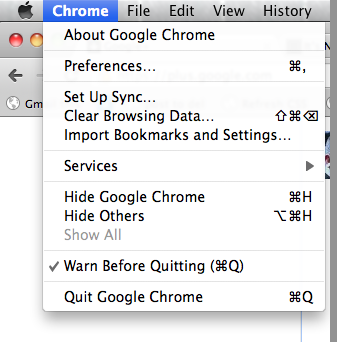
Just today I was wishing that Chrome's Hold-to-Quit functionality was an OS-wide feature. Thank you very much for creating this, it was an instant purchase in my book.
FWIW all: in Chrome, the setting is in the Chrome menu, not in preferences.
Screenshot: http://paulirish.com/i/fcba70.png
But it should really be in Preferences...
Yep - Chrome is where I got the idea from. It's a great feature I wanted to see made system wide. Looking forward to everyone's feedback.
One thing that Chrome doesn't do is even when there are zero windows open, you still have to hold down Command-Q to quit. If no windows are open, there doesn't appear to be any danger in quitting right away--after all, the major mis-press is when you try to hit Command-W to close a window and instead hit Command-Q, but if there are no windows open, there's no reason to be hitting Command-W.
"Ever hit ⌘Q and accidentally quit an application when you really meant to press ⌘W and close a window?"
At first I was really puzzled when I read this sentence...Q and W are so far apart on the Dvorak keyboard! ;-)
But Q is right above left-⌘ (and W above right-⌘) -- convenient for accidental mashing.
System Preferences -> Keyboard -> Keyboard Shortcuts -> App Shortcuts -> + -> select app, menu entry is usually "Quit <appname>", and set it to cmd-ctrl-q, or something similar.
(There's probably a more generic way by editing your ~/Library/KeyBindings/DefaultKeyBinding.dict, but I'm not sure what the appropriate selector would be)
Of course, these just change the binding, the 'hold to confirm' is quite a nice UI feature.
Edit: The reference I was remembering is http://www.hoboes.com/Mimsy/hacks/disabling-quit-rewriting/ and appears to still work in Lion. Still on a per-app basis though.
Since "Quit <appname>" is different for every application, my workaround is to rebind "Hide Others" (or "Show All") for all applications to CMD+Q. Every application has a "Hide Others" (or "Show All") and these menu items are pretty harmless.
I balked at it too, but then I really thought about it and I only care about this in a handful of apps so I just set each shortcut separately. I think I did iTerm2, Chrome, TextMate, and a few others.
It's interesting (for me) that others are doing this too though. I didn't do it because I lost something accidentally - really which apps don't ask you to save important things? - but because I wanted to embrace Lion's hidden Dock lights, which I enabled. If it shouldn't matter if an app is running or not then I shouldn't have to quit so I'm trying to break the habit.
If you're looking for other nice and useful little Mac keyboard command utilities, I implemented shake to undo: http://www.natestedman.com/post/shake-to-undo-for-mac-os-x/
Encouraging people to shake a laptop containing a hard drive is not advisable.
LOL! I didn't even bother to check if it's real or not, but just the though of shaking the life out of my laptop to make it undo sounds like fun! I'd never use it, but thinking of it makes me laugh. Thank you.
It's all real, the code is here: https://github.com/NateStedman/shake-to-undo/tree/master/Sha...
As you can see, it was all committed at once, which is the proper way to develop software.
This makes no sense to me. It says it stops cmd-Q from losing your work. Every program I have seen asks if you want to save unchanged edits before it closes the window following reception of a quit. Now, Lion has a new paradigm available for quitting, but it autosaves and versions all unsaved edits, so you also don't lose your work. How are people losing their work from pressing cmd-Q? In 25 years of using Macs off and on I've never had that problem.
The only issue I've had with this is Google Chrome, but you can reopen the program and Command-Shift-T to reopen all previously open tabs.
Seems to suffer the same limitation of Chrome's Hold-to-quit in that it doesn't work while in the application switcher.
True, but I actually see that as a "feature". It's the one keyboard way you can quickly quit an app without going through the hold-and-wait. But I'm sure your workflow probably differs from mine. Noted.
Very cool idea. I don't know if I'll personally use it; as a dvorak user, it's harder to accidentally hit cmd-q when you mean it hit cmd-w. Then again, it's also easier to hit cmd-q some times because the q sits just above the cmd.
Doesn't Auto Resume in Lion render this useless?
Have you tried to auto-resume a bunch of Safari tabs/windows? All the pages reload, which on my computer is anything but instant.
No. Auto Resume doesn't actually do anything, as far as I can tell. Just re-opens the document.
In a supporting app it autosaves all state, which is quite a bit more than just "re-opening documents". The ideal Apple is working towards is making the running state of an application irrelevant. They'll probably never get there entirely, but we've seen that it can work in practice on iOS. The friction for quitting is certainly decreasing by leaps and bounds.
I'm not sure. I can't install Lion because it doesn't have Spaces.
Spaces was a failed experiment, at least in Apple's eyes. At this point it would be wise to either find a 3rd-party replacement or embrace Mission Control Spaces, otherwise you'll just be stuck in time with everything else slowly growing obsolete on you.
Is there anything that runs on Lion and has similar capabilities to Spaces? Right now I have 9 spaces and each is at most 2 switches away from all of the others. My impression is that if I install Lion and set up 9 spaces, the outermost ones will be 8 switches apart from each other.
I'm not sure, but if not now I'm sure there will be soon.
For quick navigation of 9 spaces with assigned apps it's probably best to just use Ctrl-1 thru 9. Spacial navigation is pretty much dead between full screen apps and auto-rearranging of the spaces (well, you can turn that off I guess), so I decided to embrace Apple's new idea and see how it works.
First of all, I hated Exposé and never used it. Mission control actually is useful since I can see the apps and organize them quickly (much quicker than with SL Spaces in fact). With the horizontal spaces, navigating them quickly is less confusing, and with auto-arranging spaces it makes switching back and forth between arbitrary spaces a lot easier, sort of like Command-Tabbing.
It's a huge change from Spaces, but for me (using 4-6 SL Spaces) never reached a level of perfection due to the small bugs and unpredictabilities in the system. I'm going to give Apple the benefit of the doubt and see if they can come up with something better. So far there are some real nice touches to Lion window and space management.
I would have loved to have had this a year ago, or two, etc., but my accidental quits haven't been nearly as frustrating since upgrading to Lion. I can still see this being useful, though, especially with apps that are slow to implement resume functionality.
I've been wanting/needing something like this forever. One thing I noticed is that the '30 days' menu item isn't removed until the app is restarted. Maybe you could automatically restart the app after registration?
Will do. Thanks :)
It would be great if there was a way to bypass or disable CommandQ temporarily.
Like an option in the menu, or something else (not sure what) for people like me who have the menu bar icon disabled.
Can I marry you ? And then divorce for asking $3.99 for it ? Great stuff, too expensive, bought anyway.
Doesn't work on Leopard (10.5) if you stay a wave or two behind like I do. Drat.
This seems like the kind of thing Apple will integrate into OS X in 3.. 2.. 1...
I actually think it's somewhat unlikely that Apple will add this, due to their deprecating quitting.
They don't want you think about quitting applications at all, they want to hide that under the rug.
Making quitting more explicit (like this app) seems to do the opposite of that.
Exactly what I need!
The idea is definitely good, but I think the "problem" it solves might be overrated - after all, if an app has unsaved content, it will ask you to verify your action, so you never really lose anything but a second or two of time restarting the application the few times you do this mistake, if at all.
Not necessarily true. Often there is application state that you don't want to lose, which isn't saved. For example if you have open IM/IRC windows or if you have multiple opened Documents that you are reading that are saved.
Though I think a better way is just to save all state when quitting no matter what your application does.
Lion is definitely on the way to fixing this.
There's an important exception: browsers, particularly those that don't have an option for automatically restoring all tabs from the prior session. This may be a vanishing exception, but still a possibility.