MIT CSAIL network design principles
tig.csail.mit.eduSo in summary here's what we know:
1. The building's weirdly-shaped vertical spaces cause signal interference that cannot be mitigated by the 802.11 automatic mechanisms.
2. The building was not originally wired (or at least not wired properly) for ethernet.
3. The building is a Faraday cage, but not a useful one because it interferes with wifi penetration while exterior radar signals can still get in and block some wifi channels.
4. The building is hard to navigate for occasional visitors (personal experience and other comment herein).
5. The building leaks when it rains (private communications from residents).
Moral: Don't let Frank Gehry design your Computer Science and Engineering building. In fact, don't let Frank Gehry design any building if humans are expected to inhabit it.
And ventilation, apparently. I was told [0] that it had been designed with open spaces in mind. And when research groups decided they didn't like people walking through spaces where people are working (esp working on hardware) and put up partitions and doors, that messed up the air circulation. Also, and somewhat ironically, I was told that despite the open design, people were runnning into each other less often than in the old Tech Sq building (with its much smaller lobby), missing out on serendipitous interactions.
[0] Private communication
Context for point 5:
- MIT sued Gehry's firm: https://thetech.com/2007/11/09/lawsuit-v127-n53
- Eventual settlement: https://thetech.com/2010/03/19/statasuit-v130-n14
> He added that “value engineering,” trimming design elements to cut costs, was the primary cause of the problems
It sounds like Gehry really made a mess of the place but also, MIT can be very weirdly cheap about some things so this also sounds unsurprising.
the building is also full of pests lol. All of MIT is like this and held together with duct tape and dental floss. Still the most fun place to do science I've encountered.
No kidding. My potted Schlumbergera got nibbled by a mouse on the 9th floor. :-( I'd been nursing that plant back to health for years.
This wasn't a regular occurrence up that high, but still.
>with duct tape and dental floss
Here (Algiers, Algeria), one equivalent to this is "with newspaper and spit" or "held together with cum".
I'd love to see that phrase's equivalent in other languages.
Why cum? Seems like an odd thing to apply to a random structure… is there some other cultural reference I’m missing to understand it other than being sticky?
Cum is sticky regardless of culture, and can be used to hold things together, and make things stick. Furthermore, it is more often at arm's reach than duct tape.
It's hard to argue that cum isn't funny.
I'm going to give everyone a pass on 1 and 3, because wifi's importance and characterstics weren't necessarily known enough to design around for a 2004 building. Especially the desire to reject external radar.
2 is not really the architect's fault. The client should have speced wired ethernet, and the architect should have included it in the design, and the construction manager should have verified it as installed during construction, if speced. There's some wiggle room for the architect to suggest ethernet, but without meeting notes who knows. If the problem is no ethernet in the hallways or no ethernet in the ceiling, again that's more of a timing issue.
Navigation could be client or architect driven; I don't know about MIT, but I've been in Facebook's MPK 20 and 21 designed by Gehry, and they're also hard to navigate, but that's true of most of Facebook's buildings, and Gehry clearly adopted the client's style of ignoring the navigational needs of a building's users. Simple things like walking paths that are visually and texturally distinct from the sea of desks are super useful, but missing. Again, it's hard to know if the architect suggested these things and then followed direction from the client to ignore them, but design is a collaboration and there's plenty of blame to go around. Wifi seemed fine in MPK 20 though, so there's improvement ;)
For 5, I probably can't blame the client here. I'd expect a modern building to be generally leak free for at least 20 years; and weird angles and such might well interfere with that. Could be construction errors and not design errors though. (I see on wikipedia there was a lawsuit about some of the leaks; Gehry casts blame on client cost cutting, so maybe there's some blame to share, but I didn't find details of the settlement, just that most issues had been resolved) There may be a client/user issue though; sometimes leaks happen and they're addressable, but they need to be reported and acted on. If people are only complaining to peers and not to building management or if building management is unresponsive, that's not the architect's fault. I suspect there might be some of that from the pest problems reported here as well. Managing pests in a building is a solvable problem, but it requires active participation of management and users once they're inside the building; weird shapes may be enabling some of the ingress though.
Anyway, I'm not saying I'd recommend that Gehry design your building, I'm just saying the design is a collaboration between the client and the architect (and the builder), so you can't put all the blame on the architect. I don't know that you'd want to pay Gehry to make a boring building with straight walls and drop ceiling, but if you did, I'd guess it would go pretty smoothly and you'd have a nice standardish flexible building where you could put access points everywhere.
Navigation could be client or architect driven; I don't know about MIT, but I've been in Facebook's MPK 20 and 21 designed by Gehry, and they're also hard to navigate, but that's true of most of Facebook's buildings, and Gehry clearly adopted the client's style of ignoring the navigational needs of a building's users. Simple things like walking paths that are visually and texturally distinct from the sea of desks are super useful, but missing. Again, it's hard to know if the architect suggested these things and then followed direction from the client to ignore them, but design is a collaboration and there's plenty of blame to go around.
At least for Stata/CSAIL, the “irregular connectivity” was a celebrated aspect of the design from its inception and approval.
Stata was meant to be the spiritual successor to the old, decrepit (though illustrious) Building 20, which had a long history of ad hoc collaboration, often driven by the constraints of the physical space (i.e. the wall between your office and the next has a hole in it where some piece of equipment was routed in 1957).
During the Stata hype phase, there was a lot of talk at MIT that the idiosyncratic structure would encourage the same kinds of collaboration through random-walk encounters.
The strange thing is that they built the exact opposite of building 20: an expensive, delicate, complicated building where the grad students wouldn't dare pick up a sledgehammer to run some ethernet cables through a wall in a hurry. How could they expect the new building to fill the same role as the old one?
If they wanted to reproduce the environment of Building 20, they should have built the whole structure out of T-slot aluminum extrusions and LEGO.
This article doesn't provide much context on the challenges of the building's architecture.
If the exterior[1][2] did not give any indication, the inside is quite difficult to navigate. Unless you're a grad student who lives and breathes this building (where most of the EECS department is located), you'd better allocate 10 minutes to finding the professor's office you intend to visit. I can't find great pics of the interior (only some floor plans[3][4]), but there's a variety of confusing stair cases, open atrium's spanning multiple floors, irregular floor plans and office layouts, and an abundance of cluttered spaces. No good flat surface goes unused.
I'd never considered that it would be impossible to provide comprehensive 2.4GHz coverage because of graph coloring problems. The point about certain 5GHz channels being effectively unreliable due to radar was also an interesting insight I'd never heard before.
[1]: https://files.catbox.moe/6z4ad2.jpeg
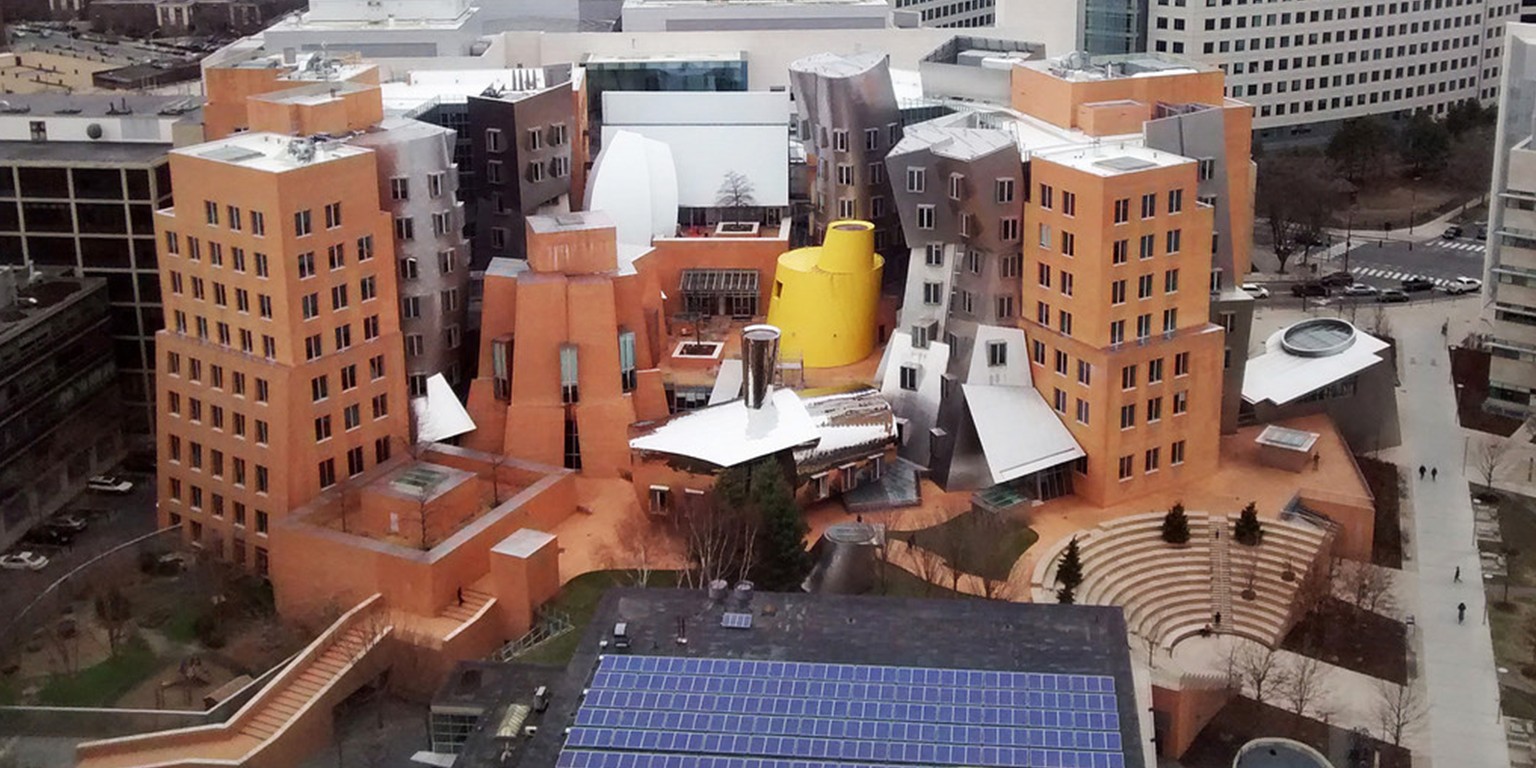
[2]: https://upload.wikimedia.org/wikipedia/commons/1/17/Stata_Ce...

[3]: https://csdl-images.computer.org/trans/tm/2018/05/figures/li...

[4]: https://i.pinimg.com/originals/80/f9/af/80f9af1c6cdc0c170cf6...

Most consumer mesh systems do not support those 5ghz channels that mandate DFS. I can’t think of one that does support them, although numerous non-mesh systems do support them.
If your router(s) do support those channels, they can be quite nice to have in a residential setting, as people I’ve observed tend to not have equipment operating in those channels. High traffic airports can be a problem, as you and the article mention, since DFS may get triggered with great frequency.
Nearby military bases in general (not just airfields) may also result in burdensome DFS triggering, although YMMV.
This is the building under discussion:
I hate wifi. It's useful to users so they like it (it's useful to me too, I admit), but it's a serious PITA to manage and to diagnose problems. Perhaps people here - especially network professionals - have tips on these age-old issues:
* What statistic(s) actually correlate best with network performance? Signal strength is what everyone assumes; is that it? Signal strength variability (i.e., availability)? Ratio of endpoint to base station active radios?, etc.
* How do you efficiently diagnose user reports of intermittent network failures? How do you distinguish interference issues from base station hardware issues from user hardware issues from good old user confusion and imagination?
* How do you efficiently and cost-effectively track down sources of interference, especially intermittent interference? They could come from anywhere, inside and outside your facility. They could be caused by a million different things, active and passive.
> Ensure that at least one signal in every neighborhood is on a U-NII-1 or U-NII-3 channel. This ensures that, even in the case of a radar hit that takes out multiple U-NII-2 channels, at least one channel is available that is not subject to the Dynamic Frequency Selection rules and will not have to change channels.
I don't understand this, can someone explain this in layman terms? Are they near some military base similar to how 2.4 GHz WiFis are usually near microwaves that can interfere (except radar is not contained in a Faraday cage)?
"The Boston Logan Airport Terminal Doppler Weather Radar (TDWR) operates on 5.610 GHz, which is wireless channel 120."
Aha I read over that one! Thanks
This made me smile — such an “MIT thing” to say in the middle of an IT infrastructure document: “There is no possible 3-coloring of any space below the 9th floor of Stata.”
A key tool mentioned in the article is Ekahau Pro. What are good alternatives for Ekahau? As I understand this require special hardware.
Most Macs support WiFi Monitor mode that should be possible to give the same functionality without extra hardware. And is only 5Ghz working on M1?
So I would expect that there is some Mac software with capability of doing the same.
A challenge with evaluating such software is assessing its accuracy. Lots of software could draw you a map of signal strength, but how do you know it is accurate?
It's like a lot of fitness devices: At least for early devices, they would display the number of steps you took, etc., but a few sources actually tried to verify the results and found they could be wildly inaccurate. (Most people didn't seem to care, of course.)
There was a thread yesterday about Ubiquiti's WiFiman iOS/Android app that does this sort of stuff (although the visualization featured in the submission is Android only).
https://news.ycombinator.com/item?id=28391112
I don't know how the functionality compares to Ekahau Pro, since I've never used Ekahau Pro.
We use the Wi-Spy DBx dongle for spectrum monitoring / analysis.
Be interested to know the answer to this question. Also would having something like a cheap SDR make a difference to what is possible?
Most (all?) cheap SDR don’t get close to the WiFi range. RTL2832U have one of the best price/range ratios and can detect 24-1766MHz and cost under $20.
LimeSDR is probably one of the better choices and cost $199 without casing as $299 with. I have been waiting for my LimeSDR close to one year now because of the shortage of chips.
You don’t get the raw data (SDR) on Mac like microwave and bluetooth, but you get all WiFi related data. Also broken packages and from other senders.
There was a thread recently, where some people mentioned confers about the limesdr[0].
Channel 144?! So, essentially most monitoring and survey equipment skip that, got it.