Two Way Mirror Improves Video Conferencing
hackaday.comThis is a cool idea, I often wondered about this.
These days I'm on a 5k monitor and when having a more direct conversation in a meeting, I make a point to place my Webex video window at the top and center of my screen. (I never run it maximized, only 1/4 of height & width, so 1/16 of my screen realestate.)
I tested this setup with PhotoBooth and compared when I look at my own face vs. the actual camera. The difference is minor.
Bonus, it signals to whom I'm speaking whether I'm looking at some other window or at them. This is useful for empathetic listening.
With so much multi-image computational photography and video processing these days, I've been wondering whether we could have a multiple camera system (with cameras on the top, bottom, left, and right of the screen) and a processor that can simulate a camera in the center of the screen - or even dynamically moved to the eyes of the caller.
I know there's a bunch of research on viewpoint interpolation, but how close might we be to a dedicated processor to be able do this in a laptop, or at least specialized VC monitor?
Apparently all current attempts resulted in very, very uncanny valleys. This thread mentions some current attempts (searching hn.algolia.com for 'gaze correction' will return additional threads).
https://news.ycombinator.com/item?id=24151123https://news.yc...
Even with multi-camera setups?
Seems possible. If the user is actually looking at the center of the screen then we only need to shift the view, not digitally move their eyes. That seems very doable with some GPU code.
> That seems very doable with some GPU code.
This seems about as hard as digitally moving eyes.
I think the main source of artifacts is going to be lighting and reflections. Specular color or reflections are only possible to see when light, surface position and normal, and observer are arranged in a specific way. If you have 2 or more cameras positioned elsewhere, there's no way to find out what color is visible to another camera in the center.
Modern AI can try to guess, but fundamentally there's no that info anywhere in the video. It can assume the object surface is made of small count of uniform materials, and extrapolate materials across picture and across frames, but this gonna fail too often for biologicals subjects like people.
Moving eyes means making decisions about human behavior, which is hard. Any weirdness will be very detectable. Just doing a 3D reconstruction with multiple cameras is more established field.
> Just doing a 3D reconstruction with multiple cameras is more established field
Yes, but that alone is not enough. You can indeed reconstruct 3D after spending enough resources, but that won’t help you finding out which color the camera is going to see, because of these reflection issues. Human eyeballs are very reflective. Even if you approximate them with spheres and distort the reflections accordingly, next subject will wear eyeglasses, the reflecting shape of these is arbitrary, you have no chance of doing that accurately enough.
The worst-case example is a person wearing eyeglasses which are completely flat on the outside. No matter how many cameras are around the screen, none of them will capture what would reflect in the eyeglasses for a missing camera at the center of the screen.
I think people will eventually solve that, not with AI postprocessing, with hardware. You can place a camera behind center of the screen, and split time between display and camera. For example, you light the display for 10ms, and for the next 6.66ms you turn off the display and instead read data from the camera. This will get you 60Hz of both display and camera.
Yeah, I've long thought this should be pretty doable. At least with a good TOF camera.
Most of the literature I've seen has been on specifically gaze correction, which isn't actually what you would want.
Not sure if you can still edit your comment, but you may want to put a space between those links.
For those on mobile: here are the two links, should they not become split above
They're the same link; presumably an accidental double-paste. Still useful to have it working though. :)
IOS 13 has a feature that can do something to that effect:
https://arstechnica.com/gadgets/2019/07/facetime-feature-in-...
They didn't end up shipping it.
I was wondering what happened to it! Makes sense, weird uncanny eyes might be ok in a work conferencing tool but I think FaceTime is used for too many personal and intimate calls for it to be acceptable.
Tracking speakers is best done via audio already linked to camera control. Now face tracking by camera's in VC was something I first encountered late 90's - can't recall kit, but Sony was first on that - which was good for presentations in which the person speaking was standing and moving.
As for perspective shifting based upon multiple inputs - processing wise look at raytracing as would need to map each camera input to extrapolate the suface details and then map that out to the virtual visulisation. Basicly you would need to 3D map, including textures and re-render that viewpoint required.
However, do you need the whole face - you just really need to fix the eye's IMHO and eyeline contact.
But that is down to how we interact in meetings with people - try doing a video conference in which everybody is wearing dark sunglasses - that is insightful as you find people focus more upon what they hear more then.
Apple had this in a beta iOS and then removed it.
Interesting. I had heard that they do it by default in FaceTime, but I had not been able to detect it.
That doesn’t work right if you wear glasses with any significant optical distortion. In fact, the current takes on this make it significantly worse since they can’t figure out (or accurately simulate) eye position behind the lenses.
May be the in-display camera will solve it easier, where the camera is integrated beneath the display seeing through a semi transparent OLED panel.
Yes, doesn't the latest generation of smartphones already do this for the front camera?
Some have the camera behind the screen, but still at the top, far away from the center.
It's funny how videos such as this, which are optimized for engagement over learning, explain things in a backwards fashion. Instead of explaining how the thing works, and then showing you how to make the parts to build one yourself. They show you how to make the parts, and only explain what it is you're building at the very end.
He never said the video was supposed to be about learning. The entire channel seems to be based around technology crafts. It's not my cup of tea but that doesn't mean no one else shouldn't enjoy it.
Oh, I didn't say no one would find it enjoyable. It's quite the opposite, actually: videos optimized for engagement tend to be more enjoyable for most people. You don't get to 2.4 million subscribers by making videos that no one likes to watch, after all.
It depends on the video. Other projects on this channel have more descriptions upfront. Overall it's a general interest channel, not purely about the mechanics of how things work.
It's explained in the beginning of the video.
The general idea of what he's building is explained ("a system that allows you to retain eye-contact with whoever you're talking to over the internet"), but how it works is not covered. He dives straight into how to build the collapsible shrowd while saying "this is super important for the whole system to work, as you will see", and only covers its purpose much later in the video.
It's also annoying when they don't show how the finished result works until the very end. This video is also guilty of this (you see the device, but the video call where it's being used is at the end).
Why waste 10+ minutes watching it being built, then finaly get to the end and discover it you don't like the result. Of course smarter people will just click to the end at first, but I'm guessing much less than half of people do that.
Sidenote: Does anyone know why these videos all seem to be at least 10 minutes long? Is there better monetization after a certain threshold?
There's a couple factors going on. One is the fact that Youtube's algorithm recommends videos based on a set of engagement-related metrics. Hitting Like/Subscribe is a big measure of engagement, but according to people do this for a living, the most important metric is watch time. This is true both for the video _and_ your channel, so having a lot of long, fully watched videos will cause your channel and its videos to be recommended more often.
The second factor is that one factor you get paid on as Youtuber is video length. Getting people to watch longer videos makes your revenue go up.
!0 minutes allows multiple midroll ads. These videos were also recommended over shorter ones, although the lift is no longer as significant as it used to be.
Essentially a teleprompter. Been looking at doing something with my external camera for all of the video calls these days.
https://www.bhphotovideo.com/c/buy/Teleprompters/ci/2122/N/4...
> Checkout is unavailable while we observe Shabbat. Please come back when checkout reopens at 9:00 pm ET Sat Aug 22
Huh, I guess this never crossed my mind, but makes sense. TIL.
It has ever been thus. Back in the day, when film still ruled the world and B&H's main claims to fame were grey market and East European cameras, they were widely known as Kosher Kamera in the enthusiast world. Back then, you needed to be careful about the day and time you posted a mail order as well. (The prohibition extends beyond working to causing work. While they didn't consider mail in flight to be their responsibility, any order postmarked between sundown Friday and sundown Saturday was, in a sense, their fault.)
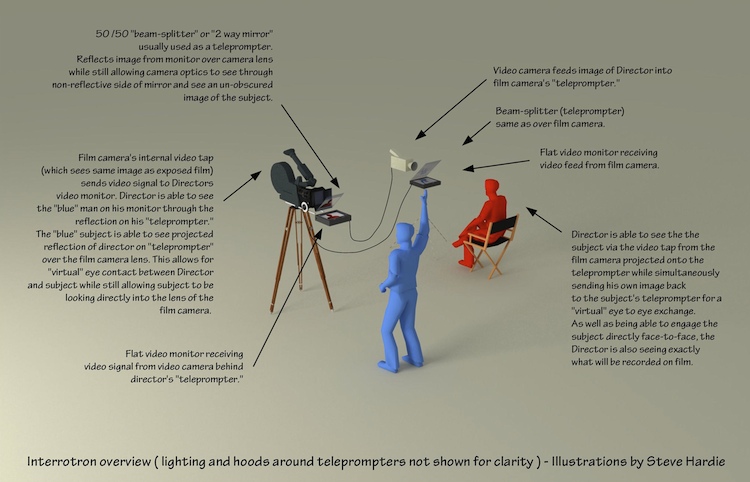
Thats how Errol Morris does his magic - https://www.youtube.com/watch?v=BEsoSR2npes
(The Interrotron)
A diagram of how it works: https://a.fastcompany.net/upload/interrotron1.jpg
Yes, in fact his documentaries are initially unnerving, because suddenly you see Robert Mc Namara shouting at you :
Some incredible foreshadowing at 2:00
Facetime will be doing that in iOS 14 https://appleinsider.com/articles/20/06/22/facetime-eye-cont...
I always recall an Apple patent[1] from years ago that posited interspersing the camera pixels with the display pixels. I wonder where they got with that...
Well, I really hate eye contact and never look people in the eyes, so this wouldn't be something interesting for me. I wonder if I am alone or if this is common.
That's actually an advantage in the remote work world, because you can stare at the camera and people will think you are looking them in the eyes. They'll trust you more thinking you are, and if you can't read their face anyway, there's no loss to you due to looking at the camera instead of their face.
I've found I trust people less who are staring at the camera, because they are prioritizing building psuedo-webcam empathy over actually looking at and following along with/understanding our shared screen.
I dunno. But at some point you can tell who's faking it. Sort of like someone who read How to Win Friends and Influence People and follows it to the letter- they use your name too often shoehorned into conversations and ask about your dog a little too early and enthusiastically with feigned interest.
Perhaps this is a cynical viewpoint brought on negatively from too many zoom webcam meetings!
Randy I think that's a great take. I can tell you put a lot into it, Randy. That's great. Books are great resource for learning--I agree, Randy!
I had a coworker who (pretty obviously, mind you) kept a One Note tracker of EVERYONE at the company's dogs, cats, and children. Wouldn't have a meeting with her for another 15 months? She'll ask you how Doja and Steve the chinchilla are doing. When she could get them, she'd also store photos of them. She considered herself a "networking genius."
it's common for people suffering from autism spectrum disorders, not so much in the general population.
We're not suffering from autism spectrum disorders; we're suffering from people starting at us.
I'm curious if you look at yourself in the eyes when you're facing a mirror?
No, I usually don't.
Errol Morris famously uses a two-way mirror contraption for his documentaries so that when he interviews his subjects, they are looking directly into the camera as if they were talking to you. It definitely gives a more intimate feel when the subjects are talking.
At the end of the video, he tried it with his friend who's not using the apparatus. Yet, her eyes seem to be looking at him too. What do you think?
Me too. I felt like she was looking more into my eyes than he was.
Maybe I've just gotten too used to video calls...
That was actually my initial reaction too.
I've found if people are just a lil bit further away from their camera they appear to be looking at me anyways.
A conference call should be like a conference table wrt how big their head should appear, once you reach that distance I really can't tell you aren't looking directly into the camera
He also wears brightly colored contacts and opens his eyelids extra wide to create an uncanny-valley fake-human youtube persona.
His lightbox setup is better than his mom's, but everything else about his setup was worse.
First, I think that's his mum because the video said it was his mum.
Second, I think it doesn't look like her eyes are directed at the camera like his, because they are not.
The GlideGear iPad teleprompter is under $200 and saves a lot of time if you’re pressed for time:
https://smile.amazon.com/gp/product/B019AJOLEM/
The setup is to use an iPad hosting Sidecar wireless display from your Mac. Use Moom or similar screen management app that detects kicking on the new display, and pops your meeting video windows onto it at full dimensions (but not ‘full screen’ mode).
If the other person is both on video and sometimes sharing content, you need to flip the video horizontally, which isn’t obvious. There are three options:
1. Check if your display can flip the video.
2. Use SwitchResX if your graphics card can do it for that particular monitor:
If it can, great. If it cannot, then ...
3. Use the Flip Mac Window utility from here, so you’ll see it the right way around in the mirror:
https://www.freetelepromptersoftware.com/mac/
How this works is it screen captures the original window, and plays it back flipped over top of the window. That means actual buttons / icons are not moved, only the rendering of the window is flipped. If you need to navigate the window, unflip it first.
Note that 12.9” iPads only fit in this GlideGear if you re-shape the mirror brace, but the mirror is large enough for a 12.9” iPad and it looks fantastic.
I like coupling this with Logitech Brio (best) or Logitech Streamcam (good).
I‘ve used it extensively with WebEx, Zoom, and Teams.
The neat thing about the DIY solution is that you can move around the camera so that it is placed over the eyes of the other person.
The webcam can be repositioned behind this mirror as well, but generally people are reasonably centered.
Couldn't you lie the screen completely flat and build it the other way (reflecting the screen and passing through the camera), avoiding the keyboard problem?
That's how traditional teleprompters work: screen below reflecting off the half-silvered mirror, camera behind.
Many laptop screens don't open completely flat, so that may not work for this particular concept.
The tutorial is already suggesting harvesting a web cam from a laptop, why not just extract the screen instead? Lots of info and equipment out there for repurposing laptop screens.
Flat (really, parallel to ground) doesn't matter -- you just need to adjust the angle of mirror to match.
Why not use an iPad. IPad on a flat surface and a webcam or any other camera behind the mirror. You can even build a custom mirror-camera using a raspberry-pi, a rip webcam and a small lcd screen. Sounds like a nice DIY project.
> but that means you aren’t looking at the camera and, thus, you aren’t making eye contact.
But that's what I love most about video conferencing: You don't have to make eye contact. The only thing better is voice-only with a shared presentation space.
Working on a similar set-up myself; got a proof-of-concept running using Duplo bricks [1], the quality of good teleprompter glass is really impressive.
[1] https://twitter.com/gunnarmorling/status/1296043605459705856
You can‘t adjust the camera position quickly during a video call, can you?
Quite cool although:
1.) I find if you put the video conference window top and center of a monitor--preferably a larger one--it works pretty well so long as you make at effort to keep your eyes towards the top of the screen. This is especially important (and takes some discipline) if you're presenting from slides.
2.) The general recommendation, which is my experience as well, is that the webcam should be up at eye level or maybe a bit above. So if you are using a laptop, it should be up on some books or other type of stand.
If you have a multi-monitor setup, make a slight gap between two of them and put the camera behind the gap. Then position the video window so the camera is central to it.
Wouldn't that split the face of the person you are talking to in half?
This is basically just a teleprompter in reverse. If you’re okay with spending slightly more $$, just buy one of those instead:
https://www.amazon.com/Glide-Gear-TMP100-Adjustable-Teleprom...
This trick has been used for a whole in VC studio's for decades and I first encountered this in the 90's. Being able to get eye-level contact with the camera when people will want to look at the screen - this just solves that. Just not cheap.
Though lighting was always key and with the two-way mirror set-up, you will want a few more lumens to compensate for loss of that mirror in front of the camera.
"VC Studio?"
Video conferencing room dedicated for such tasks.
Very cool. This is somewhat similar to the mechanism of flipping a rearview mirror in order to dim lights from behind at night.
Related video[1] about teleprompters, including some insight into the nitty gritty.
Side note: that channel (DIY Perks) has tons amazing projects. I'll never actually do any of them but the project breakdowns and assembly are fun to watch.
What we really need is a decent AR or VR headset for remote conferencing.
Even better, 3D screens like Looking Glass that require no contact with the display.
If you are wearing a headset, what would your conversation partners see?
An avatar. You really don’t need much else to get a superior experience to a video call. Being able to turn towards the person who is speaking, see the posture they are holding and have 3D audio is far better than 2d faces in little boxes. It’s also lighter on bandwidth so you don’t wind up talking to laggy robots.
cool idea. but a picture is worth a thousand words. would've loved a simple image of the setup instead of reading 5 paragraphs describing it, found it really hard to parse in my head.
Well, sadly it makes the laptop basically unusable without external mouse and keyboard.
It's for video-calls, which don't need mouse and keyboard.
Well, when I do video calls at work (and thats more than 90% of my video calls) I frequently find myself needing to look up something or edit tickets in Jira. Or showing code. So I would argue, some people do.
The best way to improve video conferencing is to stop doing video conferencing.
I haven't actually had a single video-conference since lockdown started. Plenty of audio-conferences with 50+ people for show and tells, and if two people turn their cameras on it's suprising.
Personally I'm very happy with this. Means you can tune out and keep working on stuff that matters to you when the call starts going off-track or out of your area.
I make sure to video conference right in front a mirror and I find it's no issue for me, but for this video:
1. The video itself uses the cliche "weird" baitclick.
2. Honey sponsership.
On Hackaday.
That's just sad, hackaday used to not be like that.
Guess really it's the times.