Introducing Atom-IDE
blog.atom.ioHonestly can't see why I'd use this - I have all the professional grade IDEs I need, why do I need one that is written in JS, is slower and consumes 5x more memory? Not to mention IDEs already have their own extension stores too. This seems like an 'IDE-lite', which doesn't make much sense in a world where professional grade IDEs are free.
The same reason thousands of programmers use Vim or Emacs with various extensions as their development environment. It allows the same editing experience across multiple languages. A consistent interface, lack of need for learning many (often very different) IDEs, less proprietary annoyance, many many more options for customization, much easier to port your setup to various platforms, etc.
Admittedly I don't think Atom is a very worthwhile text editor, but using an augmented text editor as an IDE is a very common practice.
I think that's less relevant than it used to be. JetBrains is now the de facto best IDE for Java, JavaScript, Python and PHP. It has Android Studio and even support for C#. Visual Studio also supports a wide array of languages. I'm in IntelliJ pretty much all the time, no matter the project.
IntelliJ is expensive if you want languages not covered by the free edition (like JavaScript), though, and even if you pay for it some things are frustratingly distinct such as if you have a Java/C++ app you need two different "IDEs" (CLion + IntelliJ), and you need to then juggle between those windows. Android Studio is able to work with both even though IntelliJ Ultimate isn't (why, Jetbrains, why!?), but getting Android Studio to work on non-Android things isn't the nicest of experiences.
I'd be more willing to pay for the quality if a nice, unified experience was the result, but it annoyingly isn't. To say nothing of the lack of support for things like Rust.
That's what this new generation of IDEs is exciting to me - the unified language server standards. Let the compilers handle understanding the code which is what they are best at. Especially if it helps make IDEs less tied to the build system in general (no, CLion, I don't want to use CMake)
Intellij Ultimate costs me £14 a month, with the plugins (which makes it equivalent to Phpstorm, PyCharm, Rubymine and Webstorm) thats less than I spend on coffee in two weeks, it's insane value however you look at it.
That said I still spend a chunk of time (maybe 30%) in vscode because for somethings I prefer it (it's git support with git lens is incredible) and for TypeScript it's comparable to Intellij with the advantage you can start it, do an edit and close before Intellij has finished re-indexing.
IntelliJ ultimate doesn't include C++ support, though, which is an additional $100 to get the "all products" package. $250 for a fairly basic C++ IDE that insists you use Cmake is not exactly an "insane value" to me, but ymmv.
C++ tooling is fairly abysmal. Partly because the language is so darn complex and full of warts. You basically need to implement most of a compiler to get meaningful IDE features.
Point being, a higher price point for a C++ IDE makes a lot of sense.
> a higher price point for a C++ IDE makes a lot of sense.
Except Eclipse does C++ better than CLion and it's $250 cheaper. The only real advantage JetBrains has here is consistency with their other products, but then they ruined that by putting it in its own standalone product. So you can't have, say, a Python/Java/Kotlin project with a C++ extension library in a single IDE window, at least not if you're invested in JetBrains technology.
Whereas that would work fine in vscode, Eclipse, Atom-IDE probably once it gets a C++ language server plugin which LLVM is working on, etc... Competition is good. IntelliJ is far from complete. That's really all I'm getting at. IntelliJ is not the pinacle, superior end-all-be-all IDE that some were saying here. It maybe is if you're in their primary supported set of languages. But it's not if you're at all on the fringes of what JetBrains supports (not that I'd necessarily call C++ a "fringe", either, but whatever)
The Eclipse indexer seems better. The CLion search tools and non-C++ features (integrated DB utilities, OOP-style refactoring tools, etc.) are certainly better.
C++ has libclang, which is "most of a compiler" and pretty good, so if you can plug libclang into your editor, which most editors like emacs can do, then it's pretty close to an IDE.
The reasoning I've heard why an IDE doesn't do that (as opposed to a beefed-up text editor) is that an IDE needs to continue parsing and analyzing even in the face of an error in your source code. Because, presumably, you still want features like "jump to the definition of FoobarClient" to work even if you've misspelled something in a header included indirectly by FoobarClient.h.
Compilers generally stop after the first set of errors in the first compilation unit. IDE indexers want to keep going as much as possible.
I keep seeing people writing about these "cheap" intellij subscriptions but on the website it's 400 pounds a year.
You're probably looking at the "Businesses and Organizations" pricing, where the org pays £499/yr per user. The personal ("Individual Customers") license is starts at £199, and decreases to £159 then £119 for subsequent years. There's a bunch of groups (e.g. Open Source projects) that qualify for free or heavily discounted licenses too.
And maybe importantly, you can use a personal license at work, on paid projects, etc.
I've never been particularly bullish on Atom or Electron, but I think Jetbrains is going to be eating their lunch for awhile at least.
You have to buy a personal license yourself, your organization cannot pay for it. I just don't want to pay for work tools, my employer should do that and then it is the higher price.
That's fair. Personally, though I could get the business license and expense it, I choose to pay for it as a personal license because I use it personally as well, and I'd be happy to pay the individual license price either way.
I really would like to see this utopian world where all other professions outside IT also get their tools for free.
My grandfather was a master carpenter, he had a saying I've always liked "If you use something for more than an hour a day buy the best you can afford".
I've never minded paying for developer tools as long as I could afford them, lots of professionals spend a lot more than we do on tools/professional development.
Not to mention this whole society which expects everything for free has made it very hard for a small company to get into the market and innovate.
If you think about how much money you can make from a professional tool and how much productivity it gains you then the price should be a no brainier.
Offtopic: I would also urge you if you want to solder not to buy a cheap soldering iron from radioshack, etc. If you don't have the money for a weller or hakko soldering station then at the very least buy a chinese temperature controlled hakko 936 clone. The difference between a crap iron and a decent temperature controlled iron is gigantic.
I used to solder a bunch as a kid, using my dad's Weller gun (which was built like a tank and still worked last I heard, even though it was something like 40 years old). When I bought my own cheap soldering iron "pencil" as an adult for one project, I thought I'd forgotten how to solder. It seemed so hard to get good joints with the cheap iron. The Weller gun wasn't even temperature controlled but it worked. The cheapo pencil iron just didn't get hot enough fast enough to be useful.
Then I bought a mid-range Weller station and things got super easy again. It's about ten years old now and still works fine. It's probably a worthwhile investment, even for rare use. I mean, it's only ~$100 to get a pretty good iron, vs. $20 for garbage.
If I ever could get my lazy butt in gear, I want to make a video to prove that you can solder competently with a cheap and crappy soldering iron.
I have a soldering iron that has to be the cheapest of the cheap, that I've had since 1991; I got it when I went to a local votech electronics school fresh from high school.
It's something like a 35 watt pencil iron, and the tip is janky like nobody's business. You have to wait like 15 minutes for it to heat up. The tip is not in the greatest shape.
But I can tin that puppy up and solder perfectly with it. Now, I'm not saying you could do SMT rework using it, but basic thru-hole is no problem at all. I've assembled tons of things with it over the years.
I also have a couple of older temp controlled irons - and they are great tools as well; honestly, I prefer them over my old iron. But I know, at least for myself, that what iron I use doesn't make a difference in the project, but rather the skills I bring to the table.
As the old saying goes, "a poor craftsman blames his tools"...
Sure, I'm a poor craftsman in this regard; I don't solder enough to ever be good at it. But, really, when you've gotta wait 15 minutes for it to heat up, and then after a few joints you have to wait some more because it cooled off in the process...really, is it a good, or even usable, tool?
I merely found it difficult to use the cheap pencil iron to get good results, because good results required a lot more out of me, mostly in the form of patience waiting for it to get hot. Also, I suspect cheap tools have gotten worse since 1991. I have cheap tools I bought in that era that are higher quality than the same brand/model today.
Nonetheless, it's just good advice to use good tools if you do something often. And, sometimes it's good advice to use good tools even if you don't do it often, but expect to do it again in the future (I find myself working on things that require soldering every couple of years, but expect that'll be true for the rest of my life, so I might as well use a decent iron to do it...it's not like they stop working after being stored for a year).
Except that your grandpa didn't have to pay a monthly subscription for his hammer. I really dislike the subscription model for tools.
How did he feel about perpetually renting them? Even if the tool is currently perfect, I don't trust that the company's future plans will align with my future needs; I expect that they'll diverge.
edit: I stand corrected; didn't see the asterisk and the separate page specifying that an active subscription isn't necessary to continue using the current version of the software.
If you bother looking at the page you'll know when you buy a yearly subscription (or 12 consecutive monthly) with Jet Brains you automatically get a perpetual license for the current version.
You only need to keep paying if you want to keep getting updates. If you're happy with the current version no one is forcing you to keep paying or keep updating.
I can't speak to all IDEs, but at least with IntelliJ you're not just renting it.
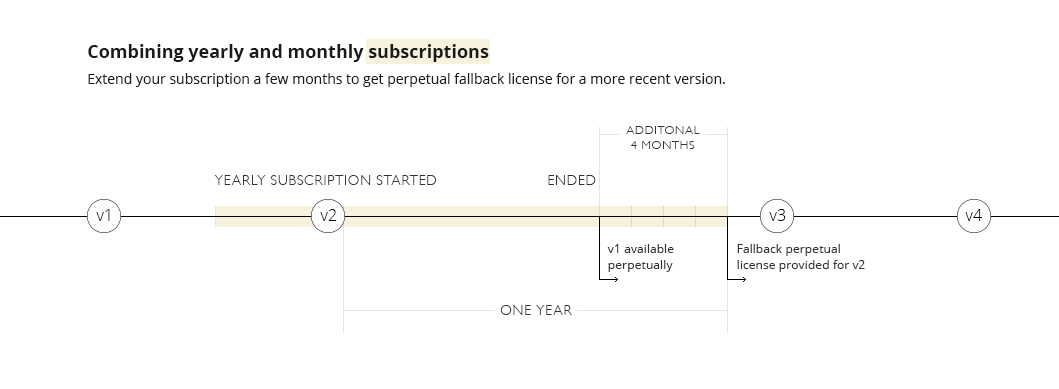
They even give you a helpful info-graphic telling you how to minimize subscription cost if you just want to get a perpetual license for a particular version:
https://sales.jetbrains.com/hc/article_attachments/203545445...
I looked at the page, but didn't read the definition of "perpetual fallback license". Thank you for the clarification.
It still seems bizarre that one standard case is that you pay for a subscription, presumably using version x, and then are pushed down to version x-1 if you didn't subscribe for at least a year under version x.
Thinking about it a bit more yeah, when you stop subscribing you might have to roll back 12 months of updates on your machine, which is pretty odd. Clearly they want to discourage you from doing it.
At least bug fixes are included:
"The license also includes all bugfix updates, more specifically in X.Y.Z version all Z releases are included."
I can understand giving you the major version at the time you bought the subscription but it's a bit stingy to exclude minor version bumps (Y releases).
It's not minor version bump. JetBrains doesn't use semver. X.Y is typically a major release, with X being the year (e.g. 2017.2)
That's an unrealistically forgiving outlook on this.
You're forced to upgrade when the language you're using upgrades. Or the ecosystem around the product evolves. The IDE doesn't live in a vacuum that will work in perpetuity.
It's realistically much closer to renting than buying as once the updates stop it's not that much longer until the product is no longer usable in a modern environment. Simple example would be if you want to use Kotlin 1.1.4 (latest stable) you must be using Intellij 2016.2 or newer to get the corresponding 1.1.4 kotlin plugin. And if you use an older plugin, the IDE will complain at you and things will be buggy and not work right. Similarly since gradle support is built into the IDE at some point that will fail if your IDE is no longer being updated.
It's not realistic to avoid updating the IDE for long. That's why Jetbrains prominently features subscription and yearly renewals - because you're very nearly forced into it.
You can hardly blame them for this situation though. They obviously have to do work to keep the IDE up to date.
That actually happened with IntelliJ - which is one reason why I'm trying to move over to Atom.
It used to be there was a plugin package to allow you to use IntelliJ for C/C++ development, in addition to all the other languages. That changed, though - and they split CLion off the main branch.
So now - if for instance you want to do NodeJS robotics work, and interface to an Arduino (for example), you would need to use regular IntelliJ with the extensions for javascript, and CLion separately for C/C++ development. Essentially dinging you twice for what should be the same damn product.
It wouldn't surprise me in the least to see them split the javascript portion off into its own editor suite as well.
Atom may not be or have everything that IntelliJ does, but because it is open source, and extensible, and not controlled by a singular entity, I know that I don't have to worry about it changing like that in the future.
Don't get me wrong, though - I like IntelliJ, I think it's a great IDE (started out with PHPStorm). But I think it should have stayed general purpose and extensible, and not lock languages out to move people to another (but essentially the same) IDE. I'd have no problem paying the yearly fee - but I'm not going to pay for it twice.
With all subscriptions 1 year or greater, the JetBrains license grants you an eternal, irrevocable license to whatever version was the latest version at the time your subscription expired (look up perpetual fallback license).
I'm not a fan of their license change either, but calling it perpetual rent is just not correct.
Last time I checked it was the FIRST version you could keep forever. I guess they wanted to avoid having people buying a license every other year. I could be mistaken, though.
https://www.jetbrains.com/idea/buy/#edition=personal
119 for Intellij 199 for everything.
I didn't need everything since Intellij with plugins is everything (for the stuff I do).
I don't know where these numbers come from. I just looked it up and my subscription to all IDEs JetBrains had to offer is $149/year. Given how much time I spend in RubyMine and IntelliJ this is a great price. Even if I wouldn't every once in a while use AppCode and DataGrip as well.
My only issue is lack of good Rust support.
For a company, yes. Individual license is much cheaper, but the devs need to pay for it themselves.
Exactly this, work would pay for it but I didn't ask, I already had a personal subscription and I use it at least as much outside of work as I do at work.
I get your pain ... the Verilog Synopsis integration party took about a decade to get over, and at $20K+/seat, it hurt to have to shell out for 2~3 independent-but-each-necessary licenses (as an indie).
But, for JetBrains, at $200/seat/year ... as an Indie making anything more than $150/hour, why would you even worry about it?
EDIT: I'm mostly a vi guy, so I don't really know my ass from a hole in the ground w.r.t. IDEs. It's just ridiculous to me that a professional might complain about a $200 tool being expensive. But, your constraints are not my constraints, so I'm probably being overly judgemental. And, for that, if I am, I am sorry.
Expensive?!?
It is a bargain compared with what I used to pay for programming tools during the 90's.
In other professions people care to buy their tools.
Like when you used to have buy your compilers.
> In other professions people care to buy their tools.
JetBrains' tools have to be rented.
> JetBrains' tools have to be rented.
That's not correct. JetBrains subscriptions come with a perpetual fallback license for the version available when you purchased the subscription. This is basically the same as the previous model where you would buy a license for a specific version with free upgrades for some period of time afterwards. Most people would continuously buy the upgrade license they wanted to stay on the latest version.
https://sales.jetbrains.com/hc/en-gb/articles/207240845-What...
This isn't accurate. When you now pay for a year long "subscription" you own that version and can use it indefinitely. Exactly like buying a version-license previously.
Relative to the productivity gains from IntelliJ it's well worth the price. It's pretty much the only development tool I gladly pay for.
This is tangential, but the IntelliJ Rust plugin is fantastic, and just got officially supported! (http://intellij-rust.github.io)
If you check the changelog [1] you'll see the rust plugin has been officially support for a little over a year.
I meant "officially supported by JetBrains" (https://intellij-rust.github.io/2017/07/31/changelog-47.html)
Dunno I used to think it was, for businesses. But if you buy your own personal license you're paying a lot less than you would for Visual Studio overall. I was fortunate to have a discount for having had a student license, so I got like 40% off the price tag or something. I paid under $200 for software that allows me to make thousands every year. Not only do you get all those fancy Java IDE's but you get ReSharper and the whole family for Visual Studio. I say it's underpriced, and every year I renew they lower the price, but my license is perpetual the moment I stop renewing for a year. I think if they charged me $300 a year I'd still find it worth it considering all they give me in return. I'm able to be much more productive in not just .NET, but Python, Java, JavaScript, PHP and other languages, and hopefully someday a Rust IDE comes out of their workshop.
I don't remember if IntelliJ Community Edition's license disallows usage of third-party plugins for languages already coered by JetBrains's paid products.
If not, anyone can create e.g. a free and open Python or Ruby IDE inside the familiar IntelliJ IDE experience, e.g. by adopting IDE-like software used in Emacs, Vim, or Sublime.
See also: language servers. I think that the future is "the editor of your choice" + "the language servers you can afford". JetBrains's IDE is already modular, but these modules just happen to run in the same Java process. This limitation of IDE architecture can be overcome, and companies like Microsoft keep pouring efforts into it.
I love IntelliJ for most languages. When it comes to JS/HTML/CSS though I use VS Code...
I find it's IntelliSense and TypeScript support superior. Especially when I'm on a project using webpack/sass/etc. IDEA just seems to get lost. It either can't find a method definition or is constantly complaining about various things.
Did you try WebStorm? Idea is a Java IDE. AFAIK you don't get the same experience from Idea+Plugins that you get from the dedicated version (in this case WebStorm). If you extend Idea with plugins you get what's available for the limited community editon.
I have IDEA Ultimate, which, as you said, allows the same functionality via plugins but isn't the same experience.
WebStorm is somewhat better, but I'm not going to pop for another license when I technically already have that functionality covered.
I haven't tried WebStorm since 2016, so my last experience is dated but I've just gotten to like VS Code for front end work.
I program a lot in C, F# and Python. I mostly use visual studio code (electron app similar to Atom, but better). It's great if you're using languages which don't come in one IDE, or where you need to pay for the IDE (F#).
Take a look at full Visual Studio, it's a much better IDE for F#, the free version beats vscode for F# dev hands down. Though I like VS code for its portability.
Not true for Javascript, the cool thing about VS code is that it will automatically download the typescript definition files even if you aren't using typescript. So you get much nicer hover and autocompletion than intelliJ/webstorm.
I'm not using JS anymore, but when I did I remember IntelliJ Idea using the typescript definitions as well. There was a section for it in the settings menu.
He did say IDE, VS code is still considered an editor (like Atom, Sublime Text, etc.)
>>>> JetBrains is now the de facto best IDE for Java, JavaScript, Python
I can't speak for most languages, but for Python it seems to be very far from the "de facto"; I've only seen a few people, and most people strongly dislike it.
I still use vim over pycharm and I write quite a bit of python and spent quite a bit of time using pycharm and setting it up. Most big IDE features break down in large code bases and for simple code bases, vim's python support is fine.
I agree; I use intellij for the consistent experience across languages.
It's difficult to beat vim (or Emacs) for quick edits. But for deep-dive coding I'm gladly sold in on jetbrains.
> Visual Studio...
Isn't it basically an Atom alternative? What makes it, and not Atom, an IDE rather than 'augmented text editor', to borrow GP's phrasing?
I think you are mixing up Visual Studio Code, the free and open source text editor with Visual studio, the closed source and paid IDE.
Ah, guilty as charged, thanks!
Not sure if they mean Visual Studio or Visual Studio Code. VSCode is an Electron-based editor similar to Atom; full-fat Visual Studio does support many languages by itself, but it's Windows only.
That's not 100% true, there is Visual Studio Mac which is based off Xamarin Studio but has a lot of the internals from Visual Studio in it like InteliSense and Roslyn
defacto "BEST" for Javascript? I think you would be suprised how many people do not use JetBrains products at all if you went to a JavaScript meetup.
Best != most used. I think most Java developers still use Eclipse.
> The same reason thousands of programmers use Vim or Emacs
Vim/emacs give a better experience though: they work in a terminal/over ssh and they are FAST and lightweight (memory use). Atom has neither of these properties.
That's not false – but it ignores the point the grandparent was making, which is that minimizing switch cost is valuable to some.
Switch-cost between what? Vim has worked pretty well for me for all programming languages I've used and on all platforms I've used. I reread grandparents comment and I'm a bit unsure what you are referring to exactly.
I'm just saying that you're hijacking the point (that using a single editor, rather than switching between IDEs, is useful) and replacing it with a competition for size and speed. Yes, vim and emacs are lighter. Does that devalue Atom's consistency? No. I say this as an avid Emacs user.
Ah, I understand now.
I guess my point was that since vim/emacs already exist and have advantages, that use case for atom seems a bit unnecessary, but of course in reality many people don't use vim/emacs due to the learning curve, so I suppose the point is irrelevant.
Well, I am editing remote code over SSH with Atom and Nuclide right now. It's been possible for a long time. Now you can even run a remote debugger on your Python program.
Ok, I take that back then. Vim/emacs only have a weight/speed advantage then.
I do, however, find it useful that I can be ssh'd into a machine, doing stuff in bash, and I can fire up vi. I suppose that's a separate discussion though.
Emacs has Tramp, which lets you edit files, manipulate directories (with dired), and do many other stuff you normally do on files seamlessly on remotes of all kinds, including ssh. If you're using emacs like vi where you start it up for each file and close when you save, you're extracting no value out of it, just use Zile.
This feature is somewhat less useful with the advent of sshfs.
It depends on what you do with it, as it does more than ssh. For example there's /sudo:: with which you can edit local files as other users. Also I have links to remote files in my Org files, and if I have ssh-agent running (which I always do), all I have to do to go to that file/directory is to click the link.
I've been wondering if there's a way to use a more graphical editor over SSH, such as vscode or sublime. I get that I could just "learn VIM" but I already know a shitload of hotkeys for vscode/sublime (they're easily transferred), so I'd rather just use them.
Just mount your remote folder with sshfs [1] and enjoy your local toolshed :) . X forwarding is overkill when all you need is accessing files.
[1] https://github.com/libfuse/sshfs , packaged by your distribution
Agreed. SSHFS is the way to go.
Learning Vim -- even the smallest subset of it -- will continue to pay off years into the future! Then you can combine it with existing Atom/Sublime/VSCode keymaps where need be and really have a nice fusion of functionality.
(VSCode vim mode is A+ btw)
I gave VSCode's vim mode a shot a few months ago and found it nowhere near Atom's vim-mode-plus. Has it gotten better?
Well, I think it has (I'm one of the developers). Since the beginning of April there's been over 149 pull requests merged. It's definitely gotten better.
You can open the file via SSH but use a local copy of VSCode/Sublime: https://codepen.io/ginfuru/post/remote-editing-files-with-ss...
Nuclide has pretty good support for remote editing (it's Facebook's "official" code editor internally), and VSCode is adding similar functionality. https://github.com/Microsoft/vscode/pull/30337
You could do X forwarding
Electron apps are terrible with X forwarding. Even locally, on your own LAN.
It's all rendered bitmaps getting sent over, causing much lag and terrible performance.
Not recommended.
Surprising, considering it's origin from web tech.
> Surprising
Or not, your forcing rendered html/dom over the x window protocol. What web tech is in this stack? Only your rendered app on a gtk/qt/wtk(not sure what atom is using, etc) window. Nothing on the network side.
mmm I wanted to edit my post but it seems to get locked after time. So just adding a comment with some info and corrections on the topic.
- Atom on linux uses GTK+[0].
- GTK+ uses XLib[1].
- From the wikipedia link "Xlib makes the client synchronous with respect to replies and events." so much for js being async ;)
- Do anybody know how workable chrome or even firefox is over the x window protocol?
[0]: https://electron.atom.io/docs/development/build-instructions...
[1]: https://en.wikipedia.org/wiki/X_Window_System_core_protocol#...
My vim process comes to a crawl if I forget to turn off syntax highlighting before opening large files. So I disagree.
That has not been my experience with vim (over the past ~12 years). I don't run a huge amount of plugins, but I do use a few. The only thing I have a noticeable occasional lag with is the parinfer clojure plugin (in neovim, and its more that the plugin lags before applying its changes rather than vim itself lagging - the author does acknowledge that its currently sub-optimal). Syntax highlighting has never caused any issues for me. I wonder why you are having issues... that does sound rather annoying.
I was also referring to the typing latency as measured by the benchmarks here: https://pavelfatin.com/typing-with-pleasure/ As you can see, vim's text input latency is measurably lower than most of the other tested editors on most platforms (zero-latency IDEA seems to beat it in some cases).
That’s a broken highlight syntax file. The good ones don’t highlight text until it becomes visible in the buffer. You should bug it if it is reproducible in neovim. The team is highly responsive.
It happens with large javascript files (bundles). I use this:
https://github.com/othree/yajs.vim
And my color scheme is:
https://github.com/nanotech/jellybeans.vim
Not sure which is at fault (if either).
Yeah, yajs hurts performance. There's actually a disclaimer on that landing page you sent me.
Neovim has its own js/json highlighting out of the box and it's pretty crazy fast for me.
But that's what I mean - we already have Emacs/Vim, with their million of extensions, which are always going to be faster. Outside of that we have Visual Studio, IntelliJ, PyCharm, the list goes on. All downloadable for free.
> we already have Emacs/Vim, with their million of extensions
My experience is that Vim is hard to use when you start to add too many extensions. There are just too many shortcuts to remember, plugins may interact in unexpected ways, and things like contextual information don't look as nice as they could. It just feels very 'hacky' to try to use it as an IDE.
I prefer to use more recent editors (first Sublime, but I'm sold to VSCode now) that are better suited to modern display and usages. I still use vim mode but I'm not even sure I'm really more productive with it. Sometimes I wonder if I shouldn't focus on just using mac os default binding.
I've never gotten into Vim, but a friend said something that piqued my interest.
Editing text is boring. Programming is fun. Vim makes text editing like programming.
I'm learning vim and I agree, even if there's no productivity gain (duh I'm new to it) it makes my work way more fun (I do have a contrived concept of fun though).
Emacs/Vim are far from being transparent. They have a very steep initial learning curve, and put off a lot of potential users as a result.
It's been years since I last used an IDE, but in my experience, they come with huge toolbars stuffed full of menus to open wizards with tons of options. The learning curve is just as steep.
Their advantage is that they provide lots of automatic features like spellcheck and autocomplete out-of-the-box, whereas you have to set these up yourself for Emacs/Vim.
I think that's why people are talking up what they see as an alternative to the monolithic IDE: the lightweight text editor with support for extensions. I know Atom isn't particularly lightweight in terms of memory usage, but it is in terms of functionality.
Lightweight in terms of functionality, not lightweight in terms of memory. Excellent combination.
One out of two ain't bad. At least they've left the one which will get 'fixed' if they just do nothing for long enough.
> I think that's why people are talking up what they see as an alternative to the monolithic IDE: the lightweight text editor with support for extensions.
Which is what vim and emacs, relative to IntelliJ, VS, VSCode, and Atom, are.
Lightweight text editor that doesn't drive you crazy the first time you try to quit it? ;-) As I said in another comment, I'm a daily vi user, but that's almost always when it's my only option. And that's been the case for well over a decade now. I just happen to feel more comfortable using sublime text; I always know how to do what I need to do, it's obvious, it's a pleasant experience. But I totally get some people have the same experience with vi/Emacs, and that's cool.
Oh, geez, cowboy up. Nontechnical secretaries learned how to use Multics Emacs back in the 70s and extend it using Lisp. Now you're telling me we can't expect professional programmers to learn it or vim?
If the return on investment justifies it, of course learn vi/Emacs. I use vi myself on a daily basis, but you must admit that not every professional programmer does. For those that don't, atom might be another option.
> going to be faster
Fast is not the end goal.
At no time should my tool be the speed bottleneck. UI responsiveness is part of that. Correct code may require a certain slowness, but a slow editor will impose extra pauses that break up your workflow unnecessarily.
it is when 'unusably slow' is the alternative..
> why do I need one that is written in JS, is slower and consumes 5x more memory
> The same reason thousands of programmers use Vim or Emacs
Uhm nope.
I find Atom to be the best editor for Markdown, though not much else. In particular, it has superb support for Pandoc as well as a good spell corrector built in.
Have you tried Typora[0]? It features inline rendering (i.e. images, formatting...)
I have barely used my standard editor (Sublime) for Markdown since I discovered it.
[0]: https://typora.io/
Except that we already have Jetbrains for this.
Dedicated IDEs seem targeted at “I'm going to spend all day living in this one big project.” Text editors such as Atom and Visual Studio Code seem better at editing a single file, or bopping between a few projects (either within the same or across multiple windows). Either can technically handle the opposite extreme, but seems out of its element there.
Also, I have yet to see an IDE that looks and feels like a native macOS application. (I'm looking forward to being corrected here.)
XCode?
D'oh!
(I also have fond memories of Think C and then Metrowerks, back in the day. A lot of us used them at Apple, instead of the official MPW.)
This brings up some other advantages of text editors versus IDEs, within my limited experience:
* More rapid support for more languages and syntaxes
* Many of the IDEs just feel sluggish. (Yes, Atom can get that way with large files, large numbers of files, or too many plugins.)
* Xcode in particular kept crashing on me last time I used it for Swift.
> fond memories of Think C and then Metrowerks
Me too, especially the former. It's so weird the things our nostalgia anchors itself to. And don't get me started on ResEdit. My emotional palette has a color reserved specifically for the feeling I got poking around applications and creating icons and cursors using it.
I'm preferring Visual Studio Code to normal Visual Studio whereever possible. Reasons for this is that I find editing (Ctrl-D) and navigating (Ctrl-P) there much more efficient, git integration is great, and I get more code on the screen (especially on a notebook).
For languages were the language service is good (typescript, C#) I barely see a disadvantage to full visual studio. For languages with weaker support (C++) I tend to open the project in both environments and use Code for longer editing tasks and full VS for compilation and debugging.
Tips: VS has a full screen mode. It also has a very configurable layout, much more so than VS Code or Atom.
But if you like VS Code then you should use it.
I don't use Atom but I do use Visual Studio Code (which is also Electron based). I use it because there are no real IDEs for Elixir and navigation is amazing. It is also lightweight (compared to JetBrains' IDEs). Another big plus is that it runs on Linux.
I wish they'd put this sort of manpower towards fixing Electron.
Or you know, move away from it entirely. But in all seriousness, I actually really like Atom as a text editor, and wish it didn't consume so many resources to run.
My primary complaint is that it can't handle large files at all. Why can't I use it to look at my logs without it completely freezing?
Too bad Mozilla is discontinuing Positron. With Servo coming up and Firefox nightly using Stylo it feels very fast compared to Chrome.
Configuration.
An IDE comes with its own text editor. Any Emacs user will tell you it is much more powerful to have an IDE come with your editor.
The ability to have your editor configured exactly how you want it (keybindings, fonts, etc.), and consistently use that configuration for all of your text editing is definitely appealing.
The same goes for having all the plugins you use with your editor available when doing "IDE" things (debugging, etc.).
TL;DR It just all-around makes more sense to have IDE features built into an editor instead of the other way around.
The fact that it also has "in collaboration with Facebook" as its tagline tells me two things:
1. This is designed specifically for React since Facebook wants to control that ecosystem.
and
2. Github is internally stuck in 2013 when FB was still "cool" and using the cloud (ooooohhhh, aaaaaahhhh) to power everything was the new trend.
Don't get me wrong, Github is a fantastic product and community. But they really shouldn't be writing desktop software.
It is just a web software masquerading as desktop software.
There are times when just using a text editor is nice. An editor with better language awareness is even more useful. An experience like that has been possible for a long time, but this looks like a much easier way to get there.
I concur. Although the thing that troubles me most about them is that for both Atom and VSCode, the binaries that are distributed by their parent companies are not a direct compile of the public source code. They use the MIT license to their advantage, clone the repo to make it private, make changes to that private repo and then distribute the binary compiled from it.
In this sense, among the popular options only Vim and Emacs live up to my expectations. Also IntelliJ possibly.
This is demonstrably false. Atom's official distributions are built on public CI platforms (Circle, Travis, and AppVeyor) from 100% public repos.
Oh sorry, I suppose I misunderstood something. It indeed is made from public repos.
But then again, I researched a bit and found the licenses to be a bit problematic, not that of Atom itself but the additional packages that are bundled in the binary. It includes some packages whose licenses are unknown and others such as Facebook's libraries(a lot of them) which have the non-free BSD+patents license. In totality the license of the binary doesn't seem to be a really good one.
I switch between Atom and JetBrains IDEs all the time. Atom is definitely peppier and has been for over a year. It has a better feel to it and much more customization. The only thing that is better about JetBrains is the exceptional debugger. Nothing in the Atom platform comes close to the JetBrains debug (and test runner) experience.
Because unlike the "profession grade IDEs", this one doesn't make me want to gouge my eyes out.
As a frivolous aside it's refreshing that the screenshot shows a light theme. Getting a bit tired of all the heavy black slabs.
I agree. A better approach would have been to take something like IntelliJ platform as a base.
This seems aimed squarely at VSCode. VSCode does a lot of this now out of the box (or with a few extensions). I think Atom is really just trying to keep up. I personally do not believe they have the horsepower to compete with Microsoft here though. VSCode is a phenomenal product.
Most importantly, VS Code does all this with a lot better performance and without Facebook.
I fought for Atom for a long time. But after browsing a node_modules folder in Code, I realized how much I'd just accepted poor performance. It also worked as good on my Linux devices as my work pc.
My impressions were the same. Unfortunately VS Code caused some data loss on the first day I tried it, so I chose to keep using Sublime, but it seems really good overall.
data loss
Care to elaborate? Might be good to help others avoid the same problem.
Basically, it closed a buffer because the backing file disappeared when I checked out a different branch. So I guess the lesson is use your file system to retain data and never your editor, which sounds obvious and you could certainly argue the loss was my fault. But I do that all the time with Sublime and never had this problem once. In fact I could quit Sublime altogether and the data would still be there when Sublime reopened.
Basically, I can see how the choice they made is a reasonable one, but my stance is a buffer should never close until I say so. If the backing file disappears, the last contents of the buffer should stay in there until I close it.
I bet a lot of people will never get bit by this, but it's nasty enough that I think they should reconsider this decision. But for me it doesn't matter, I don't want to lose work because I trusted my editor to hold on to something and it didn't, so I'll likely never use it again.
I think every editor can probably configured to do this. I've set up my VIM to do this specifically (auto reload the buffer when the file is modified). I don't think that one's on VSCode.
They're not configured to do that by default, most of them ask prompt you if a file changes.
This one is on VSCode for having unsafe default behaviour which is also different to pretty much all the other editors.
VS Code will never close a buffer that has changes (e.g. is dirty). In this case, the buffer was closed because the editor was not dirty. You can change this by configuring "workbench.editor.closeOnFileDelete": false
Having that default to "true" is really silly. VSCode is OSS right? That seems like a mulligan pull request to me. I can't imagine anyone is relying on the default behavior as-is.
> and without Facebook
And Atom does it without Microsoft.
Seriously though, what kind of comment is that? Facebook develops open source plugins for the atom ecosystem, and somehow that's supposed to be the most important criticism?
Facebook set a precedent in their open source licensing rules where users of their libraries aren't allowed to sue them for patent infringement.
Why would the users of their libraries sue Facebook for patent infringement? I don't get it.
If I recall the argument against Facebook here, the point is: let's assume that you found a company, file for a patent and implement it using some open source tools/libraries, also backed by Facebook. Now somewhere down the line FB decides that your product is really great and they can make something similar work for their platform, so they pour resources into developing their version of your solution. You are pissed, and take them to court - but you yourself are now in breach of licence, so before you can take them to court, you need to invest (possibly a lot of) time and resources to move away from those libraries - and in the meantime their competetive product with their whole financial baking is probably giving your little one a pounding which you may not survive.
If you hadn't had used any FB libraries in the first place and Facebook decided to copy your product, you would at least have a chance to make your case in court in a timely manner.
But I'm also from Europe and may not understand all the intricacies of US justice system, so feel free to correct me if I'm wrong.
Wow. If I understand this correctly, if I use their modules then I can't ever sue the company? :O
That's why some people cannot use React.
It might not be the same person using their libraries, might be a different business unit or a company acquiring the other or whatever. Also if I can't sue Facebook this in turns means I grant FB rights to all my parents (not legally but practically) (Note: IANAL and am just responding to the comment knowing to little about FB's preciseice licensing)
And this is somehow worse than a company that has extorted money from and threatened companies for using Linux?
> and without Facebook
Does Atom have any kind of Facebook integration?
They're referring to how a lot of these plugins are features extracted from Nuclide and/or open sourced by Facebook.
I've always chosen Atom over VSCode because I don't want these features. Autocomplete even on really expensive IDEs runs way to slow, clever auto formatting and it's ilk tend to not work well for me at all, and I dislike the overbearing project management features in most IDEs.
I want a text editor that vaguely understands code with some simple file browsing and plug and play extensions. Atom trying to become VSCode isn't beneficial here at all.
> Autocomplete even on really expensive IDEs runs way to slow..
Not true for jetbrains ones. Autocomplete speed is One of the reasons for me to go for their toolbox subscription
Even with a fully unlocked enterprise license on it, autocomplete was lagging far behind me on a high end macbook pro. Maybe I just type too fast or the libraries I use are poorly laid out, but it was not working.
Java.
I recently fired up WebStorm and found typing to be slower than atom for most files. I wouldn't open a large file in atom, sure, but it's been getting better in that regard and generally most of my code files are < 400 lines anyway.
And thanks to the way the extension system works in Atom you can keep your editor that way. These packages are entirely optional.
The only changes made to Atom at all to facilitate this were better built-in watching of files in Atom (benefits all packages and should improve things like the tree view when it switches over) and an async shutdown mechanism for packages.
>I want a text editor that vaguely understands code with some simple file browsing and plug and play extensions
This is my config of vscode. I disabled all autocomplete because it seemed shitty and non-functional to me (for example, I'm in an HTML file and type "<d," I see now "dialog," followed by "div." Figuring out how many times I need to press "tab" is a lot worse UX for me than just typing "<div>" every time). With all that autocomplete, pop-up dropdown menu BS disabled, it's nice and smooth.
They're just new packages (ide-*) that you can install. AFAICT nothing is included in Atom core.
Sublime Text?
Not as of 3.0 though I did enjoy 2.x quite a bit.
This seems to also have the BSD + Patents beloved by Facebook[0]. The virus is spreading.
[0]: https://github.com/facebook-atom/atom-ide-ui/blob/master/PAT...
Note: Please don't use the term "BSD + Patents" for the Facebook license. There's an actual Open Source license "BSD+Patent", which is based on the well-accepted Apache 2.0 patent grant: https://opensource.org/licenses/BSDplusPatent .
If by "spreading" you mean Facebook is publishing new open source projects using that license combination, yes, it's "spreading".
Atom-IDE is a Facebook project. It seems to be actually derived (in part) from their Nuclide project, which has a completely proprietary non-open source license.
Is it a Facebook project though? The announcement says in collaboration with Facebook. That's an unusual definition of the word collaborate.
If only there was some sort of history of the code... and the history of people that contributed to the code over time...
Something like this maybe? https://github.com/facebook-atom/atom-ide-ui/graphs/contribu...
I looked at top 12 people, none of them claim to work for GitHub, majority of them claim to work for Facebook.
Also the org is literally called facebook-atom and the LICENSE clearly indicates "Copyright (c) 2017-present, Facebook, Inc. All rights reserved."
If only there was some way to tell.
Okay, this should be the top comment here. My developer tools using extensions that give away patent protection in a one side license is unacceptable.
This is absolutely infuriating. Amazing how one file added to the repo can kill the project.
What can we reasonably do to stop this? This goes against the very notion of open source.
Developers have a lot of power here. Encourage others not to use anything that's BSD + Patents. If, in 2 years time, Vue is more popular than React and Facebook perceives PATENTS is the reason why, it could well vanish.
This is a great demonstration of the danger of BSD + Patents. First it's Facebook using it for a great frontend framework. Now Github is using it for an IDE. It truly a threat to open source.
I wouldn't bet against Vue been more widely used worldwide than React, it's huge outside the anglosphere and pretty popular inside.
Im on a project thats replacing react because of this issue. I don't agree with that descision, but lawyers.
We're going with Inferno. Vue feels like a better Angular, not a better React. It's not even comparable to React. It's just too clunky.
One pleasant surprise in this Facebook purge has been the discovery of seamless-immutable. It's far easier to work with, especially if you're using Typescript, which makes Immutable an absolute pain.
Interesting, I'm on same stack Vue/TS had not seen seamless-immutable thanks!
Don't use it. There exist a few Facebook fanboys but nobody I know likes Facebook.
Either you stop using it, or you convince a federal that it's unenforceable or unconscionable.
No, it is not. If you sue people with software patent, I’m happy you lose that ability.
Yeah but the protection only applies to facebook. You can still sue github and everyone else. We can clearly conclude that facebook is selfishly doing this for their own benefit and not because of an altruistic reason like a world without patents.
So in reality what you're saying means: "If you sue facebook with any patent, I’m happy you lose that ability. If you sue any other company other than facebook, I’m happy you keep that ability."
And now github is using the same license too :)
I don't have any patents why should I give a fuck about people who want to steal money from facebook?
This covers all patents, including non-software patents, so you lose the ability to sue for non-software patents as well. Are you happy with that?
But that is not even the point -- when facebook invokes the nullification clauses in the patent grant, you're simply back to no patent grant, at all. How is having a patent grant not strictly better?
No, I'm not happy with that, but that is also not what's happening here. You're still welcome to sue Facebook if you want, but you'd lose all patent licensed to you in the PATENT file.
I'm also not happy with spreading FUD. Bringing up non-software patent is a strawman.
What is the issue with a free patent grant (which is revoked under certain conditions)? Atom itself is licensed under MIT and doesn't give you a patent grant.
EDIT: I understand that it would be best to get a free patent grant, but most open-source projects have no patent grant at all. Why are we not complaining that Microsoft might hold patents for VSCode that they suddenly will start suing companies over?
There exist good licenses that extend a patent grant in a reasonable manner. Facebook went off and wrote their own version that is asymmetrical in their favor. Also, lawyers seem to agree that most OSS that don't include a patent grant are giving an implicit patent grant, and this explicit grant is worse for the developer than the implicit one (while being better for Facebook.)
Some lawyers argue that BSD/MIT includes an implicit patent grant, but this has never been tested in court. Facebook's lawyers obviously don't think it's clear that BSD includes an implicit patent grant, which is why they have an additional license. I don't see how "we hope that a judge would interpret the licence as an implied patent grant" is better than an actual patent grant (with some constraints).
Also, IANAL, but I never understood why the revocation of the explicit patent grant would cancel out the implied patent grant. If your argument is that "the BSD licence text implies a patent grant", shouldn't that be true regardless of any additional licenses?
It's not about whether or not the implicit grant exists, it's that the implicit grant doesn't go far enough for Facebook's liking.
What you refer to as "some constraints" is an abdication of your ability to defend your company against Facebook infringements for as long as you use software that includes this horrible clause.
IANAL, but I've read that when there's no explicit patent grant written, an implicit patent grant can be inferred, since MIT says you have the ability to use it (which would require a patent grant if covered by patents). If that is the case, no (explicit) patent grant would be better than this grant.
Still playing catchup with VSCode, but without the integrated debugger and all the rest of its fancy tooling. Is it still mind-numbingly slow as well?
I can't imagine switching back to Atom at this point, or even Sublime. For individual projects I might use IntelliJ or Visual Studio again, but outside of that VSCode is my exclusive editor for all languages for the foreseeable future. I'm very impressed by what Microsoft pulled off to be honest. (Blinking cursor jokes aside, of course)
I wish Python were better in vscode; the save to get syntax errors and dog slow processing sucks. This is largely due to the python language services ecosystem(or lack thereof a proper one) I imagine. I try to stick to TypeScript these days as much as possible anyway.
> but without the integrated debugger
Really? Isn't that what makes an IDE an IDE? We've had things like intellisense and refactoring tools in text editors for decades, the only thing that makes Visual Studio an IDE and not a stupidly complicated text editor is the debugging experience.
Can you comment on when/why you might use IntelliJ/VS over VSCode? I've recently switched to VSCode from vim, and haven't really used full IDEs since college (except for small amounts of mobile app development).
I haven't looked at vscode for a while, but intellij and it's ilk allow me to do everything inside the ide with the same interface. For example, for a django project, it has support for vagrant, SSH, django-admin tasks, remote debugging, DB inspection/modification, virtualenvs, package management, just off the top of my head.
When working with large projects, a full blown IDE can really make your life easier. I use PhpStorm for my main work and I'm just in it all day. However VSCode is what I use when I just need to quickly edit something as it's still smarter than a dumb editor.
I don't have a reason to right now, but I'm saying I could imagine having one. More specialized debugging support perhaps? Joining a team with a build system that's easier to work with from {{IDE}}?
IMO Visual Studio is an order of magnitude more feature complete than VSCode.
If you are writing C# and using Windows there is no point in not using VS.
Code completion is still generally better in VS, for one.
At least for PHP it still seems to be incredibly slow. This seems slower than some of the other 3rd party Atom addons for autocomplete. Definitely far slower than VSCode and no integrated debugger either.
In my opinion, this is how IDEs should be - make something better described as a text editor (like a fresh install of vim, sublime, or atom), and allow users to add more things to the light-weight(ish?) base. So many IDEs are overkill. Text editors with the right plugins can accomplish the same things but also be much more lightweight, and help you achieve a balance between "IDE" and "text editor"
Sorry but not only could I not disagree more but you're demonstrably incorrect.
Anyone who says a text editor "can accomplish the same things [as an IDE]" just doesn't know how to use an IDE.
The text editor vs IDE difference is the difference between using regexes and a lexer/parser to read, analyze and manipulate source code.
The amount of effort I see people put into configuring their .vimrc or .emacs files to get a subset of what you get out of the box with a decent (ie Jetbrains) IDE that at the end of the day just dosn't work as well is... staggering.
I mean text editors have their place and most notably vim/emacs work over an SSH connection. That's fine. But where possible give me IntelliJ or CLion every time.
You're comparing editors like vim with IDEs. I'd say "modern" text editors such as Atom, VSCode or Sublime are between these two extremes. They provide a lot of "higher-level" features while being lightweight and programming-language neutral.
This uses the language server protocol, so the work of "understanding" the code is delegated to another tool, which usually uses a compiler(or equivalent) to perform semantic analysis. So no regex hacks etc. if you use a sane language server.
If you want to argue that IDEs come with more features than text editors "out of the box", I'll happily 100% agree. But I've spent many hours configuring Sublime, Jetbrains IDEs (CLion, WebStorm, PHPStorm, and PyCharm) in particular, and also maybe a grand total of an hour configuring Visual Studio. Yes, I install more plugins in Sublime to get the same functionality as an IDE. No, that's not what my original comment was about.
If you honestly think there's something an IDE can do that can't be done in a text editor with plugins, then just consider this: an IDE at its core is a text editor, and all the rest is just "plugins"
Does clion support makefiles?
>Text editors with the right plugins can accomplish the same things but also be much more lightweight
Oh, the irony...
In this world 1GB RAM for Slack or Atom is considered high perf systems as they allow to edit huge files containing 100s of lines or chat with as many as 10 people at same time.
The reason I say those words is that when given the opportunity to choose what plugins you want, you don't install all the same things as an IDE comes with because you don't need all of it. Sure, an IDE with enough "off" switches would achieve the same effect, but that doesn't happen a whole lot
I'm aware that text editors with plugins have more overhead than an IDE, but at least in my experience, I don't need enough plugins to make the plugins take as big of a toll as everything that comes with a text editor. I should have been more clear about this in my original comment
Except for the fact that Atom eats more memory than Visual Studio
While the statement is true, I have almost 2GB of RAM left before opening Atom. My OS says it's fine (although I know it writes more stuff to SSD)
Fact is that it will use the maximum resource it requires, and maximum resources OS can provide.
Spacemacs turns Emacs into an IDE of sorts. I use Spacemacs when I need to SSH to another box and edit files remotely, I much prefer remoting through Emacs.
Also Visual Studio Code kind of is like this to some degree? You start with basics, and add on what you need, their D plugin is pretty decent, and their Rust one has gotten pretty popular by the looks of the last Rust survey. Also their .NET Core support is pretty much the best on VS Code compared to on other editors from what I've seen, their Sublime Text plugin seems abandoned.
Text editors and IDEs are different ends of the spectrum. IDEs present a feature rich and often opinionated dev environment while text editors are, well, editors for text like content.
There are many text editors that can do much more than just edit text files.
I like how they downplay Microsoft' role in Language Server Protocol.
Unlike lots of the posters here, I see a real need for an IDE that's completely free. I have used Eclipse and IntelliJ, and the bloat/bug/setup process in them is incredibly painful. However, I don't know if we're just going to add those problems into atom instead of what makes atom awesome - easy package management, fast text editing - and remove it.
I think the bloat about Eclipse and IntelliJ is more about Java. As much as I hate the language, if I have to do some Java I don't think there is a smoother alternative than IntelliJ.
I'm with you. Free, open source, and useful is awesome. I'll use it, and contribute when able. I wouldn't be a developer today if I didn't have access to these kind of tools when I got started with coding (I was broke, and couldn't have afforded to replace the computer on which I learned).
"It's like the Atom editor but even slower!"
I never managed to work with Atom as it is now. It's just too slow. Now they are pushing it even further, I cannot imagine how much slower could still get.
I've only found a couple of instances where Atom was slow:
1. On startup, it seems to take "forever" - but I can be patient for it
2. When having multiple files open that are really long; this may be due to linting or something, I'm not sure currently
And yes, memory usage is insane...
> When having multiple files open that are really long;
I've not used Atom so I'm curious to what you mean by this.
Firstly, what would define a really long file. Is a file with 10k of lines long?
Second, I would have though the ability to open lots of files would be a rather common occurrence for any programmer working on a large code base.
What happens in Atom if you have 30 files open?
So Atom is yet another editor supporting the language server protocol. Whether you like Atom or not, that's good news. The more that editors support it, the easier it is for new languages to get a good IDE experience with many editors.
Yes, this is the best part. Joint effort makes all editors better for tooling.
Given that even Eclipse runs faster, uses less resources and has a much better plugin ecosystem than Atom, no thanks.
Good luck against PHPStorm / IntelliJ. Nothing comes close yet, worth every penny.
Definitely. I wish they didn't do the autosave crap.
I will regret asking this, but why ?
I don't even remember what it was like to code without autosave in IntelliJ.
I will review the changeset before creating the PR anyway, so I don't see the downside of autosave.
This is my feeling as well. I hated autosave until I switched from Subversion to git and suddenly branches were a nimble and powerful tool.
Honestly, I don't even remember why it was so important to control when my code changes were written to the filesystem. I just remember it used to be extremely important to me, and then I quickly stopped caring when I started using git and GitHub.
Close editor by mistake, battery dies, go to lunch and forget what I was doing.
What is the upside? One less keystroke..?
The upside of not potentially losing everything you have done since the last time you remembered to save ?
is this a real question ?
It's configurable...
It's not.
I Imagine this will run like mid-2000s Eclipse, but with 5 times worse performance.
Man, Eclipse used to be such a dog. I was overjoyed when the Android SDK moved to IntelliJ.
So I pressed CTRL + F and typed in "debug" - zero results found. It seems like this is still a glorified text editor and not IDE-ish editor like Visual Studio Code.
Interesting to see no Ruby support, since Github runs on Rails. Maybe code completion is too hard with Ruby?
The blog about Stackoverflow report on languages? No mention of Ruby.
TIOBE? No mention of Ruby.
VSCode - Ruby isn't priority.
Basically any tools / sites that aims at multiple programming languages no longer mention or support Ruby by default. Ruby has become a niche, and now even Github, seems not to support Ruby at all.
I am worried, all these WebPack 4, Rails 6, Ruby 3x3, TruffleRuby, are all too little too late. The ecosystem is shrinking, and they are reacting to it too late.
Rubymine has it, so it can be done. Although you'd have a hard time supporting elements defined at runtime. I'd guess Ruby just has a smaller user base, and IDE support was added for tech that is the most popular among IDE users & stuff Facebook was interested in making a priority. Personally, when I program in Ruby, I don't like using an IDE.
Just started a new job at a Ruby shop and really wanted to use VS Code… but the plugins just aren't there. RubyMine is miles ahead of the free stuff right now. Maybe one day!
Can you elaborate? We're a Ruby via VSCode team. I fear I'm blissfully ignorant of the possibilities.
There doesn't seem to be a production-ready language server protocol implementation for ruby.
This is the only one I've found (not sure which state it's in):
Came here to express the same observation. Github is running Ruby + Rails so why not improve the own tooling with the own editor?
Currently I use VSCode and RubyMine (from time to time) for Rails development but both have only mediocre code completion.
20Gb of RAM latter.
Lots of people talking about their preferred IDE/editor here. It's great that we can use what we choose, because the underlying standards - languages, runtimes, repositories - are so standardised. I sometimes swap to and fro on the same project. Not at all like UI development in the 80's and 90's, where you picked between, say, VB, Delphi, Omnis etc. and that's what you were stuck with.
I use WebStorm/IntelliJ for my daily drivers. Tried Atom a while ago and have been liking VSCode more recently (good for Rust) and was very impressed, but still prefer WebStorm for JavaScript. Recently prompted to try Atom again due to the plugin for Marko.js, and was pleasantly surprised. Performance on my 2013 16GB MBPro is fine and it seems overall cleaner and snappier than I remembered. Just installed this new IDE plugin and it's instantly impressive. Good to see that the underpinnings of IDE functions are also becoming standardised thanks to LSP.
How is this different than Facebook's Nuclide?
> Atom IDE UI is fast and lightweight by design. It extracts only the subset of the core UI features from Nuclide necessary to support Atom’s atom-languageclient library in displaying features supported by the language server protocol.
Source: https://nuclide.io/blog/2017/09/12/Introducing-Atom-IDE-UI/
So I guess the main differences are that it's more lightweight, and open-source.
I like how this blog is not responsive. Atom is for desktop, so the blog has to be so.
YES! cause nobody reads news.ycombinator while taking a dump.
This is interesting because language servers are interesting. I will probably hold out for a vim language server client that isn't just a port of nvim's.
What’s wrong with neovim?
Is this the fate of all text editors once they run out of ideas to implement ?
I for sure wouldnt use this, especially with the whole kite controversy just being over (is it ?).
I appreciate the extended support for LSP, but this seems to repeat the mistake VSCode made of requiring custom plugins for each backend you'd like to integrate. This increases the overhead for server authors and makes it less likely that language servers and clients actually match spec, if people give in to writing custom integrations that can paper over bugs.
Off-topic but does anyone know what that atom skin used in the screenshot (https://user-images.githubusercontent.com/378023/29859731-74...) is called?

What I'd much rather have is a reasonable development on Android or iOS. I've tried some but it always felt awkward, even with a Bluetooth keyboard. Eventually it we"ll get there as web apps are now fine replacements for desktop apps. Question is when.
Playing catch-up with VS Code.
I can't believe it took this long for language servers and an open editor/"language smartness server" comm protocol to be developed.
I hope they address memory consumption at some point too.
Yep, I was using Atom for 6 months, I wanted to give a solid go. But now I am back to sublime text.
I can't really put my finger on it, but sublime text is just snappy and reliable in ways that Atom isn't. Got really tired of Atom lagging because I'm typing too fast, got tired of lockups and hanging. VS Code has very simillar issues too.
It was a nice experiment (can we do editors in HTML/JS?), but I'm convinced native is the only way to go for proper editing.
Have you tried VS Code? It's very snappy in my experience, much better than atom.
Yep, been using it for a month full time so far. It IS better than Atom, but it still has snappiness problems. The embedded console is great, but not as fast as just using command prompt, it just has weird laggy moments. Using the built-in Git is also laggy, there's a delay when you click to stage a file, really annoying. The search is really laggy too, when you do a search across your app, it locks up the whole window for a second or two.
Microsoft also has this really annoying tendency to use icons for everything, every once in a while I find myself googling wtf these icons are.
neither is even bearable on a Raspberry Pi, or any old laptop of which I have many laying around the house
Sublime Text works as a simple code editor as well, while Atom has start-up times not far from those of Visual Studio.
Opening files in a running instance of ST is virtually instantaneous. Not sure if it is even possible with Atom.
What release of Atom did you use? I'm curious whether newer releases actually feel better.
I'm an emacs user myself, but am looking at whether to recommend Atom to others.
Most of the RAM use comes from its architecture (it basically runs a web browser to display the UI), so this isn't a problem that they can just address. They'd have to rewrite the entire text editor with a different technology.
So why did the developers of a text editor decide on a web browser stack for their project?
Yes, I know that the answer is "electron". They picked the wrong tool for the job.
This is actually backwards: Electron was originally created for the Atom project and even used to be called Atom Shell.
And it was the wrong tool for the job even then. Atom might be Electron's reason for existing, but that just emphasizes that Electron (in its current form) should not exist at all.
I have no problem with the idea of using Javascript for desktop application development. I do have a problem with relying on a memory-hogging framework, which Javascript was originally design to _avoid_ because back in the 90's it was meant to run in the resource-limited web browser. Too bad that Javascript has strayed so far from its roots.
> So why did the developers of a text editor decide on a web browser stack for their project?
When all you have is a hammer...
Read the blog post for Atom 1.19 then. They've been making efforts there and there's been great improvements.
Yes, by dropping into C++.
With enough C++ they might just replicate Sublime Text, vim or Emacs.
Same! This really is the only reason I don't use atom as of now
Yeah, I need to save all my ram for Slack
As good as this comment is, don't reddit on hn please.
He's being unintentionally ironic, Slack is another Electron app that's just terrible about memory.
How much does it use?
A fresh install (no plugins) for me uses about 300Mb. With plugins it can get pretty high
How much you got?
Current available RAM ^ 2
I wish I was joking but that's what it feels like sometimes
Flow is supported, but Reason is not ? I thought it would be the other way around.
Anyone know which one is what the React ecosystem is moving to ?
You can already find a package wrapping the ocaml-language-server. I tried it and it works well with reason: https://atom.io/packages/ide-reason.
You should also install language-reason and reason-refmt alongside it.
Flow is more mature than Reason and is more widely used both at Facebook and outside.
This was made mostly by Facebook, it stands to reason Flow would be supported.
Reason is also made by Facebook
Is this a nicely packaged version of nuclide?
Seems like it. I tried Nuclide back when I used Atom, but the performance wasn't great so I eventually uninstalled.
It's hard to say. Nuclide supports C++, so maybe not.
No golang support, going to pass for now.
Relevant: https://nuclide.io/
How is this different from Nuclide?
Can someone compare this to Visual Studio Code?
It seems to be the exact same thing?
One is written in .NET, while the other one is written in JavaScript, run in a JavaScript runtime environment ripped out of Chrome.
No. Like Atom, VSCode is also an Electron app, written in Javascript.
They’re both electron applications?
Yes. Both are electron
what theme is used in the screen shots?
Sad.
Hoped they would cooperate with MS on VSCode
Why why why why why?
What is the point in this? Seriously. Please can someone enlighten me. Atom was bad enough with all of the other text editors are out there and not written in JS, but now you can't even say it's just a text editor. Facebook and the other contributors clearly have too much spare time on their hands.
JetBrains. End of.
</rant>
>What is the point in this? Seriously. Please can someone enlighten me.
People want to improve the tools they use. Whether or not you feel they are using their "spare time" correctly, I'm sure they don't care.
I hope fb team put ability auto import on react native flow ide
Have you tried not using atom? Atom is and has been my IDE replacement for almost 3 years now. Things like this make my experience better.
> [Utilize] the power of language servers to provide deep syntactical analysis of your code and projects.
Having my code analyzed by others' servers just so I can have better autocomplete does not sound like something I want.
Language servers are local services that analyze the code outside of your editor (and can be used by several editors etc). It's a protocol that got big the last 2 years or so.
It doesn't refer to servers in some Cloud.
So... daemons?
yes and no? Unlike a traditional daemon, this isn't a system service that always runs in the background.
The IDE (in this case atom) spins up the process and shuts it down when necessary, and then both sides communicate to each other using an implementation-defined IPC mechanism.
So it's a server more in the sense that the IDE requests info as a client, and then the server provides it (pull, not push).
So it's not a daemon or a server. It's just a process. Running some code in a separate process isn't a 'server' it's just how all programmes operate.
You seem confused as to what a server is.
If a program runs in a separate process and provides data/processing to other connected programs through some standard protocols, they are a server.
In computing, a server is a computer program or a device that provides functionality for other programs or devices, called "clients".
across a network in modern parlance
yes. They are deamons which are spawned by the editor and which are running locally on the machine. The daemons are reapsonsible for analyzing code in the edited project and to provide IDE-like features (auto-completion, refactorings, etc.) around it. The editor talks to the daemon (language-service) through an RPC protocol (language server protocol).
The servers run entirely locally on your machine.
They run on your own machine, and it's used by many other editors. The spec is by Microsoft and supported by Emacs and other editors, it's not perfected yet, but it works pretty well.
They mean the local language server/interpreter, I think.