Sourcegraph now running on an in-browser VS Code
sourcegraph.comSourcegraph CEO here. Thanks for posting! Our new VS Code-based UI makes Sourcegraph a better way for you to read a codebase on the web with the full power and intelligence of an editor, without the hassle of cloning or configuration. It provides jump-to-def, hovers, find references, advanced search, symbol search, cross-repo references, etc., for any repo and any commit on GitHub (in Go, Java, and some other languages...more coming soon).
If you find yourself reading code on GitHub a lot, or cloning repos to open and read in your editor, you'll find Sourcegraph useful. If not, then you probably won't find it useful yet, but you might like our Chrome extension, which adds these features inline on GitHub.com (https://chrome.google.com/webstore/detail/sourcegraph-for-gi...).
We'd love feedback. Try hovering over some tokens at https://sourcegraph.com/github.com/sourcegraph/checkup@maste..., for example. Click on the smiley in the bottom right to give feedback.
Huge thanks to the VS Code team for building an amazing and extensible open-source code editor that we can build on.
The product looks super useful, thanks for your efforts and congrats!
Your site is sorely lacking a good FAQ though. I just spent 10 minutes trying to figure out what languages you support, looking for a roadmap, trying to figure out if I can use this with any random repo on GitHub, and with which pricing plan. I only got the answers when I looked at the HN comments.
Thanks. I appreciate the feedback and completely agree. We will have a FAQ up tomorrow.
Looking at a file from one of my repos, the syntax highlighting looks wonky.
https://sourcegraph.com/github.com/eriknstr/VoxelMode-2.5D/-...
Everything on every line after '#' on line 21 is the same save for backslashes and ":3" which are blue.
We're working on improving that, and it'll work well for Python when we officially support Python. See https://news.ycombinator.com/item?id=14261611 for why, if you're curious.
Thanks.
Installed it, didn't work on https://github.com/rails/rails :(
This doesn't work either https://sourcegraph.com/github.com/rails/rails :(
Would be great if it worked, I liked the example with Go code.
Sourcegraph CEO here. We don't support Ruby yet, unfortunately. It officially works for Go and Java, and we have alpha/beta support for a couple more languages enabled too (TypeScript and JavaScript).
As you can imagine, Ruby code intelligence (type inference, etc.) is super tough, and there are maybe 5-10 people in the world who could build it right now. We'd love to find and sponsor a Ruby expert to add Ruby support to Sourcegraph. If you know of anybody, please send them my way (sqs@sourcegraph.com).
> As you can imagine, Ruby code intelligence (type inference, etc.) is super tough, and there are maybe 5-10 people in the world who could build it right now.
Is Yin Wang in the list?
Do you know what happened to RubySonar?
I remember reading something about it, but now only search engines retain traces of it.
Here is his post about why he closed source the PySornar and RubySonar: http://www.yinwang.org/blog-cn/2017/04/18/close-source
Thank you.
Too bad it's in Chinese, but Google Translate got me the gist. An unfortunate story.
Not sure why he didn't settle on GPL or AGPL, though.
@whitequark and @backus are the first that come to mind. But anybody on the ruby core team, working on parser or even rubcocop could do it.
Disclaimer: I contributed to rubocop.
What!? There are libraries available that do static type inference on Ruby. Although the language is rather dynamic, it's in no way an intractable problem, or even one that requires a PhD in Ruby Bullshit.
Here are some libraries that could contain that one-in-a-billion knowledge:
- RDL: type annotation, but also has a static type checker. https://github.com/plum-umd/rdl#static-type-checking
- Typed: gradual typing system, with type inference https://github.com/antoniogarrote/typed.rb
- Jetbrains has something, too: https://github.com/JetBrains/ruby-type-inference
Thanks. I am on your side and have been a Ruby fan since 2005. I'm trying to throw money at building better Ruby tooling. :)
I'm familiar with those projects, but when I last tried them, they did not work well enough with some additional constraints that the nature of our product imposes (chiefly requirements for error-tolerance and cross-project resolution), and we weren't able to find people to help us. I will try them again and see if we can sponsor someone now to help integrate when with Sourcegraph, since it looks like quite a bit of progress has been made in the last few months.
Is it possible to have something similar to this (http://youtubeonrepeat.com/youtube-repeat-button/) for Souregraph. I use Safari and there is no extension that allows me to instance view github repo in source graph.
Is it possible to use something to make this work?
Yep, I just uploaded it as a Gist. We'll put this up on the site soon as well.
https://gist.github.com/sqs/2a2680eff4dad159ae754756fe9326c2
Great thing, never heard about Sourcegraph before, we will surely try it. What is your business plan for it looks like may I ask?
Looks cool!
Mobile experience seems poor:
- Weird margins taking up lots of the screen
- Back button seems to be disabled (I pressed it about 200x trying to get back to HN and nothing happened)
- "view mode" would be nice: don't pop up keyboard for editing when I click on some part of a source file, but still support clicking symbols and offering options e.g. jump to definition.
Thanks for the feedback. We haven't done much mobile-specific work, and Sourcegraph does not work well on mobile. (Unlike most sites, very few people actually use Sourcegraph on mobile, but we want to make a great first impression no matter what.) We will be improving the mobile experience in a few weeks.
mobile is a huge deal for me. continuity is very important for my toolset. i also do over 50% of casual code reading mobile. mobile is also where i have the biggest issue that you solve. on desktop, i don't really need your product, on mobile i desperately do.
Got it. I'll email you. I would love to learn more about how you read code on mobile.
opening a file takes too long, likely due to minimap. I'd disable expensive eye-candies by default.
Sorry about that. We do need to improve the UI perf. Can you try it with the minimap off and let me know if it's faster? There is a "secret" way to disable the minimap: (1) hit Cmd-Shift-P or F1, (2) go to "Preferences: Open User Settings", (3) search for the "editor.minimap.enabled" setting, (4) hover over it and press the pencil and select "false". Then go back to the file and it should not display anymore in your current browser.
Ctrl-P for me on Windows just opens the print dialog.
Whoops, F1 or or Ctrl+E on Windows. Just updated the post above.
Thanks! Ctrl+E didn't work for me, but F1 does :)
Mission accomplished. Much faster without minimap enabled. :-)
Looking forward to the Python parser being GA, keep up the good work :)
Is it possible to install extensions (or perhaps support a couple of common ones)? For example, using vim keybindings is very important to my workflow.
Sourcegraph Director of Product here: We currently don't support installing extensions in our UI, but it's something we're definitely interested in. I'd love to hear more about other use cases you know you'd personally like to use?
You can however set up your own keybindings by editing the keyboard shortcut settings. Open the Quick Open (on a Mac, Command+Shift+P or F1 on a PC), and type "Open Keyboard Shortcuts". From here you can configure any mappings you'd like.
@sqs
Since you are posting in here, I figure I would ask. Are there plans to provide an API for Sourcegraph in the near future? My product is more focused on code history discovery and I was thinking it would be nice to be able to quickly transition into Sourcegraph for code browsing and search/analysis.
The discovery workflow would go something like this:
https://gitsense.com/media/source-graph-integration.mp4
For the API, it would nice to be able to just query Sourcegraph to see if the tree for that commit has been indexed and is searchable.
We do have an API available to customers running Sourcegraph internally. We plan to open it up to users of Sourcegraph.com in the future, but I don't have a date for that.
In the meantime, URLs like the following will stay around forever:
https://sourcegraph.com/REPO@GITREV/-/blob/DIR/FILE#L123
And there is no indexing step required (except for the initial clone), so you don't need to query for that. Sourcegraph's code analysis is realtime.
Feel free to email if you want more info! sqs@sourcegraph.com
This is definitely not a documented "API" but if you want to take the user to sourcegraph for a specific repo/file:line@commit then the url (currently) is:
sourcegraph.com/[repo]@[commit]/-/blob/[path/file]#L[line]
afaik repo must be on github.com (iirc bitbucket and GCP support was in the works) and commit can be either an absolute commit hash or a relative one like a branch name.
ie. https://sourcegraph.com/github.com/gorilla/mux@master/-/blob...
Syntax highlighting is laughably bad
The "int" in "maintained" is highlighted in checkup_test.go as a type
Sourcegraph CEO here. There are indeed some glitches in syntax highlighting, on other languages as well. I hope it doesn't significantly detract from the product value, but I understand it is not good.
Here's why it's happening:
We're using TextMate syntax bundles, which require the Oniguruma regexp engine, which only has partial pure-JavaScript implementations that can run in the browser. We use https://github.com/bcoe/onigurumajs, which is great. We think something in this stack is producing different results than using C-based Oniguruma, and we'll work on it.
The good news is that we'll open-source whatever improvements we do make, so other folks building web-based syntax highlighting components will benefit.
I've been summoned :p
We use Atom's syntax highlighter for syntax highlighting on npmjs.com -- I originally wrote onigurumajs, because I was seeing if we could viably remove the website's only compiled dependency (oniguruma) ... I wrote it over vacation, and then had to put the work down.
I would love help to see the library over the finish line; on a grammar by grammar basis it would be great to figure out what the JavaScript regex engine is missing, and try to shim the logic.
why???
The great thing about using oniguruma, is that it lets you leverage the huge collection of grammars available for TextMate -- unfortunately JavaScript's regex engine doesn't support quite a few rules that are present in TextMate grammars.
Oniguruma was a big roadblock for me on Chromebooks too.
Ideally, I'd have liked to have a version of VS Code that could be released to the Chrome Web Store, but regex is so labyrinthine in its edge cases that dropping in any other implementation was just inciting hatred from the editor.
Ultimately I looked at cross-compiling Oniguruma to WebAssembly to see how far I could get with this, and if that didn't work, NaCl.
I didn't get too far down this road as it was taking me away from the core goal of the project, and there's one of me.
You all gotta check https://photon.sh ! Syntax Highlighting as a service.
VS Code uses the Monaco editor [1], which in turn uses Monarch [2] to provide syntax definitions. the Monarch github page [3] has a FAQ which also explains why they don't support TextMate grammars, citing exactly that Oniguruma regexes != Javascript regexes.
VS Code offers pretty decent Monarch syntax definitions in the monaco-languages at [4]; you're probably better off just using those instead.
[1] https://microsoft.github.io/monaco-editor/index.html [2] https://microsoft.github.io/monaco-editor/monarch.html [3] https://github.com/Microsoft/monaco-editor [4] https://github.com/Microsoft/monaco-languages/tree/master/sr...
What about leveraging WebAssembly?
I have to say I'm really impressed by what you guys have achieved here.
I've been working for a while on different solutions to bring Visual Studio Code to more devices, among them Chromebooks (for which an in-browser editor would be ideal) - I'd be interested in seeing the writeup on this for sure.
What you have currently is quite similar to Azure's App Service Editor:
http://developingdane.com/content/images/2016/10/app_service...
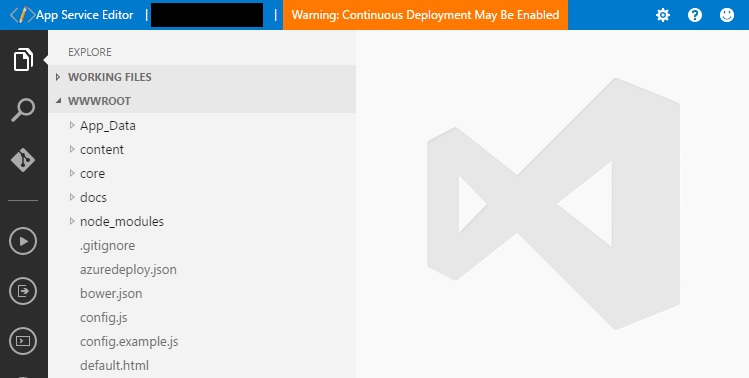
It's a versatile system, so it's good to see it getting more attention in the open.
What's the story on things like extensions and a terminal? Have you plans to expand to there?
Sourcegraph Director of Product here: We're interested in extensions as a way for our users to extend our platform, you never know how creative developers are until they can hack your product! Do you have ideas in mind for extensions you'd like to build/use?
In relation to the terminal, do you have anything in mind you'd like to use it for?
main/out/vs sure looks like vscode artifacts, not just monaco set up all nice with a fileviewer/split panes
Super awesome to see vscode running outside electron
- http://imgur.com/L6ipQgb - https://github.com/Microsoft/monaco-editor
Sourcegraph CEO here. Indeed, this is based on the full version of VS Code, with heavy customizations and a new scalable language server backend for code intelligence. Huge thanks to the VSCode team for making an awesome editor core.
We will have a technical blog post with more details soon. :)
Looks really awesome I have to say. I use Sourcegraph on a daily basis and this is a welcome improvement. Looks way more organized and better to grasp at first sight. Good job!
Thanks for the nice feedback! Our team is pumped to hear this. Keep the feedback coming, especially the things you don't like. :)
Just dropping by to thank you guys. This extension will be amazingly useful to me.
One question for the good fellas at Sourcegraph: Is it possible to run that extension in firefox? Did you try something like that? Is the code open, so I could give it a go?
Sourcegraph CEO here. We have a Firefox extension at https://addons.mozilla.org/en-US/firefox/addon/sourcegraph-a..., but it does not have quite as many features as the Chrome one.
I agree we should open-source the browser extension code, though. I would like us to do that soon. Can you send me a quick email at sqs@sourcegraph.com so I can tell you when it's open source?
It says "Compatible with Firefox 57+" so I assume it's based on the same code as the Chrome one… What APIs do you use that are not supported in Firefox? :)
(Also it says "Released under MIT/X11 License" already…)
We're a small team and we don't yet update the Firefox extension as frequently (it is still a manual process, whereas we've automated the deployment of our Chrome extension). That's all.
Regarding the licensing, I meant that we'll release the build scripts and supporting libraries used to build it, not just the final bundle.
Can someone put this in some context for me? It's an IDE as a service, or what?
Sourcegraph CEO here. It is for reading code. It gives you the full power of an editor (jump-to-def, hovers, find references, advanced search, symbol search, cross-repo references, etc.) for any repo at any commit on GitHub. It supports Go and Java right now, with some more languages in beta.
If you find yourself reading code on GitHub a lot, or cloning repos to open and read in your editor, you'll find it useful. If not, then you probably won't find it useful, but you might like our Chrome extension, which adds these features inline on GitHub.com (https://chrome.google.com/webstore/detail/sourcegraph-for-gi...).
Look really nice. What other languages are in beta? Any plans for python or JS support?
Thanks! The next languages will be TypeScript, JavaScript, Swift, and Python. You'll see some TS and JS support in the Chrome extension already. If you want to shoot me an email at sqs@sourcegraph.com, I'll make sure you hear about it when Python and JS support is released more widely.
This is really cool. I might need to build a IDE soon, and I briefly looked at using VS Code for a base, but determined that it was a bit of overkill for my purposes.
Out of curiosity, what was Sourcegraph running prior to this in-browser VS Code?
Before this, we were using a little bit less of VS Code. Before that, we had a much more minimal but custom frontend.
Amazon will surely buy you once your product matures. I can see that happening.
Really cool project!
On a related note, is there any project targeting Vscode in a web browser? I would love to ditch tmux/Vim and move to remote vscode in browser. Currently I use vnc but perf is terrible.
check out GHEdit https://github.com/spiffcode/ghedit
That's nice! However it'd be more awesome if there was a local version, not tied to GitHub but instead like. you run the node part of VSCode in a development VM and access the UI from a web browser on the host machine.
Me too i would be super interested in having a cloud hosted version of vscode!
Hi, sorry I wanted to reply to your comment on "ffffound.com closing" but it's archived I think.
Do you know how ffffounds recommendation algorithm was working? Was it the most recent 10 people who liked it, or the first 10?
i don't mean any ill intent about this comment, however that said. i worked something similar, and i strongly feel the direction that SourceGraph is heading in is the correct one.
developing in the browser, especially at large organisations is a huge productivity benefit in addition to cost benefit etc. the pros are endless. just let your mind wonder.
intro -----
the one i worked on, alongside Sourcegraph is available at:
live: https://cloud.bana.io/monaco-go/ repo: https://github.com/mbana/monaco-go
the backend was adjusted somewhat to support a WebSocket connection, besides that, the code was almost written entirely by the folks over at Sourcegraph. please note i do not have funds to pay for the Azure cloud so it might be down, or seem very slow.
i would love to resume development on this seeing as i work at large organisation and i see the huge potentional.
implementation --------------
in my opinion, i think the approach taken in my implementation might be better. there was hardly any custom code aside from stubbing code out to make VScode, or rather, monaco-editor run in the browser.
i will stress, i can and want to continue finishing this and having it land in monaco-editor master but my current job doesn't allow it.
if anyone wants to join me, please do say.
I just see a black screen. Icon in top left, no text other than "Login" and "Sign up". Chrome 58, Linux. No errors in the dev console.
Sourcegraph CEO here. We're on it. We are seeing significantly increased load times for some users due to a bottleneck in our serving of Git data. Sorry about the issues...will be fixed asap.
Edit: Fixed. Thanks!
If you're interested in Sourcegraph for reading code on GitHub you may be interested in this Chrome Extension I wrote that is in the same domain, although much less powerful: http://fiatjaf.alhur.es/module-linker/
(on the plus side my tool is very lean and fast and supports a ton of languages.)
How... how is one meant to specify a repo?
If I type "colemickens" it lists my repos. But I have... a lot of them. "colemickens/repo-name" doesn't work. Nor does any other form I've tried.
edit: maybe it's a paging issue and the "repo-name" I was trying wasn't on the first page of my repos? Unclear...
Where are you searching from? If you click "Go to repository" on the top left of the home page you should be able to find a specific repo by typing "colemickens/repo-name".
If you don't see a repo that you know you have, then it might not yet be cloned on soucegraph.com because we clone repos lazily (try navigating directly to https://sourcegraph.com/github.com/colemickens/repo-name to trigger us to clone it).
I converted to JetBrains products for a few different reasons, but one of the biggest was jump to definition that _just works_ across all language products. I suppose I could be made to consider something like this if it supported a number of other languages.
Your experience is greatly different to mine in webstorm. Better, sure, but I get about a 60% success rate. This was a vast improvement on basically anything else but it isn't _just works_.
Might be a pathological case however, the primary js project I work on is composed of about 12 modules, uses ES5 and Angular 1, except the build tooling which is ES6, has bower and npm dependencies, and has at times used every class/object pattern under the sun.
Javascript is a tricky language to do this, most libraries don't have types or JSDocs which is somewhat an issue so they need to be way less strict on what's auto-completed/interpreted. I don't see this as a fault in Jetbrains here. I say that wishing it would do more, but understanding it's probably at it's limits.
Try IntelliJ with plugins for Ruby, Python, PHP, NodeJS, Go, Rust - I agree that for the most part it just "works". Although you can "feel" it's Java engine sometimes.
I used Cloud9 IDE [1] and ShiftEdit [2] a lot in history. Both are Working very well.
[1] https://c9.io/
Are you starting new language server instance for each project? Isn't it not-scalable?
This looks very pretty and I am once again amazed by what can be done in the browser. I don't understand how this is going to make money though. What is the montization strategy?
Anyone have any suggestions for a map view extension for VS Code? I like how it looks in sourcegraph, wouldn't mind having it locally but haven't been able to find one.
It's now builtin as an option.
https://code.visualstudio.com/updates/v1_10#_preview-minimap
Oh, sweet! Didn't think to check there, thanks
Great work! Any plans to get keyboard-shortcuts (or something similar) working? I use them heavily in vscode.
Sourcegraph CEO here. There are a ton of keyboard shortcuts, and they (mostly) match VS Code's default ones. To see them all, hit Shift+Cmd+P (or Shift+Ctrl+P), and go to 'Preferences: Open Keyboard Shortcuts'.
Here are some of the key (no pun intended) ones:
Opt+S: Open QuickOpen (omni-search: searches files, workspace symbols, and repos) - Cmd-P and F1 also work
Opt+R: Go to repository
Opt+X: Run command (e.g., 'Open User Settings')
Opt+D: Go to symbol in workspace
Shift+Opt+D: Go to symbol in file
Am I being stupid here? There's no information on this website about what it is. I take it from sqs's that it's some kind of code viewer for Github projects, but I shouldn't need to come to HN to find that information out.
Edit: I was being stupid, the home page just didn't load the first couple of times I tried.