Show HN: “OK Google” – Explore Google Now voice commands
ok-google.ioI used to love using the "remind me to" command. It was a fast and convenient way to set alarms. Recently, when I attempted to use it on iOS, I was hit with an alert that "reminders have been moved to the Calendar app," where it is far less convenient to set up a reminder.
Instead of just setting the alarm with my voice and then confirming it, I have to use a click wheel to set the time, and it takes like three more steps.
This is part of a larger trend I've noticed where large tech companies use their market share to bully their users into adopting their other applications. It baffles me how any one approves these ideas. Isn't it pretty short sighted to cripple your own product, to break features that users love to promote another unloved product? Isn't that arrogant? I hope this trend passes, but my guess is that it effectively drives adoption, so to hell with everything else, right?
> This is part of a larger trend I've noticed where large tech companies use their market share to bully their users into adopting their other applications. It baffles me how any one approves these ideas. Isn't it pretty short sighted to cripple your own product, to break features that users love to promote another unloved product? Isn't that arrogant? I hope this trend passes, but my guess is that it effectively drives adoption, so to hell with everything else, right?
And this ecosystem thinking is why I'm shying away from Google products. I used to like them because each web-app had a different account tied to each one, and was standalone. And their android apps would let you pick and choose which app handled which jobs. But now they they are trying to move everything under one account umbrella, and force all of their apps to be the only one. No thanks Google, I chose android because you didn't do that.
I'd like you to give me one example where a Google app bypasses the intents system and uses another specific Google app for a task. One example.
calendar
I used to be able to use other calendars. Now it ignores my other calendars, and insists on using google calendar.
I installed another calendar app just to test this: https://i.imgur.com/nlsHUGr.jpg
I used to love using the "remind me to" command. It was a fast and convenient way to set alarms. Recently, when I attempted to use it on iOS, I was hit with an alert that "reminders have been moved to the Calendar app," where it is far less convenient to set up a reminder.
Instead of just setting the alarm with my voice and then confirming it, I have to use a click wheel to set the time, and it takes like three more steps.
This is part of a larger trend I've noticed where large tech companies use their market share to bully their users into adopting their other applications. It baffles me how any one approves these ideas. Isn't it pretty short sighted to cripple your own product, to break features that users love to promote another unloved product? Isn't that arrogant? I hope this trend passes, but my guess is that it effectively drives adoption, so to hell with everything else, right?
Is that an iOS thing? On Android reminders through the Google Now interface seem to work fine.
Yes he does mention it was on an iOS device in his post. It was a bit confusing at first but I'm absolutely sure he is talking about iOS with the scheduling reminders.
Seems like he means the Google app on iOS, so this would be the Google app telling him to use the Google Calendar app in theory.
Nice to see he responded with that info.
It was however after my comment so I was in a point of limbo at that point.
I think that alternatively can't you just use the "set an alarm for" command? It works on android
"Set an alarm for..." was pretty much all I used Siri for and all I really use OK Google for now. On Android at least, the reminder notifications don't grab my attention at all, so I need an alarm.
Siri gave me the same response for a few days but apparently they've reverted that change because it has since started working normally again.
I am referring to the Google Now app.
Siri does kind of do a similar thing, to her a reminder is in the reminders app, you have to actually say alarm or timer if you want an alarm or a timer in the clock app, might be something similar with Google Now?
Shouldn't reminders be in the calendar app? I hated having event-type things spread around in multiple apps, when I have a personal event-database already. I really liked the change.
I don't use iOS, so maybe it's different there, but other than storing the data in Calendar, I didn't notice much a change in how reminders are set from voice.
Disclaimer: I work for Google
Maybe they should be in the Calendar app. But here's the thing: I don't use the Calendar app. I use an analog calendar, the kind that hangs on the kitchen wall. My wife and I can share this calendar seamlessly. It works great for us.
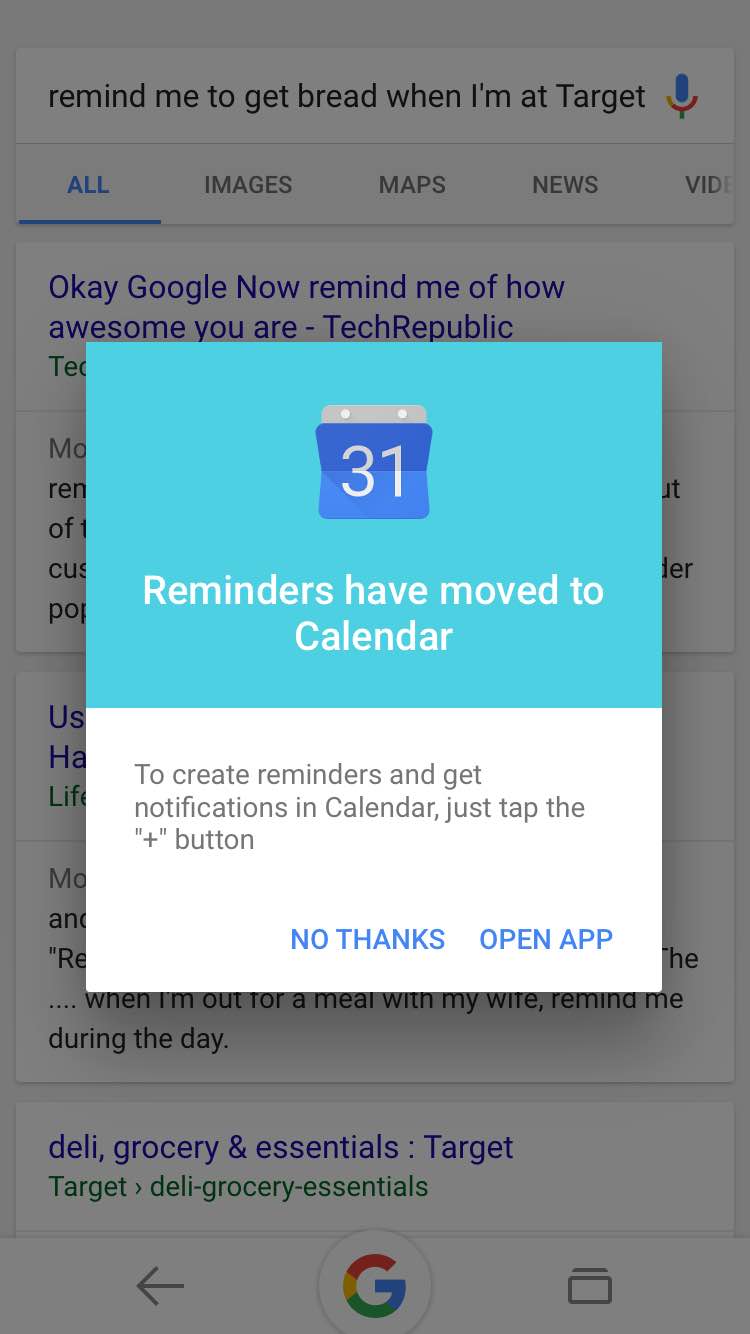
In addition to the analog calendar on my kitchen wall, I also use the Google App for iOS. I came from Android, and it was really nice having some of the functionality that I once had on my HTC phone on my iPhone. One of the features that I was trained to use, that I really enjoyed, was the ability to set reminders from the Google App. I just said, "Remind to X at N." These reminders could be location based, such as "Remind me to get bread when I'm at Target." That was awesome.
Now, I just get this warning to move to the Calendar App, where I have none of this functionality.
See: http://doncodes.com/remind-me-to-get-bread.jpg
So, I'm fine with the Calendar App having reminders. Sounds like a good thing. But why break a feature that I love to force me into an app that I have but will never use?

I think this is great, and at the same time highlights a usability problem with conversational interfaces: we don't know how to make them discoverable.
Google attempts to do this by letting you stumble upon commands, but I don't think that is good enough. I don't think tutorials are either, but I don't have any solid alternatives.
At a high enough level of sophistication you can just have conversational help.
Like if you ask Google Now "Can you help me set a reminder", it prompts you for details. That isn't discoverable per se, but it addresses a lot of the same problems, the user only has to understand that the system can answer questions about capabilities to have that conversation.
How about, when you perform an action manually it says "by the way, in future you can just tell me to ..."
I have a plugin for IntelliJ's Webstorm/Phpstorm that does just this and it's amazing - whenever I use an item that has a shortcut it pops open that short cut so I can slowly learn them.
If I also use something that doesn't have a shortcut 3 times within the programs running then it asks me if I want to set a shortcut for that action.
I think as time goes on Google will eventually be on this route considering how well it works (at least with the first portion of showing the shortcut command whenever I use it).
However that still wouldn't solve the problem of the users having to learn the commands from scratch first so if they don't know it exists they would never learn the shortcut for it in "OK Google"
What plugin is that? Sounds like that'd actually come in pretty handy!
It's amazing and I will link the phpStorm/webStorm but as I am looking I am pretty sure it has been ported to all the IntelliJ products and even more.
The only down side is it's not great on looks but honestly it's a popup to tell you a shortcut so it fits well for the purpose
"Key promoter"
Guessing they're referring to Key Promoter.
Using the search predictions and history as cues, if you're doing something that has a voice command would work too. Like if you start typing out "weather near" have a tooltip of the voice button with a caption like "Try with voice?" that you can tap and it would then turn on the mic and give you a karaoke style prompt with blanks for you to fill.
Not a new problem, nor a new solution: emacs has done this for a long time [1].
I wonder if we have to pass through all design stages every time something changes.
[1] https://www.gnu.org/software/emacs/manual/html_node/emacs/M_...
Like how google apps tell you to use the keyboard every time you try to copy/paste with your mouse? I hate that so much!
Imho this is because a lot of browsers don't support it because it does work in Chrome.
The Google app does this in a lot of places, in addition to suggesting "things to try."
And then they change the interface -- with no notice. And let you search blindly for and stumble your way through the new way to do it -- if it still exists.
This is particularly frustrating with regard to my parents and their Android phones. I'll get them set on how to do something... and then it suddenly no longer works, anymore.
For a gang of kids or twenty-somethings who are constantly communicating about the tech in their hands, this... word of mouth / osmosis approach to adoption may work.
For many others, it's damned frustrating. Including for the techie family members who end up having to help them -- over and over and over...
This is the most frustrating part of owning an android smartwatch. I have no idea what it can do. I don't understand why I can't just swipe right and view a list of all the voice commands. Seems like a simple enough solution. Finding tips on random websites and forums or through trial and error (where you look like an idiot barking non-existent commands into your wrist) is not productive.
Discovering commands by trial and error isn't much fun because the fall back action -- a Google search for the words you said -- is so boring.
The conversational UI in text adventure games was fun to explore because the fall backs were sometimes funny.
Technologies used for a static list (!):
react redux reselect aphrodite material-ui stylz redux-form react-helmet webpack faker lodash moment
Do you actually have a problem that any of those are causing?
I mean the site comes in at around 500kb transferred. That's not small, but it's also not obscenely large. A single large-ish image can easily blow that out of the water.
Yeah, it could afford to lose some weight in the javascript (although looking at it now, i'm not sure they can. much of the size of the javascript is string literals for all of the options for each phrase), but for a one-off website that doesn't have any ads or source of income, i think it's great. The author clearly wanted to make something cool, and doesn't want to spend a significant amount of time or effort optimizing it perfectly since he probably won't make a dime from it.
> Do you actually have a problem that any of those are causing?
With JavaScript turned off (an essential security precaution), no text is visible at all, which is a bit of a problem.
> I mean the site comes in at around 500kb transferred. That's not small, but it's also not obscenely large.
The actual content on the page really isn't that large. I got too bored to actually complete this, but you can see an example of what it could have looked like at http://pastebin.com/DBgK4Tv9
It could have progressively enhanced itself, taking the plain-text HTML page, parsing out the choices in the em tags (which could of course have had classes attached to mark them as choices, or even to indicate classes of choices, e.g. 'day-name'). It would have been a perfectly useful tool for people without JavaScript; it would have been perfectly useful printed on a page.
And, frankly, it would almost certainly have been a lot smaller than 500K.
That doesn't take away from how cool it is: the author did a nice, exhaustive job (so exhausted I got exhausted trying to recreate it). He should be commended for it. But we should all reflect on how we got into a situation in which the easiest thing for him to do was the wrong thing, and how we can instead get into a situation where the easy thing is the right thing.
Well, I disagree with you on disabling javascript being an "essential security precaution", but that's another discussion...
As for the rest, there's also the point that the author probably wouldn't have done this that way. That seems like a dumb sentence, but hopefully i can explain it.
This kind of thing isn't going to make any money, even with ads this is an niche thing and would probably end up making him tens of dollars at most (unless he got really lucky). That means that most likely his motivation was to "show off" a bit. Show potential employers that he can use those technologies, show off his professional skill, and at the same time solve a problem that he saw himself. So most likely it wouldn't have been made without those technologies.
But either way, I don't think that this is the wrong way of doing things. I know that many disagree with me, but for most "web apps" progressive enhancement is dead. Yeah, for a simple company website, or something which should be accessed by as many people as possible like government websites, PE is still very alive, but for everything else, it's done. Javascript is part of the platform, and disabling javascript but still expecting a fully useful web is like disabling python and still expecting all of your linux tools to work the same (after all, those same devs could have written their code in C, then progressively enhanced it with python).
It's part of the platform, and it's here to stay. Disabling javascript is not the solution to security issues.
> I know that many disagree with me, but for most "web apps" progressive enhancement is dead … Javascript is part of the platform
It shouldn't be, it really shouldn't be. The web should be about GETing, PUTting, POSTting & DELET(E)ing resources (i.e., documents); it shouldn't about GETting executables.
There's definitely a place in the world for a well-thought out universal executable platform, but HTTP + HTML + CSS + JavaScript ain't it.
Progressive enhancement is a good thing: a document which used JavaScript to become a better, live version of itself would be better than an ASCII list of neat things doable with the Google interface; it'd be better than a static HTML document. And it'd be better than a single-page app.
> It's part of the platform, and it's here to stay.
JavaScript delenda est.
>It shouldn't be, it really shouldn't be.
See, but why shouldn't it be?
Would it be valid for me to say that python shouldn't be a part of linux? That people should stop using python on their linux command line tools because linux is really about C.
The web is an application platform, and I still haven't heard any convincing arguments as why we shouldn't use it as one besides "Because it wasn't one in the past".
I agree that progressive enhancement is a good thing, and in a perfect world every application would start with the bare minimum and work up the "technology tree" to get to the latest and greatest, but in the real world of limited time and money that's almost never possible. Having something that's not perfect is better than not having anything at all.
> Would it be valid for me to say that python shouldn't be a part of linux? That people should stop using python on their linux command line tools because linux is really about C.
Somewhat fair point, but at least it would cut out the number of language runtimes one has to have on a Linux computer. For simple command-line tools, besides C/C++, you end up needing Perl, Python, Ruby, and now probably also Go and Rust.
> Having something that's not perfect is better than not having anything at all.
Arguable. The Internet is a perfect example of having a lot of things that would be better off not existing in the first place. Like, e.g., most of the sites for which ads are the only viable business model. But that's a longer discussion.
I think the important point is that, while the individual choices of a software engineer in a particular time and moment can be excused, the trend as a whole is pushing us towards increasingly batshit insane pseudo-engineering.
A static list like that should not need anything more than plain HTML/CSS and a little bit of JavaScript sprinkled on top to do the click effects. That people end up using shit ton of frameworks and external services for simple sites (this one is far from the only case) suggests that there's something very wrong with the industry as a whole. It's worth identifying it and figuring out how to fix it.
>The Internet is a perfect example of having a lot of things that would be better off not existing in the first place.
I just can't agree with that. Sure, there are things like malware which shouldn't exist, but outside of that I just can't agree that something shouldn't exist because some don't like the business model (or the technology used).
>A static list like that should not need anything more than plain HTML/CSS and a little bit of JavaScript sprinkled on top to do the click effects.
It doesn't need more than that, but having more than that provides a lot of benefits. A nicer look and feel, a more "responsive" view in terms of massively changing UI depending on the screen size, inline search, a unique and pretty useful way of showing different possibilities of each phrase, etc... All while being very simple to make (which is an extremely important point for something like this).
I know many people don't like those things, but to dismiss them as "something very wrong with the industry" is incorrect in my view. People want eye-candy, and they want it instantly. If they can't get it through the web, they will get it through downloaded applications, or apps in closed app stores, or some other methods that we haven't even thought up yet. And blaming people for wanting it isn't the answer, nor is "fixing" it against their will.
Just like how you could make this website with plain html, then layer css and javascript on top to make it look nicer, you could make a package manager on linux that has 0 dependencies, then add python and perl to enhance it. But nobody has the time or money for that, and in the grand scheme of things it's not going to hurt anyone.
This is a website about voice commands that you can say to your phone, have them sent to google, analyzed, and a result sent back (which might go to a search page which uses more data than this whole site does). Building the website in the way you feel it should would not have improved live for many people at all, and it would have possibly made the author never want to make it in the first place.
yeah, and whats all this about mobile apps? a phone is for making phone calls, not browsing web pages and playing games. these thibgs would be better off if you called a phone number that would read out the weather to you and so on. If you want to leave a text message or an email, you should call up a phone service and tell them to write the email for you.
> Do you actually have a problem that any of those are causing?
User experience.
- long, unskippable animation on site load
- navigation keys (arrows, page up/down) do not work at all without changing focus first (which takes 4 tabs)
- navigation keys do not work at all in category list (items can't be selected or scrolled)
- mousing over items produces unexpected results (text changing, distracting animation)
These may not be caused by the technologies per say, but more generally by the 'form over function' attitude.
Why does everything on the web have to be so fancy these days?
Inability to select the text.> Do you actually have a problem that any of those are causing?That's because the author set the css property `user-select` to `none`.
Why? I'm not sure, but that has nothing to do with any of the libraries listed, or even javascript at all.
I assume it is because you can click on the commands to cycle through the examples. If you didn't have this css property set you would end up selecting text.
Does it work on screen readers? I mean the site is trying to explain voice control, after all.
yes actually it does!
It needs some work with focusable things, I needed to use the special navigation keys (I tested with ChromeVox on the desktop) to get to the lists on the left and right, and to click on anything i had to use the special "click" keybinding instead of pressing enter, but it's 100% usable.
On android it works great, about the same as any other website or app (i used the android accessibility screen reader to test)
Modern screen readers are just as capable as the rest of the browser, the only place they fall short is in image-heavy sites that don't have alt tags. Obviously you can greatly help by adding things like aria tags, and using markup as much as possible, but it's not like they just don't run javascript.
Note this doesn't work with VoiceOver at all.
When you say it doesn't work at all, what do you mean? There's no reason it won't read at least the "ok google" at the top of the screen, but navigating around probably won't work here.
I don't have a mac on hand right now, but VoiceOver relies heavily on tags, so i'd bet the problem is that he is using divs for everything.
Make each thing on the left render in an <li> and use header elements at the top of each block of commands and it should work fine.
At the time of this comment, looks like the site's been hugged to death.
So without knowing what's on it, maybe a smaller size could have kept it from falling over.
I can't wait until the web becomes decentralized so there is no Slashdot/Hacker News effect anymore. The more popular a site, the more people mirroring is a much more sane setup than the current silos.
You could load static html and have it on google drive without a huge of death. :P
I've done similar with my Django stack - used way more code than needed for something simple. The reason is - if you've got a good boilerplate it's quicker and easier to use it than to start again - even if you don't need half the pieces.
It also features a toggleable sidebar, an inline interactive search/filter bar and a modern UI with good visual feedback. Not as trivial as plain li and ul.
Interactive search/filter bar: Alt+F
... which doesn't hide the uninteresting context around the commands in question, and doesn't cluster the commands with the same text together for convenient viewing.
Why not curl | grep?
Frankly, a lot of websites would be infinitely more useful if they were curl | grep friendly. It's like current generation doesn't realize that it is technically possible to fetch valuable information you need efficiently from the Internet - one just has to not make it insanely difficult on purpose.
It's not a static list, though: mouse over or click on the entries.
I just get another element when I click but the question remains the same. Is there anything more?
Looking at the source, I guess, for example, that the questions "How old is X" are all where X is
"Adam Sandler", "Adele", "Akon", "Alec Baldwin" "Alicia Keys", "Alyssa Milano", "Angelina Jolie", "Ashton Kutcher", "Avril Lavigne", "Barack Obama", "Barbra Streisand", "Ben Stiller", "Beyonce", "Bill Gates", "Bob Marley", "Brad Pitt", "Britney Spears", "Cameron Diaz", "Carmen Electra", "Catherine Zeta Jones", "Charlie Sheen", "Chris Brown", "Christina Aguilera", "Cindy Crawford", "Daniel Radcliffe", "David Beckham", "David Duchovny", "Demi Moore", "Dr House", "Drake", "Drew Barrymore", "Eddie Murphy", "Eminem", "George Clooney", "Gwen Stefani", "Halle Berry", "Hugh Grant", "Jack Nicholson", "James Cameron", "Jason Statham", "Jay Z", "Jennifer Aniston", "Jennifer Lopez", "Jennifer Love Hewitt", "Jessica Alba", "Johnny Depp", "Julia Roberts", "Justin Bieber", "Justin Timberlake", "Katherine Heigl", "Katy Perry", "Kelli Williams", "Kesha", "Kevin Costner", "Kim Kardashian", "Kristen Stewart", "Lady Gaga", "Leonardo DiCaprio", "Lil Wayne", "Lionel Messi", "Madonna", "Marilyn Manson", "Marilyn Monroe", "Megan Fox", "Michael Douglas", "Michael Jackson", "Michael Jordan", "Michelle Obama", "Mike Tyson", "Miley Cyrus", "Muhammad Ali", "Nicki Minaj", "Nicolas Cage", "Nicole Kidman", "Oprah Winfrey", "Paris Hilton", "Pink", "Reese Witherspoon", "Rihanna", "Robert De Niro", "Robert Pattinson", "Roger Federer", "Ronaldo", "Sandra Bullock", "Sarah Jessica Parker", "Scarlett Johansson", "Selena Gomez", "Shakira", "Stephenie Meyer", "Steve Jobs", "Steven Spielberg", "Taylor Swift", "Tiger Woods", "Tom Cruise", "Tom Hanks", "Tyler Perry", "Uma Thurman", "Whoopi Goldberg", "Will Smith", "Woody Allen",
It's easier to look at the list than to click every time for one random item from it.
Interestingly, the first person Google recommends to me when I type "how old is" is not on the list.
My guess is that the list is a representative sample, and the dynamic nature is to indicate that it's variable. Google will correctly answer that question for anyone who has their own Wikipedia page with a birthdate (Try 'how old is Richard Stallman') so seeing the "full list" is not a useful piece of information
Also: html, css, js, tcp, ip, electricity, and language.
Also DNS, Apache, CloudFlare, Linux, images, Fail2Ban, Ethernet, the server's CPU/Memory/Motherboard, the phone network.
All this for a static list, he could have just faxed us all this list instead like in the good old times.
Fax!?? This is exactly what chisels and stone tablets were made for.
Real hipster used a the service of a professional Griot.
> electricity
Since we're going there - bloating your website for no reason whatsoever wastes electricity. Not just for the mobile users who may be annoyed by fast-draining battery; also in general, you're literally wasting coal.
It's worth at least keeping in mind when deciding to include that another JS framework to save yourself 10 minutes of typing.
You honestly worry about how much extra coal your website will consume with an extra JS framework?
I tend to think of CPU time as an almost inexhaustible resource for a website. It needs to be responsive, but the difference between the user's machine being at 5% or 10% CPU doesn't matter.
Somebody needs to. First, consider that every decision like that you make is multiplied by the number of clients you have. If your tiny little JS side makes your clients' CPU use one more watt and you have a million visitors, then boom, one megawatt goes down the drain. Maybe not something that should keep you up at night, but still IMO worth thinking about.
Moreover, your website isn't the center of the world and the most important thing for user. If every developer follows this line of thinking, then the difference between 5% and 10% of user's CPU time is the difference between them having 20 or 10 browser tabs open before the whole computer slows down to a crawl. Bloating your site means making your users' computers less useful.
I know, people should use IPs instead of fancy domain names, DNS is just electricity wasting.
You're right, css and js aren't needed either.
It's ok - it's made with <3
And depending on the toolchain the author chose, it may also be made in less time than it'd take to hand-roll <li> and <ul> tags into a list.
With a decent editor, hand-rolling <li> and <ul> tags ain't too bad. With a good scriptable editor, hand-unrolling the different options is also surprisingly easy.
I agree. In this specific case, assuming the author had to type-out (or paste) the actual contents of the list, then "hand-rolling" it into a HTML list using a decent editor will be less (probably much less) work than plugging in all that JS cruft.
And, it only happens once, instead of wasting a tiny bit of electricity for computing the exact same thing for every visitor.
It's a modern javascript broh
Somehow it boggles my mind this is not provided by Google by default.
I am pretty sure plenty of people are missing tons of features because they don't know it exists. I don't think trying everything (with some latency) until you got some good answer is a nice way to discover/explore.
While I agree, I think the idea is that you don't need a list of commands in order to use the service. Instead you're encouraged to speak naturally - of course with varying results but I guess Google sees this as favorable compared to suggesting a manual/reference is needed.
"Speaking naturally" to Google Now for me means it's just going to google random stuff instead of doing actions. Even things like "Play next song" will make it google that term instead of switching songs.
"Play next song" is not speaking naturally.
Woosh. Missed the point entirely.
I understand the rationale but I have the feeling we are still "not there", and in the mean time, this is kinda lacking.
So thanks to op to provide a starting point. I'll definitely use it.
Speaking naturally results in the thing doing something completely different from what I wanted. Once that happens a few times, I give up and stop wasting my time.
For people like me, without documentation it's just another pile of garbage on the side of the road.
"Ok Google!", "What can I say?"
Kudos to a clean & useful design.
As a side note, it makes me wonder that with all the brainy AI, it's we who are still learning computer's language instead of the other way around. I hope that'll change in the next 3-5 years, where we don't have to memorize the syntax & limitations of voice commands.
Is anybody else having trouble using Ok Google for sending texts? It recognizes the recipient alright but stops dictation way too early, even if I pause just for a second. Then it doesn't seem possible to resume dictation. Does anybody know how to get around this? (Android 5.1.1)
ask to send a message, then wait for it to prompt for who, and after that wait for a prompt for what you want it to say.
I use that function while on my motorcycle through my helmet a bunch, and breaking it up like that allows me to confirm/deny each step because often the wind noise makes it impossible to hear what i said.
I find that sometimes, after the "OK Google, send a text to $PERSON" my watch will ask whether it should be to their mobile, work or home landline. A way to set it to only send text messages to mobiles would make sense but I can't find any way of doing that.
You probably need to go to Contacts and long-press on the proper number, and use "set as default" (or something similar) option.
I have in fact set it as default, but the watch still likes to ask "which number".
I don't use it to send messages, but the few times I tried to set a reminder with it in the past couple of months, it failed miserably, stopping dictation too early or simply ignoring the command entirely. On a Moto G (3rd gen), Android 6.0
The Internet of Things won't take off until devices can hand Google/Amazon/Apple a list of nouns that respond to a list of verbs. Memorizing these voice commands is as clunky as using a different mobile app for each appliance.
"Turn on the coffee machine when my alarm goes off"
"Turn the stove down in 5 minutes"
"Is the dryer done?"
Nice list, is there one available for the other languages supported by Google Now?
I have an Huawei watch (android wear) that I use "OK google" on quite frequently. It doesn't have a brightness sensor, though, and the one command I'd really like to see is something like "OK google set brightness to max" or something along those lines. (I usually keep it at the lowest brightness for indoor use, but then I can't see anything at all outside.)
"OK google brightness boost" might work too if it lasted a bit longer. (There's a Brightness boost button, but it reverts back to lower brightness before I can finish whatever I wanted to do, so it's not very useful in practice. It doesn't even stay on long enough to open the settings and manually set the brightness to max.)
(Oh, and if anyone from Google happens to read this, PLEASE fix reminders to appear at the correct time instead of 3 hours early.)
These I use heavily:
remind me [time] to [something]
wake me up at [time]
countdown [amount] minutes
add [something] to my shopping list
I still get happy every time Google Now recognizes them correctly (75%). Being a native speaker and having a faster phone (Moto G) would add a few % I guess.
This is really interesting. There's a lot of functionality I didn't know I had on my phone.
A small typo I noticed is under "Device Control", an option is "Turn on/off Flaslight" rather than "Flashlight"
__OK GOOGLE TELL ME JOKE__ didn't work.
Try without the underscores?
Is all that information public? Or in other words, how does it work?
OK Google OK Google OK Google OK Google Navigate to nearest Target No goddamnit arg! back back OK Google OK Google OK Google Navigate to nearest Target Fuck! [Repeat]
Literally laughed out loud at this one, spot on.
Voice commands sound great in theory but the worst part is that you have to press the hardware back button to fix it when it (invariably) stuffs up. It's an absolute showstopper when trying to use it in the car.
Really useful. I have to say I'm not a fan of the bizarro dual scroll-bar shenanigans going on though.
Oh god someone finally did this I have google now on my phone and I had no idea how to use it.
suggestion - instead of scrollable divs, just make the page scroll like normal. can achieve the same UX without the wonkiness that comes with scrolly divs
This was much needed for me. Thanks for your awesome html5 public gift. Simple & efficient design, great information.
Why this confusing UI (click to do what actually?) for the simple info that is there?
Or am I missing something interesting by using Firefox?
I'm using Firefox too. I found the UI to be bizarre, but the content was so helpful I just tried to ignore it. This site finds a place on my bookmarks bar despite its horrific UI.
This seems really well put together, but I can't help but wonder how long until it gets a takedown notice from Google?
Using Google in the domain name alone is enough for it to be taken down.
I never understood this well.
For example the case of YouTube mp3 (http://www.youtube-mp3.org/).
In past Google tried to stop YouTube mp3 because of violations to the YouTube Terms of Service, but, if it is true that it only suffices using someone else's trademark in a domain for the owner to shut your domain down, then why did never Google attack it on this side?
On the other hand: http://www.paypalsucks.com
Here is a good reading from the Electronic Frontier Foundation on domains like that:
"Avoiding Gripes About Your Gripe (or Parody) Site": https://www.eff.org/wp/tips-shutting-down-g
Another classic http://www.untied.com
Great, a site with an unskippable intro. But hey, at least it's in html5 and not flash!
Please fix that site to work on mobile.. The sidebar is in fron of the content.
Only in english, maybe one or two only in USA?